Hiding some snippets
-
Snippet counts in the snippets table do not match the database (3.10.2)
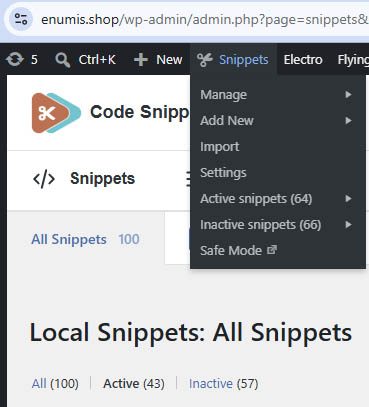
After updating from 3.9.6 to 3.10.2, the snippets list page shows fewer snippets than actually exist. The plugin’s own admin bar menu reports the correct numbers, so the two counters inside the plugin disagree with each other.
What the database contains
SELECT active, COUNT(*) FROM wp_snippets GROUP BY active;

active  COUNT(*)
0       66
1       64
Total: 130 snippets — 64 active, 66 inactive.
What the admin bar menu shows (correct)
- Active snippets (64)
- Inactive snippets (66)
What the snippets table shows (incorrect)
- All Snippets 100
- All (100) | Active (43) | Inactive (57)
Pagination reads “100 items, Page 1 of 1”, so this is not a paging issue — 30 snippets are simply missing from the list, 21 of them active.
Before the update, on 3.9.6, the same page showed All (130) | Active (64) | Inactive (66), matching the database.
Impact
The missing snippets still execute normally, so this appears to be a display/query problem rather than data loss. But there is no way to edit or deactivate them from the UI, which is a serious problem on a site with a large number of snippets.
Environment
- Code Snippets 3.10.2 (updated from 3.9.6)
- Table name is
wp_snippets, while WordPress core tables use thewp_1_prefix - Shared hosting, LiteSpeed, PHP-FPM, MySQL
The unusual prefix combination may be relevant, given that 3.10.0 included a fix for “network snippet lookups using the wrong database table on multisite”.
Happy to run any queries or provide further details.


You must be logged in to reply to this topic.
