Help me
-
Hello , Despite everything is connected and configured correctly I get this error:
We tried to send the post but no profile is selected for this post.

-
Hi @uplupl,
Are you on version 8 or 8.1? As per other thread you commented on, version 8.1 should solve this issue.
If the issue persists, can you please go to the plugin settings, go to the “help” tab, and go to the last question and then copy and paste that diagnostic info in your reply?Thanks!
This is the original request someone raised about this: https://wordpress.org/support/topic/we-tried-to-send-the-post-but-no-profile-is-selected-2/#post-16851672 just FYI.
Thanks a lot for your help. Now the error has been fixed. But unfortunately even though it warns me that the post has been saved I can't find the post on Linkedin. Do you have any advice for me please. Thank you PHP Version: 7.3.33 Wordpress Version: 6.2.2 Plugin Version: 8.1 Do not share posts by default: No Currently authenticated: 27/08/2023 Default share profiles: urn:li:organization:15250277 Default share message: [POST_TITLE] [POST_LINK] Sharing to post types: ,Post,Job_listing,Video-recensioni,Recensioni Active Plugins: WPML Multilingual CMS WPML SEO a3 Lazy Load Advanced Custom Fields Multilingual Advanced Custom Fields PRO Classic Editor Code Snippets Yoast Duplicate Post EWWW Image Optimizer Fatal Error Notify Pro Instant Articles for WP Intuitive Custom Post Order Jetpack HubSpot All-In-One Marketing - Forms, Popups, Live Chat Loco Translate Open Graphite PixelYourSite Post to Google My Business Remove Dashboard Access SEOZoom Plugin Ultimate Member Wordfence Security Yoast SEO Premium Yoast SEO WP File Manager WP Job Manager - Alerts WP Job Manager - Applications WP Job Manager - Job Tags WP Job Manager WP LinkedIn Auto Publish WP Activity Log WPFront User Role Editor WPML Media WPML String Translation WP-OK: Tools WP RemoteHi @uplupl,
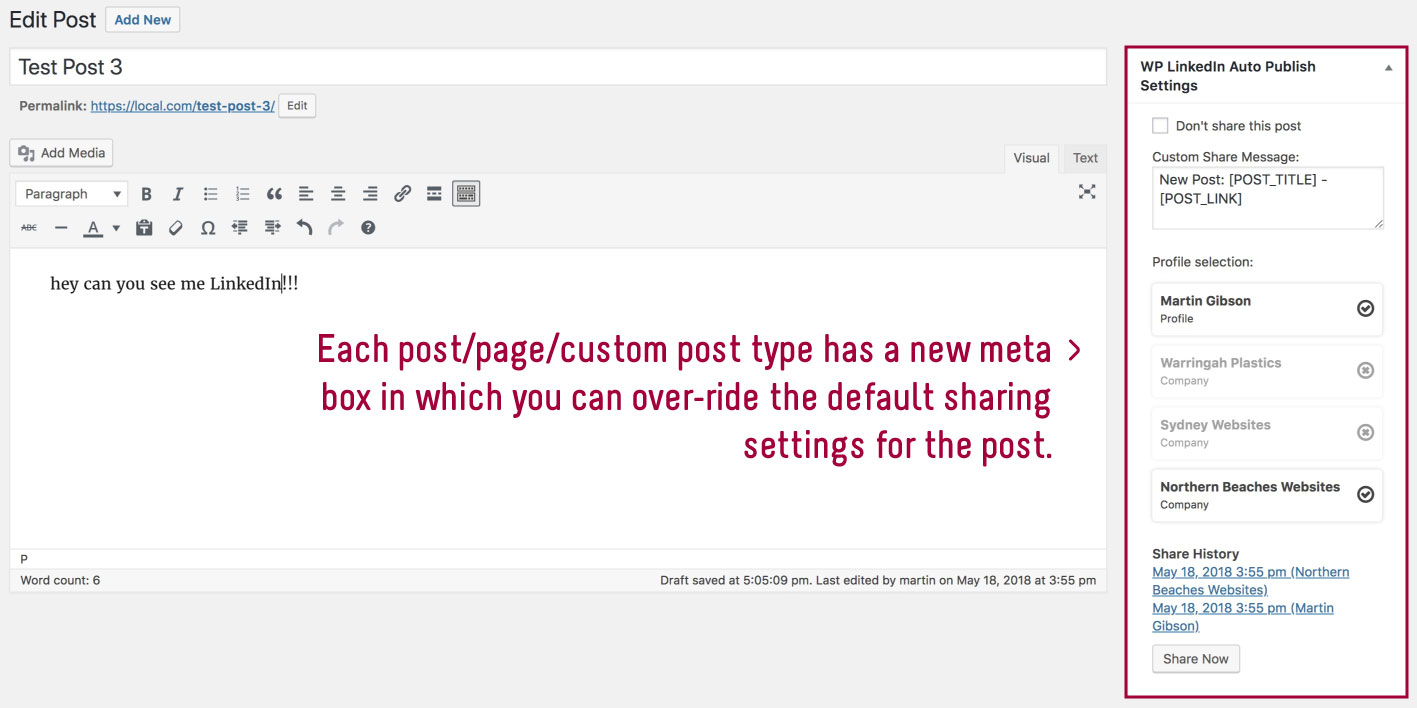
When you do a share (and if it is successful), in the metabox on the post edit page it will have a link to the post in LinkedIn.
Please see this here of what this looks like: https://ps.w.org/wp-linkedin-auto-publish/assets/screenshot-5.jpg?rev=1876943
Thanks again for your patience,
Yes in my box I see my comany perfectly active.
It also confirms me;
Successfully Shared!
but it doesn’t work the associated linkedin page is empty.
Hi @uplupl,
Are you saying that it shows a link, but when you go to the link, the link is empty? Can you send me what the link is?
Thanks
As you can see yourself, not any other ulr
https://ibb.co/yW731ZX
https://ibb.co/LQyzLXc
https://ibb.co/kMMyvBKHi @uplupl,
So you are saying that no link is shown at all. So you don’t see a link like the screenshot I shared before: https://ps.w.org/wp-linkedin-auto-publish/assets/screenshot-5.jpg?rev=1876943
Thanks,
Hi,
Unfortunately I don’t see anything, no link.
Hi @uplupl,
Unfortunately I am not able to repeat the issue on my end. I did find a bug where the name of the profile shared to in the log was wrong, but I couldn’t repeat the issue where the log item wasn’t shown at all. I will need to monitor this issue and see if there are other reports.
Thank you,

The topic ‘Help me’ is closed to new replies.