• Resolved simonhacquard

    (@simonhacquard)


    Hi!
    Not easy to describe and be understood in english but i will try :
    I try to import some variables products from csv.

    There are some attributes only visibles and other usefull to create variables.

    Two of my attributes are ‘In variations”, but don’t change product price.
    So, i try to group multiple terms in a single cell (seperated with pipe |) instead of create each variations with each term in differents rows.

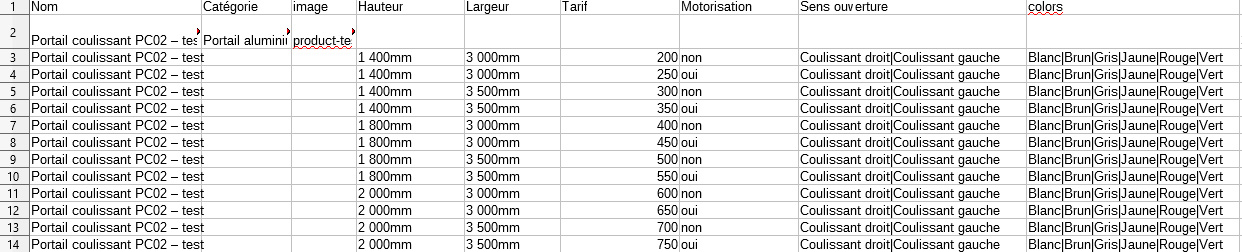
    So, here is how my csv looks like :

    >https://i.ibb.co/S6jxB06/help-import.jpg

    (first row is parent product, others rows are variations)
    (‘Hauteur’, ‘Largeur’, ‘Tarif’, ‘Motorisation’ are variables that change price product)
    (‘Sens ouverture’ and ‘colors’ doesn’t change price product and are avalaibles for all the 12 variations).

    Unfortunately, all my variables created products have only ‘Blanc’ as a color and ‘Coulissant droit’ as a ‘sens ouverture’, all the others terms are missing.

    I try to find a php function but i did’nt find something that work : https://www.wpallimport.com/documentation/developers/code-snippets/#change-delimiter-used-when-retrieving-multiple-elements-with-xpath

    How can i make it works ?
    Thanks!

Viewing 3 replies - 1 through 3 (of 3 total)
  • Plugin Author WP All Import

    (@wpallimport)

    Hi @simonhacquard

    You should be able to fix this by saving the following code in the Function Editor (All Import -> Settings):

    function wpai_wp_all_import_variation_any_attribute( $variation_any_attribute, $import_id ) {
        return TRUE;
    }
    
    add_filter( 'wp_all_import_variation_any_attribute', 'wpai_wp_all_import_variation_any_attribute', 10, 2 );

    This will cause the pipe-delimited attributes to be imported as “Any” in the variations, e.g.: https://d.pr/i/nW1MsE.

    • This reply was modified 6 years, 3 months ago by WP All Import.
    Plugin Author WP All Import

    (@wpallimport)

    Hey @simonhacquard

    I’m marking this as resolved since we haven’t heard back in a while. Let me know if you still have questions about this. Anyone else, please open a new thread.

    Thread Starter simonhacquard

    (@simonhacquard)

    Hi!
    So sorry for the late answer.
    Thank you for helping.

    However your online support by email fixed my issue before you did it.

    First, i had to “Only set those combined attribute values in the parent record, remove them for the variations in your file”. After that, my import was done and my variables all set.

    Then, i had a second issue. Unfortunately, there was no default value selected for “colors” and “sens ouverture” while “Set the default selection in the attributes dropdowns” and “Set first variation as the default selection” were checked.

    Your developer has fixed iin a newx beta version (3.2.2).

    As i said to Soflyy Support, Thank for you help. Best support ever, this is amazing to be able to work with great profesionnal like Solfyy.

    Best Regards,
    Simon

Viewing 3 replies - 1 through 3 (of 3 total)

The topic ‘Group multiple attribute terms in a cell’ is closed to new replies.