How does the Form Abandonment Tracking work exactly?
Does it save everything as entered or only specific fields? I’d specifically want to view all partial submissions in the dashboard to see which fields cause drop-off and to identify issues users might be having with the form.
@usrbingeek Great question, and I want to be precise about it.
Form Abandonment Tracking records a signal, not the entered data. When someone starts filling a form (fills at least one field) and then leaves without submitting, we log which form it was, how many fields they’d filled, the last field they interacted with, and how long they spent. Importantly, it does not save the values they typed, nothing half-entered is stored, which is deliberate on the privacy side, so there aren’t “partial submissions” with their data to view.
I totally understand a privacy concern if it wasn’t disclosed, but as long as there is a warning at the top of the form, the users are consenting to it by continuing.
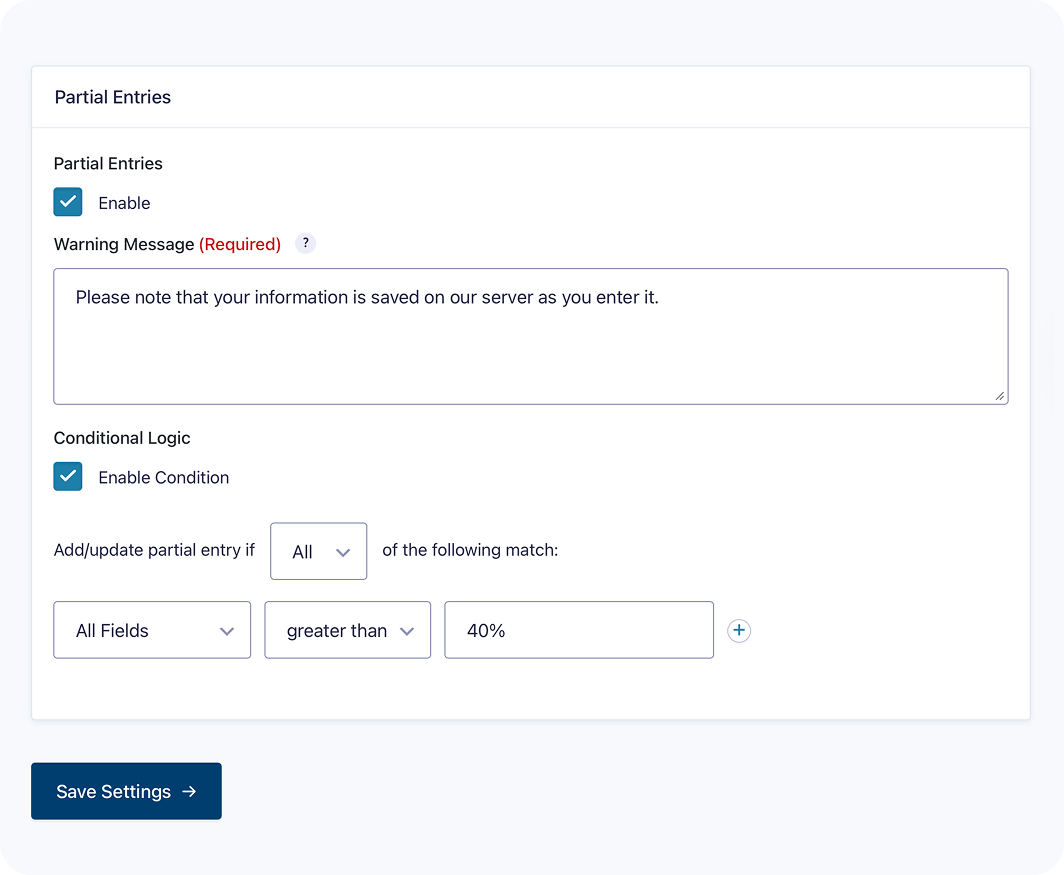
Example from a competiting form plugin:
Please reconsider it since many form competitors offer it, and it’s incredibly useful for identifying issues or friction points in our forms. But most importantly, it helps us recover leads and abandoned checkouts, enabling us to follow up and re-engage users who dropped off mid-process by offering personalized help, discounts, or reminders to complete the purchase. More than half of our drop-offs complete after the re-engagement. Its critical to us.
Another advantage of this is that it also saves the user’s work in case they accidentally click a link and leave the form, or if their browser crashes or reloads the page due to excessive memory usage, among other reasons.
Thanks for laying this out so thoroughly, the lead-recovery case, the re-engagement numbers, and the point about preserving someone’s in-progress work if they lose the page are all fair, and I can see why it’s important to you. You have genuinely made the case well.
To be straight with you about where we stand: what you are describing is capturing and storing data as it’s typed, before the person submits. That’s a real, valuable feature, several competitors offer it and it’s something we can do, but only if we build the whole thing around it properly: an explicit consent/warning gate, a configurable retention policy with automatic deletion, and full integration with WordPress’s data export and erasure tools. We already have the privacy building blocks (consent field, IP anonymisation, retention cleanup, export/erase), so we are well placed to do it right but “do it right” is the operative part, and it deserves its own considered release rather than a quick addition.
So: this is firmly on our radar as a feature we want to build, opt-in and off by default, with the consent and retention controls that keep it safe for site owners and their visitors.