Filters not working
-
The filters aren’t working properly on http://thaihealingalliance.com/v2-therapist-search/
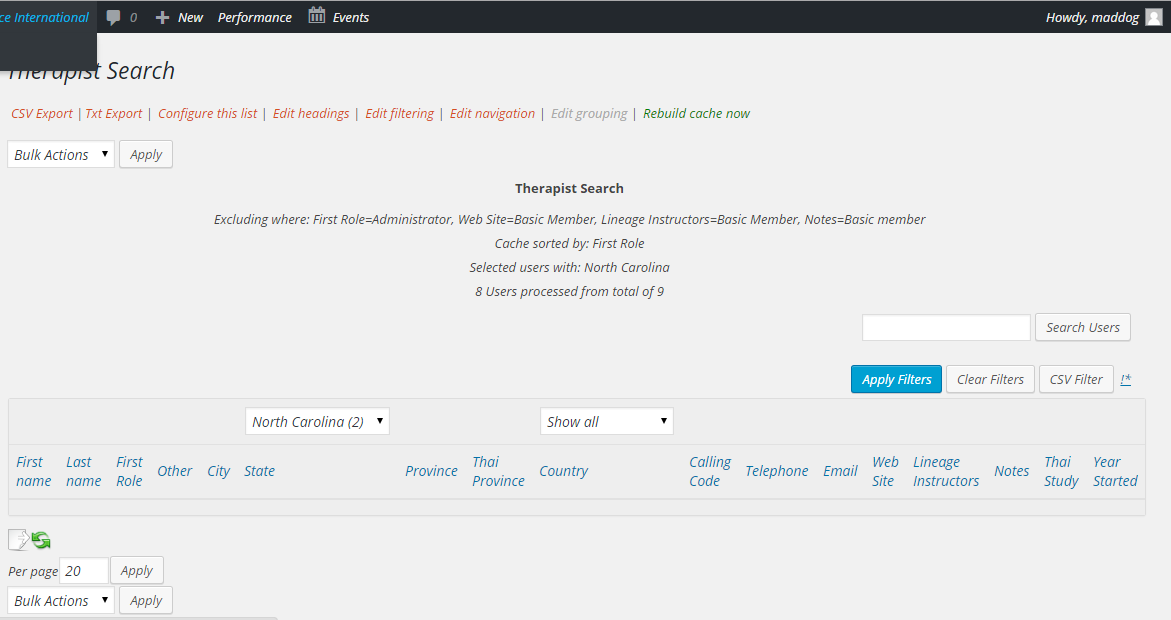
I added a State filter (and refreshed the cache!) and the select box shows up and lists the proper number of records for each state, but when I filter by a state I get no result on the page. I’m sure it’s something simple….I hope.
Thanks

-
Might be something interfering as all works in demo sites with variety of third party created fields. You should be able to pass the parameters in the url like this:
http://directories.wpusersplugin.com/simple-user-list/?filter=1&first_role=SubscriberDoes it work in admin backend ?
If yes (it’s the same code) then something definitely interfering in front end.
Switch to default theme, deactivate all other plugins. does it work etc …debug: http://webdesign.anmari.com/2932/debugging-a-possible-clash-between-plugins-andor-a-theme/You said somewhere else I think that the ‘detail’ linktype was working – it uses same concept as filtering, so I’m guessing its the same problem.
It’s not working in the ADMIN backend either. For example, the dropdown shows two for “state=North Carolina” (which is right), when I select it and filter, I get no results.
See backend admin screenshot: here
Very strange – it’s not like you have a lot of users either. But just in case – what is your wp and php memory set to ? (see plugin settings / about if you don’t know – should tell you )
also did you try temporarily with a default (eg 2015) theme and temporarily deactivating other plugins, and non of your code changes?
There aren’t many users because I’m setting this up. The existing member system is an old Perl system and I’m trying to get it set before migrating the members.
It’s not the theme. Default themes don’t filter either.
Memory should be more than enough:
Plugin version: 3.18
Php version: 5.4.37
Wp version: 4.2.2
Wordpress Memory limit: 96M
Php Memory Limit: 256MAnd Dev Inspector shows no jQuery errors normally or when filtering.
Before I start working through the plugins, any specific ones or types you would recommend starting with?
THANKS
Maddog please read http://webdesign.anmari.com/2932/debugging-a-possible-clash-between-plugins-andor-a-theme/ posted above. A quick and easy way to get some info is deactivate ALL plugins and just activate the one (unedited). If it works then, then you know it’s a clash – some plugins interfere with the $_REQUEST or the wp_query without realising that they are affecting more than just their stuff. So it’s not always obvious.
It’s easy to reactivate all the recently active plugins, so its a wonderful quick way to check and you should really have done it by now. Then if necessary you can spend time figuring out which it is.
If still doesn’t work on it’s own, then you have to think what ELSE is different about your system (no one else has this exact problem). Sometimes with converted data people have other weird problems where some data is returned but not others – usually it’s because their data is crappy and inconsistent.
Your setup works on search but totally not on filter, so it’s a bit different, which makes me think it’s more likely to be something interfering.
Also I hope you using the ‘column value’ default filter setting ?
Your fields are also different from other peoples, so maybe see what happens if you filter on a normal wp field – maybe the first_role like the demo system ? Does that work ? If so then you know it’s something about your fields or the data in them.
Do you have a local test system (everyone should) – does it work with similar data there?
Sometimes folks work out what it is that way. If it doesn’t work there, put the whole thing into WP_debug mode and see if any messages indicate anything. THis may cause other plugins/themes to issue lots of notices, so you may want to do this with them deactivated. (Mine should not as I develop with debug on)
Since it’s a live site I cloned it to a subdomain. I disabled ALL plugins except AMR and AMR Plus. The page renders correctly but the filters still don’t work!
I changed it so it’s filtering on first_role….it doesn’t work.
There is nothing unusual about the fields or their content. They weren’t migrated (that comes after it’s all working), they were hand entered.
Search works. Filter ALL works and it goes back to the whole list. Filtering on an individual selection DOES NOT WORK.
It’s AMR User v3.18 and AMR User Plus v2.13
WP_debug shows no errors.
Now what??
After a few hours, some progress.
With a fresh, clean install using Twenty-Fifteen and only two plugins enabled (AMR and AMR Plus) I just started mucking around……
No filters work if I use COLUMN VALUE.
However, if I change to “Field Value *” it works for the fields I need (Country and State). Oddly nothing works for first_role. If I change filtering for first_role using “Field Value *” the whole AMR section on the page goes blank, including the filter buttons, etc.
It’s working on the real site with all plugins activated, which is what I need. But why doesn’t it work the “normal” way? Wish I’d thought of trying it sooner!
Whew! Thanks for sticking with me. Next up may be GROUPING.
Oh gosh this sounds awful. I should have inspected your source and seen what you had.
The “Field value” business is something I ultimately want to get rid of. It exists because of the way the plugin grew so to get rid of it requires careful handling to keep compatibility. So you must have multiple fields in one ‘column’ then ie: decimal type ordering? Basically the plugin treats that as ‘one’ value (think first name & last name giving ‘full name’)because folks wanted to csv it like that AND then other people wanted to filter on parts of this ‘oneness’.
When reinvented, the plugin will convert the field filters to normal ones and it should be seamless – its a way way though.
Alternative: you could use the simple (html5) output, with css to float the items (like http://directories.wpusersplugin.com/memberdetails/ – css needs tweaking) AND put them in separate ‘columns’ eg: full integer ordering and THEN the normal filtering would work.
I’ll reinspect the grouping in a day or so.
Well at least you got to the bottom of it, I’ve had the flu, normally I can deduce what’s happened fairly quickly.
Hope you’re feeling better.
The fields were created using Profile Builder (http://www.cozmoslabs.com/wordpress-profile-builder/). This the third freakin’ “membership” plugin I’ve worked with on this site. The client is very specific in what they want and nothing easily works that way. So the fields are stored however they’re doing it!
But it’s working now. I’m already using “Simple HTML5” mode on them.
One question: Is there a function I can use to target the specific LABELs for the filters to change the text (as in, “Select a State”)?
I’ll be on vacation next week but if you can look into the grouping for me I’d appreciate it. From what I can tell it’s something I need for several of these lists. I don’t mind modifing functions if the plugin is problematic, but I do need to do some grouping sorts for the listings.
Thanks for sticking with me on this!
Mad Dog
Hi,
1) looks like you figured it out with the labels – using the custom ‘headings’ but not actually choosing to show the whole list heading, so it just appears as a lable. Just need prettier css – maybe fixed width on the input lables for #userlist2) Grouping kinda works – but there is a minor oddity – looks ok in html5 but not in table. Hopefully have it sorted soon.
3) OMG ! I think I figured out why your filtering was not working. The before/after values currently become part of the value (again think “last name, first name” => full name). Never really intended for html to be added and looks like the input field values being passed through some filter which is stripping the html
tags you added, so it looks ok. Add the br tag and default filtering breaks, remove the br tag, ok again. NOt great – relates to what I said before about the history of the thing and the difficult in changing for folks using this. I’m going to have to have to change it soon though – too confusing.4) Not sure whether your client cares about hcard/vcard microformats – you might want to check they not getting broken by squishing fields together.
5) Do you mind telling me what your client wanted that the other user field plugins weren’t handling ? I’ve yet to find a perfect one either, although advanced fields came close (Just talking fields, not membership)
2. If the only grouping problem is that it doesn’t work as a table, that shouldn’t be a problem since I’m using simple (HTML5) anyway.
3. Makes sense about the before/after values. I could *swear* I saw html in an example or somewhere in the documentation it said that you could do that. Did I invent the idea?? I found that it could be a problem when I added the word “Web:” before the web address and found that it was included in the URL on the page. So of course I moved it to the end of the line above as in
<br />Web:I mean, how else would you easily format it the way I display it?4. At this point hcard/vcard isn’t remotely important.
5. This would be a long one…..and I have to remember. I started with s2Member. When that wouldn’t do these kinds of lists (the client is very insistent on how they look and work) I added BuddyPress. That did it but when I tried to customize it, it turned into a nightmare. I considered using S2Member with AMR but then never did like the S2Member serialized fields. So I switched to Profile Builder (since this isn’t a paid membership site so the whole payment part wasn’t needed) which I’ve liked, but again, the directory sucks. So I started using AMR…..why can’t all this be easier!?
MD

The topic ‘Filters not working’ is closed to new replies.