Feature Request: Specify tab to open
-
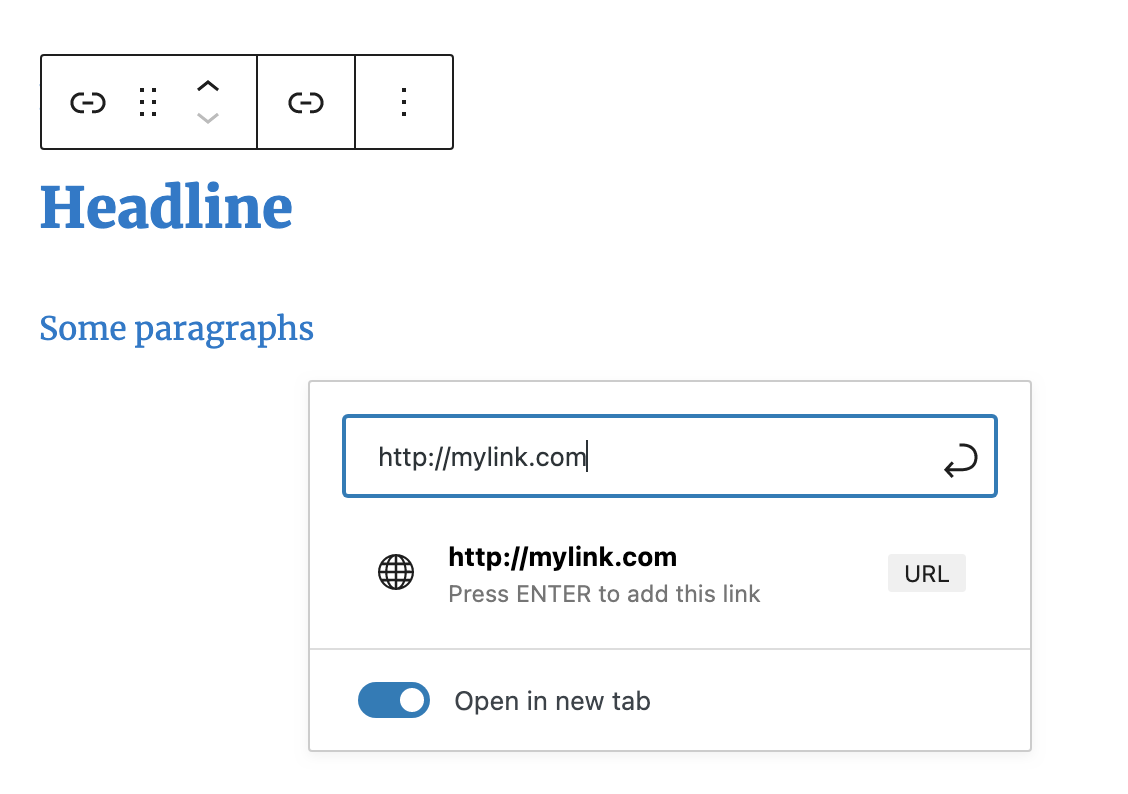
I have a page with dozens of links to various organizations. In testing, I find that some people click on one link, then instead of closing the page that opened, the click back on our original page and click on another link. Because the “Open in new tab” setting has no target control, target=”_blank” is what we end up with, and the user ends up with more and more tabs open in their browser window.
Adding the ability to specify the target tab would be useful. But perhaps this is now considered a security issue, since you have to remove the nofollow and noreferrer rels to make it work.

-
There are only possibilities to open a link in a brand new tab or in the same tab. Not open in an existing tab?
But why “open in an existing tab”? If you click a link you want to open that link than you can watch that link and close it again.
As I explained, when we do user testing, particularly with older people, they end up with dozens of tabs open, to the point of confusion when they eventually start closing them.
But regardless of whatever my use case may be, there is a “target” attribute and it can be set to values other than “_blank” when coding manually. All I am asking is that you support the spec and allow the designer to specify the name of the tab that the link should go to.
I don’t use iframes, but I suspect someone who does would have the same problem, since your plugin provides no way to specify the target.
Don’t you see the checkbox “Open in a new tab” like in the screenshots from the widget description > screenshost: https://ps.w.org/hyperlink-group-block/assets/screenshot-2.png?rev=2560266
Which Theme do you use? It’s an older one and not an FSE Theme? Maybe switch the Theme to a new one from WordPress and try it again, like “Twenty Twenty-Three”, “Twenty Twenty-Four”.
Of course I see the “Open in a new tab” checkbox. In the very first paragraph I wrote: “the “Open in new tab” setting has no target control…”
The whole point of my post is to point out the limitation of not allowing us to specify the name of the tab the link opens into.
As for versions: I’m using WP 6.9.1 with Themeisle’s Neve FSE (not ‘plain’ Neve) but I also test everything on a clean site using the latest release WP and the “Twenty Twenty-Five” theme with no additional plugins before I report it.
Here is the code your plugin generates:

My request is that you provide the ability to edit the ‘target’ attribute. Of course, I can edit the HTML directly to change the target, but it would be nice if you simply provided a field to allow users who aren’t comfortable editing HTML to specify a target.
And as long as I am requesting features, here are the link options WP presents when a text block or an image block is linked:


You will notice that they do not give the option to specify the target either, but they do provide more options. (Yes, I know that you provide some of these additional settings in the “Advanced” section of the right-hand settings panel, but that’s not an obvious place to look.)
I understand that specifying a target is frowned upon by most people, but our user testing shows that it is helpful in our situation. (Preponderance of links, demographics of users)
I was just trying to suggest ways you could make your plugin better; if you are not interested in this, I understand. No need to reply; I’ll just fix the code by hand and hope that someday you’ll issue an update with more attribute options.
As WordPress has only a checkbox to set the target to _blank. Because target _self is the default, if no target attribute is rendered. So I don’t understand more options for the target attribute?
Please write in short what your feature will be? Just have the other attributes on the right side direct at the pop-up window?
We like to have proposals from the community!
You write: “As WordPress has only a checkbox to set the target to _blank. Because target _self is the default, if no target attribute is rendered. So I don’t understand more options for the target attribute?”
Answer: go back and look at the page I linked to in the first message: https://www.w3schools.com/tags/att_a_target.asp — you will see 5 possible values that the target attribute supports. I am asking that you support those.
It does not matter to me whether it is found in the Advanced section of the settings panel or as a field in the hyperlink dropdown menu. I suppose the Advanced section makes more sense, since this is actually an advanced feature not many people will use.
If you write you don’t use IFrames, why do you need the other target attributes? Can you give us some examples?
_parent, _top and framename just make sense with IFrames and WordPress don’t use IFrames much?
No, sorry. Trying to convince you to support an attribute that is part of the standard seems like a fruitless task. I already gave you my use case above.
Beyond my needs: I pointed out that there is an attribute that is not supported by your plugin, but I think it ought to be. If you do not choose to implement it, that is your choice. As I said above, I’ll just fix the code by hand and hope that someday you’ll issue an update with more attribute options.
I test for my self, after useing ChatGPT, with a “tabname” and that works in Chrome. And ChatGPT says it works 😉
<a href="seite1.html" target="meinTab">Seite 1</a>
<a href="seite2.html" target="meinTab">Seite 2</a>
Best can be: “Tabname Tags” you can set new and use it for other Block instances, that all Blocks will open in just the same, new tabs.

That’s the idea. Thank you for understanding. I will hope that you choose to implement it in an upcoming release.
We release a new version.
Please check “Open in a new tab” and go to the right sidebar > advanced, set a “tabname” and save.
If there will be more time, we can add tab names as global tags.
Sometimes it doesn’t work and opens another tab. May it depend on the rel attribute, but why can it be found with ChatGPT?
-
This reply was modified 1 month, 2 weeks ago by
Daniel Floeter.
On my machine (current macOS/Safari) the presence of either the noopener or the norefferer attribute forces a new tab regardless of the specified target. That is due to the security that those attributes are enforcing. Removing both of those attributes allows the desired behavior, but now the site is less secure.
Interesting to me is that if the first link opened has no security attributes, then subsequent links open in the same tab. But if the first link opened has either no… attribute, then all subsequent links open in a new tab. This could be browser specific behavior. But at least the page designer now has options, and for that, I say thank you very much!
Interesting consistency note: When the “Open in new target” box is checked and the page is saved, it overwrites anything previously defined in the tab name attribute with “_blank” but it does not overwrite anything that is already in the link rel attribute. (If there is nothing in the link rel field, “noreferrer noopener” is inserted. I’m not saying this is right or wrong; I am just noting the inconsistency of one field being overwritten and the other one not being overwritten. Or, to look at it the other way: if “Open in new target” is unchecked and the page saved, the tab name attribute is cleared, but the link rel attribute is not. (The conclusion I draw from that is that when turning “Open in new tab” on, tab name should not be set to “_blank” if it is already defined.)
Also: I think you’ve got a typo (‘targe’ instead of ‘target’) in the help text: “Use same tabname as targe to open in same tabs”
If you want to mark this thread as resolved, I agree.
I tested the new version extensively and it now does exactly what I requested. Thank you!
But… I followed the “Donate to this plugin” link and it only takes me to the forums page of reviews. Likewise, the plugin description page at <https://wordpress.org/plugins/hyperlink-group-block/> has a “Donate to the plugin” link that goes to the reviews page.
Do you no longer accept financial donations? I wanted to make a contribution, since this plugin is very useful to me, but I cannot find a way to do that. Is leaving a 5 start review enough?
I did find a place on the tiptoppress.com site where I can pay for a different plugin. Can I use that?
Do you use it without the “rel” attributs: noopener or the norefferer?
We are considering changing the default values of both attributes. Based on our testing, using both attributes, rel=”noopener norefferer” and target=myTab, fails.
If you want to say txs please give us a short 5-star rating and if have inspiration you can write more text and details for other users and the community. May there are some others for this plugin.
Also, you get some create input.
If you want spend micropayments and cents https://wordpress.org/plugins/gallery-styles/
In the places where I want to cause all links to open to the same tab, I remove both noopener and noreferrer. That does make me nervous, and I considered abandoning the whole idea of targeting a specific tab, but then you provided the option, so I’m going that way. Philosophically, I’m fine with the target sites knowing that I referred them. But I do worry a little about the potential for “tabnabbing” that noopener exposes. But all in all, I trust the sites I am linking to.
And I’ll definitely check out gallery-styles: that may resolve a different problem I was working through!
-
This reply was modified 1 month, 2 weeks ago by

You must be logged in to reply to this topic.