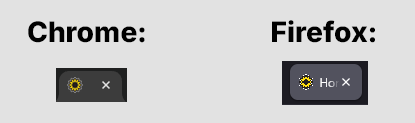
I’ve noticed this over the last several months: all favicons generated by RealFaviconGenerator appear very pixelated in Firefox on Windows 10 desktop. It just started one day, and I’m seeing it in every WordPress installation using this plugin. Favicons appear normal in Chrome, and all other favicons in Firefox appear normal except in instances where this plugin is being used.
I’ve taken awhile to report it because I thought maybe it’s just me or something about my setup, but maybe I’m just the only person using Firefox?
Example:
This topic was modified 2 weeks, 3 days ago by afwebdev.
I can’t reproduce the problem. I’ve just created a favicon for a sample WordPress site and the rendering is as expected on both browsers.
Can you give the URL of a production WordPress site of yours I could visit to observe the problem? Can you give me an image you pass to the plugin as the root icon?
If you don’t wish to disclose anything here, you can use RealFavicon’s contact form.
Regards, Philippe
This reply was modified 2 weeks, 3 days ago by phbernard. Reason: images broken
I visited the URL you sent me and I can’t reproduce the issue. The icon is clean on both Chrome and Firefox. Definitely not like the screenshot you posted.
I’m using Firefox 154.0 (64 bits) on Windows. What’s yours?
Two things you may want to check:
What happens when you visit other sites with Firefox? (I mean: not sites you personnaly work on)
Can you visit your site from Firefox running on another device?
OK – it sounds like it’s just something on my specific computer I need to figure out.
I’m also currently on Firefox 154.0 64-bit and have been seeing the issue for months spanning multiple browser versions. All other sites appear normal in Firefox & Chrome.
If I get this figured out I’ll post back here. Thank you!
In the meantime I would like to investigate the issue myself and maybe provide more feedback to the Firefox team. Could you send me the original SVG version of your logo if you have one? (not the one that was produced by RealFavicon). You can send it to me as plain text via the contact you already use a few days ago.