• Resolved clydefrog1

    (@clydefrog1)


    On my site, I exclude the category from the whole site this way:

    function exclude_category($query) {
        $query->set('cat', '-2370');
    }
    if(!is_admin()){
      add_action( 'pre_get_posts', 'exclude_category' );
    }

    but the plugin still displays posts from this category, even if I entered

    'taxonomy' => 'category',
    'term_id' => -2370,

    Is there a solution?

Viewing 7 replies - 1 through 7 (of 7 total)
  • Plugin Author Hector Cabrera

    (@hcabrera)

    Hi @clydefrog1,

    Hard to say what’s happening without more info. If I had to guess, if you’re using multiple categories with your posts then WPP won’t exclude a post from the list if it the post also belongs to another category that’s being allowed.

    Thread Starter clydefrog1

    (@clydefrog1)

    Hello @hcabrera,
    Post has only one category (id = 2370) and if I remove the function “exclude_category” from the functions.php then the post is not displayed via the plugin.

    Plugin Author Hector Cabrera

    (@hcabrera)

    Alright, I’ll do some testing and report back as soon as possible.

    Plugin Author Hector Cabrera

    (@hcabrera)

    Hi @clydefrog1,

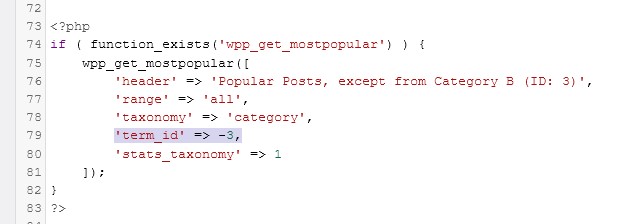
    Alright so I tried to reproduce the issue and the category filtering worked as expected for me. Using the pre_get_posts function in functions.php didn’t make any difference at all, WPP was able to filter out posts from the selected category just fine.

    Category List screenshot

    Posts list in admin section showing category assignments

    wpp_get_mostpopular() function screenshot

    pre_get_posts code snippet in functions.php file

    Popular Posts list on the front-end with category exclusion

    • This reply was modified 4 years, 10 months ago by Hector Cabrera. Reason: Fixed screenshot not loading
    Thread Starter clydefrog1

    (@clydefrog1)

    Ok, I tried disabling all other plugins, but it didn’t help. Maybe I can provide some other information?


    Plugin Author Hector Cabrera

    (@hcabrera)

    If the issue still persists even after deactivating all of the other plugins then the only two things I can think of at the moment are:

    • Page caching: are you using a caching plugin? Or is your hosting service providing some sort of page caching mechanism automatically for you? Or are you using a CDN based caching service, like Cloudflare for example?
    • There might be an issue with your own code. You can share it here if you want me to review it.
    • This reply was modified 4 years, 9 months ago by Hector Cabrera. Reason: Reworded for clarity
    Plugin Author Hector Cabrera

    (@hcabrera)

    Closing topic due to inactivity.

    OP if you still need help with this please feel free to leave a comment below.

Viewing 7 replies - 1 through 7 (of 7 total)

The topic ‘Exclude category’ is closed to new replies.