• Resolved vincentra

    (@vincentra)


    Whenever I update a product or browse to the products section of the admin panel I get in my error log file these messages.
    Strong lines are from a error_log(print_r($menu_order,true)); I added
    (So for some reason $menu_order is an integer maybe a product ID)

    
    <strong>[Thu Jul 09 02:18:42.438120 2020] [php7:notice] [pid 23830] [client 1.1.1.1:62900] 103246, referer: https://example.net/wp-admin/</strong>
    [Thu Jul 09 02:18:42.438145 2020] [php7:warn] [pid 23830] [client 1.1.1.1:62900] PHP Warning:  array_search() expects parameter 2 to be array, int given in /var/www/html/example.net/wp-content/plugins/woocommerce/includes/admin/class-wc-admin-menus.php on line 213, referer: https://example.net/wp-admin/
    [Thu Jul 09 02:18:42.438156 2020] [php7:warn] [pid 23830] [client 1.1.1.1:62900] PHP Warning:  array_search() expects parameter 2 to be array, int given in /var/www/html/example.net/wp-content/plugins/woocommerce/includes/admin/class-wc-admin-menus.php on line 216, referer: https://example.net/wp-admin/
    [Thu Jul 09 02:18:42.438162 2020] [php7:warn] [pid 23830] [client 1.1.1.1:62900] PHP Warning:  Invalid argument supplied for foreach() in /var/www/html/example.net/wp-content/plugins/woocommerce/includes/admin/class-wc-admin-menus.php on line 219, referer: https://example.net/wp-admin/
    <strong>[Thu Jul 09 02:18:42.445246 2020] [php7:notice] [pid 23830] [client 1.1.1.1:62900] 103245, referer: https://example.net/wp-admin/</strong>
    [Thu Jul 09 02:18:42.445272 2020] [php7:warn] [pid 23830] [client 1.1.1.1:62900] PHP Warning:  array_search() expects parameter 2 to be array, int given in /var/www/html/example.net/wp-content/plugins/woocommerce/includes/admin/class-wc-admin-menus.php on line 213, referer: https://example.net/wp-admin/
    [Thu Jul 09 02:18:42.445282 2020] [php7:warn] [pid 23830] [client 1.1.1.1:62900] PHP Warning:  array_search() expects parameter 2 to be array, int given in /var/www/html/example.net/wp-content/plugins/woocommerce/includes/admin/class-wc-admin-menus.php on line 216, referer: https://example.net/wp-admin/
    [Thu Jul 09 02:18:42.445288 2020] [php7:warn] [pid 23830] [client 1.1.1.1:62900] PHP Warning:  Invalid argument supplied for foreach() in /var/www/html/example.net/wp-content/plugins/woocommerce/includes/admin/class-wc-admin-menus.php on line 219, referer: https://example.net/wp-admin/
    <strong>[Thu Jul 09 02:18:52.786825 2020] [php7:notice] [pid 24094] [client 1.1.1.1:18666] Array\n(\n    [0] => index.php\n    [1] => separator1\n    [2] => edit.php\n    [3] => upload.php\n    [4] => lmfwc_licenses\n    [5] => edit.php?post_type=page\n    [6] => edit-comments.php\n    [7] => edit.php?post_type=product\n    [8] => woocommerce\n    [9] => wc-admin&path=/analytics/revenue\n    [10] => woocommerce-marketing\n    [11] => separator2\n    [12] => themes.php\n    [13] => plugins.php\n    [14] => users.php\n    [15] => tools.php\n    [16] => edit.php?post_type=hongobuilder\n    [17] => vc-general\n    [18] => options-general.php\n    [19] => rank-math\n    [20] => wp-mail-smtp\n    [21] => separator-last\n    [22] => mycred\n    [23] => mycred_gambling_currency\n    [24] => separator-woocommerce\n    [25] => revslider\n    [26] => mailchimp-woocommerce\n    [27] => user-verification\n)\n, referer: https://example.net/wp-admin/edit.php?post_type=product</strong>
    

    I’ve changed to default theme and deactivated all plugins except woocommerce and related, then with everything reactivated except Rank Math SEO there are no errors.
    Once I activate Rank Math SEO the error reappear again.

Viewing 14 replies - 1 through 14 (of 14 total)
  • Thread Starter vincentra

    (@vincentra)

    Specifically the product ids shown on the product admin list.
    https://example.net/wp-admin/edit.php?post_type=product

    I get 100 since I show only 100 per page.

    Plugin Author Rank Math SEO

    (@rankmath)

    Hello @vincentra

    Thank you for contacting the support and sorry for any inconvenience that might have been caused due to that.

    Assuming you are using the latest version of all the plugins and the themes (please update if not yet), it would seem like a conflict with one of the plugins or the theme you are using.

    To determine that, please follow this troubleshooting guide:
    https://rankmath.com/kb/check-plugin-conflicts/

    Please start with the default theme and only WooCommerce, & Rank Math activated, and then start activating the theme, and other plugins one by one to find the culprit.

    Only the site admin would know and your users won’t be affected by this troubleshooting.

    Looking forward to helping you.

    Thread Starter vincentra

    (@vincentra)

    Hi, I’ve already tried that.
    Only with woocommerce plugins active, I activate rank math and the error starts showing up.

    I’m using the last version of Rank Math SEO.

    Plugin Author Rank Math SEO

    (@rankmath)

    Hello @vincentra

    Can you please send a recorded screencast as it is working fine on our end? Here is a screencast:
    https://i.rankmath.com/zz4lQN

    Looking forward to helping you. Thank you.

    Thread Starter vincentra

    (@vincentra)

    I obviously didn’t do the conflict test right the first time, I’ve found out that Rank Math is not the cause of the error.
    It seems to be the Hongo Addons plugin from my theme.

    Thanks.

    Plugin Author Rank Math SEO

    (@rankmath)

    Hello @vincentra

    Glad you got it sorted.

    If it isn’t too much to ask for – would you mind leaving us a review here?
    https://wordpress.org/support/plugin/seo-by-rank-math/reviews/#new-post

    It only takes a couple of minutes but helps us tremendously.

    It would mean so much to us and would go a really long way.

    Thank you.​​

    Thread Starter vincentra

    (@vincentra)

    Hey, I just found out that the error only happens when “Hongo Addons” and “Rank Math SEO” ar BOTH active, having only one of them active doesn’t cause any error.

    What am I supposed to do?

    Thread Starter vincentra

    (@vincentra)

    Ok, I just found out you can use debug_backtrace() to get more info about what’s calling what.

    I just found that Rank Math is calling

    /**
     * Add content for custom column.
     *
     * @param string $column_name The name of the column to display.
     * @param int    $post_id     The current post ID.
     */
            public function columns_contents( $column_name, $post_id ) {
                    do_action( $column_name, $post_id );
            }

    this function where $column_name is ‘menu_order’ and ‘$post_id’ is the product id.

    
    WC_Admin_Menus->menu_order(104467) called at [/var/www/html/example.net/wp-includes/class-wp-hook.php:287]
    #1  WP_Hook->apply_filters(, Array ([0] => 104467)) called at [/var/www/html/example.net/wp-includes/class-wp-hook.php:311]
    #2  WP_Hook->do_action(Array ([0] => 104467)) called at [/var/www/html/example.net/wp-includes/plugin.php:478]
    #3  do_action(menu_order, 104467) called at [/var/www/html/example.net/wp-content/plugins/seo-by-rank-math/includes/admin/class-post-columns.php:170]
    #4  RankMath\\Admin\\Post_Columns->columns_contents(menu_order, 104467) called at [/var/www/html/example.net/wp-includes/class-wp-hook.php:287]
    #5  WP_Hook->apply_filters(, Array ([0] => menu_order,[1] => 104467)) called at [/var/www/html/example.net/wp-includes/class-wp-hook.php:311]
    #6  WP_Hook->do_action(Array ([0] => menu_order,[1] => 104467)) called at [/var/www/html/example.net/wp-includes/plugin.php:478]
    #7  do_action(manage_product_posts_custom_column, menu_order, 104467) called at [/var/www/html/example.net/wp-admin/includes/class-wp-posts-list-table.php:1265]
    #8  WP_Posts_List_Table->column_default(WP_Post Object ([ID] => 104467,[post_author] => 1,[post_date] => 2020-07-09 22:23:48,[post_date_gmt] => 2020-07-09 22:23:48,[post_content] => ,[post_title] => Custom Order,[post_excerpt] => ,[post_status] => publish,[comment_status] => open,[ping_status] => closed,[post_name] => custom-order,[to_ping] => ,[pinged] => ,[post_modified] => 2020-07-14 10:48:03,[post_modified_gmt] => 2020-07-14 10:48:03,[post_content_filtered] => ,[post_parent] => 0,[guid] => https://example.net/?post_type=product&p=104467,[menu_order] => 0,[post_type] => product,[post_mime_type] => ,[comment_count] => 0,[filter] => raw), menu_order) called at [/var/www/html/example.net/wp-admin/includes/class-wp-list-table.php:1361]
    #9  WP_List_Table->single_row_columns(WP_Post Object ([ID] => 104467,[post_author] => 1,[post_date] => 2020-07-09 22:23:48,[post_date_gmt] => 2020-07-09 22:23:48,[post_content] => ,[post_title] => Custom Order,[post_excerpt] => ,[post_status] => publish,[comment_status] => open,[ping_status] => closed,[post_name] => custom-order,[to_ping] => ,[pinged] => ,[post_modified] => 2020-07-14 10:48:03,[post_modified_gmt] => 2020-07-14 10:48:03,[post_content_filtered] => ,[post_parent] => 0,[guid] => https://example.net/?post_type=product&p=104467,[menu_order] => 0,[post_type] => product,[post_mime_type] => ,[comment_count] => 0,[filter] => raw)) called at [/var/www/html/example.net/wp-admin/includes/class-wp-posts-list-table.php:1298]
    #10 WP_Posts_List_Table->single_row(WP_Post Object ([ID] => 104467,[post_author] => 1,[post_date] => 2020-07-09 22:23:48,[post_date_gmt] => 2020-07-09 22:23:48,[post_content] => ,[post_title] => Custom Order,[post_excerpt] => ,[post_status] => publish,[comment_status] => open,[ping_status] => closed,[post_name] => custom-order,[to_ping] => ,[pinged] => ,[post_modified] => 2020-07-14 10:48:03,[post_modified_gmt] => 2020-07-14 10:48:03,[post_content_filtered] => ,[post_parent] => 0,[guid] => https://example.net/?post_type=product&p=104467,[menu_order] => 0,[post_type] => product,[post_mime_type] => ,[comment_count] => 0,[filter] => raw), 0) called at [/var/www/html/example.net/wp-admin/includes/class-wp-posts-list-table.php:741]
    #11 WP_Posts_List_Table->_display_rows(Array ([0] => WP_Post Object ([ID] => 104467,[post_author] => 1,[post_date] => 2020-07-09 22:23:48,[post_date_gmt] => 2020-07-09 22:23:48,[post_content] => ,[post_title] => Custom Order,[post_excerpt] => ,[post_status] => publish,[comment_status] => open,[ping_status] => closed,[post_name] => custom-order,[to_ping] => ,[pinged] => ,[post_modified] => 2020-07-14 10:48:03,[post_modified_gmt] => 2020-07-14 10:48:03,[post_content_filtered] => ,[post_parent] => 0,[guid] => https://example.net/?post_type=product&p=104467,[menu_order] => 0,[post_type] => product,[post_mime_type] => ,[comment_count] => 0,[filter] => raw)), 0) called at [/var/www/html/example.net/wp-admin/includes/class-wp-posts-list-table.php:718]
    #12 WP_Posts_List_Table->display_rows() called at [/var/www/html/example.net/wp-admin/includes/class-wp-list-table.php:1273]
    #13 WP_List_Table->display_rows_or_placeholder() called at [/var/www/html/example.net/wp-admin/includes/class-wp-list-table.php:1204]
    #14 WP_List_Table->display() called at [/var/www/html/example.net/wp-admin/edit.php:449]
    , referer: https://example.net/wp-admin/edit.php?post_type=product
    Plugin Author Rank Math SEO

    (@rankmath)

    Hello @vincentra

    Thank you for your patience.

    We have fixed the issue internally and will let you know as soon as the update is released.

    We seek your understanding in this matter.

    In the meantime, if there’s anything else we can help you with, please let us know. We are here to assist.

    Thread Starter vincentra

    (@vincentra)

    Thank you @rankmath I wasn’t sure if it was an error per se or just a weird coincidence with both plugins so I was ready to have to fix it myself every update.

    Plugin Author Rank Math SEO

    (@rankmath)

    Hello @vincentra

    We appreciate your patience and understanding in this matter.

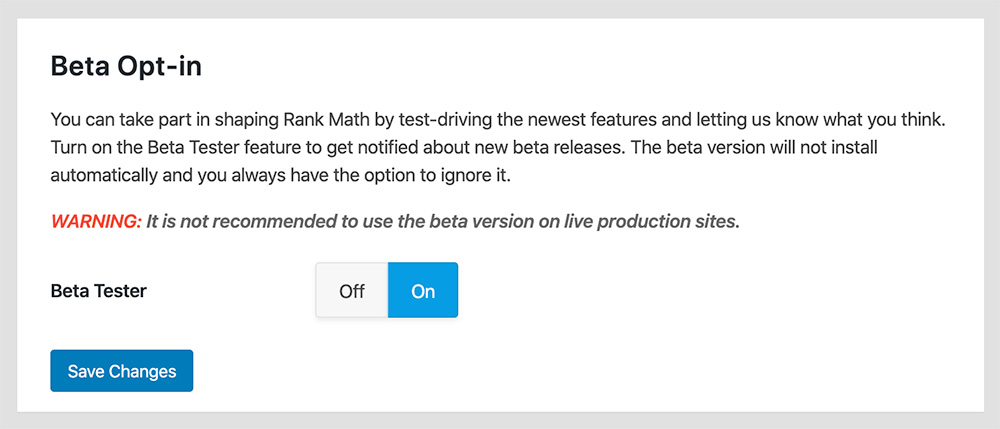
    We released a quick Beta update you can try to see if that helps.

    Please enable the Beta update by following this:
    https://rankmath.com/kb/version-control/#beta-updates
    https://rankmath.com/wp-content/uploads/2020/02/Rank-Math-Beta-Testing.jpg

    If you are unable to see an update, please clear Rank Math’s transients from:
    WP Dashboard >> Rank Math >> Status & Tools >> Database Tools >> Remove Rank Math Transients >> Remove transients
    https://i.rankmath.com/Pbu5J6

    Please clear the caches from the server and WordPress after updating.

    You can disable the Beta updates once you update to the latest version and the issue is fixed.

    Hope that helps. Thank you.

    Thread Starter vincentra

    (@vincentra)

    Hi, I can only test from my phone, but after updating I don’t see the errors anymore.

    Plugin Author Rank Math SEO

    (@rankmath)

    Hello,

    Glad it’s sorted now.

    If you face any other issue, please feel free to open a new support topic and we will be more than happy to assist.

    Thank you.

    Plugin Author Rank Math SEO

    (@rankmath)

    Hello @vincentra

    We have released a new update, 1.0.46, that should fix the issue.

    Please update to it or you can enable the auto-update by following this tutorial:
    https://rankmath.com/kb/version-control/#auto-update

    We appreciate your patience and understanding in this matter.

    If there is anything else we can help you with, please feel free to open a new support topic.

    We are here to help. Thank you.

Viewing 14 replies - 1 through 14 (of 14 total)

The topic ‘Error on admin/class-wc-admin-menus.php’ is closed to new replies.