Editing Stock Management Message
-
I wanted to resurrect this question because I have the same one..
https://wordpress.org/support/topic/stock-management-how-to-edit-message/
I’m trying to conceal how much inventory I actually have. I don’t want people to plug in a huge number and find out my exact numbers in my inventory. Is it possible to change this message somehow to say ‘Sorry we don’t have sufficient inventory, please contact XXXX@XXX.com’ instead of ‘Value must be less than or equal to 289’

There is a setting in woocommerce that lets you hide stock numbers, but it seems like this is an easy way to get around that.
I found a topic on another forum that sounded like they figured it out, but was unable to replicate it.
Anyone have any advice?

-
I also found this in my research: https://wordpress.stackexchange.com/questions/218336/change-out-of-stock-error-message-in-woocommerce-cart
Is there a way I can change the message to something like this minus the number in stock?
-
This reply was modified 6 years, 9 months ago by
pogle.
@dynamiczach looking back at the other (closed) ticket on this same subject, can you elaborate on how that ‘Value must be less than or equal to XXX’ message is a browser message and not something in woocommerce? Is it possible to be edited, or will it always show what the actual quantity is even if it’s set to hidden in woocommerce?
Hi @pogle,
Let’s take a look at how this message is created and in what circumstances you’ll see it.
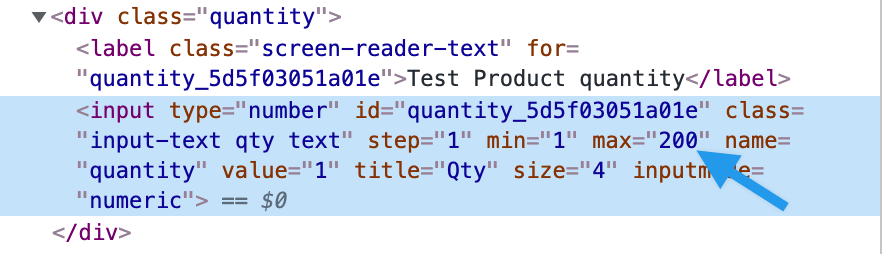
When a product is set to have inventory managed and backorders not allowed, WooCommerce adds a “maximum” value to the input field. That’s why the browser generates a message there when too many items are selected.
Here’s a screenshot of the code:
One way to turn that off is to allow backorders on that product. It will remove the maximum from the input. That will keep visitors from being able to figure out how many you have in stock.
If you have any questions about this, let me know.
Cheers,
thanks, i’ll try that.
-
This reply was modified 6 years, 9 months ago by

The topic ‘Editing Stock Management Message’ is closed to new replies.
