Editing Product Page
-
Hi There,
I’ve been using your plugin for a short while now, and I’m loving it, it’s really helping me handle the 100’s of orders per week we have, and I have already left a review.
I’ve come across a few things when editing products that either you can do in the native WooCommerce product editing which doesn’t currently exist with your plugin (which forces me to turn it off temporarily) and I wanted to highlight this as well as a few feature requests, and bugs.
I apologise in advance if any of these features already exist and I just haven’t found them in BrikPanel yet.
- COGS in Product Variations
Updating the cogs of a product variation whilst editing the product doesn’t seem to save or update. When I refresh the screen, all the values disappear. The overall product COGS works fine. The only way I can get variations to update the COGS is via using the google sheets method.
2. Bulk adding Tags or Manual Attributes via copy and paste
In the native WooCommerce Product editor, you can copy and paste in all the values you would like with a delimiter such as a comma or | symbol. This could be useful rather than typing every value in manually. Depending on the context.
Example: https://whisperingraven.co.uk/wp-content/uploads/2026/08/Attribute-and-Tag-Seperators-.png
Example 2: https://whisperingraven.co.uk/wp-content/uploads/2026/08/product-tags-.png
3. Global Attributes
In the native editor, there is a button where you can add all attributes from that created attribute category. This would be really useful rather than typing in or selecting each one manually.
Also you’re able to add new attributes into the global attribute category in the native product editor but not in BrikPanel, this can be useful rather than going to the attributes part of the backend first before I can add it to the product.
Example: https://whisperingraven.co.uk/wp-content/uploads/2026/08/Select-all-button-.png
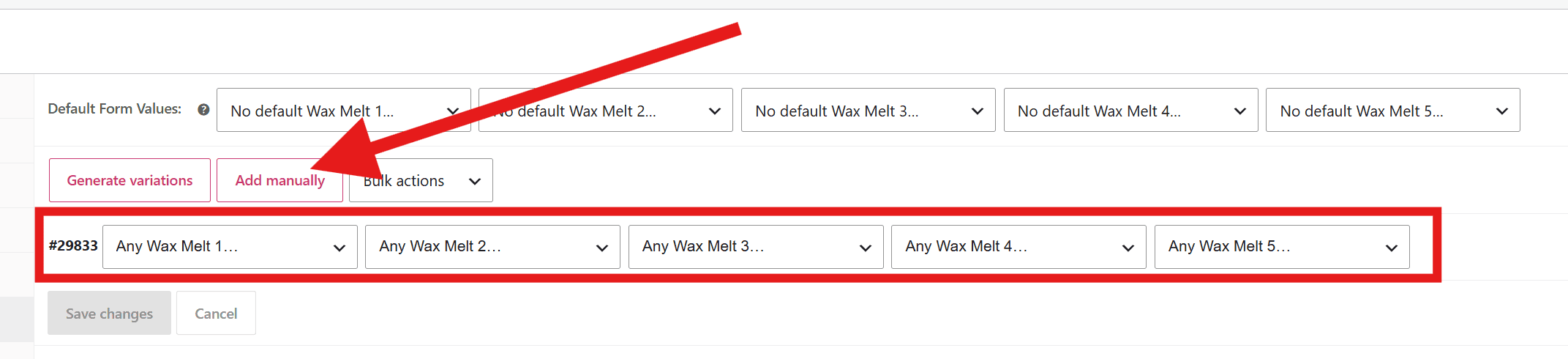
4. Variations (Add Manually)
In the native editor, there is a button to add variations manually, currently BrikPanel only has a “Generate Variations” button, and sometimes I don’t want 120 variations, I just want 1 variation and the user can pick any combination of them from each applicable variable. I haven’t found a way to do this on BrikPanel yet.
Example: https://whisperingraven.co.uk/wp-content/uploads/2026/08/Add-Manually-.png
5. Widescreen Usage
Is it possible to make better use of a widescreen display? Currently everything is truncated into the middle, but I feel there are certain elements that either don’t need a lot of space, or would be easier to use if we had more widescreen usage like the native editor has. I think that sections like the product descriptions or the variations editing table, would benefit from this as it might not then need the scroll bar.
Example 1: https://whisperingraven.co.uk/wp-content/uploads/2026/08/widescreen-usage-.png
Example 2: https://whisperingraven.co.uk/wp-content/uploads/2026/08/widescreen-usage-variations.png


You must be logged in to reply to this topic.