firstly, what you say here makes little or no sense:
It has nothing to do with my standard coding…WITHOUT the WordPress PHP code it looks perfectly fine.
and if you think this is a wordpress issue than why have you titled the post “CSS Issue”? Do you want CSS help or do you want to rant about how WP does this that and the other?
second, Im using firefox and I dont see any extra spacing at the top or bottom, save maybe 1/8 of an inch.
It makes perfect sense.
This is the exact same page, but WITHOUT the WordPress PHP code:
http://pinkladyconstrictors.com/wp-content/themes/pinklady/page2.html
That 1/8″ is 1/8″ too much space.
Ive opened up BOTH pages in firefox tabs that are right next to one another. There is absolutely NO difference in the top margin. There is extra space on the left-hand and right-hand side.
Is that what you are referring to? Notice, I emphatically stated where I did not see extra space, while you did not state where you did see it.
I think your issue is with WordPress wrapping content in <p> tags, thats a thorn in some ppl’s sides. If it screws things up for you, search for “disable autop” — there are atleast 10 ways to kill it.
of course, most of us code knowing that autop exists and make allowances for it; at least I did. i have divs upon nested divs, and a very boxy layout, and theyre all the same width.
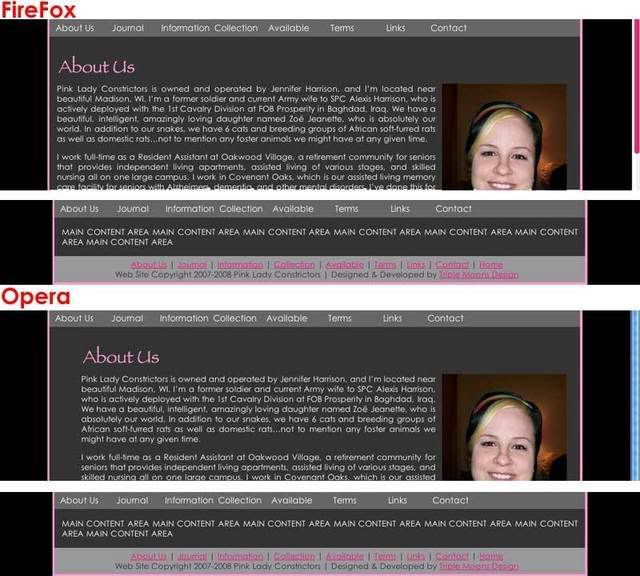
FireFox isn’t the MAJOR problem. Opera is. Open up both side by side in Opera. The problems in both browsers is obvious. Here is a link to screenshots.
Thank you for suggesting disabling autop…
However…That isn’t going to help clients who don’t know HTML…Because it still looks the same in the WYSIWYG editor even though I have to actually go in and edit code to make it break correctly.
Talk about an irritating bug with WordPress. Makes me rethink recommending it as a CMS option for clients.