(Not Resolved Yet!)
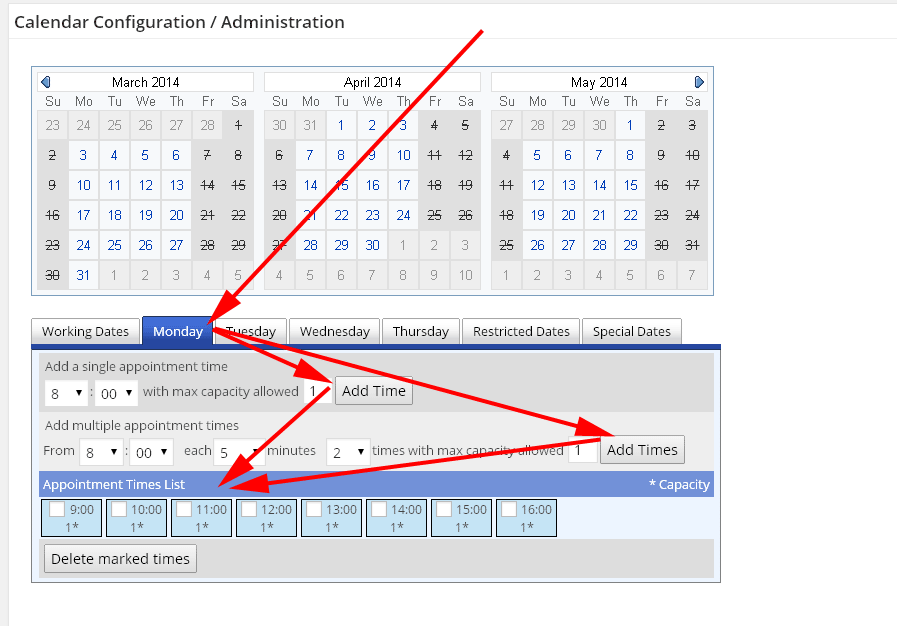
Thanks, the css is not so important, the “Default Daily Time Slots” however are.
I know how to change individual days time slots but i want to change the “Default” settings so that the whole calendar has my modified settings for ALL days.
The times are initiated in cpabc_appointments.php with the sql INSERT INTO statement below (that I’ve tried to change by re-activating the plugin) – which didn’t work
I assume I would have to do an sql UPDATE. I am not too familiar with SQL and would not want to risk wrecking my site – so i guess I would have to uninstall the plugin and re-install it but would that alter the DB. (do the plugin’s DB tables get wiped when uninstalled? if not, will the re-run INSERT statement cause the old data to be overwritten or will it insert another line/tuple in to the table and mess everything up?)
$sql = ‘INSERT INTO '.$wpdb->prefix.CPABC_APPOINTMENTS_CONFIG_TABLE_NAME.' (conwer,form_structure,'.CPABC_TDEAPP_CONFIG_ID.','.CPABC_TDEAPP_CONFIG_TITLE.','.CPABC_TDEAPP_CONFIG_USER.','.CPABC_TDEAPP_CONFIG_PASS.','.CPABC_TDEAPP_CONFIG_LANG.','.CPABC_TDEAPP_CONFIG_CPAGES.','.CPABC_TDEAPP_CONFIG_TYPE.','.CPABC_TDEAPP_CONFIG_MSG.','.CPABC_TDEAPP_CONFIG_WORKINGDATES.','.CPABC_TDEAPP_CONFIG_RESTRICTEDDATES.','.CPABC_TDEAPP_CONFIG_TIMEWORKINGDATES0.','.CPABC_TDEAPP_CONFIG_TIMEWORKINGDATES1.','.CPABC_TDEAPP_CONFIG_TIMEWORKINGDATES2.','.CPABC_TDEAPP_CONFIG_TIMEWORKINGDATES3.','.CPABC_TDEAPP_CONFIG_TIMEWORKINGDATES4.','.CPABC_TDEAPP_CONFIG_TIMEWORKINGDATES5.','.CPABC_TDEAPP_CONFIG_TIMEWORKINGDATES6.','.CPABC_TDEAPP_CALDELETED_FIELD.') ‘.
‘ VALUES(0,”‘.esc_sql(CPABC_APPOINTMENTS_DEFAULT_form_structure).'”,”1″,”cal1″,”Calendar Item 1″,””,”ENG”,”1″,”3″,”Please, select your appointment.”,”1,2,3,4,5″,””,””,”8:3,9:0,10:0,11:0,13:0,14:0″,”8:3,9:0,10:0,11:0,13:0,14:0″,”8:3,9:0,10:0,11:0,13:0,14:0″,”8:3,9:0,10:0,11:0,13:0,14:0″,”8:3,9:0,10:0,11:0,13:0,14:0″,””,”0″);’;
$wpdb->query($sql);