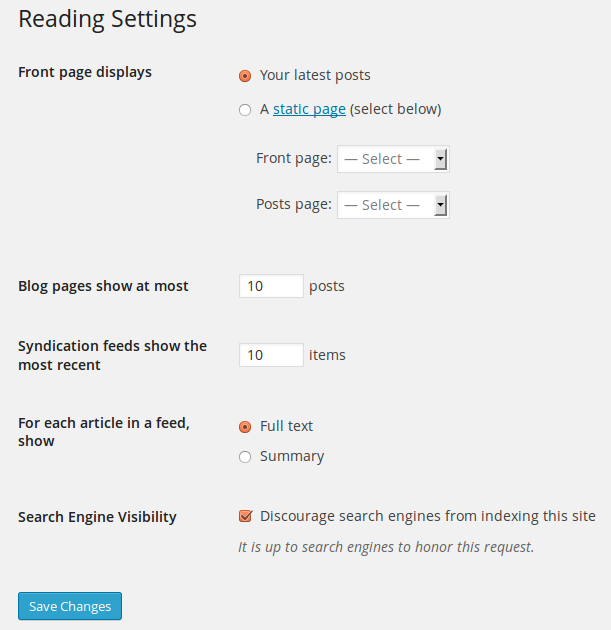
You have set ../blog/ as your posts page. You should be posting to that so that you won’t lose your previous posts. If you want some other URL for your posts, you can reset it.
Review:
http://codex.wordpress.org/images/2/25/options-reading.png
http://codex.wordpress.org/Creating_a_Static_Front_Page
Sorry it took a while to get back I have been on Vacation. Anyway, how do I get multiple post pages?
Why do you need multiple post pages? You can successfully assign categories and link to them through a custom menu or other links.
Im very new to this, I have no idea what im doing. I don’t even know the terminology for any of this. What I am trying to do is have sections on my site for various types of videos. One for interviews and one for Reviews and when I make a post I dont want to loose the previous post either. So I could really use some guidance even if it means starting from scratch again.
Just keep on posting and use the categories such as videos and reviews. That will solve your problem.
And how do I set this up?
Can you link to one of your posts?
http://theconcertcruizer.com/blog/ See this was suppose to go into my interviews section but it just ended up in Blog plus my previous is no longer there.
You have just one post there. The category is uncategorized. Go to posts and edit it to change uncategorized to interviews. Similarly, add a new test post (just a few words now) and create a new category like reviews.
Ok but do I put down for a slug and what does “Parent” mean? And sorry for not getting back to you. I just got back from Canada.
Parent means the main category under which subcategories (child) can be assigned. If you want just two or three main categories under which all your posts should appear, you don’t need child categories.
But what about the slug? What should I put down?
If your category is Interviews, its slug is interviews.
Ok I did it but on the dashboard it still says Uncatagorized. I cant even delete it.
Please check if your site loads properly. I am unable to view your site.