Container Layout Issue
-
I’m brand new to WordPress and web design and have started working on a website.
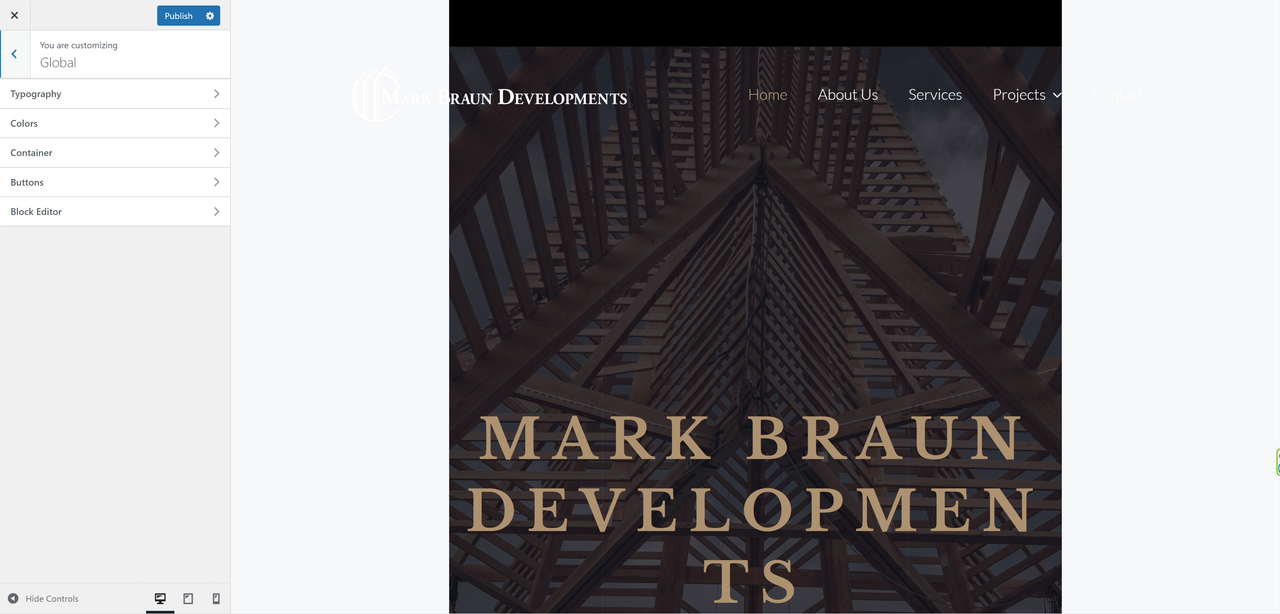
I went into customizing & Breadcrumb, and selected “inside”. Big mistake because it messed up the container width and caused it to narrow in on both sides.
Customizing and selecting different containers does nothing, it stays exactly the same. Its not responsive anymore.
This happened once before when going through sidebar selections, where it narrowed on both sides, but fixed it by going through containers. Now its no longer responsive to anything. Even going in and editing pages has the same narrow layout.
Even deactivating all plugins, going through customize containers, no change, not responsive to any of the options still.
Any Help would be greatly appreciated, I don’t want to start over again!
Here’s what it looks like.
https://i.postimg.cc/vH3FfjkK/Screenshot-20221101-204255gt.png


The topic ‘Container Layout Issue’ is closed to new replies.