Viewing 7 replies - 1 through 7 (of 7 total)
  • Hello @cellfashionusa,
    Hope you are doing well.

    I have tested the WooCommerce keeping the Elementskit Plugin activated and seems everything is working fine there. I haven’t found any issue with the Notices of WooCommerce. You can check this screenshot for a better understanding.

    As you can see that it is working perfectly, maybe there is something wrong in your end that is preventing the Notice section to appear properly. As you have already performed the plugin conflict test and found that Elementskit is causing the issue, it requires a closer inspection from your end.

    It will be better if you could create a ticket at our support center. You will find the link to our Support Center on the USEFUL LINKS section of the Plugin Details page. Mention the link of this thread while creating the ticket. We will check and let you know further update as soon as possible.

    Looking forward to your response.

    Best Regards,
    Prosenjit

    Thread Starter cellfashionusa

    (@cellfashionusa)

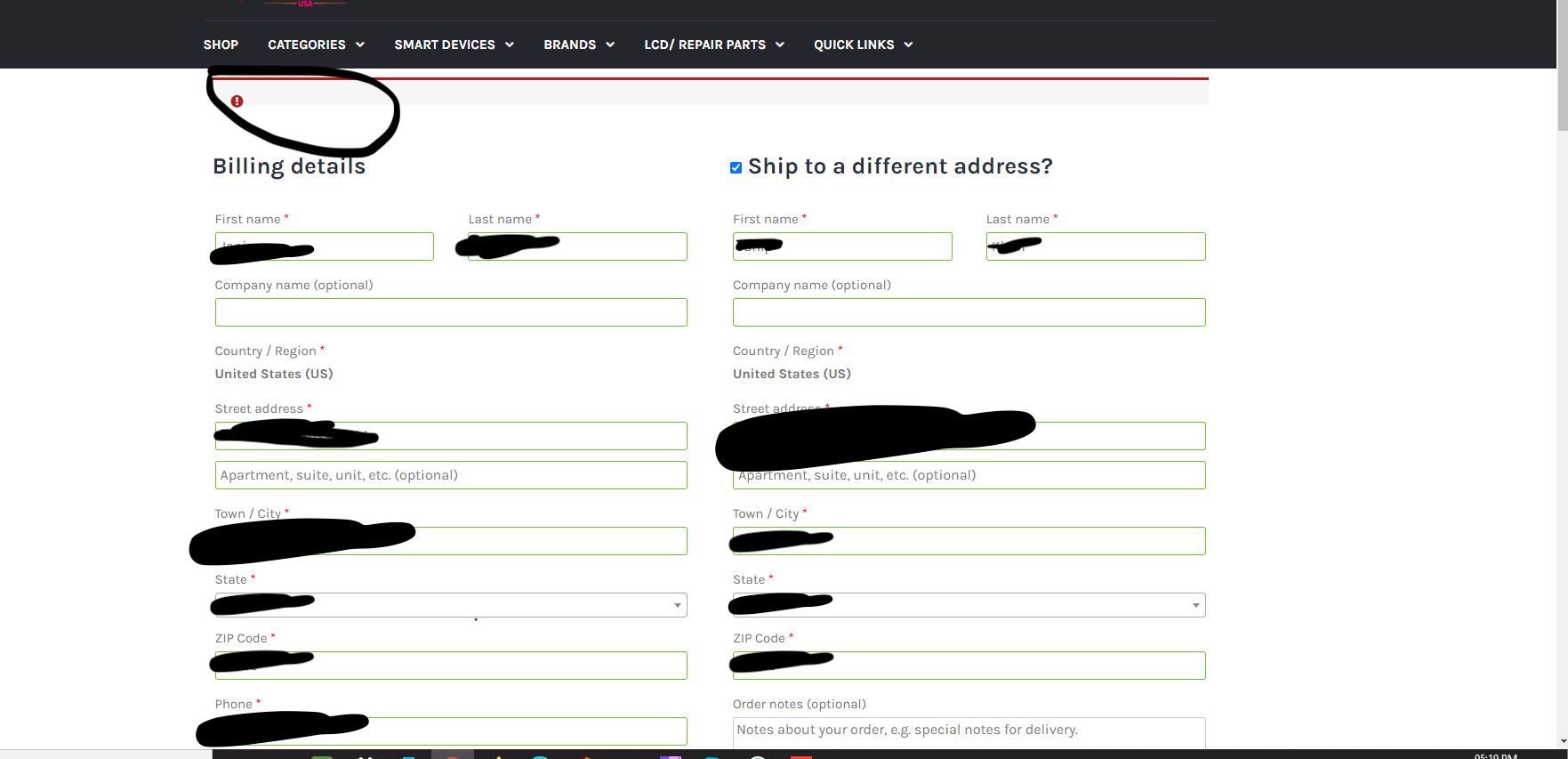
    Screenshot: https://i.ibb.co/Kzb1tgY/Check-Out-Issues.jpg
    inspector Img: https://i.ibb.co/3pWYZkB/Screen-Shot-2021-12-19-at-9-58-43-PM.png
    Counsol IMG: https://i.ibb.co/7XG0Jnk/Screen-Shot-2021-12-19-at-10-00-19-PM.png

    Check the link above the screenshot is issue and msg and I have also included inspect elements error , that’s all it has there no error on backend

    Hi @cellfashionusa,
    Hope you are doing well.

    Thanks for sharing the images. Since I am unable to reproduce the issue, we need more information. is it possible for you to attach the link to your site for further inspection? It will be better if you can share the Server Info(Tools > Site Health) so that we can check those too.

    It will help us to inspect the issue properly and also in providing you an update as soon as possible. Looking forward to your response.

    Best Regards,
    Prosenjit

    Thread Starter cellfashionusa

    (@cellfashionusa)

    Server architecture Linux 3.10.0-1160.49.1.el7.x86_64 x86_64
    Web server Apache
    PHP version 7.4.27 (Supports 64bit values)
    PHP SAPI fpm-fcgi
    PHP max input variables 1600
    PHP time limit 112
    PHP memory limit 3000M
    Max input time 76
    Upload max filesize 3000M
    PHP post max size 3000M
    cURL version 7.80.0 OpenSSL/1.1.1m
    Is SUHOSIN installed? No
    Is the Imagick library available? Yes
    Are pretty permalinks supported? Yes
    .htaccess rules Custom rules have been added to your .htaccess file.

    Thread Starter cellfashionusa

    (@cellfashionusa)

    Server Info
    ===========

    WP Version: 5.8.2
    PHP Version: 7.4.27
    Database Version: 5.7.36
    Client IP Address: 24.3.115.202
    Server IP Address: 162.240.1.25
    Server Load: 0.35, 0.21, 0.16
    Server Load Average: 0.24
    PHP Memory Usage: 5% (151.67M of 3000M)

    Server Info
    =============

    OS/Server: Linux 5448323.cellfashionusa.com 3.10.0-1160.49.1.el7.x86_64 #1 SMP Tue Nov 30 15:51:32 UTC 2021 x86_64
    Server Software: Apache
    Server Version: 64Bit
    Server Address: 162.240.1.25
    Server Port: 443
    Document Root: /home/cellfashionusa/public_html
    Server Name: cellfashionusa.com
    Server Load: 0.35, 0.21, 0.16
    Load Average: 0.24
    Server Signature: Disabled
    Apache Modules: n/a
    Server Protocol: HTTP/2.0
    HTTP Connection: n/a
    Server Gateway: CGI/1.1
    Server Time: 2022-01-03 12:59:33

    ===========
    Database Info
    ===============

    Database: MySQL Community Server (GPL)
    Version: 5.7.36
    Uptime: 10 days, 13 hours, 46 minutes, 26 seconds
    Hostname: 5448323.cellfashionusa.com
    Charset: utf8

    =======
    PHP Info
    ========

    PHP Version: 7.4.27
    Zend Engine: 3.4.0
    PHP Memory Limit (runtime / server): 3000M / 3000M
    PHP Memory Usage: 5% (151.86M of 3000M)
    PHP Peak Memory Usage: 36M
    PHP Post Max Size: 3000M
    PHP Upload Max File Size: 3000M
    PHP Execution Time Limit: 112s
    PHP Input Time Limit: 76s
    PHP Max Input Vars: 1600
    PHP Include Path: /home/cellfashionusa/public_html/wp-content/plugins/kirki/:/home/cellfashionusa/public_html/wp-content/plugins/kirki/core:.:/opt/cpanel/ea-php74/root/usr/share/pear
    PHP Allow URL File Open: Enabled
    PHP File Uploads: Enabled
    Session: Enabled
    Session Name: PHPSESSID
    Cookie Path: /
    Save Path: /var/cpanel/php/sessions/ea-php74
    Use Cookies: Enabled
    Use Only Cookies: Enabled
    Loaded Extensions: Core, date, libxml, openssl, pcre, zlib, filter, hash, pcntl, Reflection, SPL, session, standard, cgi-fcgi, bcmath, bz2, calendar, ctype, curl, dba, dom, enchant, mbstring, fileinfo, ftp, gd, gettext, gmp, iconv, imap, intl, json, ldap, exif, mysqlnd, odbc, PDO, pgsql, Phar, posix, pspell, shmop, SimpleXML, snmp, soap, sockets, sqlite3, sysvmsg, sysvsem, sysvshm, tidy, tokenizer, xml, xmlwriter, xsl, zip, mysqli, pdo_mysql, PDO_ODBC, pdo_pgsql, pdo_sqlite, xmlreader, xmlrpc, imagick
    open_basedir:
    fsockopen: Enabled
    cURL: Enabled
    SOAP Client: Enabled
    Short Open Tag: Enabled

    ========
    Security Info
    ==========

    Register Globals: Disabled
    Safe Mode: Disabled
    Display Errors: Enabled
    allow_url_include: Disabled
    allow_url_fopen: Enabled
    Server Signature: Disabled
    WP Unique Keys: Enabled
    mod_security: Not Installed
    open_basedir: Disabled
    upload_tmp_dir: /tmp
    expose_php: Disabled
    Thread Starter cellfashionusa

    (@cellfashionusa)

    Please Check Above info as i have send everything

    Hello @cellfashionusa ,
    Hope you are doing well.

    Thanks for sharing the System Info. We have received the Ticket you have created at our support center and we also have responded to that ticket with a video that shows the WooCommerce Notices are appearing properly.

    So, Please check that response and let us know the update on the reply to that Ticket. We will check and let you know what to do next.

    Best Regards,
    Prosenjit

Viewing 7 replies - 1 through 7 (of 7 total)

The topic ‘Conflict With WooCommerce’ is closed to new replies.