Code Showing in List View
-
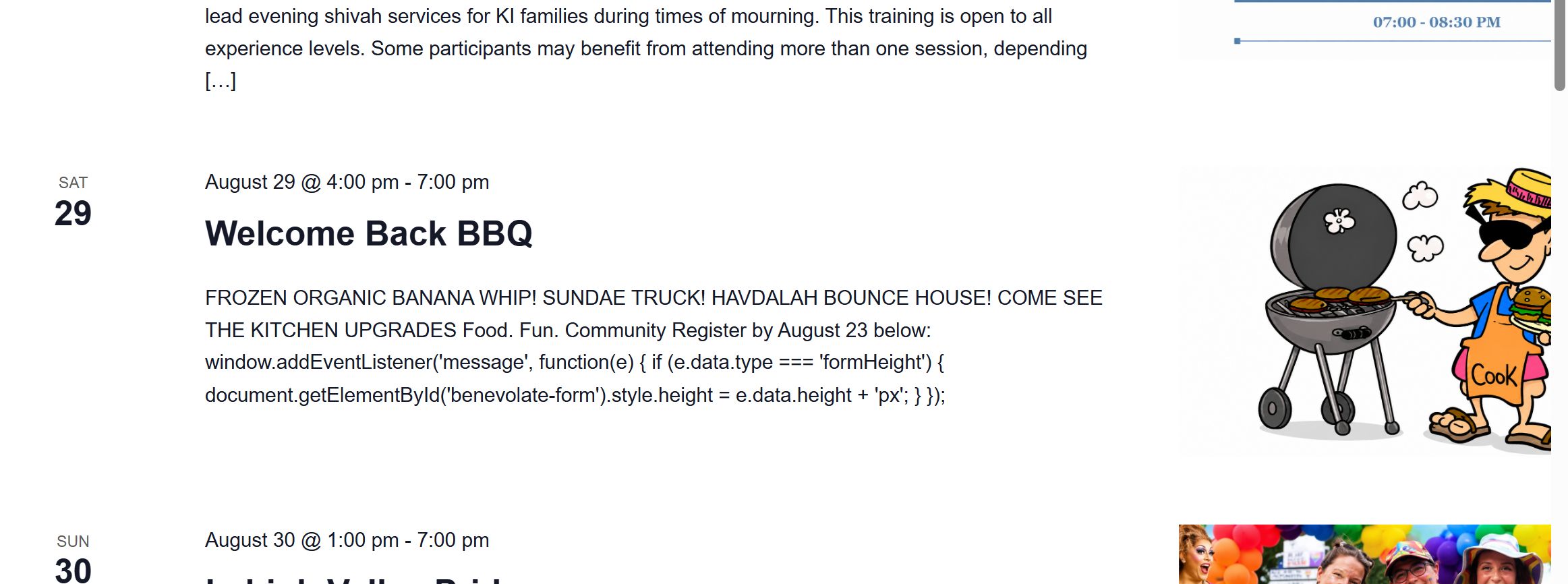
I put some code into my post and the code shows up in my list view. How do I not have the code showing up on the list?
The page I need help with: [log in to see the link]

-
Hi @deathbunnynoir,
Thanks for reaching out! I’d be happy to help with this.
I checked your calendar on my end, but I wasn’t able to find the code appearing in your List View.
Are you still experiencing this issue? If so, could you please provide a few more details?
- What code are you trying to add?
- How did you add it (for example, via a template override, custom snippet, plugin, or custom field)?
- A screenshot of the issue.
Those details will help me recreate the issue and investigate it further.
I look forward to your reply.
Hi @deathbunnynoir,
Thanks for your response.
From what I understand, the List View is currently displaying the excerpt of your event description rather than the full content. When an event doesn’t have a manually defined excerpt, The Events Calendar automatically generates one by stripping out any HTML and displaying only a limited number of characters from the event description.
This behavior is intentional, as it’s designed to keep the List View concise and easy to browse.
If the full event description were displayed instead, it would also include any embedded HTML—such as your form—which could make the List View extremely long and difficult to navigate, especially if multiple events contain lengthy descriptions or forms.
I hope that explanation makes sense.
That said, if your goal is still to display the full content or include the form in List View, let me know. I can look into whether this can be achieved through a template override or another customization approach.
No, the issue is the code is showing at the end of the excerpt. You can see the code in the screenshot I uploaded.
I don’t want what the end user would see as “gibberish” showing in the list view excerpt.
The excerpt is pulling the code out from the embedded form. I don’t want full event/form in the list, but I don’t want the code showing up either.
There is no code like that showing in the event itself – only in the excerpt. Maybe I am not being clear on this?Hi @deathbunnynoir,
From what I can see, the code you’re seeing is actually part of your event description.
In List View, the plugin strips out
<script>tags and other HTML elements before generating the excerpt. As a result, any code that isn’t properly rendered can end up appearing as plain text like the code that you see.To avoid this, I recommend adding a manual excerpt to your event. The List View will use the excerpt instead of automatically generating one from the event description, allowing you to control exactly what text appears without exposing any code.
Please give that a try and let me know if it resolves the issue for you.
That worked 🙂 I just need to remember to do that when I have forms on the page. Thanks!
Thanks for your confirmation and I’m glad that it is now working.
If you have a minute, a great review from you would be amazing!
I’ll close this thread for now, but please do not hesitate to start a new thread if you have other issues at all. This allows us to track topics/issues efficiently and follow the WordPress Forum Guidelines.

You must be logged in to reply to this topic.
