• Resolved kwint

    (@kwint)


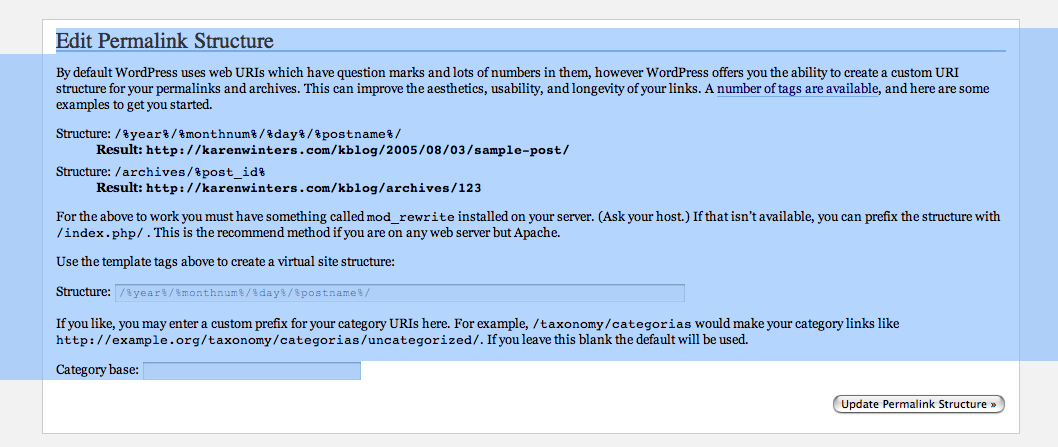
    I installed WP successfully and have been adding entries to my database. Tonight, I went to one of the management tabs in the admin area that talked about changing structure and it said to choose one of the structures (it was a structure like 2005/08/02/ …) and I pasted that into the field below and hit update. I selected the top option, and immediately got a 500 message. I couldn’t do anything after that, not even access the dashboard anymore. I backed up all the data and deleted everything from my directory and re-installed wp, clean. I got the same 500 message, so clearly something is happening at the server, not just in the files on my directory. How and where do I fix this? I am happy to start over from scratch but it appears that now I’m locked out of using wp altogether. Is there something I need to do with MySQL?
    My apologies for being a beginner with this. I am using WP for Mac, I’m using OS 10.4

Viewing 5 replies - 16 through 20 (of 20 total)
  • Ah, yes, why do you have “/Structure: ” in there? Just put this in the box:

    /%year%/%monthnum%/%day%/%postname%/

    That should fix it. 🙂

    Thread Starter kwint

    (@kwint)

    Thank you for the suggestion. I did that exactly, and hit update perm structure, and got a 500 error again …
    Then, I opened and copied the .htaccess file before deleting it, again, and the content is here:
    http://pastebin.com/328540
    I even took a screenshot of the page before I hit the “update permalink structure” button so you could see what I’m typing in:
    http://www.karenwinters.com/wptroubleshoot/permascreenshot1.jpg

    After going back to wp-admin I can see the first page of the blog again, but still get a 404 if I try to navigate past the first page using the “previous entries” link at the bottom of the page.

    Thread Starter kwint

    (@kwint)

    Would it work if I just deleted the 15-20 or so items in the database and started over? Or wouldn’t that solve the problem, either? I’ve just barely gotten started bringing over the old material, so it would probably only take an hour or so to re-enter it. The database was empty and never used when I installed wp day before yesterday.

    That “Structure: ” shouldn’t be in there.

    Here is my .htaccess file for example (the /archives/ part is my post permalink structre): http://pastebin.com/328564

    Try loading the permalink page, deleting the .htaccess file, pasting /%year%/%monthnum%/%day%/%postname%/ into the box, and hitting save.

    If that doesn’t work, we’ll try manully removing the permalink structure settings outta the database.

    Thread Starter kwint

    (@kwint)

    Viper007Bond, you are a genius and a very generous soul.
    Apparently the problem was the order in which I was doing things.
    I tried it in the new order you suggested … loading the permalink page, then delete the .htaccess file, then pasting the right text into the field, then hitting the update button. My entries are all back and I even have “pretty links” now, as I originally wanted before I tried to drain the swamp.
    Thank you so much for your patience with me. There’s just no way I could have figured it out from my primitive knowledge. You’re the best!

Viewing 5 replies - 16 through 20 (of 20 total)

The topic ‘Changed structure, now get 500 message –’ is closed to new replies.