I am running WordPress 6.0.3 and Plugin version 1.11.0 if that helps.
Hi @oskardotglobal
Thanks for the message.
Our “Simple Cloudflare Turnstile” plugin only loads the scripts on pages that need it (for better performance).
If you are using custom addons/plugins to display the forms, there is a chance it may not detect this, and therefore is not loading the scripts on that page.
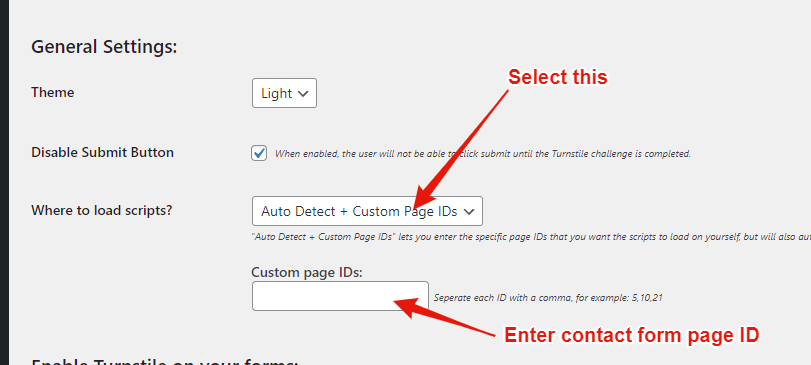
The simple solution which should fix this is to select the “Where to load scripts” option and choose “Auto Detect + Custom Page IDs” then enter the page ID for your contact form page: https://i.gyazo.com/b64535ee254be27fd8bcebb74cf55d41.png
Alternatively, you can just select the “All Pages” option, and it will load the scripts everywhere and should work then.
Let me know if this solves it for you.
If you have any other questions, feel free to ask.
Thanks!
Elliot
Hey Elliot,
unfortunatly it still doesn’t work. I selected the “All Pages” option, the captcha shows, loads, completes but the button stays slightly transparent:
View post on imgur.com
By the way, do posts also have page ids?
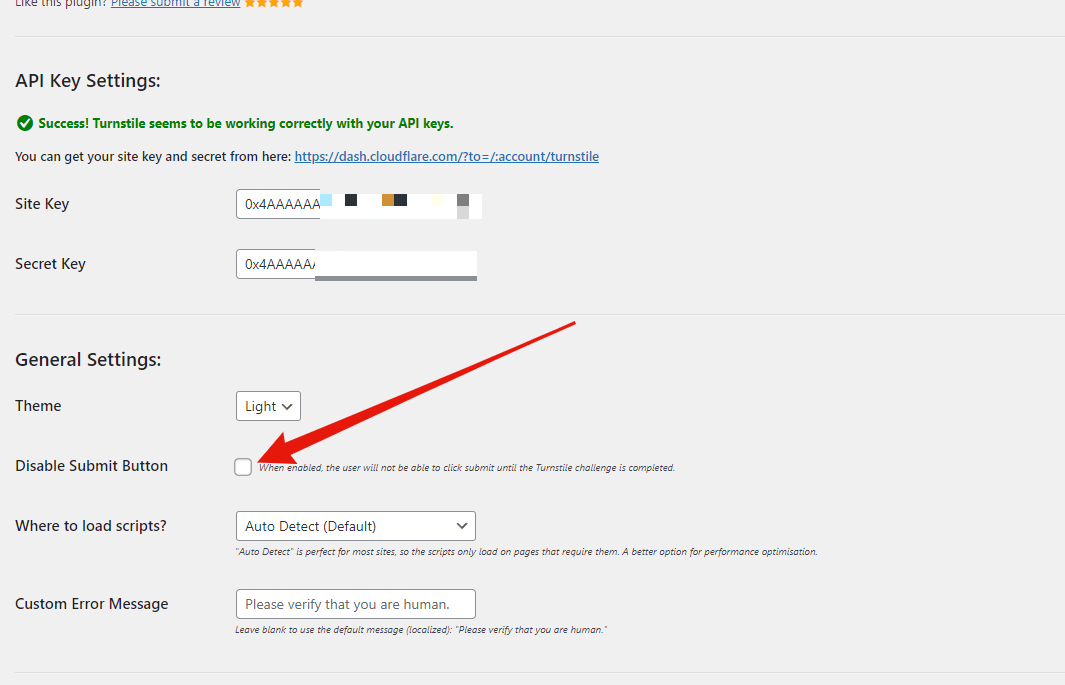
Can you try turning off the “Disable Submit Button” option, this should fix your issue: https://i.gyazo.com/97d57cbbf94e2221f9df417f42987e0a.png – This should be working though, I’ll take a look into it.
Yes, posts do have “page IDs”. You can see the ID in the URL when you edit the post: https://i.gyazo.com/4dfd750e5b3cdec9266f631eadc862c7.png
Thanks, I’ll try it later.
Took me a bit longer, but I tried it and if turn off “Disable submit button” everything works as expected.