Cart page does not fully load
-
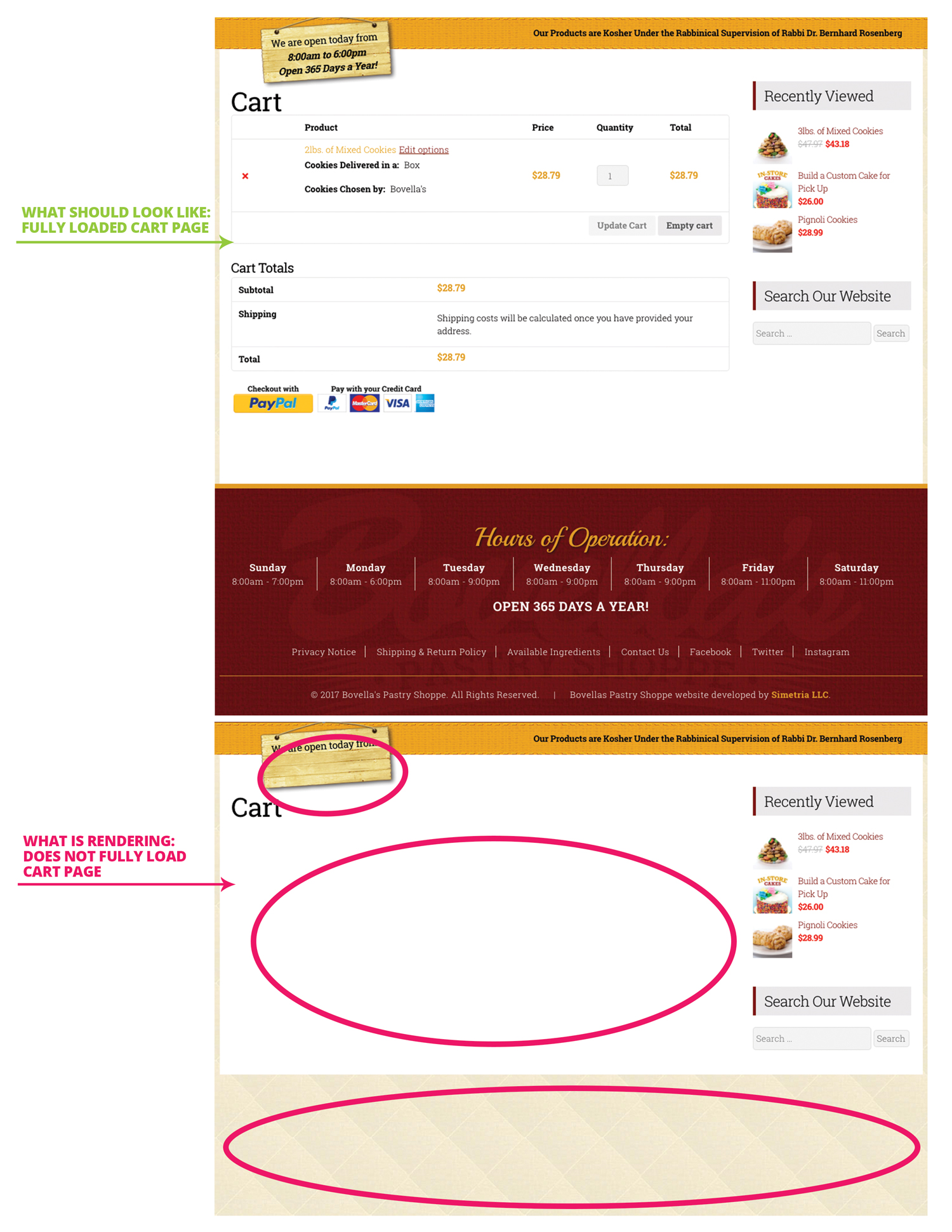
Hi, I am experiencing a sporadic phenomenon on my website where sometimes the cart page does seem to fully load, and no matter how many times I do a soft or a hard refresh, we will not load the cart page and its products.
I had a few customers call me letting me know they were experiencing this issue about 2 weeks ago. I went to the site and tried to re-create the issue and could not, so I took it as use error, then more and more customers called saying the same thing. So I went back and tested and tested it until I finally experienced the issue. Basically what ends up happening is – you add a product to the cart, and when you go visit the cart, only part of the page loads (see images comparison). I can hit refresh a thousand times and it would not finish loading the page.
I then turned on debugging, and saw messages about memory being low. So I contacted my server provider and then put me in a larger/faster server, with more than double the allocated memory from my previous server. Great. This is was last week, yesterday I received a call from a customer saying that she experienced the cart page issue. Dang. Ok, so I tried to re-create the issue. I have tried placing items in the cart about 20 times and do not the issue, so it seems to be happening less, but still there (what ever the issue/s are).
In addition to the above content, I also update all my plugins and WordPress to the latest versions, and cleared WC Transients, and the Expired Transients.
Anyone can let me know what I can/should do to get this fixed? I know the MYSQL version should be updated…working on that with the hosting company.
### WordPress Environment ###Home URL: http://bovellas.com
Site URL: http://bovellas.com
WC Version: 2.6.14
Log Directory Writable: ✔
WP Version: 4.7.3
WP Multisite: –
WP Memory Limit: 256 MB
WP Debug Mode: ✔
WP Cron: ✔
Language: en_US### Server Environment ###
Server Info: Apache
PHP Version: 5.6.30
PHP Post Max Size: 64 MB
PHP Time Limit: 50000
PHP Max Input Vars: 5000
cURL Version: 7.38.0
OpenSSL/1.0.1tSUHOSIN Installed: –
MySQL Version: ❌ 5.5.54 – We recommend a minimum MySQL version of 5.6. See: WordPress Requirements
Max Upload Size: 64 MB
Default Timezone is UTC: ✔
fsockopen/cURL: ✔
SoapClient: ✔
DOMDocument: ✔
GZip: ✔
Multibyte String: ✔
Remote Post: ✔
Remote Get: ✔### Database ###
WC Database Version: 2.6.14
:
woocommerce_sessions: ✔
woocommerce_api_keys: ✔
woocommerce_attribute_taxonomies: ✔
woocommerce_downloadable_product_permissions: ✔
woocommerce_order_items: ✔
woocommerce_order_itemmeta: ✔
woocommerce_tax_rates: ✔
woocommerce_tax_rate_locations: ✔
woocommerce_shipping_zones: ✔
woocommerce_shipping_zone_locations: ✔
woocommerce_shipping_zone_methods: ✔
woocommerce_payment_tokens: ✔
woocommerce_payment_tokenmeta: ✔
MaxMind GeoIP Database: ✔### Active Plugins (9) ###
Bovellas Pastry Shoppe Contact Form: by Sergio Ribeiro – 1.0.0
Akismet Anti-Spam: by Automattic – 3.3
Bovella’s Pastry Shoppe Sales Report: by Sergio Ribeiro – 1.0.0
PayPal for WooCommerce: by Angell EYE – 1.3.3
Responsive Lightbox: by dFactory – 1.6.12
WooCommerce TM Extra Product Options: by themecomplete – 4.4.1.1
WooCommerce UPS Toolbox: by Catman Studios – 1.17.3
WooCommerce: by WooThemes – 2.6.14
Yoast SEO: by Team Yoast – 4.5### Settings ###
Force SSL: –
Currency: USD ($)
Currency Position: left
Thousand Separator: ,
Decimal Separator: .
Number of Decimals: 2### API ###
API Enabled: ✔
### WC Pages ###
Shop Base: #4 – /shop/
Cart: #5 – /cart/
Checkout: #6 – /checkout/
My Account: #7 – /my-account/### Taxonomies ###
Product Types: external (external)
grouped (grouped)
simple (simple)
variable (variable)### Theme ###
Name: Bovellas Pastry Shoppe
Version: 1.0.0
Author URL: http://simetriastudio.com
Child Theme: ❌ – If you’re modifying WooCommerce on a parent theme you didn’t build personally
then we recommend using a child theme. See: How to create a child themeWooCommerce Support: ✔
### Templates ###
Overrides: –
`


The topic ‘Cart page does not fully load’ is closed to new replies.
