• Resolved kuma88

    (@kuma88)


    Hello,
    in the card I would like a new paragraph to start at the point I want, instead the text remains on one line.
    I have also tried inserting number fields one below the other, but in addition to the number I would like the name of the field to be displayed.
    How can I do this?
    Thanks.

Viewing 6 replies - 1 through 6 (of 6 total)
  • Plugin Author wpdirectorykit

    (@listingthemes)

    Hi,

    Please check this result card designer instructions:
    https://wpdirectorykit.com/documentation/#!/result_card_designer

    You can also create completely custom layout in html if needed for specific theme purpose, inside theme files, first copy result card view and then modify, example:
    https://wpdirectorykit.com/documentation/#!/custom_coding

    application\views\frontend\result_item_card.php

    If you nee more detailed help/info, please contact us here via telegram or email so we can investigate in detail: https://wpdirectorykit.com/contact.html and provide some video example or screenshot/sketch

    We will do our best to help you.

    You are welcome!

    Thread Starter kuma88

    (@kuma88)

    Thank you for all the answers you have given me so far.

    Is it possible to add the contact us button instead of the price on the card?

    Thank you once again!

    Plugin Author wpdirectorykit

    (@listingthemes)

    Possible but only this way for now:

    You can also create completely custom layout in html if needed for specific theme purpose, inside theme files, first copy result card view and then modify, example:
    https://wpdirectorykit.com/documentation/#!/custom_coding

    application\views\frontend\result_item_card.php

    If you nee more detailed help/info, please contact us here via telegram or email so we can investigate in detail: https://wpdirectorykit.com/contact.html and provide some video example or screenshot/sketch

    We will do our best to help you.

    You are welcome!

    Thread Starter kuma88

    (@kuma88)

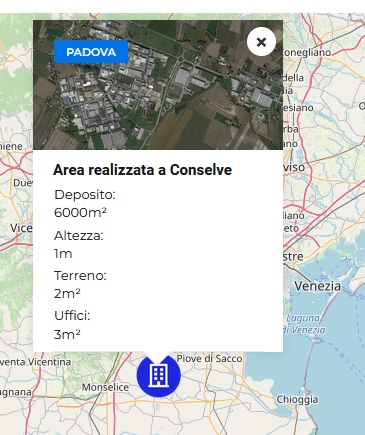
    How can I display all four fields in the ‘Features part’ section? I only see one.
    Many thanks.

    Plugin Author wpdirectorykit

    (@listingthemes)

    Space is limited there, so try to use shorter field names there.

    Best that you contact us this way to check your situation more closely:

    If you need more detailed help/info, please contact us here via telegram or email so we can investigate in detail: https://wpdirectorykit.com/contact.html and provide some video example or screenshot/sketch

    We will do our best to help you.

    You are welcome!

    Plugin Author wpdirectorykit

    (@listingthemes)

    Just as info for other clients if will have similar needs, possible to show all features with basic css like:

    .wdk-listing-card .wdk-features-part {
      white-space: unset !important;
    }

    for this example:

Viewing 6 replies - 1 through 6 (of 6 total)
The topic ‘Card layout’ is closed to new replies.