Maybe you’re just looking at the different mail template. In the mail actually received http://i.cubeupload.com/SUA2c7.png there is a line “E-mail: ***@***”, while in the mail template http://i.cubeupload.com/OsYkAk.png nothing corresponding to the line.
Hello friend i have same problem i use gmail and i dont know the reason have same problem i received the emails but when i give in request i request to me.
I try a lot of things for now only work:
put these in head addiocional
to: [your-name] <[your-email]>
These no work all good you received emails of you and the other man, and when give in request you request to you and other man also.
Sorry my english is bad 🙂
Is how if gmail no recoignaze these <[your-email]> in field from.
the name work good but email no catch:
[your-name] <[your-email]>
Email catch my email and by these when i reply go to me again..
I go a lot of days try fin solution and nothing.
Regards
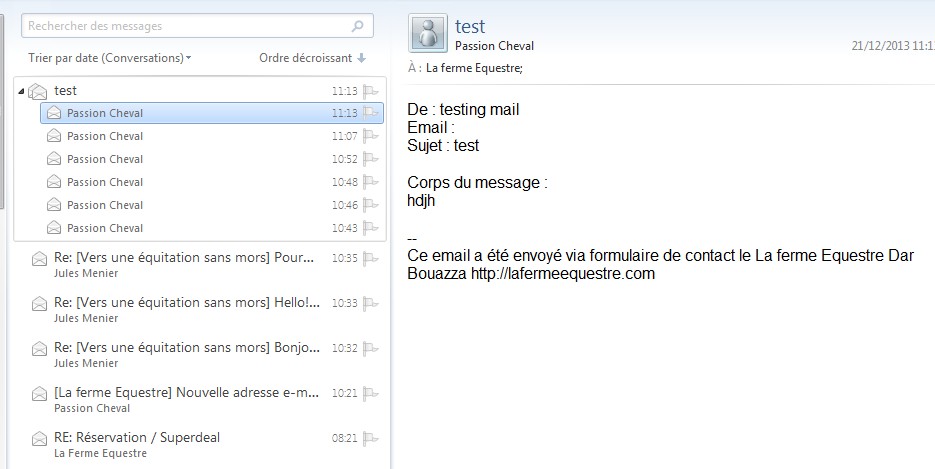
Ok i have exactly the same problem here… With the default template just modified.
CF catch the site author name/email as sender.
So impossible to “reply to” on a received mail…
In addition, the tag <[your email]> setup in the form return a empty place in the sent mail if placed in the “message boddy” (the right text case)
config : http://lafermequestre.com/files/2013/12/cf1.jpg
result : http://lafermequestre.com/files/2013/12/cf2.jpg
Hello i see you received empty the email in body or Corp because you should use [your email] these mean erase <> you can test these but problem is gmail no catch the details [your-name] <[your-email]> only catch if you add in head adittionaly to: [your-name] <[your-email]> but gmail when give in request catch the to your email and email of coustomer…
Then problem is gmail no catch good the email of contact form destinatar y and changue by wordpress email or smtp email in my case.
Regardasss
I dont use Gmail. ANd yes it does work without the <> in the boddy, but only the mail is mentiened, without “link”, but the issue “From” still remains, which is the most important.
thanks anyway 🙂
Which email you use? I only have gmail do time and changue now is little difficult. Any solution for gmail? Regards!!!
i use MY server emails on MY domains 🙂
No idea about Big Brother mail ^^
Moderator
 Jan Dembowski
(@jdembowski)
Forum Moderator and Brute Squad
Edit: Everyone else EXCEPT THE OP Rather than hijacking the existing topic that belongs to Andre Pascoa please start your own.
http://wordpress.org/support/plugin/contact-form-7
Unless you are helping Andre Pascoa (and you are not) then you are being rude to that user.