Hey @iintra
Thank you for your interest in WP-Lister for Amazon.
1) With WP Lister I can update stock situations, product descriptions, prices delivery charges on Amazon from WooCommerce?
Yes
2) If I sell on Amazon, i want the order to be processed through WooCommerce – is this possible with WP Lister?
When a customer places an order on Amazon, the order will be placed/processed through Amazon, but you can have that Amazon order created as a Woocommerce order within your Woocommerce allowing you to create invoices, add tracking and update the order status/shipping status directly on Amazon: https://docs.wplab.com/article/43-create-orders-in-woocommerce
3) Can WP Lister deal with delivery charges and delivery options?
Yes, but you must create shipping templates on Amazon and then select them in your listing profiles in WP-Lister: https://docs.wplab.com/article/170-can-i-use-shipping-templates-with-wp-lister-for-amazon
4) Is the integration real-time?
Amazon utilizes a feed system where feeds are generated, send to Amazon, and processed. Naturally this kind of system takes time for feeds to be processed, usually a few minutes. With that said, WP-Lister can check for orders and submit feeds as often as every 5 minutes. If you want it to be more often, like every minute, you would need to setup an external cron job: https://docs.wplab.com/article/99-external-cron-job-setup on your server and set it to run every minute.
5) As I update order status in WooCommerce, will WP Lister update Amazon customers?
Yes.
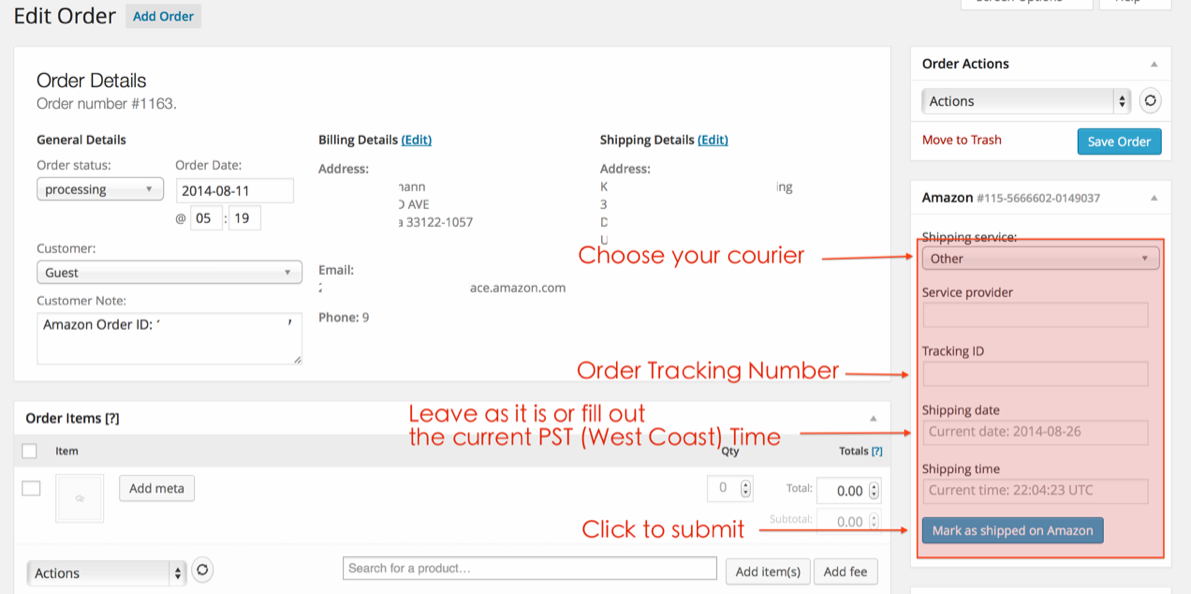
You can enter the tracking information into the Amazon/eBay shipping details section of the edit order page that will work just fine, as shown in the following screenshot: https://www.wplab.com/wp-content/uploads/2014/09/screenshot-wpla-orders-02.png
In order for WP-Lister to send tracking to eBay/Amazon the tracking number must be inserted into the “_tracking_number” field of the Woocommerce Shipment Tracking extension. Most users that want an automated system for updating shipping information on orders install the WooCommerce Shipment Tracking plugin and use ship station to have shipstation send the tracking info to that Woocommerce Shipment Tracking plugin which will then have WP-Lister send that tracking data to eBay/Amazon when an order is marked completed (as long as you enable the “Complete sale on eBay automatically” setting on the advanced settings page of WP-Lister for eBay and the “Mark as shipped on Amazon” setting on the general settings page of WP-Lister for Amazon). If you don’t use shipstation, you could simply ship the order, and enter the tracking number into the Woocommerce shipment tracking extension manually, then mark the order as completed in Woocommerce and click update. That would update the Woocommerce order as well as the eBay order or Amazon order.
You could also (instead) upload a CSV file through WP All Import (or one of the compatible CSV plugins found here: https://docs.wplab.com/article/21-update-inventory-from-csv) that contains tracking details – which you can already do right now, and you don’t even have to use WP-Lister specific meta fields (column names), you can simply use the default fields that are used by the official WooCommerce Shipment Tracking extension: “_tracking_provider” and “_tracking_number” for each order.
All you have to do is create a CSV file that, when fed to the CSV plugin, will populate those fields with the correct values. We have confirmed that this works with WPAllImport. If you plan on using another CSV plugin then you should give it a try and see if it works. If it doesn’t, you should send us your example file which we can run through the CSV plugin on our own, and take care of adding a few lines of code to WP-Lister so that it would actually send that information to eBay while the CSV plugin is processing the file, a task for which FTP details would come in handy.
In order for any of the above options to work you must enable the “Create Orders” setting in each WP-Lister plugin so WP-Lister can create WC orders from the eBay and Amazon orders. This will allow you to provide tracking details to those WC orders which will then have WP-Lister send the tracking details to eBay/Amazon as long as you follow the instructions above.
Kind regards,
John