• Hi folks,
    I need a little help with resizing images in WordPress. I want to set exact width of 956 to an image and floating height. I have tried this:

        add_image_size('full_widthn', 956, 9999, TRUE);
        add_image_size('full_widthn2', 956, 9999, false);
        add_image_size('full_widthn3', 956, 9999);
        add_image_size('full_widthn4', 956, 100, false);
        add_image_size('full_widthn5', 956);

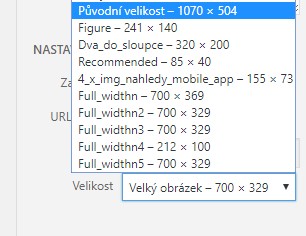
    But the result of this code is this. (only 700px width)

    The original resolution of the uploaded image is 1070px. Where could be a problem, please?

    • This topic was modified 8 years, 8 months ago by masterr77.
    • This topic was modified 8 years, 8 months ago by masterr77.

    The page I need help with: [log in to see the link]

Viewing 7 replies - 1 through 7 (of 7 total)
  • Be careful adding image sizes to wp, it can eat up space very quickly! I’m not sure what you mean by floating.

    When you insert the image is it still only 700 pixels wide? If so, is it just because of the width attribute, or is the image file itself only 700?

    Also, images added with add_image_size aren’t normally added to the size options dropdown in the media library automatically. Are you doing this with a plugin, or other code not shown here?

    Thread Starter masterr77

    (@masterr77)

    Hi,
    by floating I mean “does not matter on height, but need the exact width”.

    The Image is 1070px wide. I put the code to the functions.php and it added options to the dropdown menu automatically. It´s in theme setup.

    The whole code looks this way:

    if (!function_exists('webreseni_setup')) :
    	function webreseni_setup()
    	{
    	
    		load_theme_textdomain('webreseni', get_template_directory() . '/languages');
    
    		add_theme_support('post-thumbnails');
    
    		add_image_size('figure', 241, 140, TRUE);
    		add_image_size('recommended', 85, 9999, FALSE);
    
    		add_image_size('fb_thumb', 1200, 630, TRUE);
    		add_image_size('4_x_img_nahledy_mobile_app', 155, 9999, FALSE);
    
    		add_image_size('full_widthn', 956, 9999, TRUE);
        add_image_size('full_widthn2', 956, 9999, false);
        add_image_size('full_widthn3', 956, 9999);
        add_image_size('full_widthn4', 956, 100, false);
        add_image_size('full_widthn5', 956);
    
    		add_filter('image_size_names_choose', 'ml_custom_image_choose');
    
    		function ml_custom_image_choose($args)
    		{
    
    			global $_wp_additional_image_sizes;
    
    			// make the names human friendly by removing dashes and capitalising
    			foreach ($_wp_additional_image_sizes as $key => $value)
    			{
    				$custom[$key] = ucwords(str_replace('-', ' ', $key));
    			}
    
    			return array_merge($args, $custom);
    		}
    
    		//	add_filter('jpeg_quality', create_function('', 'return 100;'));
    // This theme uses wp_nav_menu() in one location.
    		register_nav_menus(array(
    				'primary' => __('Primary Menu', 'webreseni'),
    		));
    
    // Enable support for Post Formats.
    		add_theme_support('post-formats', array('aside', 'image', 'video', 'quote', 'link'));
    
    // Allows theme developers to link a custom stylesheet file to the TinyMCE visual editor.
    		function webreseni_add_editor_styles()
    		{
    			add_editor_style('custom-editor-style.css');
    		}
    
    		add_action('init', 'webreseni_add_editor_styles');
    
    // Setup the WordPress core custom background feature.
    		add_theme_support('custom-background', apply_filters('webreseni_custom_background_args', array(
    				'default-color' => 'f9f9f9',
    				'default-image' => '',
    		)));
    
    // Enable support for HTML5 markup.
    		add_theme_support('html5', array('comment-list', 'search-form', 'comment-form',));
    	}
    
    endif; // webreseni_setup
    add_action('after_setup_theme', 'webreseni_setup');

    Anyway, even if I use the WordPress settings to set the sizes of a thumbnail, it only resizes to 700px wide. It almost looks like there is some width maximum, is it possible?

    • This reply was modified 8 years, 8 months ago by masterr77.
    Moderator bcworkz

    (@bcworkz)

    With themes and plugins thrown into the mix, just about anything is possible 🙂

    Core WP would not limit images to 700px, there’s something in your theme or plugins setting this limit. Try switching to one of the twenty* default themes and disabling all plugins. Temporarily add your image sizing code to the twenty* theme’s functions.php. Upload a new image and insert it into a post. Your sizes will be available as specified.

    Restore your desired setup, one module at a time, testing after each. Start with your theme. When you upload a new image and find it again limited to 700px, the last activated module is the cause.

    Thread Starter masterr77

    (@masterr77)

    Hi, thanks for help. I found the problem https://codex.wordpress.org/Content_Width it was set to 700px. In twenty* is set to 525px ($GLOBALS[‘content_width’] = 525;), that´s ridiculous.

    Moderator bcworkz

    (@bcworkz)

    Thanks for reporting back. It’s hard to believe that I’ve not come across this before! You’re basically right of course, but the width in the default themes varies quite a bit. It’s 825 in twentysixteen. In twentyseventeen, it varies by the page layout being used. In default twenty* themes it’s easily overridden through filter or action hooks. Which hook to use varies by theme, it’s best to utilize the same hook the theme uses if a theme specific hook is not offered.

    The reason I’ve not encountered this restriction before is the original full size image is supposed to always be available and has always sufficed for me because I always resize images before uploading. I agree 525 is a little skimpy, but presumably that’s all that’s appropriate for that theme’s layouts. Combined with full size being available and the fact it can be overridden makes it excusable in my mind.

    What is rather strange in your case is it appears that the full size image is not available in the image insertion dialog box. If that is indeed the case, your theme is probably removing it in the “image_size_names_choose” filter. What is removed can be replaced as long as the registered size still exists. (Its registered key is 'full') Just be sure your callback is added with a priority argument larger than the one removing it.

    Thread Starter masterr77

    (@masterr77)

    In twentyseventeen is the width size 525px, maybe it´s fine for that layout, I don´t know.

    “What is rather strange in your case is it appears that the full size image is not available in the image insertion dialog box. ” – No, it´s not removing it, you can see it in dialog in the image above “Původní velikost 1070 x 504”.

    🙂

Viewing 7 replies - 1 through 7 (of 7 total)

The topic ‘add_image_size set exact width + height does not matter’ is closed to new replies.