Hi there,
I noticed in the screenshot, you would love to add users to a given group.
You can get this done by navigating to Users > All Users. Then proceed by using the Groups options provided to add the desired users to the desired group using Group Actions. Please see the screenshot below:
https://ibb.co/sQtxhMv
You can also read more on this here.
STAY SAFE and I wish you a very fine and productive day ahead!
Best,
Eugen.
Hi eugen,
Thank you for your comment. I am now able to query all users
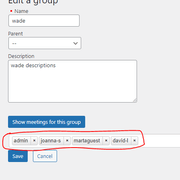
but I don’t know how to insert the Groups_User_Group::create
and Groups_User_Group::delete on selectize dropdown.
Thank you
-
This reply was modified 4 years, 8 months ago by
 wadeshow25.
Plugin Author
 Kento
Kento
(@proaktion)
Why don’t you just use the user interface that Groups already provides for this purpose? Looks to me like you’re trying to duplicate actions that are already integrated on your WordPress dashboard in the Users section. See https://docs.itthinx.com/document/groups/memberships/


