Have you checked that you’ve enabled this option for pages under All in One SEO, Social Meta, Facebook Settings, Enable Facebook Meta for.
Are you using a theme or plugin that adds visual builder type features to pages? If so, then many of these are causing conflicts with other plugins. Deactivate any visual page builder features on your site and see if that fixes your problem.
Thanks for quick response. And yes, it seems the WPBakery Visual Composer (packed with Epix Theme) have trouble with that settings. If i deactivate the plugin i was able to see the Social Settings in pages.
Thank you for the tip.
You’ll probably find it’s generating a CSS style that conflicts or overrides a default WordPress style. We’ve see this a lot with these visual builders.
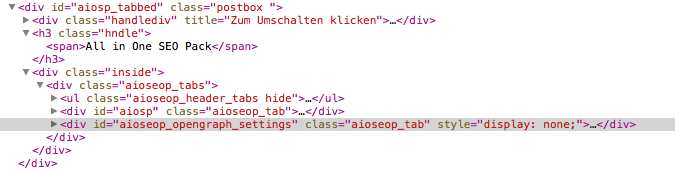
Great tip, there was a css code to hide:
https://i.cloudup.com/4XaC_kS6za.png
Did you know how to fix that?
That is correct code. Thats what hides the inactive tab.