App setup error
-
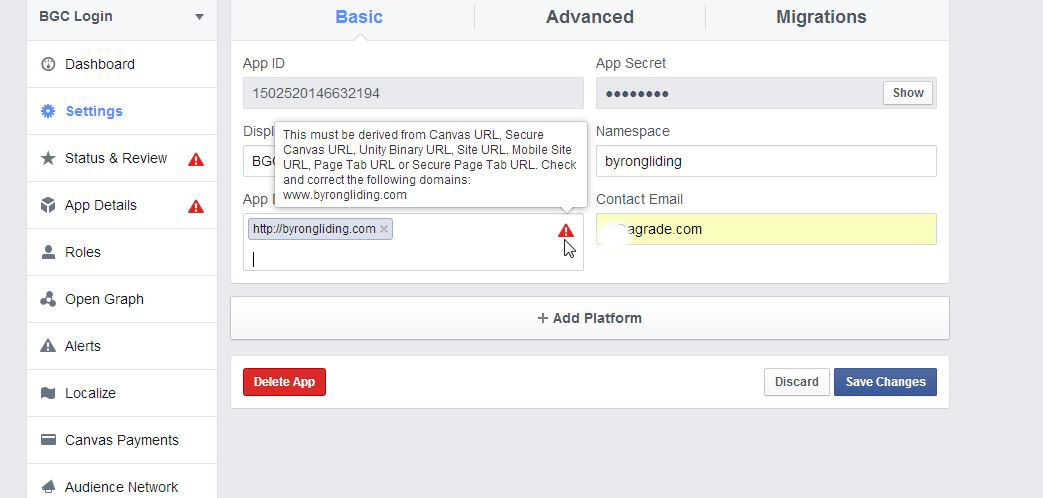
After adding FB API and installing the widget in a sidebar, on logging out and then attempting to login with FB Login Widget I get the following error message:
Given URL is not allowed by the Application configuration.: One or more of the given URLs is not allowed by the App’s settings. It must match the Website URL or Canvas URL, or the domain must be a subdomain of one of the App’s domains.

-
You must use your site url, the url where you are installing the plugin in the Facebook API settings. Otherwise the plugin will not work.
Please click here for a more detail API setup instruction.
Thanks, but I tried that several times and each time it was rejected. The instructions on that popup are not very clear, but looking at others I’d set up it should be http://domain.com – I did not try http://www.domain.com as it’s not set up that way.
I possibly posted on this forum before I went back and tried again, can’t recall now, but I spent well over an hour, possibly two, trying to figure out the problem.
Hmm… I notice that my horrible gravatar has not changed, and yet I changed it the other night and the new one is showing when I got back to the Gravatar site. I think perhaps I’m using two different email addresses – I cannot see how that would possibly affect the FB API settings, but I’ll look into it.
Tried again, this time using all possible combinations of the url including http://www http://domain and domain.com, and several different email addresses including the main FB login addy. No deal.
Screenshot here:
http://byrongliding.com/images/BGC-Login.jpgIn the Facebook APP page check for 2 things
1. In the Dascboard tab check if there is a small Green Ball on right side of the APP name. The Green Ball means your APP is in live mode. If not in the live mode the APP will not work
2. In the settings tab enter Site URL as your site url for example http://www.example.com/
This topic is resolved.

The topic ‘App setup error’ is closed to new replies.