• Resolved jalf62

    (@jalf62)


    Hi.

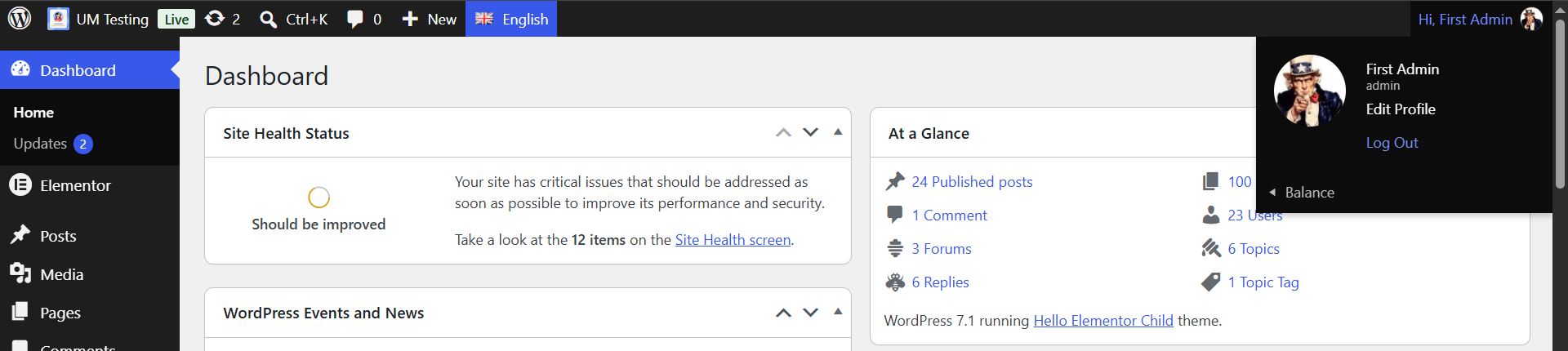
    I’ve added the Ultimate Member plugin to my site. The plugin has added a few features, such as the ‘image on hover’ effect in the WordPress menu. Even though it doesn’t do anything, an ‘Item-Image’ appears above the menu. How can I disable it so that it doesn’t appear? I can’t find anything about this in the documentation.

    Thank you very much

    The page I need help with: [log in to see the link]

Viewing 2 replies - 1 through 2 (of 2 total)
  • Plugin Support Yurii

    (@yuriinalivaiko)

    Hi @jalf62

    Do you mean the avatar image in the dropdown menu with the “Edit Profile” and “Log Out” links?

    This is native WordPress functionality. See function wp_admin_bar_my_account_menu. You can disable this submenu using the code snippet:

    // Disable the "My Account" submenu item in the WP_Admin_Bar.
    add_action( 'get_header', function () {
    remove_action( 'admin_bar_menu', 'wp_admin_bar_my_account_menu', 0 );
    } );

    If you meant a different image, please take a screenshot to clarify the issue.

    Regards

    Plugin Support andrewshu

    (@andrewshu)

    Hi @jalf62

    This thread has been inactive for a while so we’re going to go ahead and mark it Resolved.

    Please feel free to re-open this thread if any other questions come up and we’d be happy to help. 🙂

    Regards

Viewing 2 replies - 1 through 2 (of 2 total)
You must be logged in to reply to this topic.
