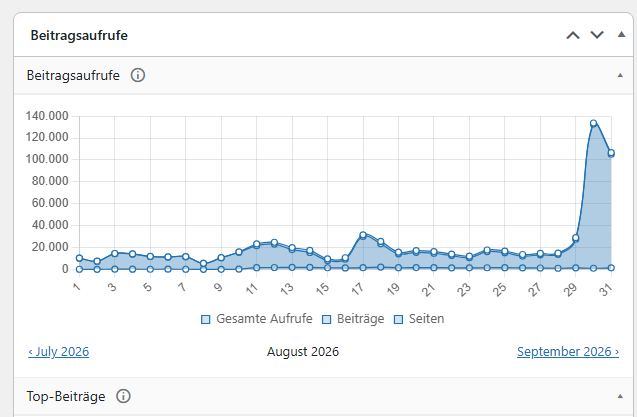
Yes me too, values totally crazed
Plugin Support
 weiser
(@weiser)
Wildly inflated daily view counts like you’re describing – jumping from 14,000-16,000 to over 100,000 – point toward bot traffic or a counting configuration issue, especially if it started right after an update.
Here are the most common causes for this kind of spike:
- Bot/crawler detection not filtering properly – If the crawler filter isn’t catching certain bots, those visits get counted as real views. Check your settings at Post Views > Counting > Visitor Exclusions and make sure bot exclusion is enabled.
- Count Interval too low – If the interval is set to 0 or a very short window, repeat visits (including bot refreshes) inflate the numbers. We recommend 24 hours as a baseline. You can find this at Post Views > Counting > Tracking Behavior > Count Interval.
- Counter Mode and caching conflicts – If you’re using PHP Mode on a cached site, cached pages may not track correctly, or conversely, certain configurations can cause over-counting. JavaScript Mode or REST API Mode (or Fast AJAX if you’re on Pro) handles caching better.
- Strict Counts disabled (Pro only) – Without Strict Counts enabled, the count interval can be bypassed through incognito mode or cleared cookies, which bots do frequently.
To help narrow this down, could you share the following?
- Are you running the free version or Post Views Counter Pro?
- What Counter Mode are you using (PHP, JavaScript, REST API, or Fast AJAX)?
- What is your Count Interval set to?
- Are bot/crawler exclusions enabled?
- Do you have a caching plugin or server-level caching active?
- A screenshot of the inflated report graph would also be very helpful.
If you can share those details, we’ll try to give you a more targeted fix.
Thread Starter
 guenni
(@guenni)
- Are you running the free version or Post Views Counter Pro?
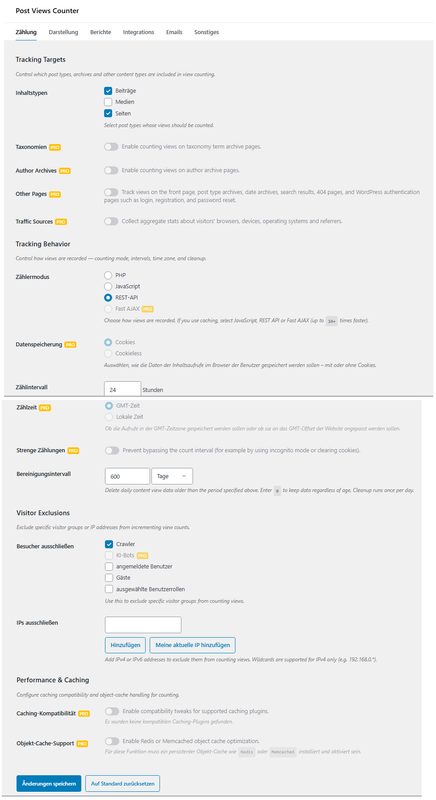
Till now, I’m using the free version
- What Counter Mode are you using (PHP, JavaScript, REST API, or Fast AJAX)?
REST API
- What is your Count Interval set to?
24 hours
- Are bot/crawler exclusions enabled?
Crawler excluded option checked within the plugin – also some bots / crawler are disabled from the domain owner at web server level.
- Do you have a caching plugin or server-level caching active?
No
- A screenshot of the inflated report graph would also be very helpful.
https://i.postimg.cc/FKHcpqnx/image.png
Settings:
https://i.postimg.cc/xTdcWHP0/image.png
-
This reply was modified 5 days, 20 hours ago by
 guenni.
-
This reply was modified 5 days, 20 hours ago by guenni.
-
This reply was modified 5 days, 20 hours ago by guenni.