Data loading failed – Data error in Analytics
-
I am seeing error messages in the dashboard and some widgets are not loading there.
“Data loading failed” for Top traffic source and Top converting traffic source
+
“Data error in Analytics – The server provided an invalid response”
I have tried re-enabling the SiteKit plugin, I have tried reconnecting GA4 and also tried the troubleshooting mode as suggested in the help but the problem remains. Please help.The page I need help with: [log in to see the link]

-
Thanks for reaching out @rmintellek. It sounds like there may be something blocking Site Kit from retrieving these Analytics metrics. While it may be temporary, please share the following and we can hopefully determine more on this:
- Your Site Health information. You can use this form to share privately if preferred.
- When checking the Site Kit dashboard from a Chrome browser incognito window does the same occur? If so, please share any browser console errors that appear. This can help indicate a browser or caching related block.
- Were you able to see these metrics previously?
Once we have the above we can investigate this further. The console errors as indicated above may prove useful, while we can also review any network related issues using Chromes developer tools depending on what we can determine.
Let me know if you have any questions with the above. Thank you.
@jamesosborne Yes I had access to these metrics previously and they stopped working a couple of weeks ago, I was hoping a plugin update would fix it. I have shared the info in the form.
Chrome console errors:
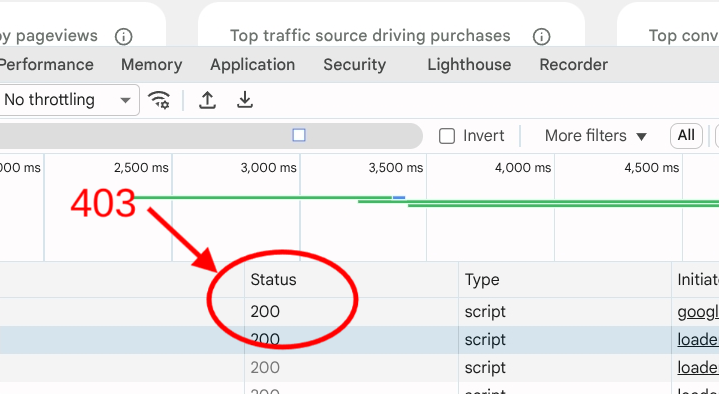
Failed to load resource: the server responded with a status of 403 ()
/wp-json/google-site-kit/v1/modules/analytics-4/data/report?metrics%5B0%5D%5Bname%5D=totalUsers&dimensions%5B0%5D%5Bname%5D=date&startDate=2026-06-06&endDate=2026-07-03&orderby%5B0%5D%5Bdimension%5D%5BdimensionName%5D=date&reportID=analytics-4_dashboard-all-traffic-widget-ga4_widget_graphArgs&_locale=user:1 Failed to load resource: the server responded with a status of 403 ()
/wp-json/google-site-kit/v1/modules/analytics-4/data/report?metrics%5B0%5D%5Bname%5D=totalUsers&startDate=2026-06-06&endDate=2026-07-03&reportID=analytics-4_dashboard-all-traffic-widget-ga4_widget_totalsArgs&compareStartDate=2026-05-09&compareEndDate=2026-06-05&_locale=user:1 Failed to load resource: the server responded with a status of 403 ()
/wp-json/google-site-kit/v1/modules/analytics-4/data/report?metrics%5B0%5D%5Bname%5D=totalUsers&startDate=2026-06-06&endDate=2026-07-03&compareStartDate=2026-05-09&compareEndDate=2026-06-05&reportID=analytics-4_top-traffic-source-widget_widget_totalUsersReportOptions&_locale=user:1 Failed to load resource: the server responded with a status of 403 ()
/wp-json/google-site-kit/v1/modules/analytics-4/data/report?metrics%5B0%5D%5Bname%5D=totalUsers&dimensions%5B0%5D%5Bname%5D=sessionDefaultChannelGroup&startDate=2026-06-06&endDate=2026-07-03&compareStartDate=2026-05-09&compareEndDate=2026-06-05&limit=1&orderBy=totalUsers&reportID=analytics-4_top-traffic-source-widget_widget_trafficSourceReportOptions&_locale=user:1 Failed to load resource: the server responded with a status of 403 ()
/wp-json/google-site-kit/v1/modules/analytics-4/data/report?metrics%5B0%5D%5Bname%5D=sessionKeyEventRate&dimensions%5B0%5D%5Bname%5D=sessionDefaultChannelGroup&startDate=2026-06-06&endDate=2026-07-03&compareStartDate=2026-05-09&compareEndDate=2026-06-05&limit=1&orderBy=sessionKeyEventRate&reportID=analytics-4_top-converting-traffic-source-widget_widget_reportOptions&_locale=user:1 Failed to load resource: the server responded with a status of 403 ()
googlesitekit-api-e3…01c15fe35f57df.js:1 Google Site Kit API Error method:GET datapoint:report type:modules identifier:analytics-4 error:”The response is not a valid JSON response.”p@googlesitekit-api-e3…01c15fe35f57df.js:1Very useful insights @rmintellek, many thanks for sharing. Based on the 403 error, it looks like this could be caused by a host block or firewall, given the request is acknowledged but blocked. Something may have changed at host level, or the issue could be temporary. Before we perform and checks with your hosting, can you confirm that the same occurs if you temporarily deactivate WordFence, in the event a particular configuration is blocking some resources?
It may also be worth checking if the same occurs if you temporarily bypass Cloudflare? I performed some checks on your site and I can see it’s pointing to Cloudflare services, with a a configuration or change there also possibly impacting your Site Kit dashboard.
@jamesosborne disabling Wordfence made no difference and I have checked the cloudflare setup/logs and see no evidence of any Google user agent being blocked. I have also tried switching it to development mode to bypass the cloudflare cache and pausing cloudflare all together as per the link you sent through but the problem remains. Is there anything specific in cloudflare you need me to check?
Appreciate the update @rmintellek. If you already performed a check with Cloudflare bypassed then that would probably indicate that this isn’t the cause. If there are event logs you can check from your Cloudflare account, feel free to do so.
What we can try next is to review the same 403 errors from the Site Kit dashboard using Chromes developer tools. To do so, follow the steps below:
- Open the Site Kit dashboard.
- Right-click anywhere on the page and select Inspect, or press
F12(Cmd + Option + Ion Mac). - At the top of the DevTools panel, click on the Network tab.
- Refresh the page. This forces the page to reload and make those same requests the result in the error.
- Open one of the 403 errors by clicking on the file name (For the file associated with one of the 403 errors, as indicated in the Status tab)
- Click on the Headers tab and look at the Request URL. The URL here is what’s being blocked, likely at host level. (Not that with this information you can perform a cURL or other command from your host terminal to see if this is being blocked, or ask your hosting provider).
- Click on the Responses tab and share what you see here. You may see a message here indicating the cause. You may also wish to share the Request URL from directly above.
Let me know if you have any questions with the above. Thank you.
Testing with cloudflare bypassed again (with chrome) shows that this is where the problem is. Can you guide me on what needs to be done in cloudflare to remove the block but keep cloudflare enabled in general? Is there a user agent I need to whitelist?
I’ve resolved this now by creating a custom rule in cloudflare to skip all Super Bot Fight Mode Rules based on the following details:
(http.request.uri.path contains “/wp-json/google-site-kit/”)
Thanks for your help with troubleshooting this @jamesosborneGood question. I performed a quick check and I don’t see any option to reset Cloudflare settings to default, but maybe I’m missing something. I would suggest reaching out to Cloudflare and asking them about this specific block. I suspect you may be able to use the Site Kit dashboard without error by whitelisting any Site Kit or Google endpoint as you suggested, but this something I would expect you don’t need to do unless you made specific or strict rules. You could whitelist the Google Site Kit REST API resources via:
/wp-json/google-site-kit/Let me know if that works for you, or if you have any questions. Using the previous provided steps, you may also whitelist the Request URL.
I see you responded with your own fix before I got back to you @rmintellek! Appreciate the update, and glad that whitelisting worked with your particular setup. If you run into any further errors or if you have any Site Kit related queries, be sure to get in touch.
If you have a moment free please also consider leaving a review given it sounds like you’ve been a Site Kit user for some time based on your mention of the error appearing a few weeks ago. We’d love to hear your feedback.

You must be logged in to reply to this topic.