nav.php 400 (Bad Request)
-
I have PHP 8.3.25, WP 6.8.2, Theme BAM.
I try (after a long time) to change my menu and get a 400 bad request.
I have already deleted cookies and cache, deactivated the plugins. The error is still there. I am at a loss.
I have recently implemented this PHP version, can it be related to this version?
Many thanks for any tips!
Best regards from Vienna,
IngridThe page I need help with: [log in to see the link]

-
What is the
nav.phpfile? From your theme? Why do call it? Where exactly do you see this error message? In the frontend or backend? Feel free to show us with a screenshot: https://wordpress.org/support/forum-user-guide/block-editor/#adding-screenshotsHey there
Your question is quite unclear, it would be best if you could explain it a little better.
What appears as of now is that you have updated the php version and you are now getting 400 response. This is most probably due to unsupported plugins or themes that are not compatible with php 8.3
Confirm that Theme BAM that you are using is compatible with the php version you are using.
I recommend that you check all your plugins and themes is updated to latest versions.
Again, if this is not the issue you are facing, please give us more clarity so that we can assist you better.
Take Care
Hellou from Vienna again,
I’m a dummy user, worked “hard” to understand what to do – but have no technical knowledge… sorry for that (and I’m almost 67yrs old 😉 )
In admin adding menu entries works, saving the menu triggers the 400 bad request. I had contact with my provider support, their answers were deaktive plugins and delete cookies and cache, what I have done – but didn’t solve the problem.
this morning I wrote to Theme BAM support regarding compatibility BAM to PHP 8.3
We’ll see … I’ll come back.
THANK you all for your time and answers!
Ingrid
Hey @pipsi
You’re on exactly the right track! Contacting BAM theme support about PHP 8.3 compatibility was the smart move. Here’s what I’d suggest while you wait for their response:
Simple things to try first
- Try a different browser – Sometimes it’s just a browser quirk. If you normally use Chrome, try Firefox, Private/Incognito or Edge.
- Check if it’s just large menus – Can you save a menu with just 1-2 items? If small menus work but large ones don’t, that confirms it’s a technical limit issue.
- Ask your hosting provider specifically about PHP 8.3 – Tell them you recently upgraded PHP and now menu saving gives 400 errors. They might need to adjust some settings on their end.
Most likely outcome The BAM theme support will either give you an updated version that works with PHP 8.3, or they’ll tell you to temporarily downgrade to PHP 8.1 or 8.2 until they release a fix.
Don’t worry about being “technical” – this is likely just a compatibility issue that needs to be fixed by either your theme developer or hosting provider. You’ve done everything right by doing the basic steps first and contacting the right people!
Let us know what BAM support says – that will probably solve it! 🙂
Hi @serafinnyc
Thank you!
I already ctc my hosting provider!
And I saw, that Theme BAM V 1.3.5 is on PHP 5.3 – https://wordpress.org/themes/bam/So will see what all their support answers bring 😉
Ingrid
Hi again @pipsi that just means their theme requires a minimum PHP version of 5.3, not that their on it. For security purposes everyone should be on a minimum of 8 and up now. I believe even 8.2 will start being phased out soon.
Hey @pipsi
You are doing exactly what should be done, I hope the theme creators get back to you quickly.
If you are not using a specific feature of the current theme I would recommend if you could try other themes as well just in case something works for you.
Take care
Hi again @serafinnyc
here the BAM support answer:
Thank you for contacting us. Yes, the BAM theme is tested upto PHP 8.4. You can check the error log to see what causes the problem. Please login to your server and check the error logs. You can read this article to learn how to enable errorlog if your server has not an errorlog – https://www.wpbeginner.com/wp-tutorials/how-to-find-and-access-wordpress-error-logs-step-by-step/
****
I installed WP Debugging plugin *)
actived it
try to add new menu item (and got 400 response)
opened my FileZilla, but couldn’t find the debug.log in the/wp-content/folder …
it’s frustrating sometimes (but I know I’ll fix this problem 🙂 )*) btw .. my hosting provider is a disaster in terms of support, as I discovered 🙁
Hey there
Did you enable the plugin from settings?
Here is a screenshot of how to enable it after installation.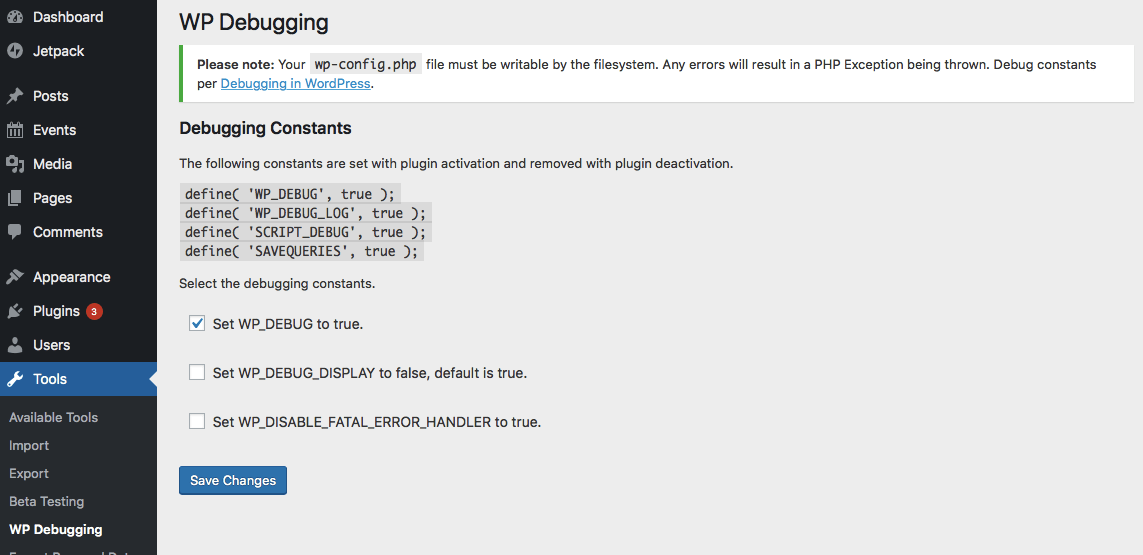
Let us know if you can see the debug log after doing this.
hey, I can see it now! thank you!
Great, now I think you will be able to track the actual error. Let us know if you can’t figure out what is happening. We are always here to help.
Take Care
Hej all,
thank you all for the support!
the 400 bad requests were caused by my extensive menu – by the way, I couldn’t delete any menu item either, nothing worked anymore.
I have reduced the size of my menu in the last few days through human interface 😉 by creating a category structure, re-entering more than half of my posts via copy/paste and thus drastically reducing my menu.
I am really grateful for all help! wonderful support!Ingrid


The topic ‘nav.php 400 (Bad Request)’ is closed to new replies.