WordPress is not generating the srcset attribute correctly
-
Hi,
Intermittently WordPress is not generating the srcset attribute correctly, the variable $src_matched is false for some images, and always the same images.It can be verified that the function fails by pasting this code in functions.php for a giver post_ID with this issue:
$srcset = wp_get_attachment_image_srcset( 213166, 'full' );var_dump( $srcset );Most of the following posts here fail https://www.ross.no/portfolio – seen in web browser (Chrome, etc) Inspector as ‘data-no-bp’=’720’ due to the failed srcset, and should have been with empty value ‘data-no-bp’=”
The page I need help with: [log in to see the link]

-
If it only happens with certain pictures, can you link their originals? This would allow you to assess this more accurately and possibly test it yourself.
This has been tested extensively by the theme developers (Uncode) , so it has been confirmed over and over again by them.
I have grouped a sample here: https://staging.ross.no/?page_id=262000&preview=true
Original images of the featured images for the posts:https://staging.ross.no/wp-content/2023/12/20231218-DSC_4451-1-5.5.jpg
https://staging.ross.no/wp-content/2021/06/20210625-DSC_1007-1-4.9.jpg
https://staging.ross.no/wp-content/2021/06/20210617-DSC_0235-1-4.9.jpg
https://staging.ross.no/wp-content/2021/06/20210617-DSC_0039-1a-4.9.jpg
https://staging.ross.no/wp-content/2021/06/20210617-DSC_9958-1-4.9.jpg
-
This reply was modified 1 year ago by
Morten Ross.
I’ve tried to recreate your problem 3 times today – without success, or I’m getting it wrong.
Scenario
Freshly installed WordPress 6.7.2 without any plugins and with TwentyTwentyFive as theme. PHP 8.2 and 8.3 were used.
I created a new page there and added your image20231218-DSC_4451-1-5.5.jpgvia the image block.The output in the frontend also looks as I expect it to:
<figure class="wp-block-image size-large"><img fetchpriority="high" decoding="async" width="1024" height="683" src="https://example.com/wp-content/uploads/2025/03/20231218-DSC_4451-1-5.5-1024x683.jpg" alt="" class="wp-image-10104" srcset="https://example.com/wp-content/uploads/2025/03/20231218-DSC_4451-1-5.5-1024x683.jpg 1024w, https://example.com/wp-content/uploads/2025/03/20231218-DSC_4451-1-5.5-300x200.jpg 300w, https://example.com/wp-content/uploads/2025/03/20231218-DSC_4451-1-5.5-768x512.jpg 768w, https://example.com/wp-content/uploads/2025/03/20231218-DSC_4451-1-5.5-1536x1024.jpg 1536w, https://example.com/wp-content/uploads/2025/03/20231218-DSC_4451-1-5.5-2048x1365.jpg 2048w, https://example.com/wp-content/uploads/2025/03/20231218-DSC_4451-1-5.5-1200x800.jpg 1200w, https://example.com/wp-content/uploads/2025/03/20231218-DSC_4451-1-5.5-1980x1320.jpg 1980w" sizes="(max-width: 1024px) 100vw, 1024px"></figure>What happens here on your page? Or what is wrong from your point of view?
I also debugged the output via PHP, as written in your example above. To do this, I used the ID of the uploaded image:
add_action( 'init', function() {
 $srcset = wp_get_attachment_image_srcset( 42, 'full' );
 var_dump( $srcset );
});
Output:
https://example.com/wp-content/uploads/2025/03/20231218-DSC_4451-1-5.5-scaled.jpg 2560w, https://example.com/wp-content/uploads/2025/03/20231218-DSC_4451-1-5.5-300x200.jpg 300w, https://example.com/wp-content/uploads/2025/03/20231218-DSC_4451-1-5.5-1024x683.jpg 1024w, https://example.com/wp-content/uploads/2025/03/20231218-DSC_4451-1-5.5-768x512.jpg 768w, https://example.com/wp-content/uploads/2025/03/20231218-DSC_4451-1-5.5-1536x1024.jpg 1536w, https://example.com/wp-content/uploads/2025/03/20231218-DSC_4451-1-5.5-2048x1365.jpg 2048w, https://example.com/wp-content/uploads/2025/03/20231218-DSC_4451-1-5.5-1200x800.jpg 1200w, https://example.com/wp-content/uploads/2025/03/20231218-DSC_4451-1-5.5-1980x1320.jpg 1980wThat’s right, isn’t it?
You are also welcome to report specific errors to the developers at https://core.trac.wordpress.org/newticket. However, you will then need a scenario like the one I described above to be able to reproduce this clearly. No other plugins, only default themes.
Many thanks for your time, and sorry you have been unsuccessful in reproducing. My issue here is that I’m not a coder, and simply forward what the theme developers communicate. The issue is that with all these images failing generates huge CPU spikes on server, as every time a user scroll the Portfolio these images are recreated for the session, and not read from previous generation as it is expected to, as WP fails to properly either skip the check, or deliver what is expected. This should only happen once, in the first browse of the images. The theme developer declined to open a ticket as they claim they have never seen this with other clients, and it is not a bug in their theme, thus I’m in the middle trying to explain.
I have also activated the 2025 theme on staging.ross.no, but as this issue only happens in archives or photostreams, I’m unable to see the false output by the function. So this never is a problem in post view, only on homepage archive view and photostreams. But when I navigate to a category the post with error belongs to, I don’t see the output to screen, nor find it in (
srcset) Inspector, so where is the output?OK, the output is only visible when logged in, so that’s fine and is displaying ‘bool(false)’.
Here’s what I have done to recreate it:
I have created a new post, uploaded the original image from https://staging.ross.no/wp-content/2023/12/20231218-DSC_4451-1-5.5.jpg to it, saved, and then added back the code to function.php (it kills the media library, so must be deactivated to use it) with the new ID (262016), which is now this original image: https://staging.ross.no/wp-content/2023/12/20231218-DSC_4451-1-5.51.jpg
bool(false) is again displayed. But when I test other post IDs I also get the same error, I’m not able to find any post ID where output is srcset value, so I’m at a loss as to whether or not this is doing what’s intended, or I’ve misunderstood.
I incorrectly assumed that the the function used the post ID to access the featured image, thus all attempts returned false.
With this out of the way the above test result in the expected output:
string(434) "https://staging.ross.no/wp-content/2023/12/20231218-DSC_4451-1-5.51-scaled.jpg 2560w, https://staging.ross.no/wp-content/2023/12/20231218-DSC_4451-1-5.51-700x467.jpg 700w, https://staging.ross.no/wp-content/2023/12/20231218-DSC_4451-1-5.51-768x512.jpg 768w, https://staging.ross.no/wp-content/2023/12/20231218-DSC_4451-1-5.51-1536x1024.jpg 1536w, https://staging.ross.no/wp-content/2023/12/20231218-DSC_4451-1-5.51-2048x1365.jpg 2048w"So using the original image attached the post where this fails and uploading this again to a new post generates a new original image, that has no such problem, and what you also experience.
So the question is what is wrong with the original image, or how WordPress is identifying it as being erroneous? The file itself is OK, otherwise using it for a second upload would also inherit this problem.
Where do we go next?
I have created a new post, uploaded the original image from https://staging.ross.no/wp-content/2023/12/20231218-DSC_4451-1-5.5.jpg to it, saved, and then added back the code
Can you be more specific on how you “UPLOAD”.
When you add an image block to the page do you select “UPLOAD” which loads a file from PC – or – select “MEDIA LIBRARY” – OR – select “INSERT FROM URL” (using a url copied from a media library image) ?
The first two show srcset – the last doesn’t.
In Edit Post, I select ‘Set featured image’, or ‘Add Media’, then ‘Filter media’, ‘Uploaded to this post’, click ‘Select files’, and paste the image URL.
In normal production work-flow, I simply drag and drop images from NAS drive.
I think we are on the right track – the way to insert the picture is unfavorable for you.
In Edit Post, I select ‘Set featured image’, or ‘Add Media’, then ‘Filter media’, ‘Uploaded to this post’, click ‘Select files’, and paste the image URL.
What exactly do you mean by the “image URL”? Can you please show screenshots of the way so that it is really clear what you are using? How you can provide screenshots is described here: https://wordpress.org/support/forum-user-guide/block-editor/#adding-screenshots
Let’s not focus too much on the URL to image, as this is only done for the testing purpose here to use the original image of the posts where the problem is. 100% my uploads are done with dragging images from local NAS to the media uploader.
This is the UI:
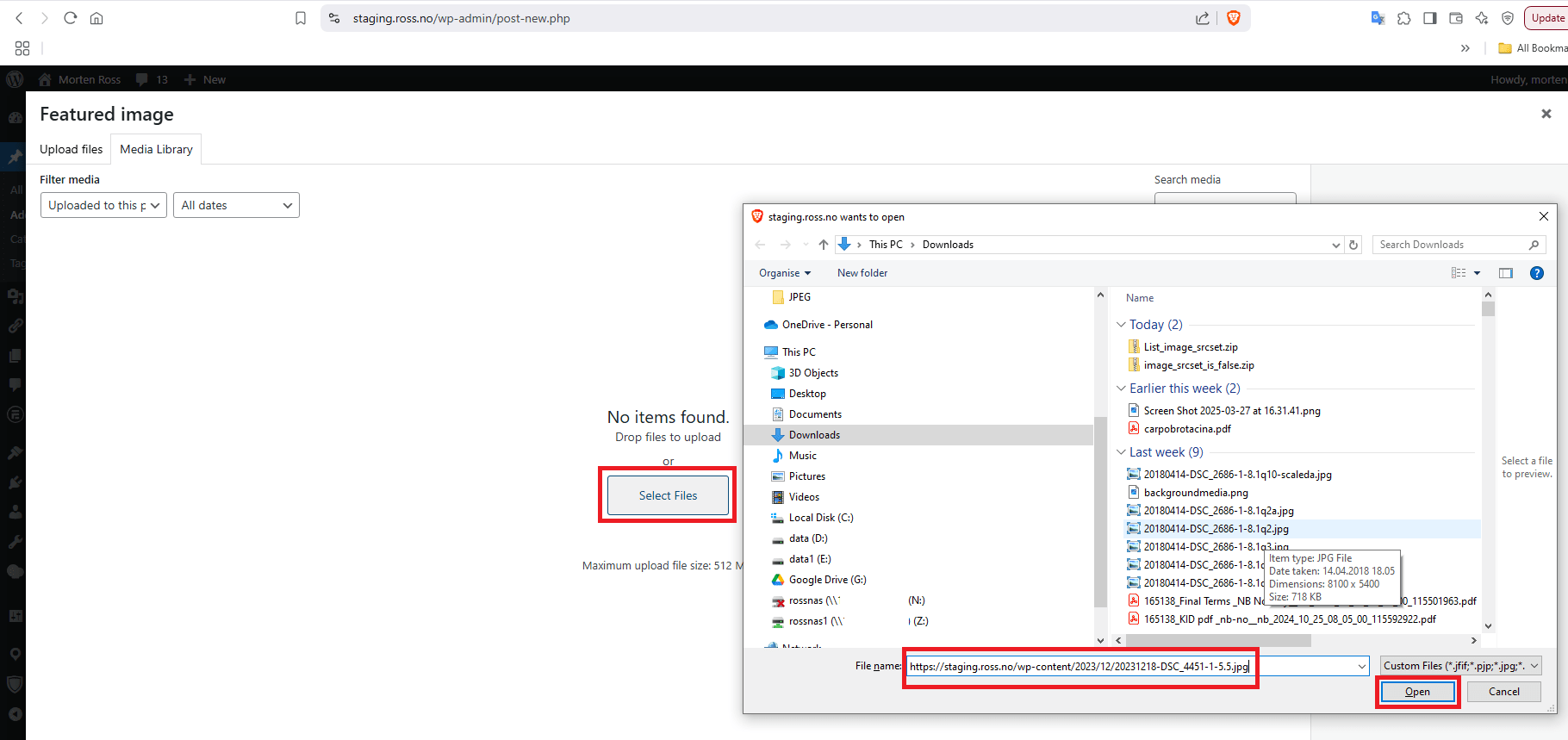
As the theme developers have not seen this before, and I use large images which is likely not commonly done, which result in WP creating a scaled 2560px copy, it might only happen when WP is creating a “new” scaled image.
I tried to check every 14k images for the srcset value, but what I got from Perplexity did not work. This could at least make me get a complete overview of whether or not this issue is only for *scaled images.Did you enter a URL in the selection field and then click “Open” to insert it? This isn’t dragging images, but rather specifying a URL.
If I enter a URL into the field and click “Open,” as shown in your screenshot, my local system (Windows) first downloads the file and then uploads it to WordPress. It’s possible, but it’s tedious.
For me, selecting a file usually looks like this:
View post on imgur.com
And it then arrives as a file in the media library:
View post on imgur.com
When editing the file there, I see this information about the file:
View post on imgur.com
In the frontend, it is output without any problems using srcset, as described above.
If you were to insert a file in the upload window using drag and drop, there wouldn’t be a file selection field at all. WordPress would upload the file as it arrives and save it to the media library.
And yes, the file is scaled because it exceeds WordPress’ upload limits. However, this doesn’t change the fact that thumbnails are generated for the srcset values.
I think we misunderstand each other, as I do not experience any scrset error using the image URL, and I never use it. This is only done for testing here. As this test did not reproduce the error we need to check further.
For all other uploads I drag and drop to Media uploader without clicking ‘Select files’, as I have more than one image to attach.
Is there a possibility of comparing what is stored in the database for an image with this error to one that does not have this issue? My point in mentioning the scaled part, is that this is an extra processing step, and perhaps sometimes this step is not fully executed. There must be a discrepancy somewhere, and as copying the file itself did not reproduce, then there is the database.
I think I still don’t understand your problem, especially since you’ve already included your analysis in your description. And I can’t understand it at all.
Of course, WordPress also stores some image data in the database. You can find it in the postmeta table under the attachment’s post_id as the meta_key “_wp_attachment_metadata.” For me, its meta_value looks like this for your image:
a:7:{s:5:"width";i:2560;s:6:"height";i:1707;s:4:"file";s:42:"2025/03/20231218-DSC_4451-1-5.5-scaled.jpg";s:8:"filesize";i:566163;s:5:"sizes";a:8:{s:6:"medium";a:5:{s:4:"file";s:35:"20231218-DSC_4451-1-5.5-300x200.jpg";s:5:"width";i:300;s:6:"height";i:200;s:9:"mime-type";s:10:"image/jpeg";s:8:"filesize";i:19954;}s:5:"large";a:5:{s:4:"file";s:36:"20231218-DSC_4451-1-5.5-1024x683.jpg";s:5:"width";i:1024;s:6:"height";i:683;s:9:"mime-type";s:10:"image/jpeg";s:8:"filesize";i:138369;}s:9:"thumbnail";a:5:{s:4:"file";s:35:"20231218-DSC_4451-1-5.5-150x150.jpg";s:5:"width";i:150;s:6:"height";i:150;s:9:"mime-type";s:10:"image/jpeg";s:8:"filesize";i:9054;}s:12:"medium_large";a:5:{s:4:"file";s:35:"20231218-DSC_4451-1-5.5-768x512.jpg";s:5:"width";i:768;s:6:"height";i:512;s:9:"mime-type";s:10:"image/jpeg";s:8:"filesize";i:88580;}s:9:"1536x1536";a:5:{s:4:"file";s:37:"20231218-DSC_4451-1-5.5-1536x1024.jpg";s:5:"width";i:1536;s:6:"height";i:1024;s:9:"mime-type";s:10:"image/jpeg";s:8:"filesize";i:252021;}s:9:"2048x2048";a:5:{s:4:"file";s:37:"20231218-DSC_4451-1-5.5-2048x1365.jpg";s:5:"width";i:2048;s:6:"height";i:1365;s:9:"mime-type";s:10:"image/jpeg";s:8:"filesize";i:392629;}s:14:"post-thumbnail";a:5:{s:4:"file";s:36:"20231218-DSC_4451-1-5.5-1200x800.jpg";s:5:"width";i:1200;s:6:"height";i:800;s:9:"mime-type";s:10:"image/jpeg";s:8:"filesize";i:174759;}s:23:"twentytwenty-fullscreen";a:5:{s:4:"file";s:37:"20231218-DSC_4451-1-5.5-1980x1320.jpg";s:5:"width";i:1980;s:6:"height";i:1320;s:9:"mime-type";s:10:"image/jpeg";s:8:"filesize";i:372230;}}s:10:"image_meta";a:12:{s:8:"aperture";s:3:"6.3";s:6:"credit";s:11:"Morten Ross";s:6:"camera";s:8:"NIKON D5";s:7:"caption";s:0:"";s:17:"created_timestamp";s:10:"1702889584";s:9:"copyright";s:11:"Morten Ross";s:12:"focal_length";s:3:"105";s:3:"iso";s:4:"1600";s:13:"shutter_speed";s:8:"0.000625";s:5:"title";s:0:"";s:11:"orientation";s:1:"1";s:8:"keywords";a:0:{}}s:14:"original_image";s:27:"20231218-DSC_4451-1-5.5.jpg";}If you notice any difference here, the next step would be to find out why it occurs. This, in turn, requires a detailed analysis of WordPress’s media processing and can be quite time-consuming.
Here is the full explanation from the theme developers:
After some investigation, I found the problem.
For some reason, WordPress is not generating the srcset attribute correctly. So the bug is not related to Uncode. When calculating the srcset, the function exits here:
https://lopezb.d.pr/i/6sTEaX
That function is in a core file of WordPress, in wp-includes/media.php. The problem is that the variable $src_matched is false for some images. This shouldn’t happen, and I don’t have an idea why it happens, so I don’t have a solution for this. And trust me, this is the first time since the dynamic srcset was introduced that I have seen something like this. I was the one who developed this feature almost 4 years ago, so I know it very well.
The problem is that WordPress doesn’t offer a filter to skip that check.
You can verify that the function fails by deactivating Uncode and pasting this code in functions.php of your theme or child theme:
$srcset = wp_get_attachment_image_srcset( 213166, 'full' );var_dump( $srcset );
It prints ‘false’, instead of the correct srcset value (213166 is the ID of one of those problematic images).
Alternatively, you can try to force that variable to true using a hook. If you want to try, at your own risk, here’s the code you can paste in the functions.php of your child theme:
https://pastebin.com/raw/MpSMrAmZ
I don’t know what consequences using that filter might have. -
This reply was modified 1 year ago by


The topic ‘WordPress is not generating the srcset attribute correctly’ is closed to new replies.