>>I get what seems to be a common error either that it can’t create a folder for the date, or that it can’t move the file into the correct folder <<
@paulbinct Did you check the path to uploads folder? Here is how that would look like:https://hoststud.com/attachments/wordpress1-jpg.1000/
>>I tried ftp’ing a file into a folder which works insofar as the uploading is concerned buttttttttttttt… the file doesn’t show in the media library<<
You need to import the image IDs to database. Use this plugin: https://wordpress.org/plugins/media-sync/
Let me know how it goes 🙂
Thanks very much @soberbanda Kuldeep!
I don’t have that upload path option in this installation, maybe because it’s quite old (?)
I’ve installed Media Sync, that was a great suggestion but it doesn’t seem to be doing anything… letting it run but so far it’s just showing me a blank page 🙁
Any other thoughts? I appreciate your efforts very much!!!
-
This reply was modified 4 years, 8 months ago by
 paulbinct.
@paulbinct What is your user role? You would need admin rights for that.
It would be really helpful if you could post screenshots. Use this: https://snipboard.io/ and show me your settings > media and wp-admin dashboard.
Here is a thread you can follow: https://wordpress.org/support/topic/unable-to-create-directory-uploads-3/
Hi Kuldeep (@soberbanda) !
You’re awesome, thank you! I followed that thread, pretty much what I tried already. I added the upload function to my config file, no luck. I am logged in as admin, in terms of their site although apparently not as ftp user as I’m unable to change folder perms.
https://snipboard.io/V58gpt.jpg
Love to hear any other suggestions!
@paulbinct Try this (as an alternative to media sync): https://wordpress.org/plugins/add-from-server/
I would suggest asking your host about the ownership (not permissions) of the WP directory tree being writable by the PHP user.
Also, check whether move_uploaded_file function is blocked in your php configuration.
Let me know 🙂
Kuldeep (@soberbanda)
At the risk of being a pain in your backside 🙁
“check whether move_uploaded_file function is blocked in your php configuration”
Can you explain this to me please?
Thanks! Again…
Goooood morning Kuldeep (@soberbanda) 😉
So, assuming the php.ini file always lives in the admin folder, it doesn’t appear they have one. Could this be the problem? Of course, the weird thing is that the site apparently has been running fine for years without it. 😐
If this is a likely explanation, what’s a good source for this file?
I owe ya, but you already know that!
Kuldeep (@soberbanda)
Ooops, update 😉
So, I did find a file php5.ini although it wasn’t in the admin folder. It contains only one line wincache.ocenabled = "On". Does this shed any light on my horror show?
Your eternally grateful friend.
Not a problem @paulbinct
The file would be here: https://betterstudio.com/wp-content/uploads/2019/08/get-backup-host-1.jpg
Copy and paste the following in the php.ini file:
max_execution_time = 60
memory_limit = 128M
post_max_size = 8M
upload_max_filesize = 8M
max_input_time = 60
file_uploads = On
safe_mode = Off
Locate .htaccess file and paste this: php_value max_execution_time = 60
Locate wp-config.ph and paste this: set_time_limit = 60
(Note – Do not forget to save changes)
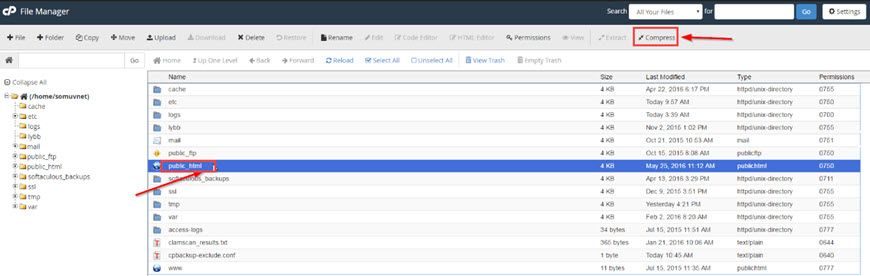
Who is your web host? If you are using cPanel, here is how that looks like: https://i.stack.imgur.com/i37cV.jpg
Hi (again) Kuldeep (@soberbanda) 😉
So, I don’t have .htaccess as far as I can see. I did create a php.ini file, with the code you provided and uploaded it, trying both in the admin folder as I saw in a blog somewhere, as well as in the main directory. No change…
🙁
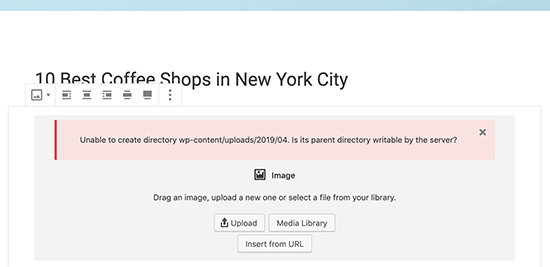
@paulbinct When you try to upload a media file, what error do you get? Is it this:
https://www.wpbeginner.com/wp-content/uploads/2019/04/createdirectoryerror.png
This could happen due to a number of reasons. A misconfiguration on your shared hosting server can sometimes change those permissions without you doing anything.
For example, your web hosting provider ran an upgrade which unexpectedly changed file permissions.
You would need to change permission or ask your web host if ownership of files is writable by the web server user.
Yes my patient friend 😉
That’s the error… I tried, and was unable, to change permissions so I think I am at the point of having to ask the person who is hosting this for them to either give me elevated access or take a look himself. Terribly frustrating.
I remain deeply grateful for all your help Kuldeep (@soberbanda)!
Paul
@paulbinct Thank you for your co-operation Paul 🙂
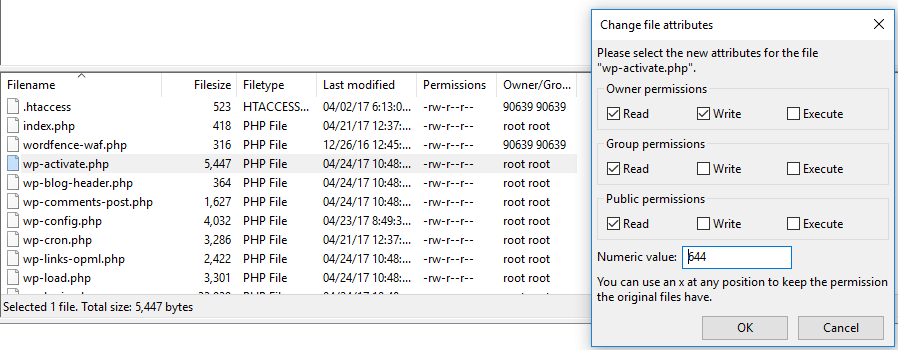
It would be really helpful to decipher your file permissions if you could show me a screenshot like this one: https://www.elegantthemes.com/blog/wp-content/uploads/2017/04/wordpress-permissions.png
Heyya Kuldeep (@soberbanda)
https://snipboard.io/MK5BTZ.jpg
So, here’s the permissions… I’m unable to change them:
Command: SITE CHMOD 777 wp-content
Response: 500 ‘SITE’: command not understood
So I’m going on the assumption that at some point, somehow, the ownership of the folder changed?
Sighhhhhhhhhhhhhhhhhhhhhhhhh…
-
This reply was modified 4 years, 8 months ago by paulbinct.