Analytics Download Button Does Not Work
-
Hi there,
I’m having issues downloading the data from the Analytics tab — when I click on the button, nothing happens. Any idea what could be causing this problem or how to fix it?
Cheers
The page I need help with: [log in to see the link]

-
Hi @mirandafac,
I’m having issues downloading the data from the Analytics tab — when I click on the button, nothing happens. Any idea what could be causing this problem or how to fix it?
I understand that on your site, nothing happens after clicking “download” in Analytics >> Revenue.
As silly as it sounds – are there any sales in the selected date range?
If yes – you will see this “Your Revenue Report will be emailed to you” pop-up:
You should receive an email with a .csv file within the next couple of minutes.
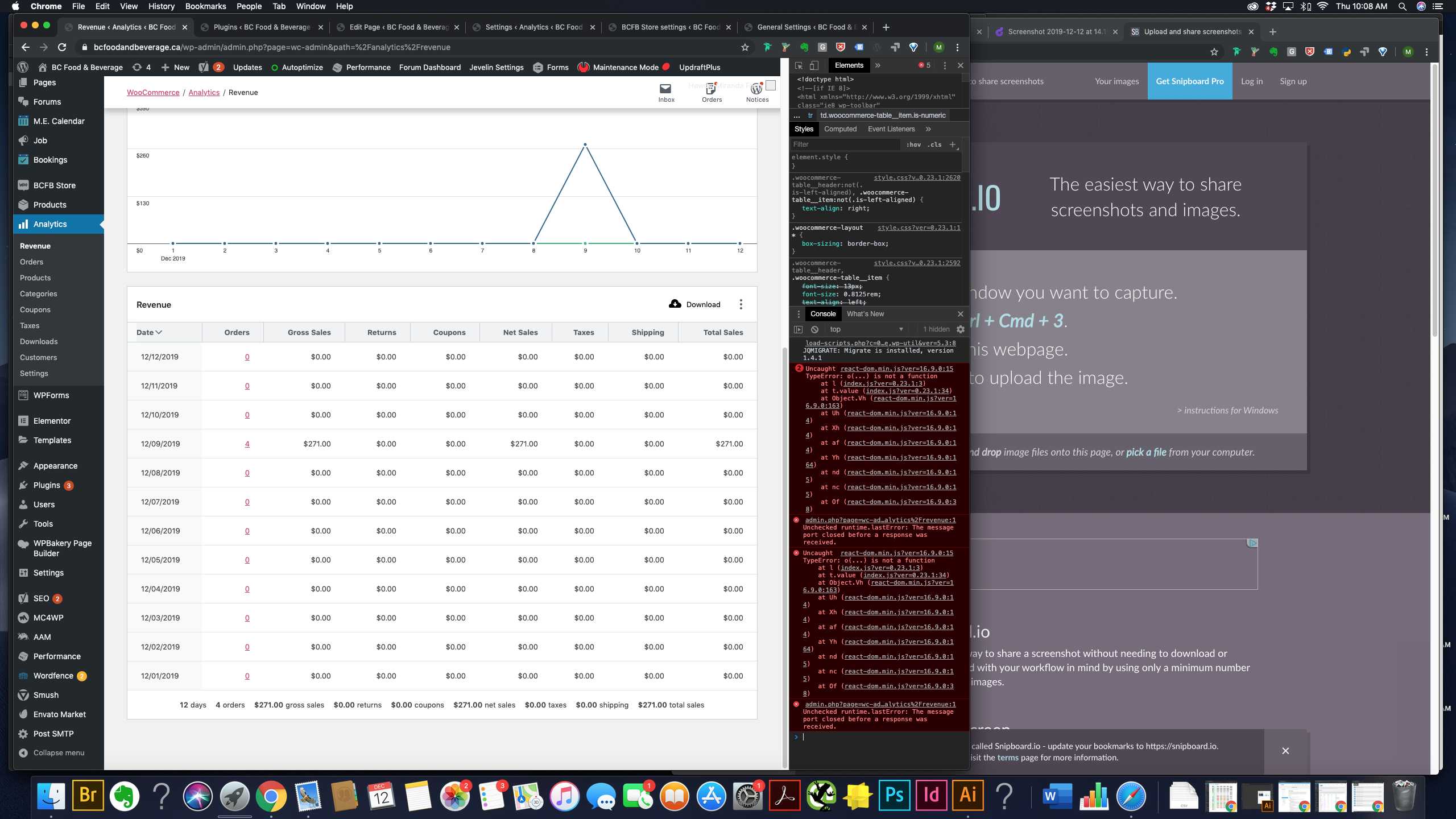
If you’re not seeing this and no emails arrive despite having actual sales in the selected date range – I’d suggest checking if you have any JavaScript errors in the console (browser developer tools):
Feel free to take a screenshot, upload it to a service like https://snag.gy and paste a link here.
Thank you!
Yes, there is one transaction in the time frame, and I am not getting the pop-up message about the email. This email gets sent to the default site email?
Looks like there are indeed some errors…
https://snipboard.io/5cS0Iy.jpgThanks!
Hi there,
Thank you for the screenshot! The JavaScript error seems unrelated though.
This email is sent to the email address associated with the user.
Can you please try logging in as a different user with administrator role in an incognito browser window or in a different browser and attempting to re-download/resend the report?
Let me know if that works!
Ok, I logged in on a different admin account on Safari, and incognito on Safari and Chrome, none of these brought up the “email sent” popup notification or sent a download. Anything else we can try?
Also no luck with Firefox
Hello @mirandafac,
Are you noticing the console error only after clicking the download button?
What versions of WordPress, WooCommerce, and WooCommerce Admin are you using?
What other plugins do you have installed?
Thanks!
Hi there,
Yes, the error seems to come up only after I click the “Download” button.
Wordpress: Version 5.3.1
Woocommerce: Version 3.8.1
Woocommerce Admin: Version 0.23.1Plugins we are running & are active:
Advanced Access Manager
Autoptimize
BCFB Store
BCFB Store ‘Email Money Transfer’ Gateway
BCFB Store Admin
BCFB Store Blocks
BCFB Store Branding
BCFB Store Integration for MEC
BCFB Store Memberships
BCFB Store Memberships Directory Shortcode
BCFB Store Services
BCFB Store Stripe Gateway
BCFB Store Subscription Downloads
BCFB Store Subscriptions
Disable Comments
Easy Updates Manager
Elementor
Envato Market
Gravity Forms
Gravity Forms Mailchimp Add-On
Gravity Forms User Registration Add-On
Jetpack by WordPress.com
Job Board Manager
MC4WP: Mailchimp for WordPress
Minimal Coming Soon & Maintenance Mode
Modern Events Calendar
Post SMTP
Really Simple SSL
Redirection
Revision Control
Smush
Teams for BCFB Store Memberships
Unyson
UpdraftPlus – Backup/Restore
W3 Total Cache
Wordfence Security
WPBakery Page Builder
WPForms Lite
wpForo
Yoast SEOHi,
I was going to open a topic for this too. I’m having the same exact error everytime i try to download any report. I’ve tried the plugin on 2 different websites and i get the same error.
On a fresh install the download button worked once for me. After that i always get the JS error.
Error : https://ibb.co/Ld8hDN8
Line of error : https://ibb.co/7tH5m39Having the same issue. Analytics are displaying but nothing happens after clicking the ‘Download’ button.
Thank you @mirandafac for the screenshots – I am able to reproduce the issue and am working on a fix for it.
I’ll update this thread when we release the bug fix.
Hello @mirandafac @difaye @neg0,
We just released version 0.23.2 which contains a fix for this issue. Please update and open a new support thread if you have any further issues.
Thank you!
Yes it’s working on my site! Thanks so much for your help!
-
This reply was modified 6 years, 4 months ago by
hypertexture.
Hello @hypertexture,
If you need help with WooCommerce Admin, please open a new support thread here: https://wordpress.org/support/plugin/woocommerce-admin/
Thank you!
Unfortunately I’m having the same issue. Lots of sales. No console errors. But the button simply triggers the notification “Your Revenue Report will be emailed to you.”, and no email ever arrives. We are using the “Offload SES” plugin from Delicious Brains to send emails, and no email is even attempted by Analytics through this system. We are using Version 0.24.0 of WooCommerce Admin.
-
This reply was modified 6 years, 4 months ago by


The topic ‘Analytics Download Button Does Not Work’ is closed to new replies.