Revert back?
-
WP is obviously having issues with this update. How do I revert back to the most previous version? I can’t count the number of issues I’m having. Post and page editors are gone, even before classic editor was installed. Slower than a turtle.

-
Dashboard left menu items don’t hover and dropdown, have to click to see them. I’m using twenty seventeen…
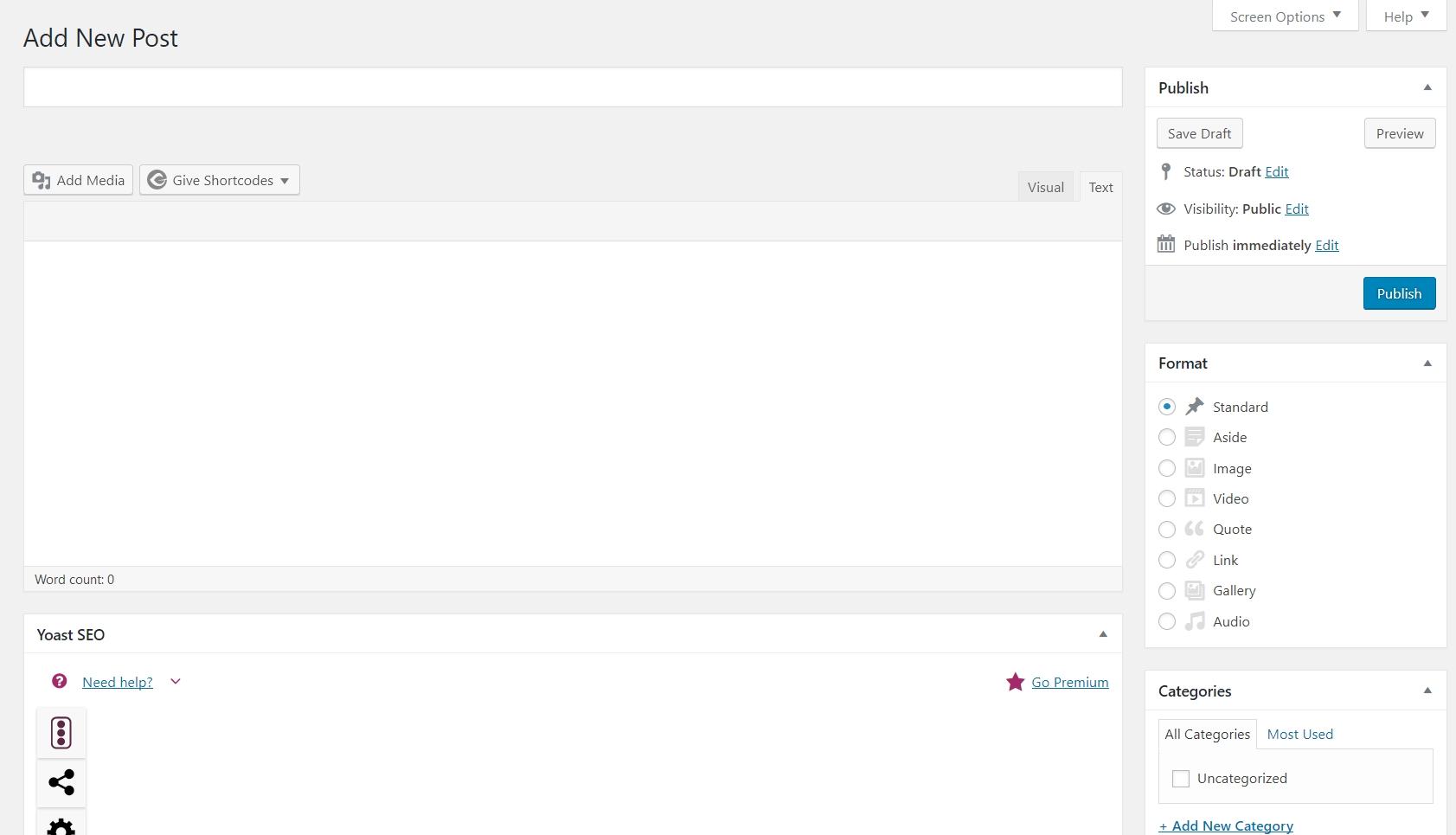
New post, new page editor buttons are all missing, format, category, dropdowns for nothing works….
Did you install and enable (as defaut) the classic editor?
Yes, several times on and off, resaved permalinks, can’t find a plugin conflict with health adviser….. This exact problem is happening with three websites all on a dedicated server running twenty seventeen.
What does the debug tab of the health-check plugin show? Please paste that in a reply.
This?
### WordPress ###
Version: 5.0
Language: en_US
Permalink structure: /%year%/%monthnum%/%day%/%postname%/
Is this site using HTTPS?: Yes
Can anyone register on this site?: No
Default comment status: open
Is this a multisite?: No
User Count: 5
Communication with WordPress.org: WordPress.org is reachable
Create loopback requests: The loopback request to your site completed successfully.### Installation size ###
Uploads Directory: 8.42 MB
Themes Directory: 2.09 MB
Plugins Directory: 59.23 MB
Database size: 1.08 MB
Whole WordPress Directory: 106.37 MB
Total installation size: 107.45 MB### Active Theme ###
Name: Top Ammunition Sites
Version: 1.0.0
Author: Randy Miller
Author website: http://www.topammunitionsites.com
Parent theme: Twenty Seventeen
Supported theme features: post-thumbnails, automatic-feed-links, title-tag, menus, html5, post-formats, custom-logo, customize-selective-refresh-widgets, editor-style, editor-styles, wp-block-styles, responsive-embeds, starter-content, custom-header, widgets### Other themes (2) ###
Twenty Nineteen (twentynineteen): Version 1.0 by the WordPress team
Twenty Seventeen (twentyseventeen): Version 1.8 by the WordPress team### Must Use Plugins (1) ###
Health Check Troubleshooting Mode: Version 1.5.0
### Active Plugins (16) ###
Akismet Anti-Spam: Version 4.1 by Automattic
Classic Editor: Version 1.2 by WordPress Contributors
Coming Soon Page & Maintenance Mode by SeedProd: Version 5.0.23 by SeedProd
Disable Toolbar: Version 1.0 by Michael Dance
Give – Donation Plugin: Version 2.3.0 by GiveWP
Health Check & Troubleshooting: Version 1.2.3 by The WordPress.org community
iQ Block Country: Version 1.2.0 by Pascal
Nav Menu Roles: Version 1.9.2 by Kathy Darling
Optimize Database after Deleting Revisions: Version 4.7.2 by CAGE Web Design | Rolf van Gelder, Eindhoven, The Netherlands
Real-Time Find and Replace: Version 3.9 by Marios Alexandrou
Really Simple SSL: Version 3.1.3 by Rogier Lankhorst, Mark Wolters
Register IPs: Version 1.8.0 by Mika Epstein, Johnny White
Simple Link Directory – Pro: Version 10.5.5 by QunatumCloud
Title Remover: Version 1.2 by WPGurus
WP Mail SMTP: Version 1.4.1 by WPForms
Yoast SEO: Version 9.2.1 by Team Yoast### Media handling ###
Active editor: WP_Image_Editor_Imagick
Imagick Module Version: 1656
ImageMagick Version: ImageMagick 6.7.8-9 2016-06-16 Q16 http://www.imagemagick.org
Imagick Resource Limits:
area: 8 GB
disk: -1
file: 49152
map: 8 GB
memory: 4 GB
thread: Not Available
GD Version: bundled (2.1.0 compatible)
Ghostscript Version: 9.07### Server ###
Server architecture: Linux 3.10.0-693.21.1.el7.x86_64 x86_64
PHP Version: 7.2.12 (Supports 64bit values)
PHP SAPI: fpm-fcgi
PHP max input variables: 10000
PHP time limit: 600
PHP memory limit: 512M
Max input time: 400
Upload max filesize: 32M
PHP post max size: 48M
cURL Version: 7.62.0 OpenSSL/1.0.2q
SUHOSIN installed: No
Is the Imagick library available: Yes
htaccess rules: Custom rules have been added to your htaccess file### Database ###
Extension: mysqli
Server version: 5.6.41
Client version: mysqlnd 5.0.12-dev – 20150407 – $Id: 38fea24f2847fa7519001be390c98ae0acafe387 $
Database prefix: wp_### WordPress Constants ###
ABSPATH: /home/patriotslist/public_html/topammunitionsites.com/
WP_HOME: Undefined
WP_SITEURL: Undefined
WP_DEBUG: Disabled
WP_MAX_MEMORY_LIMIT: 512M
WP_DEBUG_DISPLAY: Enabled
WP_DEBUG_LOG: Disabled
SCRIPT_DEBUG: Disabled
WP_CACHE: Disabled
CONCATENATE_SCRIPTS: Undefined
COMPRESS_SCRIPTS: Undefined
COMPRESS_CSS: Undefined
WP_LOCAL_DEV: Undefined### Filesystem Permissions ###
The main WordPress directory: Writable
The wp-content directory: Writable
The uploads directory: Writable
The plugins directory: Writable
The themes directory: Writable
The Must Use Plugins directory: Writable`
The problems you are describing are symptomatic of not having the javascript load properly. This is common after any update where the JS code changes. Basically, your browser or something is serving you up a mix of the old and the new code, instead of all the new code.
First, clear your browser cache.
Second, if you use something like Cloudflare on your site, clear the Cloudflare cache.
Third, if you have any caching plugins, clear them too.
Basically, clear any caches related to your site at all. And the browser cache twice, because browsers can be jerks about keeping their cache intact.
I use no caching plugins or cdn of any kind. Browser is clear.
Classic editor is installed and activated. This is what my editor looks like on three different sites, even after I disable classic editor: https://topammunitionsites.com/wp-content/uploads/2018/12/Screen-Shot-12-09-18-at-02.10-PM.jpg
None of the dropdowns for anything will work either.
I use no caching plugins or cdn of any kind. Browser is clear.
Then you are actually missing Javascript on the site, or you have some kind of cache that you don’t know exists.
These sites have worked flawlessly for months until this update. What can I do next? @sterndata?
I have removed everything cache related in htaccess. Still not working.
After removing classic editor plugin, I now have a white screen on new page or post….
Sounds like maybe you have an incomplete upgrade, where some of the files are missing or something like that.
Visit the updates page, and hit the Reinstall button. That will try to update all the files.
If that fails, try doing a manual upgrade, and replacing the files with the latest versions of them directly.
https://codex.wordpress.org/Upgrading_WordPress#Manual_Update


The topic ‘Revert back?’ is closed to new replies.