

Description
Voris is a privacy-first analytics platform. This plugin connects your WordPress site to it without editing a theme, pasting a snippet into a code-snippets plugin, or losing your setup on the next theme update.
Who makes it
Voris is a brand of Rocket Venture Labs B.V., based in Amsterdam, the Netherlands. Rocket Venture Labs develops this plugin and operates the Voris service at voris.ai, so the plugin and the analytics it connects to come from the same team.
What it does
- Connects in one click. “Connect to Voris” opens Voris’s approval page, and the plugin binds this site and stores the connection for you — no copy-pasting IDs. You can still enter a site ID by hand if you prefer.
- Counts visits. Once connected, every public page reports pageviews and Core Web Vitals to Voris, exactly as Voris’s standard install does.
- Keeps you ahead of your plan. The settings screen shows your usage against your plan, with a nudge as you approach the limit. Plan figures come from Voris, so an upgrade is reflected without updating the plugin. No payment or checkout happens in WordPress.
- Reports store revenue. With WooCommerce active, completing an order reports the order total and currency to Voris from your server — so revenue is counted even when a visitor uses an ad-blocker, your pages are cached, or payment happens on the gateway’s own site.
- Corrects refunds. Refunding an order, in full or in part, reports the matching correction.
- Stays out of the way. If Voris is slow or unreachable, your pages, your admin, and your checkout carry on exactly as if the plugin were not installed. Failed deliveries are retried in the background and, if they still cannot be sent, listed for you on the settings screen.
What it never sends
No visitor IP address. No names, email addresses or postal addresses — not even from an order. No visitor, session or user identifiers. Voris works out geography and device from the request on its own side and discards the IP; the plugin’s job is to send the event, nothing more. (This describes the plugin’s own events; the browser tag’s per-mode behavior is set out under “External service” below.)
Documentation
Step-by-step guides for installing, connecting your site, privacy modes, WooCommerce revenue tracking, and troubleshooting live on the Voris help site: https://docs.voris.ai/wordpress. The settings screen also links to the right page for each section. (Opening a help page sends nothing to Voris — it is documentation, not an analytics endpoint.)
External service
This plugin is a client for Voris, a privacy-first analytics service operated by Rocket Venture Labs B.V. (Amsterdam, the Netherlands). It is not a standalone plugin: analytics are collected and shown by Voris, so using it means sending data to Voris. The plugin contacts Voris in three ways:
- Browser analytics tag — on every public page, the plugin loads Voris’s tracking script from
https://cdn.voris.ai/v1/vor.js(deferred). It reports pageviews and Core Web Vitals to Voris. In Voris’s default privacy mode (Mode A) it sets no cookies, uses no browser storage, and creates no visitor identifier. If your Voris site is configured for Mode B or C, identifiers are derived on Voris’s side according to your configuration and your own legal setup. - Server events — once connected, and with WooCommerce active, the plugin sends order and refund events from your server to
https://ingest.voris.ai/api/event, so revenue is counted even behind a cache or an ad-blocker. These events carry no IP address, no names or addresses, and no visitor, session or user identifiers. - Connection & plan data — connecting your site (one-click OAuth) and reading your plan usage happen against
https://app.voris.ai(/oauth/*and/api/partner). Nothing is sent to Voris until you connect.
Voris derives geography and device on its own side and discards the IP address; it is never stored. Data is processed primarily in the EU, with some sub-processors elsewhere — the Privacy Policy has the specifics.
By connecting your site you agree to Voris’s terms and privacy practices:
- Terms of Service: https://voris.ai/legal/terms/
- Privacy Policy: https://voris.ai/legal/privacy/
Screenshots

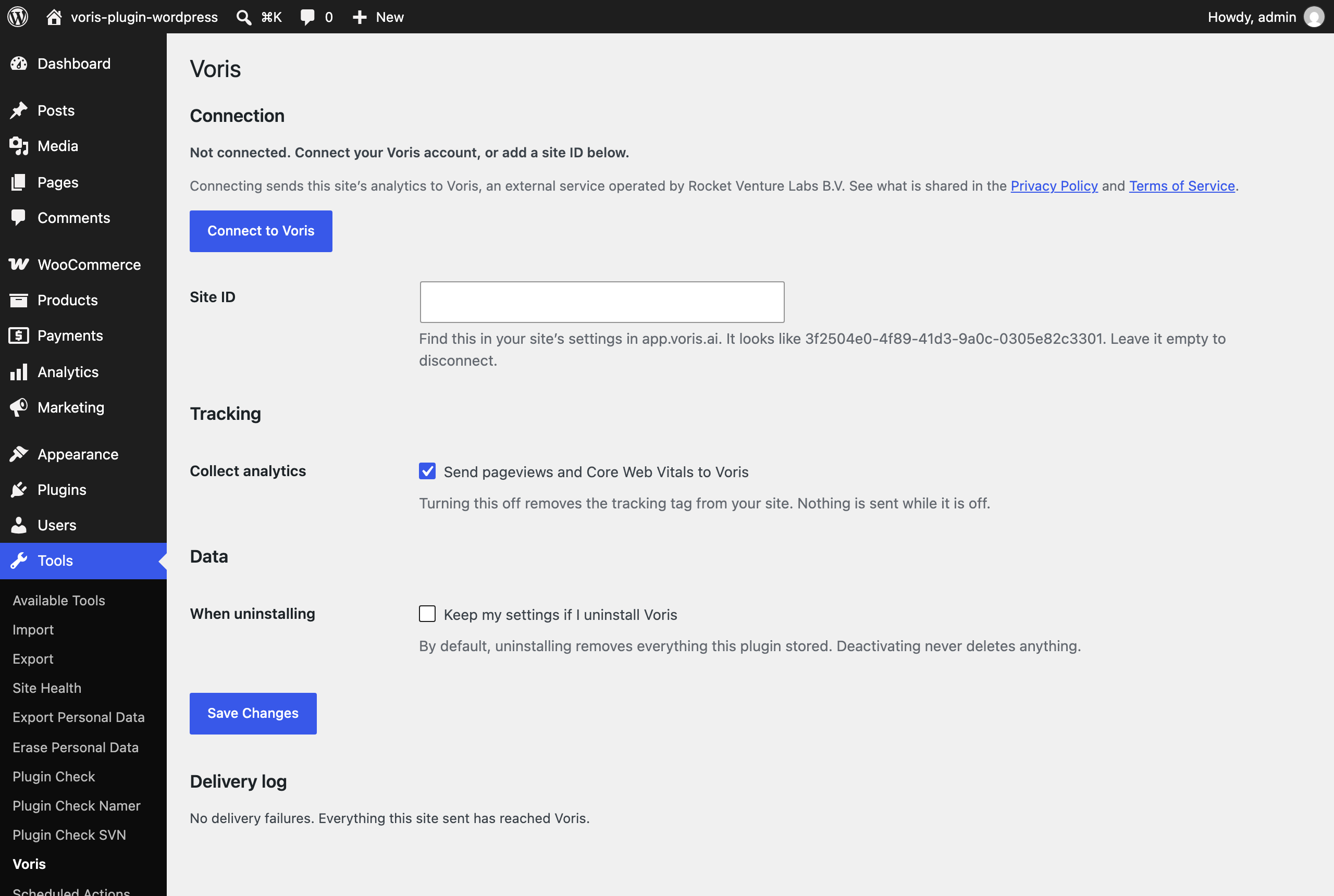
Installation
- Install and activate the plugin.
- Go to Tools Voris.
- Click Connect to Voris and approve in the tab that opens — or paste your site ID by hand (find it in your site’s settings in app.voris.ai; it looks like
3f2504e0-4f89-41d3-9a0c-0305e82c3301). - Save. Tracking starts immediately.
Full documentation — installing, connecting, privacy modes, WooCommerce revenue, and troubleshooting — is at https://docs.voris.ai/wordpress.
FAQ
-
Not for Voris’s default privacy mode. In Mode A the tracker sets no cookies and uses no browser storage, and no visitor identifier is ever created. If your Voris site is configured for Mode B or C, consent is part of your own legal setup rather than something this plugin decides.
-
Does it work with my consent plugin?
-
Yes. Voris registers with the WP Consent API, which most consent plugins (CookieYes, Complianz, Cookiebot, Borlabs Cookie, Real Cookie Banner and others) support. When one of these is active and set to require statistics consent, Voris’s tracking tag waits for that consent before it loads. When no consent plugin is present, Mode A needs no banner, so the tag loads as usual. The settings screen tells you which state you are in.
-
I changed my settings and nothing seems different
-
If your site uses a page cache, the old HTML is still being served. Purge the cache and the change takes effect. The plugin reminds you of this whenever you save.
-
My store’s revenue is not showing up
-
Revenue is reported when an order reaches Completed, not when it is paid. Stores that leave orders in Processing indefinitely will not see revenue in Voris. Virtual and downloadable orders that auto-complete report immediately.
-
A refund did not show up
-
A refund is only reported when Voris confirmed receiving the original purchase. If the purchase could not be delivered, reporting the refund would leave your dashboard showing a refund against a sale Voris has no record of, so the plugin skips it and notes the skip in the delivery log.
-
Does it work without WooCommerce?
-
Yes. Commerce features simply do not appear, and nothing errors.
-
What happens if I uninstall?
-
Everything the plugin stored is removed. If you would rather keep your settings for later, tick Keep my settings if I uninstall Voris on the settings screen first. Deactivating never deletes anything.
-
Does it slow my site down?
-
No. The tracking tag is loaded from Voris’s CDN with
defer, and revenue events are sent after the page has finished rendering, with a two-second ceiling. Nothing about Voris blocks a page, an admin screen, or a checkout.
Reviews
There are no reviews for this plugin.
Contributors & Developers
“Voris – Privacy-first Analytics” is open source software. The following people have contributed to this plugin.
Contributors
Translate “Voris – Privacy-first Analytics” into your language.
Interested in development?
Browse the code, check out the SVN repository, or subscribe to the development log by RSS.
Changelog
1.0.0
- First public release on WordPress.org.
- Connect your site to Voris in one click, or enter your site ID by hand.
- Pageviews and Core Web Vitals via Voris’s hosted, cookieless tag.
- WooCommerce revenue on order completion (the canonical
order_createdevent), with refunds reported as their ownorder_refundedfigure rather than subtracted from revenue. - Plan usage on the settings screen, with upgrade nudges as you approach your limit.
- Background retries with a visible delivery log when an event cannot be sent.
- WP Consent API integration, and a privacy & data-sharing summary on the settings screen.