Description
StatInform is a self-hosted analytics plugin for WordPress that keeps all data on your own server. It does not use cookies, does not send data to third parties (Google, Yandex, or anyone else), and has a minimal impact on your site’s performance.
Key features
- No cookies. Session identification uses
sessionStorage, which is cleared when the browser tab closes. No long-lived identifiers, no cross-visit tracking. - No external services. All data is stored in your own MySQL database. Nothing is sent anywhere.
- Minimal server load. The collection endpoint runs outside of WordPress core. It does not load
wp-load.php, does not touch the database, and simply appends a line to a buffer file. - Page-level detail. Tracks entry/exit pages, full session page chains, time on each page, and transitions between pages.
- Source detection. Classifies traffic by referrer and UTM tags. Recognizes search engines, social networks, and messengers (Telegram, WhatsApp, Viber, and others).
- Outbound link tracking. Tracks clicks on external links,
mailto:, andtel:links. - Bot filtering. Detects known bots by User-Agent and
Accept-Languageheaders. - Bounce rate. A session is a bounce when it has <= 1 unique page and total time < 15 seconds.
- Data export. Export any table to CSV for a chosen period. Create ZIP archives on the server. Delete old data with optional pre-archiving.
- No cookie consent banner required for this plugin’s own data collection, because no cookies are used and no personal data is stored in identifiable form.
Performance and architecture
StatInform’s collection endpoint intentionally runs outside of WordPress core. This means:
- No
wp-load.php. The endpoint is a standalone PHP script. It does not load WordPress, does not connect to the database, and does not fire any hooks. - The endpoint lives in
wp-content/uploads/eistat/. It is copied there on activation from a template file inside the plugin folder. WordPress.org guidelines require plugins to store user data inuploads/, not in the plugin directory. - No SQL in the collection path. Events are appended to hourly
.jsonlbuffer files. Aggregation into the database happens separately via WP-Cron or the manual “Update now” button. - Data files are protected from direct access.
.htaccessfiles in the buffer and archives folders block direct HTTP access. On Nginx, these files are ignored and equivalent server-level rules should be configured.
Notes for reviewers
A few static-analysis warnings appear when running Plugin Check (PCP) on this plugin. They are false positives:
-
InterpolatedNotPreparedon SQL queries. All queries use$wpdb->prepare()for values. Table names are built as$wpdb->prefix . 'eistat_'and cannot be parameterized throughprepare(). The table prefix is a controlled value that never comes from user input. -
NonceVerification.Recommendedon GET parameters. The admin views read filter parameters (days,view,date,source,link_type,paged) directly from$_GET. These are read-only filters that do not change state, so a nonce is not required. All values are sanitized withsanitize_text_field(),sanitize_key(), orabsint(). -
DirectDatabaseQueryandNoCaching. The plugin uses custom tables with the prefixwp_eistat_. These tables are not part of the WordPress object cache, so caching them would provide no benefit.
The plugin does not write any PHP code to user files. The buffer path is stored as plain JSON in uploads/eistat/buffer-path.json and read with file_get_contents() + json_decode().
Screenshots
Installation
- Upload the
statinformfolder to/wp-content/plugins/. - Activate the plugin through the Plugins menu in WordPress.
- On activation, the plugin creates six database tables and a data folder at
wp-content/uploads/eistat/with the following structure:uploads/eistat/collect.php— the collection endpoint.uploads/eistat/buffer-path.json— a plain JSON config with the buffer directory path.uploads/eistat/buffer/— hourly.jsonlfiles.uploads/eistat/archives/— exported ZIP archives.
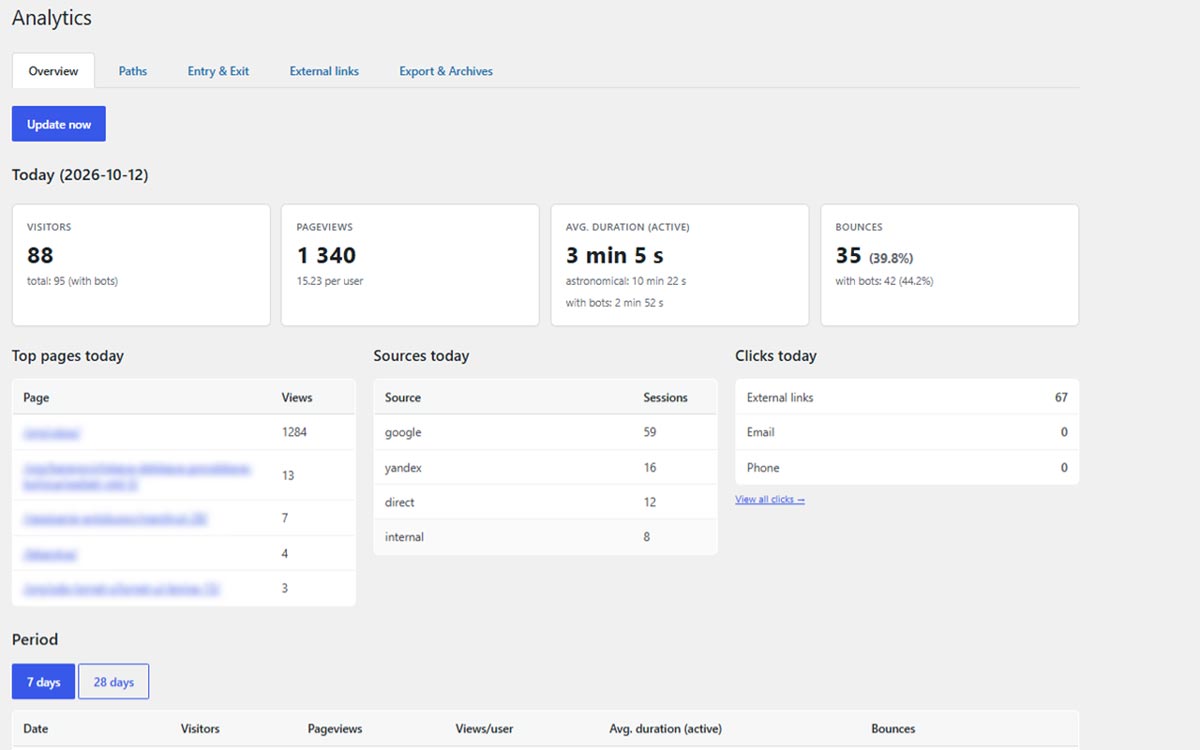
- Go to Analytics in the admin menu to view your dashboard.
FAQ
-
No. Session identification uses
sessionStorage, which is cleared when the browser tab is closed. No cookies are set by the tracker. -
Does it send data to Google, Yandex, or any other service?
-
No. All data stays in your own MySQL database on your own server.
-
For StatInform’s own data collection, no – because no cookies are set and no personal data is stored in identifiable form.
-
Does it slow down my site?
-
The collection endpoint bypasses WordPress core entirely. Each tracked event adds roughly a few milliseconds of server work. Aggregation runs in the background, not during page loads.
Reviews
There are no reviews for this plugin.
Contributors & Developers
“Statinform: Cookieless Analytics (No Consent Banner)” is open source software. The following people have contributed to this plugin.
Contributors
Translate “Statinform: Cookieless Analytics (No Consent Banner)” into your language.
Interested in development?
Browse the code, check out the SVN repository, or subscribe to the development log by RSS.
Changelog
1.0.0
- Initial release.