

Description
SFR Analytics is a self-hosted analytics plugin for WordPress. All visitor data is stored in your own database — nothing is sent to third-party services. No cookies, no external scripts, no tracking pixels.
Get a clear picture of your site’s traffic without compromising your visitors’ privacy.
Need a central multi-site dashboard? Use the free SFR Analytics Hub plugin to aggregate analytics from multiple WordPress sites.
What’s new in 1.1
- Database usage in Settings — see table size, bot vs human rows, and reclaim unused MySQL space
- Shorter bot retention — keep verified visits for months or years; bots can expire in days
- Top Referring Sites — group Facebook, Reddit and Pinterest hosts, show every referring domain, and spot AI referrers (ChatGPT, Perplexity, Claude, and similar) at a glance
- On-site vs Direct — clicks between pages on your own site are no longer counted as Direct for new visits
Dashboard at a Glance
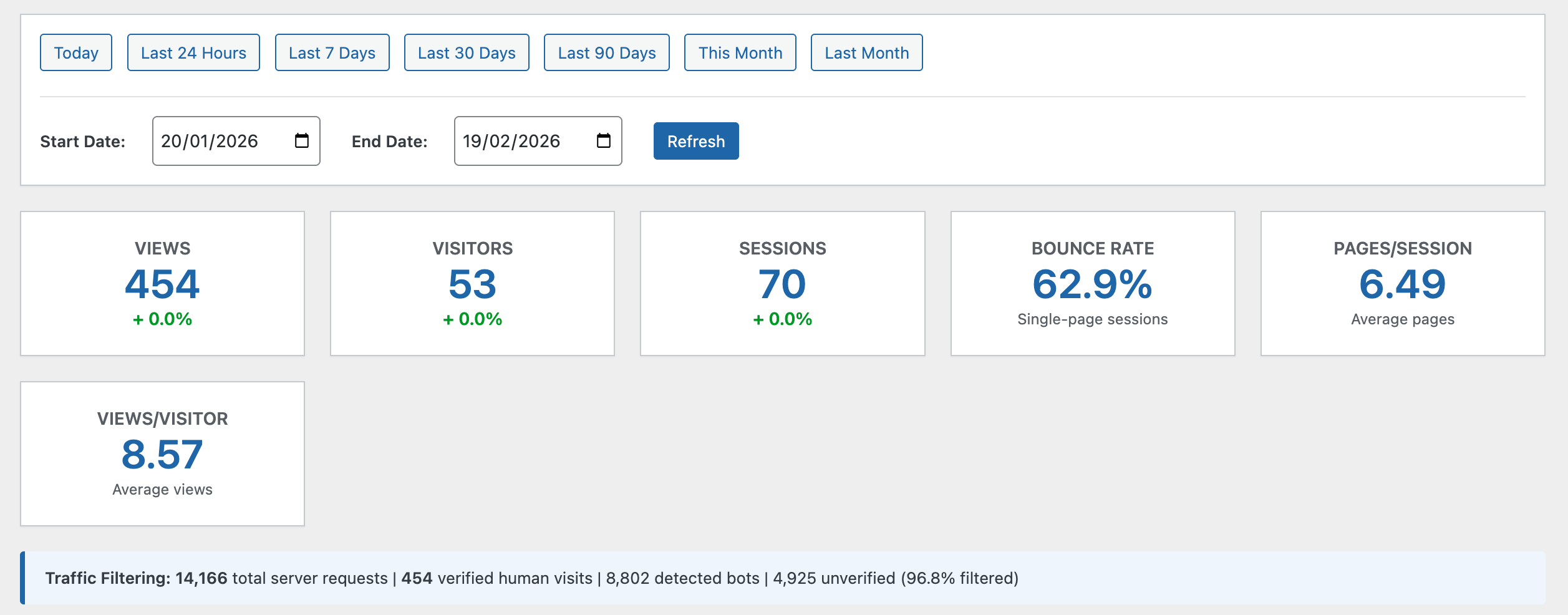
- Views, Visitors, Sessions — core metrics with period-over-period comparison
- Bounce Rate & Pages per Session — engagement indicators
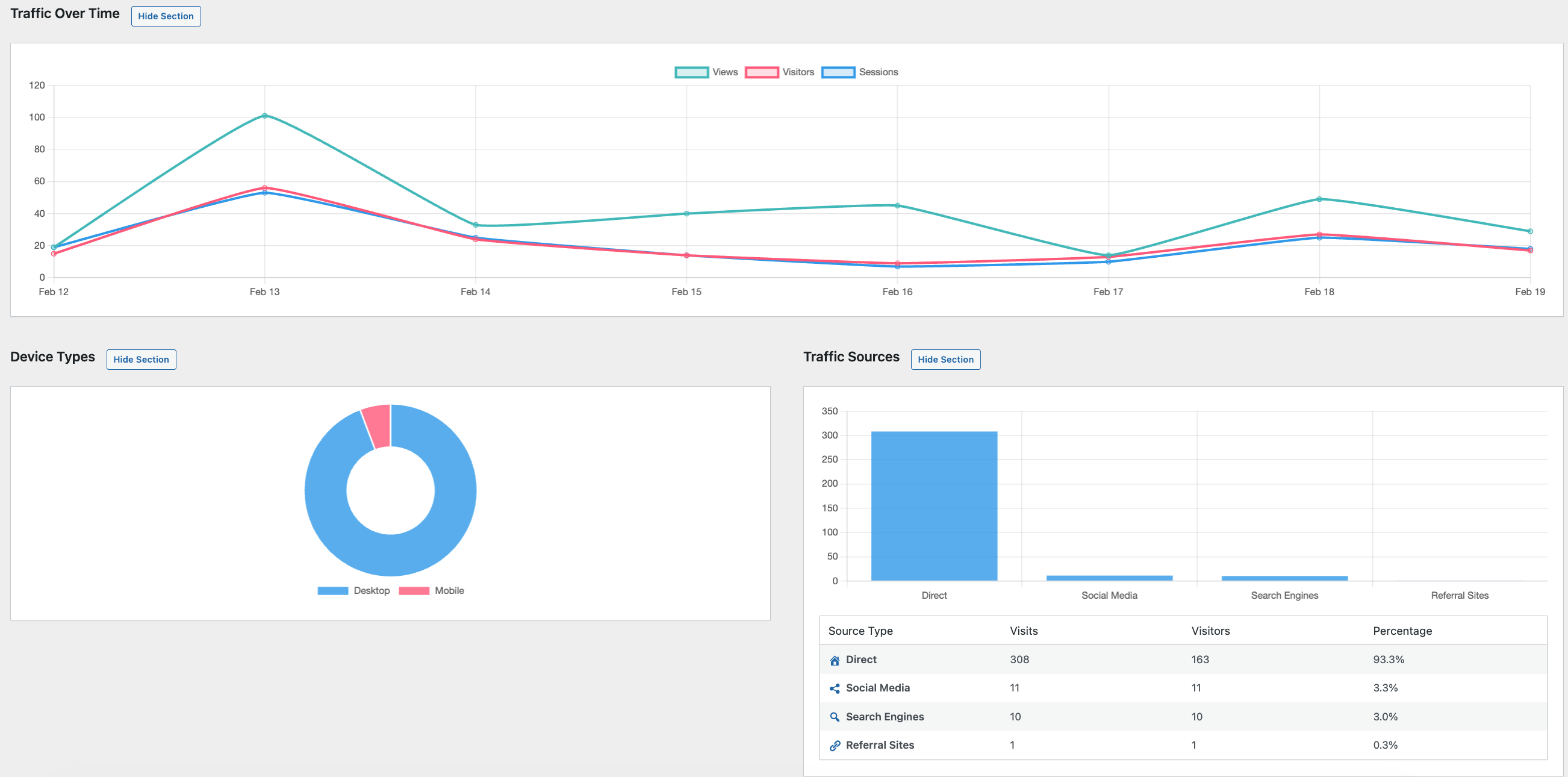
- Traffic Over Time — interactive line chart with date range presets
- Top Content — your most viewed posts and pages
- Traffic Sources — where your visitors are coming from
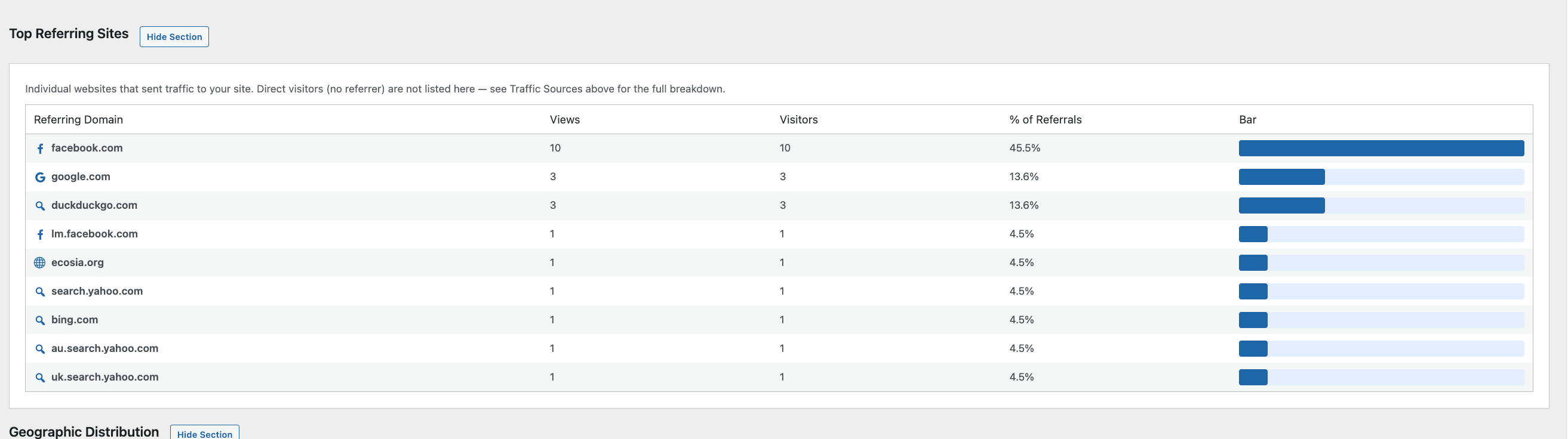
- Top Referring Sites — individual domains sending you traffic, with optional grouping for Facebook, Reddit and Pinterest, and a chat icon for AI assistants
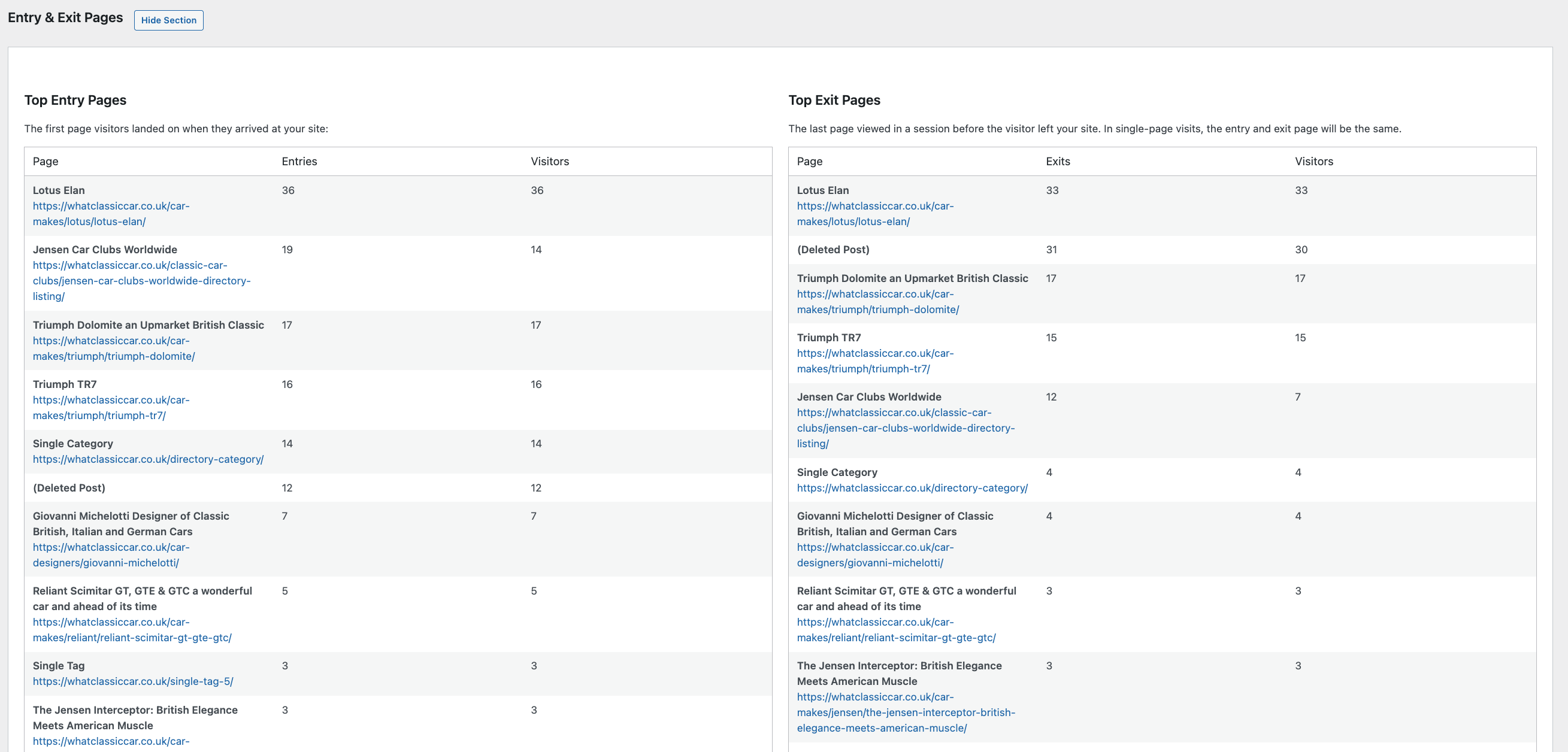
- Entry & Exit Pages — first and last pages in each visit
- Device Types — desktop, mobile and tablet breakdown
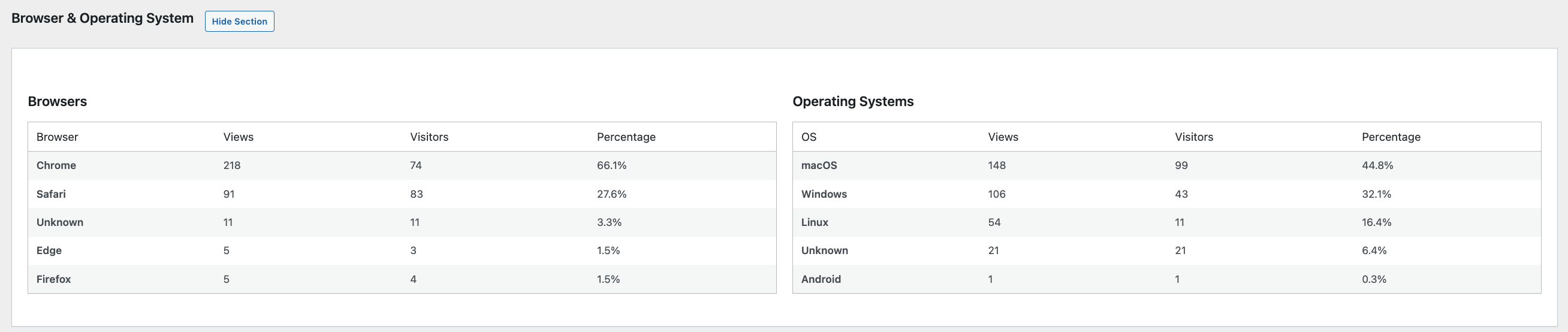
- Browsers & Operating Systems — which browsers and OS your visitors use
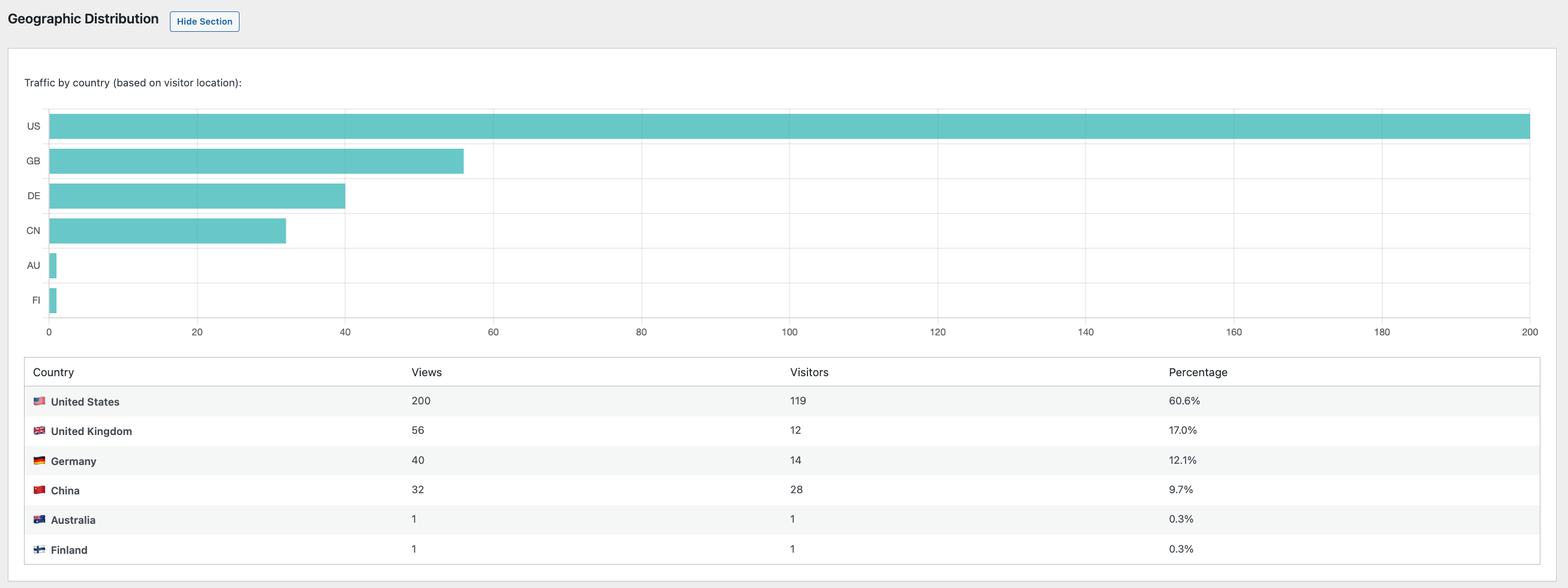
- Geographic Distribution — visitor countries (only available if using a CDN like Cloudflare that provides country headers; all other tracking works without a CDN)
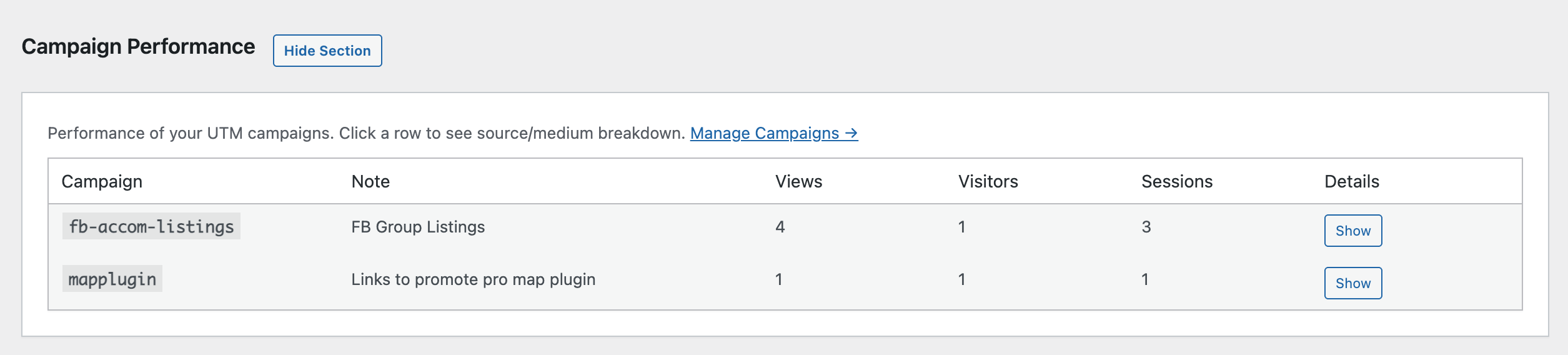
- Campaign Performance — UTM campaign results with source/medium drill-down
- Online Now — on-demand live visitor count with optional online-only auto-refresh in the dashboard
All dashboard sections are collapsible — show only what matters to you.
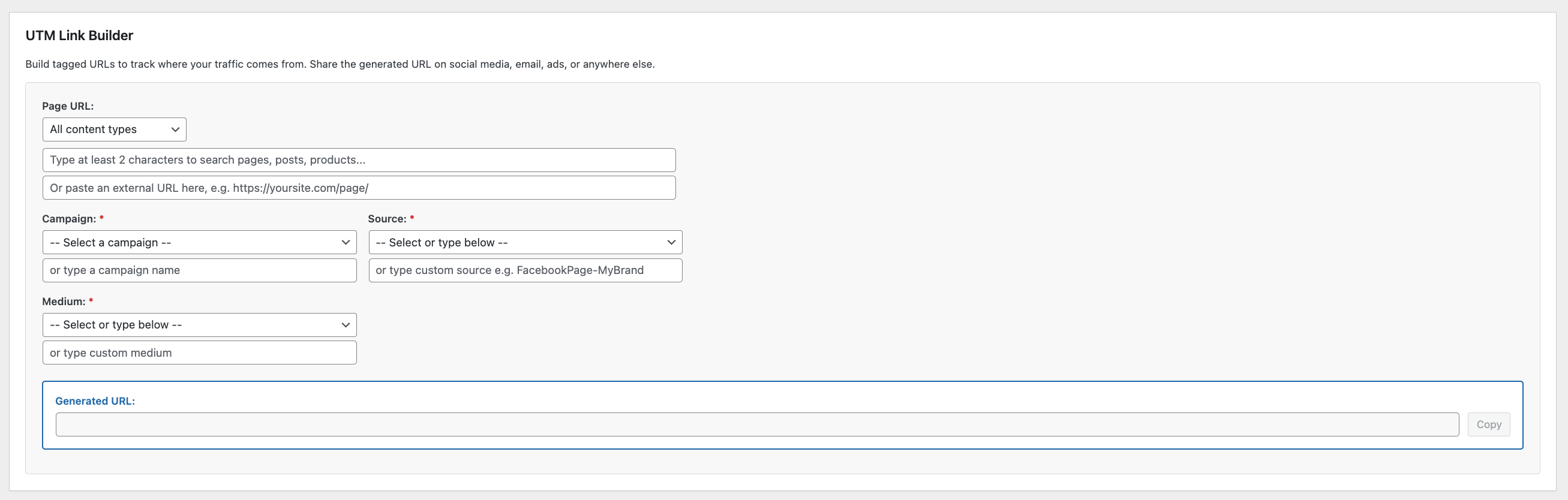
Campaign Manager & UTM Link Builder
Plan and track marketing campaigns without leaving WordPress:
- Create campaigns with notes and track their performance over time
- Build UTM links with a visual tool — pick a page, choose source/medium/campaign, and get a ready-to-use URL
- Smart page picker — search across all your content types with post type and category filtering
- Preset sources and mediums — common options (Facebook, Google, newsletter, etc.) with clear descriptions
- Save generated links for quick reference and reuse
- Custom sources and mediums — add your own and they’re saved for next time
- Auto-lowercase campaign names to prevent data fragmentation
Smart Bot Detection
Not all traffic is human. SFR Analytics filters out noise automatically:
- 200+ known bot patterns — search engines, AI crawlers, SEO tools, monitoring bots, headless browsers, security scanners and more
- JavaScript verification — a lightweight inline script confirms real browser execution, so bots that don’t run JavaScript are never counted
- Missing header detection — flags requests without User-Agent or Accept-Language headers
- Filterable patterns — add your own via the
sfran_bot_patternsfilter
The dashboard shows you exactly how much traffic was filtered: total requests vs verified human visits.
Privacy First
- No cookies — visitor identification uses anonymous hashed fingerprints
- No PII stored — IP addresses are hashed (SHA-256), never stored in plain text
- Optional IP anonymisation — strip the last octet before hashing
- Do Not Track support — respects the browser DNT header when enabled
- Local storage only — your data never leaves your server
- Configurable retention — keep verified visits for 30 to 3,650 days; bots and unverified requests can expire much sooner
- Database usage in Settings — see table size, what takes the space, and reclaim unused MySQL overhead
- GDPR-ready privacy text — copy-paste paragraph for your privacy policy
IP & Country Filtering
- Exclude specific IP addresses or CIDR ranges (e.g.
192.168.1.0/24) - One-click “Ignore My IP” button
- Exclude entire countries by country code
- Exclude logged-in users by role (administrators, editors, etc.)
REST API
A full set of authenticated REST API endpoints lets you access your analytics data programmatically:
/sfran/v1/summary— overview stats with optional comparison/sfran/v1/top-content— most viewed content with pagination/sfran/v1/traffic-sources— referrer breakdown/sfran/v1/time-series— daily views/visitors/sessions/sfran/v1/campaigns— campaign performance/sfran/v1/entry-pagesand/sfran/v1/exit-pages/sfran/v1/referrers— top referring domains/sfran/v1/devices,/sfran/v1/browsers,/sfran/v1/geographic/sfran/v1/online-now— current active visitor count for the last N minutes (default 5)
All endpoints require authentication (WordPress Application Passwords or other REST API auth) and the manage_options capability. Use these to build custom dashboards, export data, or integrate with other tools.
Performance
- Batch processing — pageviews are buffered and written in batches, reducing database load
- Indexed tables — optimised queries for fast dashboard rendering
- Lightweight frontend — a single inline verification script, no external files loaded for visitors
- No impact on page speed — tracking uses
navigator.sendBeacon(non-blocking)
Works with SFR Analytics Hub
SFR Analytics collects data on each individual site.
For cross-site reporting, install the free SFR Analytics Hub on your main site.
With SFR Analytics Hub, you can also view live online visitors across all connected sites from one central dashboard.
The WordPress.org Hub edition supports up to 3 connected sites.
Need more than 3 sites with the same workflow? See SFR Analytics Hub Pro.
Screenshots
Installation
- Upload the
sfr-analyticsfolder to/wp-content/plugins/, or install directly from the WordPress plugin screen. - Activate the plugin through the Plugins screen.
- Database tables are created automatically on activation.
- Visit Analytics Dashboard to see your data.
- If you manage multiple websites, install SFR Analytics Hub to view aggregated reporting in one dashboard.
That’s it — tracking begins immediately for all published pages and posts.
FAQ
-
Does this plugin send data to external services?
-
No. All data is stored locally in your WordPress database. No external API calls are made for tracking.
-
Is this GDPR compliant?
-
Yes. The plugin stores only anonymous hashed identifiers — no IP addresses, names, emails or any personally identifiable information. It also supports Do Not Track headers and provides ready-made privacy policy text.
-
No. Visitor and session identification is based on anonymised hashing of request headers, not cookies.
-
How does bot detection work?
-
Two layers: first, the User-Agent string is checked against 200+ known bot patterns. Second, a lightweight inline JavaScript verification confirms that the visitor is a real browser. Only verified pageviews appear in your dashboard stats.
-
What should I do after updating?
-
Nothing is required. Dashboard stats already use verified human visits only.
If Analytics Settings Database usage shows a large table, many bot or unverified rows, or high reclaimable overhead, you can optionally click Delete Bots & Unverified Now, then Reclaim Disk Space. Verified human visits are kept. The plugin never deletes this data automatically on update. SFR Analytics Hub is unaffected for days it has already synced.
-
Why is Direct traffic so high?
-
Direct means the browser sent no referring website — typed URL, bookmark, email or messaging apps, in-app browsers, and privacy tools that strip the referrer. Older versions also stored clicks between pages on your own site as Direct. From 1.1.2 those new clicks appear as On-site. Historic on-site clicks stay Direct because they were saved without a referrer.
-
Can I group Facebook and Reddit referrers?
-
Yes. On Top Referring Sites, use Group Facebook, Reddit & Pinterest to combine hosts such as
m.facebook.com,l.facebook.com,old.reddit.comandpin.it. This is a display option and does not change stored data. -
Can I exclude my own visits?
-
Yes. Go to Analytics Settings and click the “Ignore My IP” button, or manually add IP addresses and CIDR ranges.
-
What is the Campaign Manager?
-
A built-in tool to plan marketing campaigns and generate UTM-tagged URLs. When visitors arrive via those links, the campaign performance is tracked automatically and shown on your dashboard.
-
How does country detection work?
-
Country detection relies on CDN headers (e.g. Cloudflare’s
CF-IPCountry). If your site is not behind a CDN that provides country headers, the geographic section will show no data — but all other tracking works normally. -
Can I control how long data is kept?
-
Yes. In Analytics Settings, set how long verified human visits are kept (30 days to 10 years). Bot and unverified requests use a shorter retention (default 7 days). Settings also shows database size, what takes the most space, and buttons to delete old data, remove bots/unverified rows, and reclaim unused MySQL disk space.
-
Does it work with caching plugins?
-
Yes. The tracking script runs client-side after the page loads, so it works correctly with page caching, CDN caching and server-side caching.
-
Does it slow down my site?
-
No. The only frontend output is a small inline JavaScript snippet (no external files). It uses
navigator.sendBeaconfor non-blocking requests and does not affect page load time. -
Can I access analytics data programmatically?
-
Yes. The plugin provides a full REST API with 11 endpoints. Authenticate with WordPress Application Passwords (or any REST API authentication method) and you can retrieve any data shown on the dashboard. Ideal for custom dashboards, reporting tools, or external integrations.
-
Can I combine data from multiple sites?
-
Yes. Install SFR Analytics Hub on a central WordPress site, then connect each site running SFR Analytics using WordPress Application Passwords (administrator account required on each feeder site).
Reviews
There are no reviews for this plugin.
Contributors & Developers
“SFR Analytics” is open source software. The following people have contributed to this plugin.
Contributors
Translate “SFR Analytics” into your language.
Interested in development?
Browse the code, check out the SVN repository, or subscribe to the development log by RSS.
Changelog
1.1.2
- Added: Group Facebook & Reddit button on Top Referring Sites (also combines Pinterest hosts such as pin.it)
- Added: Show all referring domains (the table previously listed the top 20 only)
- Added: On-site traffic source for clicks between pages on your own site
- Added: Chat icon for AI referring sites (ChatGPT, Perplexity, Claude, Gemini, Copilot, and similar)
- Added: Optional admin notice when the analytics table is large, pointing to Delete Bots & Unverified Now (nothing is deleted automatically)
- Improved: Pinterest short links (pin.it) and country domains now count as Social Media
- Improved: Direct no longer includes new on-site clicks (older on-site hits still appear as Direct)
- Fixed: Delete Bots on large tables no longer looks like a no-op (cached figures, timeout during OPTIMIZE). Each pass reports how many rows were removed and whether to click again; Reclaim Disk Space is a separate step.
1.1.1
- Fixed: Referring domain icons no longer treat “t.co” / “x.com” as a substring, so reddit.com, chatgpt.com, and sites like cozycrimeindex.com no longer show the Twitter bird
1.1.0
- Added: Database usage panel on Settings showing table size, index size, reclaimable overhead, and row counts (verified / bots / unverified)
- Added: Separate, shorter retention for detected bots and unverified requests (default 7 days)
- Added: Option to stop storing known bot hits at all
- Added: One-click minimize storage (delete bots and unverified, keep verified human visits)
- Added: Reclaim Disk Space (OPTIMIZE TABLE) so deletions actually shrink MySQL usage
- Improved: Cleanup now runs in batches and reclaims unused InnoDB space after large deletes
- Updated: Tested up to WordPress 7.1
0.7.3
- Fixed: False conflict warnings on plugin re-activation (constants, options, and database tables from a previous install/upgrade)
- Fixed: Plugin Check compliance (i18n translators comments, redirect safety, database sniff annotations)
- Updated: Tested up to WordPress 7.0
0.7.2
- Fixed: Geographic country flags no longer require PHP mbstring (
mb_chr) — avoids fatal errors on hosts without that extension
0.7.1
- Fixed: Top Referring Sites % now correctly represents % of referral visitors (not views)
- Updated: Hub-aligned Online Now + UI wording and review prompt improvements for admins
- Updated: Referral and traffic-source percentage labels for clarity
0.7.0
- Added: Online Now panel on the SFR Analytics dashboard with one-click live visitor checks
- Added: Online-only auto-refresh toggle (off by default) with 15s/30s/60s interval options
- Improved: Online controls moved to a dedicated row so date-range refresh and live checks are clearly separated
- Improved: Companion workflow with SFR Analytics Hub for cross-site live visibility
0.6.1
- Added: Companion links for the free SFR Analytics Hub plugin in readme and admin UI
- Added: Plugin row meta links for Hub (free) and Hub Pro (more than 3 sites)
0.6.0
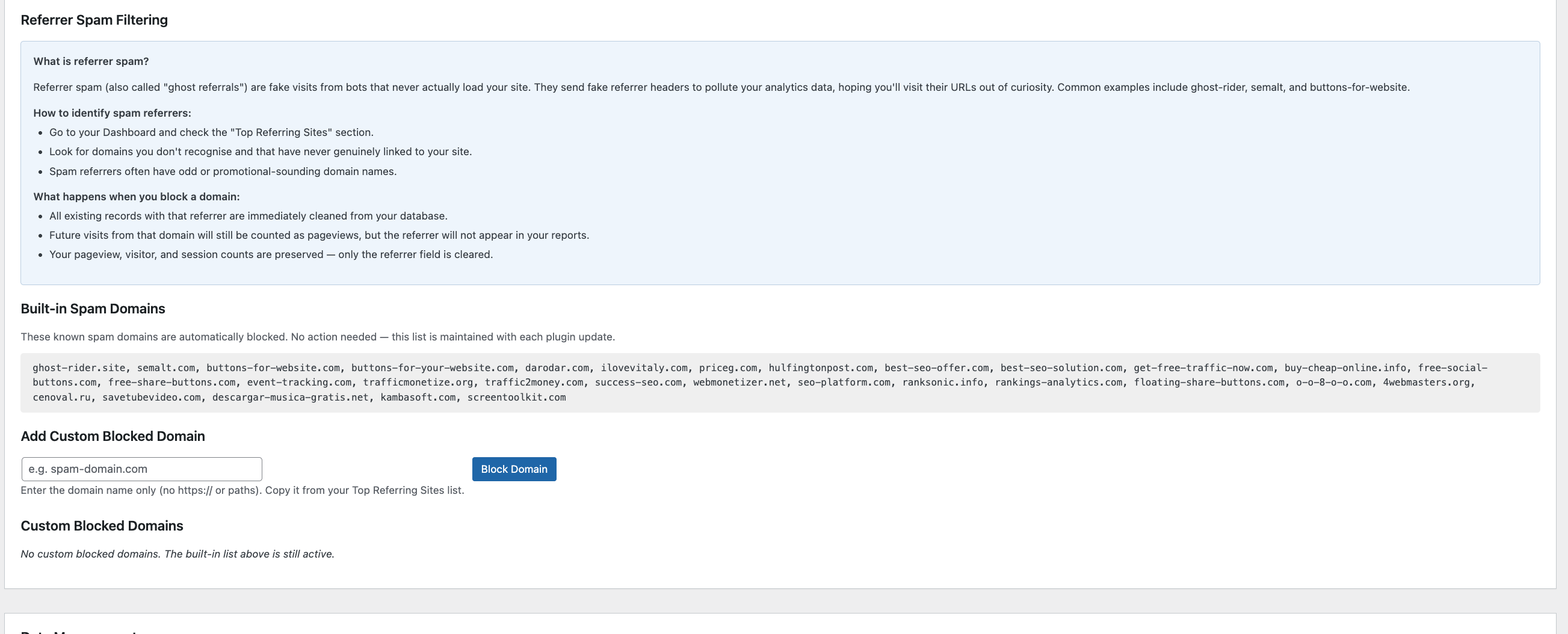
- Added referral spam filtering — built-in blocklist of 30+ known ghost referrer domains, auto-cleanup on upgrade
- Added manual referrer domain blocking via Settings with one-click add/remove
- Added IP address tracking with anonymisation support (respects existing anonymize-IP setting)
- Added IP address column to database schema with automatic migration
- Added self-referral filtering — own domain no longer appears in Top Referring Sites
- Added “Last 24 Hours” date preset button on the dashboard
- Added country flag emoji and full country names in the Geographic Distribution table
- Added icons for traffic source types (Direct, Search Engines, Social Media, Referral Sites)
- Added recognisable icons for popular referring domains (Google, Facebook, Twitter/X, YouTube, LinkedIn, Reddit, Pinterest, Bing, etc.)
- Added REST API
/bulkendpoint — returns all data types in a single request - Added REST API
/dailyendpoint — returns per-day snapshots for external integrations - Added human traffic percentage to summary stats API response
- Improved referral percentage display to 1 decimal place
- Improved Top Referring Sites description text
0.5.0
- Improved page picker filtering for UTM Link Builder — excludes password-protected pages, functional pages, and non-content post types
- Updated readme for WordPress.org submission
- Code quality and compatibility improvements
0.4.0
- Added Campaign Manager for creating and tracking marketing campaigns
- Added UTM Link Builder with smart page picker, preset sources/mediums, and saved links
- Added Campaign Performance dashboard section with source/medium drill-down
- Added Top Referring Sites dashboard section (individual domains)
- Added Entry Pages and Exit Pages dashboard sections
- Added REST API endpoints for campaigns, entry/exit pages, referrers, devices, browsers, and geographic data
- Added smart page picker with AJAX search, post type filtering, and category filtering
- Added content-based filtering to exclude functional pages from the page picker
- Improved bot detection patterns
- Improved PHPCS compliance and security hardening
0.3.0
- Added IP address exclusion with CIDR range support
- Added one-click “Ignore My IP” button
- Added country exclusion for geographic filtering
- Added settings help documentation
- Added JavaScript verification for human traffic confirmation
- Added Device Types, Browser, OS, and Geographic dashboard sections
- Added Traffic Over Time chart
- Added Bounce Rate and Pages per Session metrics
- Improved bot detection with 200+ patterns including AI crawlers
0.2.0
- Added collapsible dashboard sections with persistent preferences
- Added Traffic Sources chart and table
- Added data retention settings and manual cleanup
- Added user role exclusion from tracking
- Added Do Not Track header support
- Added IP anonymisation option
- Added privacy policy text generator
- Performance improvements with batch processing and buffer system
0.1.0
- Initial release
- Pageview tracking with visitor and session identification
- Admin dashboard with overview statistics
- Top Content report
- REST API endpoints (summary, top-content, traffic-sources, time-series)
- Bot detection and filtering
- Session tracking with configurable timeout
- GDPR-compliant privacy handling
- Data stored locally — no external services