Description
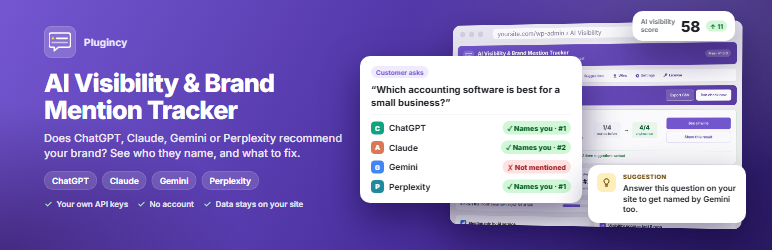
Buyers now ask AI before they search. “Which accounting software is best for a small business?” “Is this company legit?” If the AI assistant recommends your competitors and not you, you lose the customer without ever seeing them. And the answers change from week to week, because the assistants search the web live and their sources keep moving.
Ai visibility & Brand Mention Tracker is an AI visibility tracker for WordPress. It works as a ChatGPT rank tracker and AI brand monitoring tool for the four assistants buyers use most. It asks them the questions your customers ask, on a schedule, and shows the answers in your dashboard: whether your brand is mentioned, in which position, which competitors are named instead, and which websites the AI cites as sources. Then it gives you generative engine optimization (GEO) and answer engine optimization (AEO) suggestions, and proves which ones worked.
So instead of guessing, you know whether AI is sending customers to you or to your competitors, what to change to get named, and which of your changes brought results.
It runs on your own site with your own API keys. No account, no SaaS subscription for tracking, and your prompts and results stay in your WordPress database, so you keep control of both the cost and the data. You can start with one AI service and one API key, and add the others later.
Key Features at a Glance
- Track brand mentions in ChatGPT, Claude, Gemini and Perplexity, with web search on.
- AI visibility score, mention rate, average position and a trend chart across runs.
- AI citations: see which sources each answer cites, and how often your own site is cited.
- Competitor tracking and AI share of voice, plus brands AI names that you are not tracking yet.
- Every AI answer word for word, with your brand and competitors highlighted.
- GEO / AEO suggestions with the evidence behind each one.
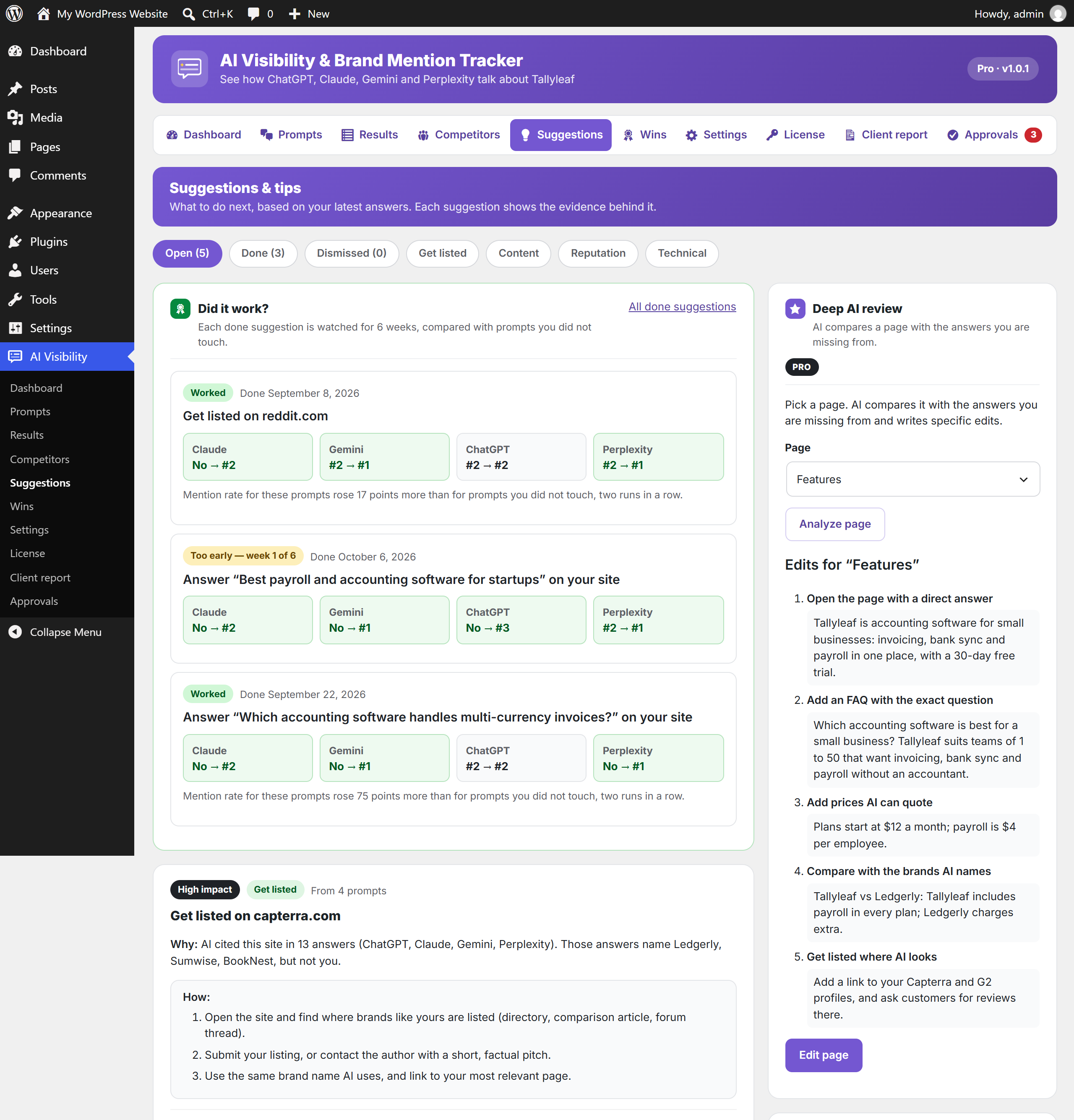
- “Did it work?” tracking for six weeks after you act, compared with prompts you did not touch.
- Wins timeline and a share image for LinkedIn or X.
- Prompts by type (discovery, comparison, branded) and country for local AI search results.
- Daily, weekly or manual runs, 1 or 3 samples per prompt, a monthly API call limit and low-cost default models.
- CSV export, dashboard widget, MCP abilities, multisite and right-to-left languages.
AI Visibility Tracking for ChatGPT, Claude, Gemini and Perplexity
Add the questions a buyer would ask before choosing a product or company like yours. Each run sends every prompt to every AI service you enable, with web search on, so answers are close to what people see in the apps. Prompts are grouped by type (discovery, comparison or branded) and can be set for a country, so local businesses see the answers their own market gets. The dashboard turns the answers into a visibility score, mention rate per AI service, average position when mentioned, and a chart of the last runs. You see at a glance whether AI recommends you more or less than before, and which AI service needs work.
Brand Mention and AI Citation Tracking
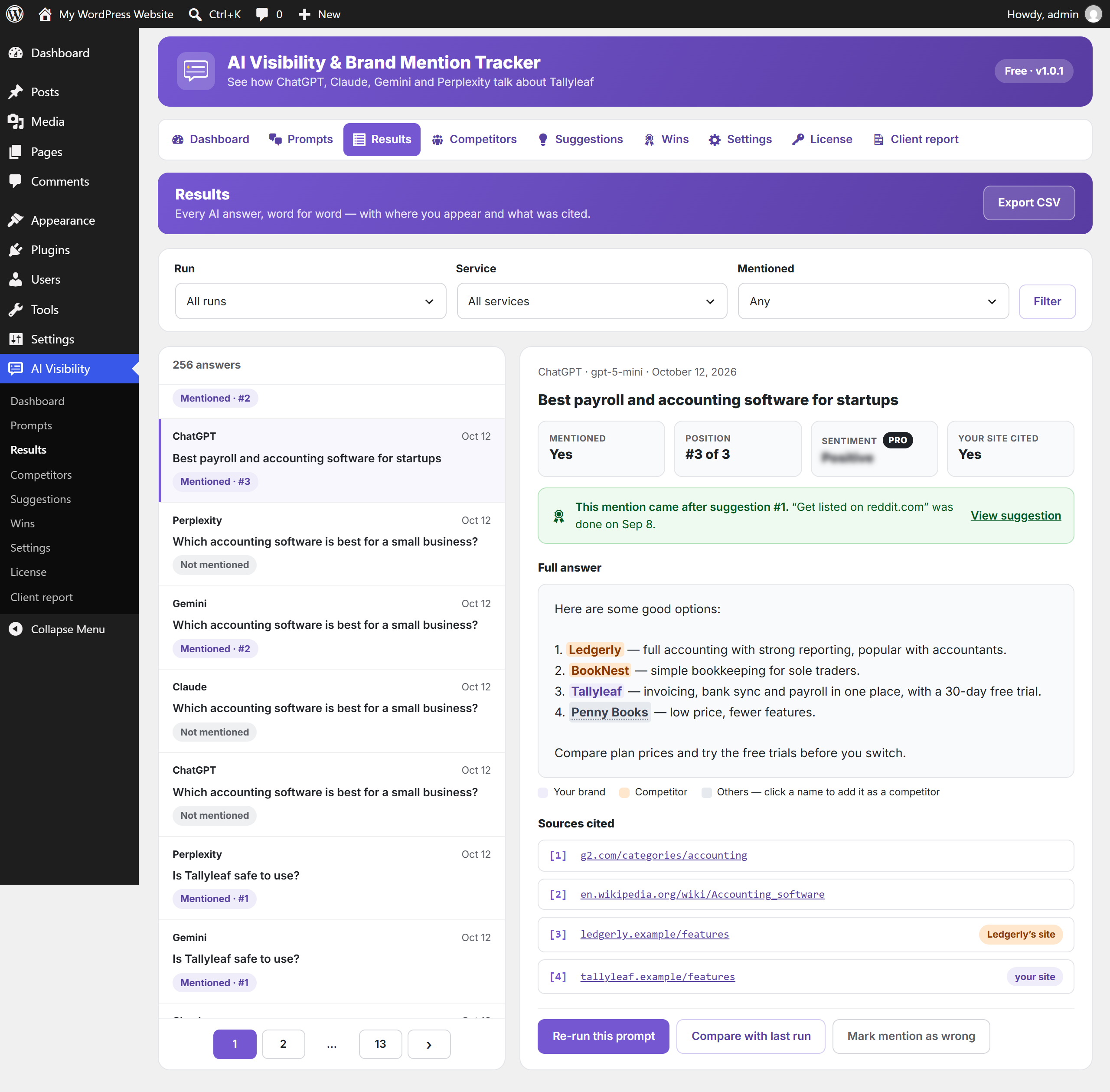
Open any answer to read it in full. Your brand and every tracked competitor are highlighted, other names you use (short name, old name, abbreviation) are counted as your brand, and other brands AI names can be added as competitors with one click. The sources the AI cited are listed with labels: “your site” for your own pages, “about you” for pages on other sites with your brand name in the link (such as a review or a profile), and the competitor’s name for its site. Filter answers by run, AI service and mention. If a mention was detected wrongly, mark it and the numbers update.
You read exactly what AI tells your buyers about you, and you see which websites shape that answer and where it pays to be listed.
Competitor Tracking and AI Share of Voice
See who AI recommends next to you, or instead of you: mention rate, average position, share of voice and the AI service each competitor is strongest on. The plugin also lists names AI keeps recommending that you have not added yet, and the prompts where a competitor is named and you are missing. These are your biggest opportunities.
GEO and AEO Suggestions You Can Act On
After each run the plugin writes a short list of what to do next, each with the evidence behind it, so you spend your time on the changes most likely to get you named instead of guessing:
- Get listed on the review sites, directories and forums AI cites for your topic, where your competitors already appear.
- Answer the question on your site for prompts where AI names competitors and not you. One click copies a writing brief for ChatGPT or Claude: the question, the brands AI names instead and the sites it cites.
- Unblock AI crawlers such as GPTBot, ClaudeBot and PerplexityBot if your robots.txt blocks them.
- Fix pages hidden from search when the site discourages search engines.
Proof of What Worked
Mark a suggestion done and the plugin watches the prompts it affects for six weeks. It compares them with prompts you did not touch, two runs in a row, before it calls a result a win. The Wins page shows the timeline, how many AI engines now mention you, and a ready image to share. You learn which kind of work pays off, so you can do more of it, and you have real numbers to show your team or your client.
Low Cost, Your Own API Keys
You pay the AI services directly, and only for what you use. Each answer is one API call: 8 prompts on 4 services is 32 calls per run. Low-cost models are set by default, runs can be daily, weekly or manual, and a monthly limit stops runs before costs grow. Asking each prompt 3 times gives steadier numbers but uses 3 times the calls, so it is off by default. There is no monthly tracking fee, and a typical weekly check costs a few cents.
Ask Claude or ChatGPT About Your AI Visibility (MCP)
MCP (Model Context Protocol) lets an AI assistant connect to your site and use its data. It is an open standard, so the same connection works with any assistant or AI app that supports MCP. With the free MCP Adapter plugin by WordPress and WordPress 6.9 or later, you can ask your assistant “How visible is my brand in AI this week?” and it reads the answer from this plugin. The free plugin gives the assistant four read-only tools:
- Get AI visibility summary: score, mention rate, position and share of voice from the latest run.
- Get AI answers: the answers, filtered by run, service or mention.
- Get competitor comparison: how each competitor compares with you.
- Get suggestions: the open suggestions and what to do, with a writing brief for content suggestions.
Turn it on in Settings, where the plugin also shows the server URL to paste into your assistant. You can then check your brand’s numbers from the chat you already use, without opening WordPress. In the free plugin, AI can only read; it cannot change anything.
Private by Design
API keys are stored encrypted. Requests go straight from your server to the AI services you enable. Nothing loads on the front end of your site, and no visitor data is collected.
Who It Is For
- Businesses and SaaS that want to know whether AI recommends them.
- SEO specialists and marketers adding AI SEO and AI search optimization (GEO, AEO, LLM SEO) to their work.
- Agencies that track how AI talks about their clients’ brands, and report it with their own logo.
- Local businesses checking AI answers for their country.
- Online stores and publishers that want to be cited by AI answers.
Works With Your SEO Plugin
It does not replace Yoast SEO, Rank Math or All in One SEO; it adds the AI side that they do not measure. It is tested with 60+ popular plugins and themes, including Elementor, WooCommerce, Yoast SEO, Rank Math, Wordfence, LiteSpeed Cache, W3 Total Cache, Polylang, TranslatePress, Astra, Kadence and GeneratePress, on PHP 7.4 to 8.4 and on multisite.
Pro Features
The free plugin is complete for tracking one brand. Ai visibility & Brand Mention Tracker Pro adds:
- AI sentiment: each answer that names a brand is rated positive, neutral or negative, in any language, for you and every competitor.
- Negative mention suggestions: when AI describes your brand negatively, you get a suggestion with the answers that said it.
- Prompt ideas: “Suggest 10 prompts for my brand” reads your site’s pages and writes the questions your buyers are likely to ask.
- Deep AI review: AI compares one of your pages with the answers you are missing from and writes specific edits for that page.
- Client report: a white-label report of your results and wins, with your name and logo, ready to print or save as PDF.
- Email report: the same report sent by email to you or your clients, every week, every 2 weeks or every month.
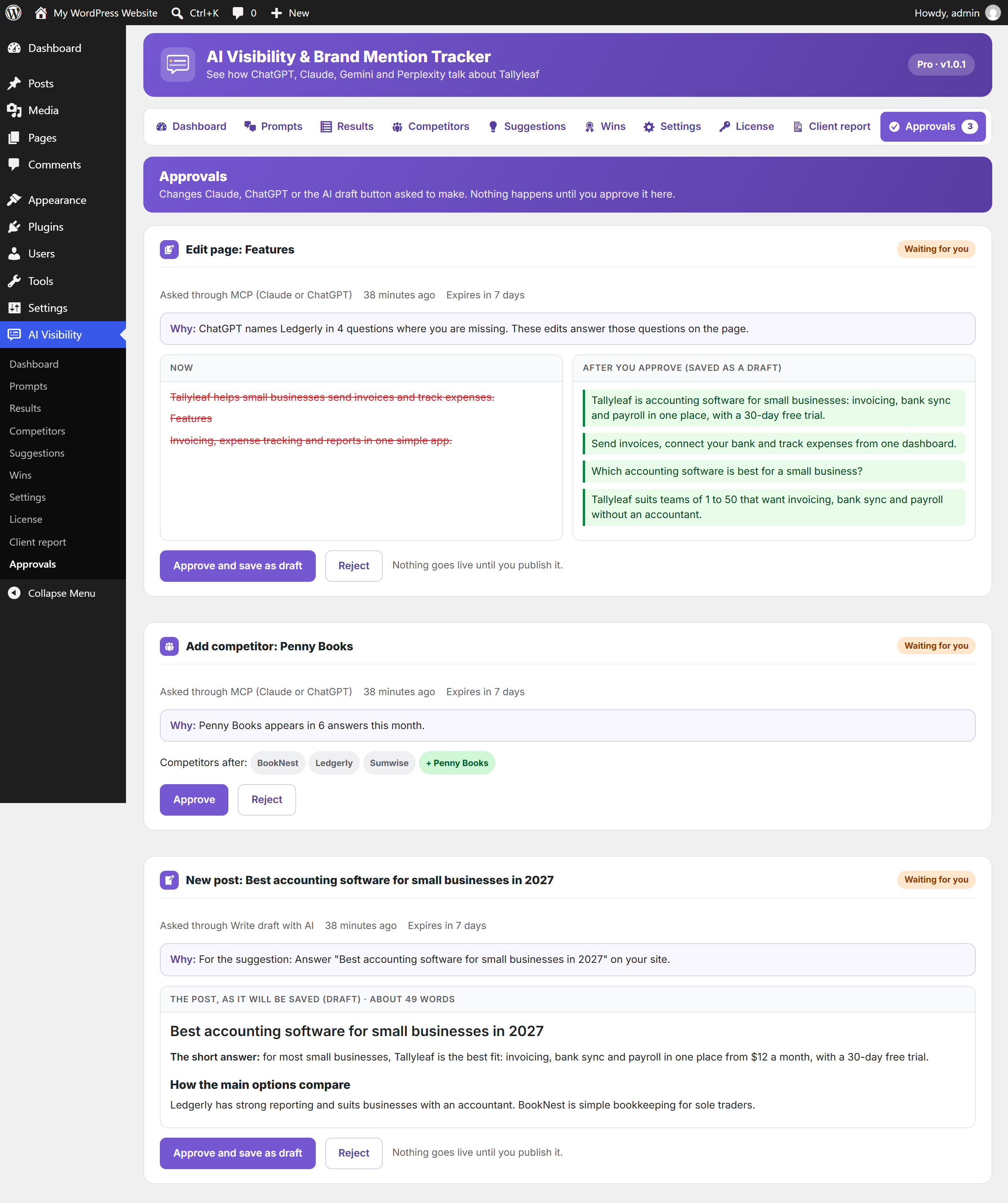
- AI drafts from suggestions: “Write draft with AI” writes the missing page from the suggestion’s evidence. It waits for your approval and is saved as a draft; publishing it marks the suggestion done and starts measuring.
- MCP changes, with your approval: your AI assistant can add or remove competitors, add, pause or delete prompts, mark suggestions done, run a check, edit a page or write a new post. Each tool is off until you turn it on, and every change waits on the Approvals page until you approve it. Pages are only ever saved as drafts.
Client Reports for Agencies (Pro)
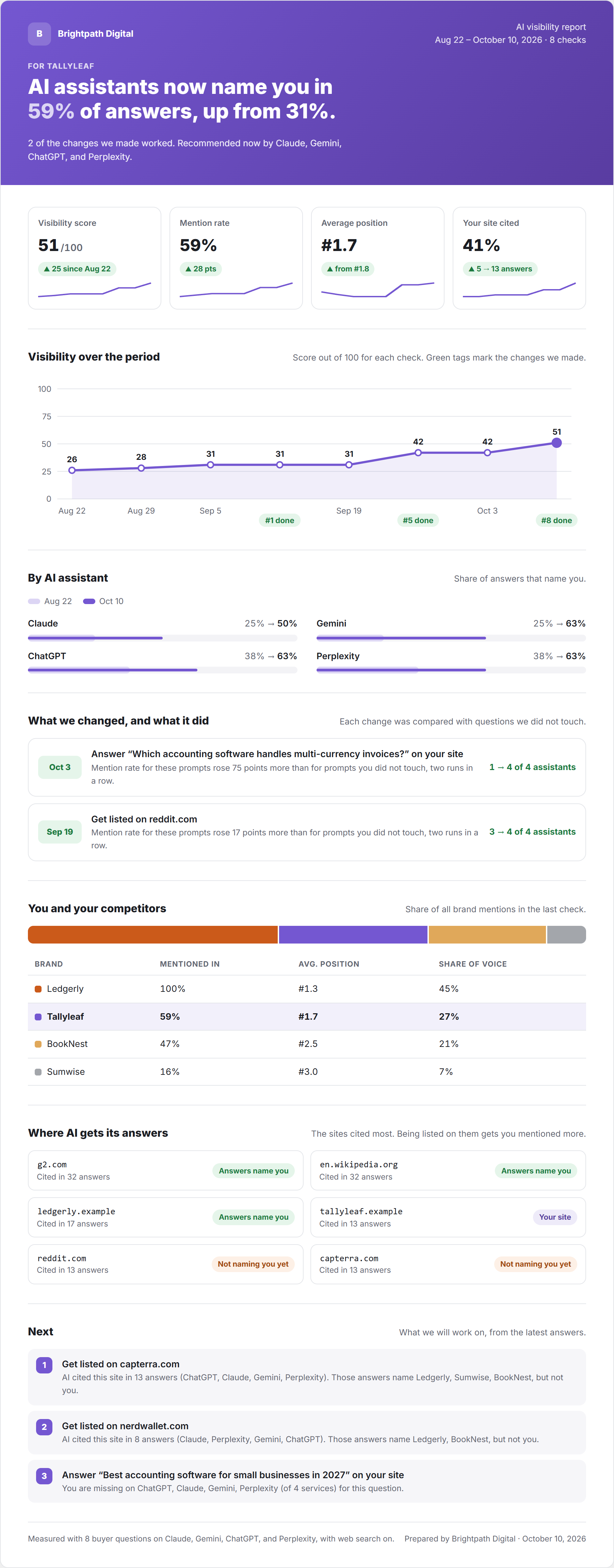
Show clients what you did and what it changed, in a report with your agency’s name and logo (or the site’s own name and logo if you leave them empty). Each report covers the last 8 checks:
- Headline: for example “AI assistants now name you in 59% of answers, up from 31%”, and which assistants recommend the brand now.
- Four numbers with the change: visibility score, mention rate, average position and how often the client’s site is cited, each with a small trend line.
- Visibility over the period: the score for each check, with tags where your changes were made.
- By AI assistant: each assistant you track, first check against the latest, so the client sees which one changed most.
- What we changed, and what it did: each suggestion you completed, and how many assistants mention the brand before and after.
- You and your competitors: share of voice, mention rate and average position.
- Where AI gets its answers: the sites cited most, and whether they name the client yet.
- Next: the three things to work on, from the latest answers.
How to send it:
- Go to AI Visibility Client report and add your agency name and logo.
- Click Print / Save as PDF to send the report as a PDF.
- Turn on Email report, choose How often (every week, 2 weeks or month) and enter the client’s address in Send to. After a check finishes, no more often than you chose, they get the same report by email: the wins, what changed and the next three actions.
Which AI does the Pro work? Sentiment, prompt ideas, the deep AI review and AI drafts use one AI service you choose (ChatGPT, Claude, Gemini or Perplexity) with your own API key. Each is an extra API call on that key.
External services
This plugin sends your tracked prompts to the AI services you enable, using API keys you provide. Nothing is sent until you add a key and enable a service. Requests are made from your server when a check runs (on your schedule, when you click “Run”, or when an MCP client you authorised asks for one).
OpenAI API
Used to get ChatGPT answers to your prompts. Sent: the prompt text and model name.
Terms: https://openai.com/policies/terms-of-use/ — Privacy: https://openai.com/policies/privacy-policy/
Anthropic API
Used to get Claude answers to your prompts. Sent: the prompt text and model name.
Terms: https://www.anthropic.com/legal/commercial-terms — Privacy: https://www.anthropic.com/legal/privacy
Google Gemini API
Used to get Gemini answers to your prompts. Sent: the prompt text and model name.
Terms: https://ai.google.dev/gemini-api/terms — Privacy: https://policies.google.com/privacy
Perplexity API
Used to get Perplexity answers to your prompts. Sent: the prompt text and model name.
Terms: https://www.perplexity.ai/hub/legal/terms-of-service — Privacy: https://www.perplexity.ai/hub/legal/privacy-policy
Plugincy anonymous results (optional, off by default)
Only if you turn on “Share anonymous results” on the Wins page. When a suggestion you marked done gets its final result, the plugin sends to plugincy.com: a random install ID, the plugin version, the suggestion type and category, whether it worked, the mention-rate change for those prompts and for untouched prompts, whether your page was cited, and the number of days it took. No brand names, prompts, answers, URLs, site address or personal data are sent. Used to rank suggestion types by how often they work. Turn it off at any time on the Wins page.
Terms: https://plugincy.com/terms-and-conditions/ — Privacy: https://plugincy.com/privacy-policy/
Privacy Policy
Ai visibility & Brand Mention Tracker stores your prompts, the AI answers, competitors and results in your own WordPress database. It does not track your site’s visitors, set cookies on the front end, or collect personal data.
Your prompts are sent to the AI services you enable, under their own terms (see External services). The optional anonymous results switch sends only the counts described above to Plugincy.
Screenshots



Installation
- In your WordPress admin, go to Plugins Add New, search for “Ai visibility & Brand Mention Tracker”, install and activate it. Or upload the zip under Plugins Add New Upload Plugin.
- Go to AI Visibility Settings. Add an API key for at least one AI service (each card links to where you get a key) and enter your brand name and website.
- Go to AI Visibility Prompts and add the questions your customers ask. Add your competitors on the Competitors page.
- Click Run check now on the Dashboard, or leave it on the weekly schedule.
Requirements: WordPress 6.5+, PHP 7.4+, and an API key for at least one of OpenAI, Anthropic, Google Gemini or Perplexity.
FAQ
-
What is AI visibility?
-
How often AI assistants mention and recommend your brand when people ask about your kind of product or service. This plugin measures it as a mention rate and a visibility score per run, per AI service and per prompt.
-
What are GEO and AEO?
-
Generative engine optimization (GEO) and answer engine optimization (AEO) are the work of getting your brand named and cited in AI answers, the way SEO is for search results. The plugin shows where you stand and suggests what to change.
-
Do I need API keys? What does it cost?
-
Yes, one key for each AI service you want to track; you can start with just one. Each answer is one API call, billed by the AI service to your own account. With the default low-cost models a weekly run of 8 prompts on 4 services usually costs a few cents. Set a monthly call limit in Settings; runs stop when it is reached.
-
Which AI models does it use?
-
Low-cost models with web search by default: GPT-5 mini for ChatGPT, Claude Haiku for Claude, Gemini 2.5 Flash for Gemini and Sonar for Perplexity. You can type any other model name your key supports; “Use recommended” puts the default back.
-
Are the results the same as in the ChatGPT app?
-
Close, not identical. The plugin uses each service’s API with web search on, which is the nearest thing to the apps, but answers vary from run to run and by account. That is why the plugin shows trends across runs and can ask each prompt 3 times per run.
-
Does it track Google AI Overviews?
-
Not directly. It asks Gemini, Google’s AI model, through its API. Google does not offer an API for AI Overviews results.
-
Can I track my competitors?
-
Yes. Add competitors with any other names AI may use for them. The plugin shows their mention rate, position and share of voice next to yours, and suggests names AI recommends that you have not added.
-
How do I track ChatGPT mentions of my brand?
-
Install the plugin, add an OpenAI API key in Settings, and add the questions your buyers ask on the Prompts page. Click Run check now. The Results page shows each ChatGPT answer word for word with your brand highlighted, and the Dashboard shows how often it mentions you and in which position. Add keys for the other services to track them the same way.
-
Can I use it as a ChatGPT rank tracker?
-
Yes. When an answer names several brands, the plugin records your position in it (#1, #2 and so on) and shows your average position per AI service, per prompt and over time, next to each competitor’s.
-
Is this an AI SEO plugin?
-
It is the measuring side of AI SEO. It shows whether AI assistants name and cite you, and suggests GEO and AEO changes to get named more often. It does not write meta tags, sitemaps or schema, so keep your SEO plugin for those.
-
Does it show whether AI cites my website?
-
Yes. Every answer lists the sources it cited. Your own pages are labelled “your site”, pages on other sites with your brand name in the link are labelled “about you”, and competitors’ sites carry their name. The dashboard shows how often your site was cited.
-
Can I track AI answers for a specific country?
-
Yes. Each prompt can have a country, which is passed to the AI services that support local search results.
-
Does it work with Yoast SEO, Rank Math or All in One SEO?
-
Yes. It works alongside them and measures the AI side they do not cover.
-
Where is my data stored? Is anything sent to Plugincy?
-
Prompts, answers and results are stored in your WordPress database. API keys are stored encrypted. Requests go straight from your site to each AI service you enable. Nothing is sent to Plugincy unless you turn on the optional, anonymous “Share anonymous results” switch on the Wins page (see External services below).
-
Will it slow down my site?
-
No. Checks run in the background in small batches through WP-Cron, and nothing is loaded on the front end of your site.
-
Which questions should I track?
-
The ones a buyer would ask before choosing a product or company like yours: “best … for …”, “… vs …”, “is … legit?”, and questions about price or location. Start with 5 to 10. Each prompt is sent to every service you enable on every run.
-
What is MCP and do I need it?
-
You do not need it. MCP lets AI assistants connect to your site. With the free MCP Adapter plugin and WordPress 6.9+, your assistant can read your summary, answers, competitors and suggestions from this plugin. Pro also lets it make changes, such as adding a competitor or writing a draft post, and each change waits for your approval.
-
Can AI change my site on its own?
-
No. In the free plugin, AI assistants can only read your results through MCP. In Pro, they can ask for changes, but each change tool is off until you turn it on, and every change waits on the Approvals page in WordPress until you approve it. Pages and posts are saved as drafts; nothing goes live until you publish it.
-
Can agencies use it for clients?
-
Yes. Install it on each client site; each site tracks its own brand. Pro adds a branded client report and an email report every week, 2 weeks or month.
-
Does it work on multisite?
-
Yes. Activate it per site; each site tracks its own brand.
-
What happens to my data if I uninstall?
-
Uninstalling removes the plugin’s tables, settings and scheduled tasks.
Reviews
There are no reviews for this plugin.
Contributors & Developers
“Ai visibility & Brand Mention Tracker” is open source software. The following people have contributed to this plugin.
Contributors
Translate “Ai visibility & Brand Mention Tracker” into your language.
Interested in development?
Browse the code, check out the SVN repository, or subscribe to the development log by RSS.
Changelog
1.0.1
- First release: AI visibility tracking for ChatGPT, Claude, Gemini and Perplexity.
- Dashboard with AI visibility score, mention rate, position, share of voice and citations.
- Results with full answers, highlights and cited sources.
- Competitor tracking and discovered brands.
- GEO / AEO suggestions with evidence, six-week impact tracking and Wins.
- Daily, weekly or manual runs, 1 or 3 samples per prompt, monthly API call limit, CSV export, dashboard widget and MCP abilities.
- Writing brief for ChatGPT on content suggestions.