

Description
Fundraising for NGOs, structured the way NGOs work. An event (a race, a gala, a campaign) has causes donors can support, optionally with a reward in return (for example “participation in the 5k run + t-shirt”). Causes can have champions: people who collect donations on their behalf and get their own page and progress bar.
- Events, causes and champions as their own content types, with targets and progress bars.
- Donation form with preset amount buttons (25, 50, 100 … and “other amount”), or a fixed price for tickets and rewards.
- Rewards with limited places. A cause can stop accepting donations when its places are taken.
- Payments: card payments through Stripe Checkout, PayPal, and bank transfer (the donation waits until you confirm the money arrived). More providers can be added by other plugins.
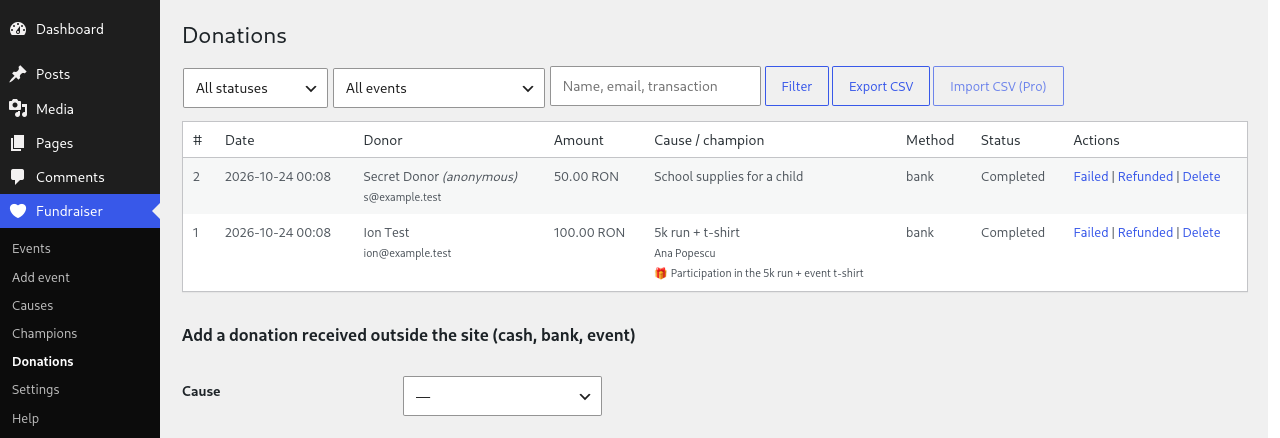
- Donation list in the admin with filters, manual entries for cash and bank donations, status changes and CSV export.
- Thank-you email to the donor and a notification to you.
- Public donor list (anonymous donors are shown as “Anonymous”).
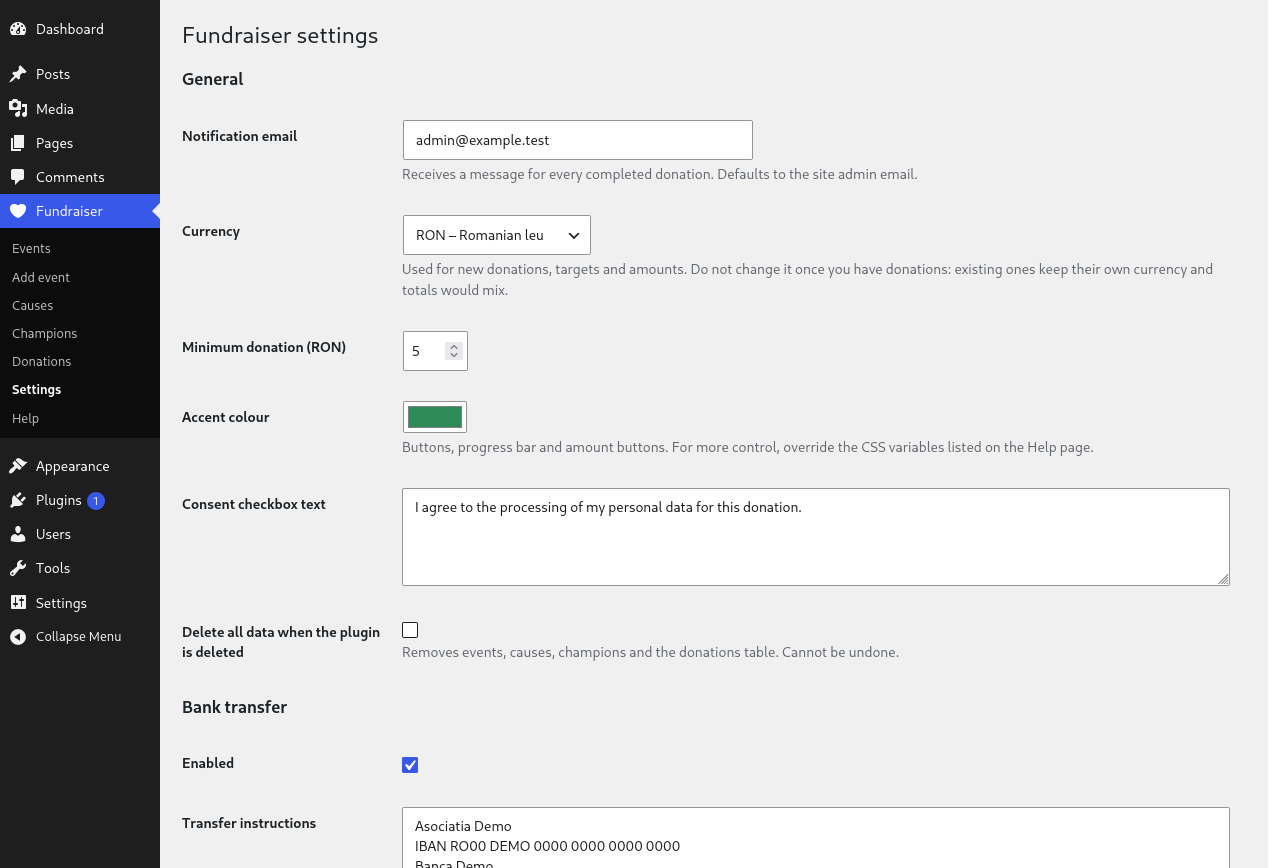
- Currency setting (RON, EUR, USD and more) and an accent colour; the look is controlled by CSS variables.
- Privacy: consent checkbox, WordPress personal data export and erase support. Personal details are erased and the amounts are kept for your accounting.
- Translations: ready for translation; community translations (including Romanian) come from translate.wordpress.org.
- A Help page in the admin documents every shortcode.
Shortcodes
[nmrfh_donate cause="123" amounts="25,50,100,200" other="Other amount" default="50"]donation form[nmrfh_event id="45"],[nmrfh_cause id="123"],[nmrfh_champion id="77"]pages[nmrfh_donors scope="cause" id="123" limit="10"]recent donors
Events, causes and champions also show their content automatically on their own pages.
Pro
The plugin is fully functional on its own. An optional paid add-on, NMR Fundraiser Hub Pro, adds recurring (monthly) donations, CSV import of donations and a block editor block for the donation form. This plugin shows a short description of it and a link to https://namir.ro/downloads/nmr-fundraiser-hub-pro/. It does not contact any server for this.
Developers
Hooks: nmrfh_gateways (add payment providers), nmrfh_currencies, nmrfh_donate_form_extra, nmrfh_donation_created, nmrfh_donation_completed.
External services
This plugin connects to a payment provider only when you switch that provider on in Fundraiser > Settings and a donor chooses it. Bank transfer sends nothing anywhere.
Stripe
Used to take card payments on a Stripe-hosted page. When a donor chooses “Card (Stripe)”, the plugin sends Stripe the donation amount, currency, the cause title, the donation number, and the donor’s email address, and the donor is redirected to Stripe. Stripe also sends payment confirmations to your site’s webhook address. Your Stripe secret key is stored in your site’s settings.
- Service: https://stripe.com
- Terms of service: https://stripe.com/legal/ssa
- Privacy policy: https://stripe.com/privacy
PayPal
Used to take payments through PayPal. When a donor chooses PayPal, the plugin sends PayPal the donation amount, currency, the cause title and the donation number, and the donor is redirected to PayPal to approve the payment. The plugin then asks PayPal to capture and confirm the payment. Your PayPal client ID and secret are stored in your site’s settings.
- Service: https://www.paypal.com
- Terms of service: https://www.paypal.com/legalhub/paypal/useragreement-full
- Privacy policy: https://www.paypal.com/privacy
Screenshots


Installation
- Upload the
nmr-fundraiser-hubfolder to/wp-content/plugins/. - Activate it. A Fundraiser menu appears in the admin.
- Open Fundraiser > Settings: choose your currency and switch on a payment method.
- Add an Event, then one or more Causes for it. Put
[nmrfh_donate cause="ID"]on any page, or link to the cause page. - Fundraiser > Help lists every shortcode and option.
FAQ
-
Do I need Stripe or PayPal?
-
No. Bank transfer works without any account: donors get your account details and the donation counts once you mark the transfer as received.
-
Can donors choose their own amount?
-
Yes. Each cause is either “donor chooses any amount”, “at least the amount below” or a fixed amount. The
amountsshortcode option adds quick buttons such as 25, 50, 100. -
Are donor details deleted on request?
-
Yes. The WordPress “Erase personal data” tool wipes name, email, phone and message and keeps the amount, so your totals stay correct.
-
Does it work with caching plugins?
-
Yes, as long as the page cache is cleared at least once a day (the default for most caching plugins). The form carries a security token that WordPress accepts for up to 24 hours. If it has expired, the donor sees “This form has expired. Please try again.” and the page reloads with a fresh one. It is also protected by a hidden field and a per-visitor rate limit.
-
How do I change the colours?
-
Pick an accent colour in Settings, or override the
--nmrfh-*CSS variables listed on the Help page. -
Can I change the currency later?
-
Not safely once you have donations: existing donations keep the currency they were made in, so totals would mix two currencies.
Reviews
There are no reviews for this plugin.
Contributors & Developers
“NMR Fundraiser Hub” is open source software. The following people have contributed to this plugin.
Contributors
Translate “NMR Fundraiser Hub” into your language.
Interested in development?
Browse the code, check out the SVN repository, or subscribe to the development log by RSS.
Changelog
0.2.0
- Currency setting, accent colour and CSS variables.
- Romanian translation.
- Help page documenting the shortcodes.
- Preset amount buttons for the donation form (
amounts,other,default). - Extension points for the Pro add-on.
0.1.0
- First version: events, causes, champions, Stripe, PayPal and bank transfer.