

Description
iGuRu Daily Privacy Stats shows how your site is doing, without sending a single byte about your visitors to anyone. Everything is counted and stored in your own WordPress database, in two small tables.
What you see
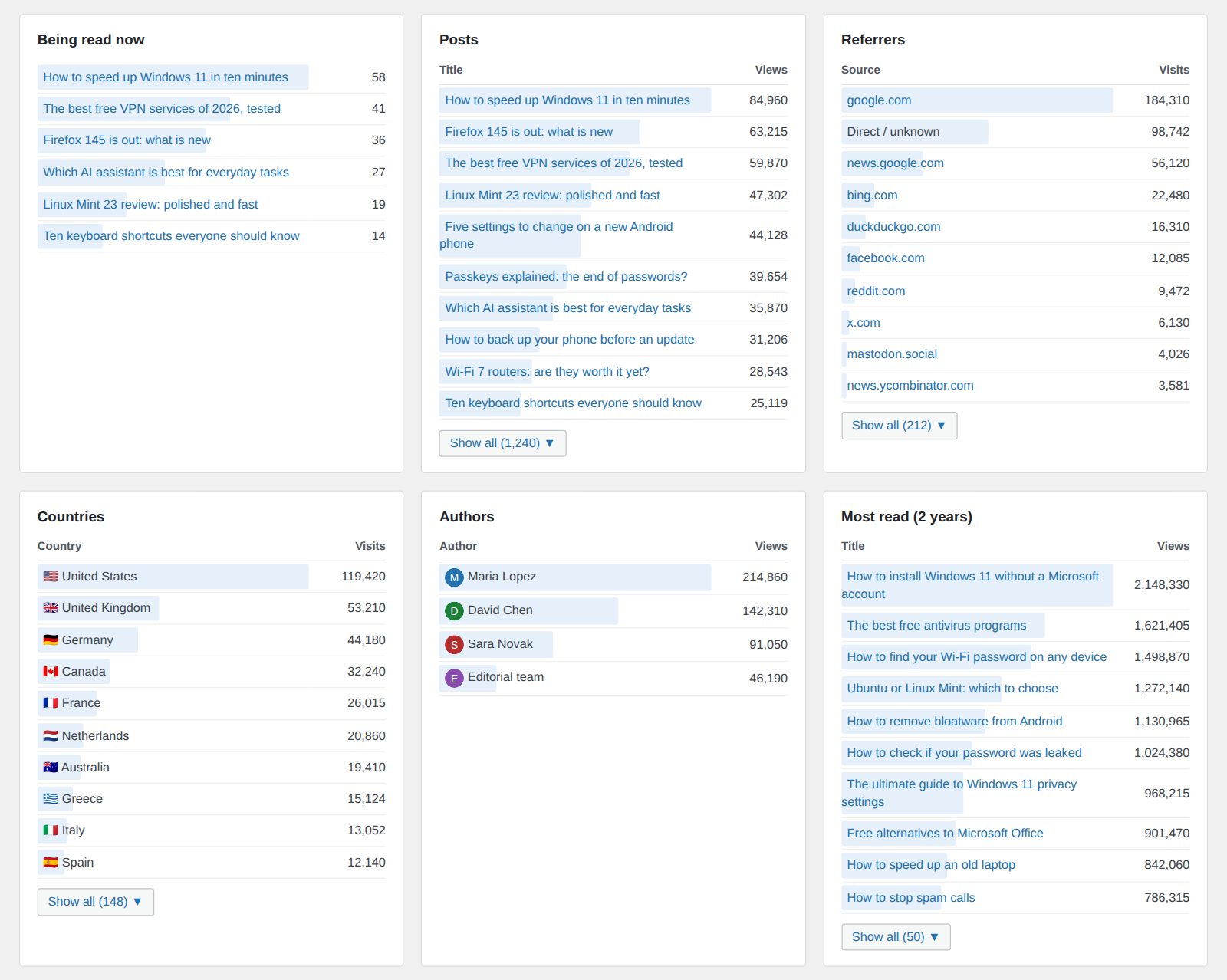
- Readers online now, and the posts they are reading (also as a Dashboard widget)
- Views and visits per day, for the last 30 days, in a clear bar chart
- Totals for today, 7 days, 30 days, 90 days, 1 year or 2 years
- Views per visit, and your best day ever
- Most read posts, for the chosen period and overall
- Referrers, grouped sensibly: all Google domains as “Google”, feed readers together, X/Twitter links together
- Countries, with flags (when your CDN or server provides the visitor’s country, e.g. Cloudflare)
- Authors, ranked by the views of their posts
Privacy by design
- No cookies, no local storage, no fingerprinting stored
- No IP addresses are stored, not even shortened ones
- No external services and no third-party scripts
- Only daily totals are kept: there is no record of individual visitors
- “Online now” uses a one-way hash of the IP address and browser with a secret that changes daily; the hash is deleted after 10 minutes, and the IP address is never stored
- Logged-in editors are not counted, and known bots are ignored
Because no personal data is collected, the plugin does not require a cookie consent banner on its own. As always, mention your analytics in your privacy policy.
Light and fast
- One tiny inline script (well under 1 KB) that sends a single beacon per page view, only when the page is actually visible
- No jQuery, no chart library: the dashboard uses plain HTML and CSS
- Compatible with page caches (WP Rocket, FlyingPress, LiteSpeed Cache and others) and with Cloudflare: the counter works on cached pages
- Old data is removed automatically after the period you choose (90 days to 2 years)
The plugin is fully translatable.
Screenshots


Installation
- Upload the
iguru-daily-privacy-statsfolder to/wp-content/plugins/, or install the zip from Plugins > Add New > Upload Plugin. - Activate the plugin.
- Open Dashboard > Statistics. Counting starts immediately.
FAQ
-
The plugin stores no cookies and no personal data, only daily totals per post, referrer and country. In most cases this needs no consent banner. Laws differ between countries, so describe your analytics in your privacy policy, and ask a lawyer if you are unsure.
-
Does it work with page caching?
-
Yes. Views are counted by a small script in the page, so they are counted even when the page comes from a cache or a CDN. The script is marked so that WP Rocket, FlyingPress and Cloudflare Rocket Loader do not delay it.
-
Can I use it instead of Jetpack Stats, or alongside it?
-
Both. iGuRu Daily Privacy Stats runs entirely on your own server and needs no WordPress.com account, so it can replace Jetpack Stats, or run next to it while you compare. It does not import Jetpack’s past statistics: counting starts when you activate it.
-
Where do the countries come from?
-
From a header that your CDN or server adds to each request, for example Cloudflare’s CF-IPCountry. The plugin does not look up IP addresses. If your setup provides no country header, the Countries card stays empty and everything else works normally. Developers can supply the country with the
dpstats_countryfilter. -
What is the difference between a view and a visit?
-
A view is counted each time a post is opened. A visit is counted for the first page of a visit that comes from outside your site (a search engine, social media, a direct link). Moving between your own pages adds views, not visits.
-
How is “Online now” counted?
-
Each reader is represented by a one-way hash of the IP address and browser, made with a random secret that changes every day. The IP address is never stored, the hash cannot be turned back into it, and each hash is deleted after 10 minutes. “Online now” counts the readers seen in the last 5 minutes.
-
Are my own visits counted?
-
No. Logged-in users who can edit posts are not counted. Use the
dpstats_skip_userfilter to change this. -
How much space does it use?
-
Very little: only daily totals are stored. Even a busy site with thousands of posts uses a few megabytes per year. The Data section of the Statistics page shows the current size, and lets you delete a single month.
-
What happens when I delete the plugin?
-
By default your statistics are kept, so you do not lose them by accident. To remove everything, tick “Delete all statistics when the plugin is deleted” in Statistics > Data before deleting the plugin.
-
Can my theme provide the view counts instead of the plugin’s script?
-
Yes. A theme that already counts views can declare
add_theme_support( 'iguru-daily-privacy-stats' )and calldo_action( 'dpstats_record_view', $post_id, $referrer )for each counted view ($referreris the page’s document.referrer for the first view of a page load, andnullfor later ones). The plugin then adds no script. -
Which hooks are available?
-
dpstats_record_view(action): record a view from a theme or another plugindpstats_own_counter(filter): turn the built-in counter on or offdpstats_skip_user(filter): decide whether the current user is counteddpstats_is_bot(filter): adjust bot detectiondpstats_country(filter): supply the visitor’s two-letter country codedpstats_visitor_ip(filter): supply the visitor’s address used for the “Online now” hashdpstats_referrer_name(filter): change how a referrer host is groupeddpstats_alltime(filter): supply all-time totals for the “Most read” card
Reviews
There are no reviews for this plugin.
Contributors & Developers
“iGuRu Daily Privacy Stats” is open source software. The following people have contributed to this plugin.
Contributors
Translate “iGuRu Daily Privacy Stats” into your language.
Interested in development?
Browse the code, check out the SVN repository, or subscribe to the development log by RSS.
Changelog
1.0.3
- Updated package for review.
1.0.2
- Plugin renamed to iGuRu Daily Privacy Stats.
1.0.1
- Plugin renamed to iGuRu Daily Privacy Stats; admin page moved to Dashboard > Statistics.
1.0.0
- First release on WordPress.org.