

Description
Honest Analytics counts your traffic and shows it in the WordPress admin. Nothing is sent anywhere, and nothing is stored that could identify a visitor later.
See it running
Click around a live dashboard with a year of seeded traffic before you install anything – one-click sign-in, no account needed: demo.honest-analytics.com.
What it never stores
- No IP addresses. Not in a table, not in a log, not in a cache key, not in the write spool. The address exists as a variable inside one function, is hashed, and is gone.
- No full referrer URLs. Only the host.
?token=…never reaches disk. - No full user-agent strings. Parsed into browser, operating system and device type, then discarded.
- No permanent raw pageview records. Individual hits remain only in the write spool or queue until they are folded into aggregate rollups, then are deleted.
- No cookies in the default configuration.
- No third parties in the counting. No telemetry, no CDN, no fonts, no map tiles, no licence check, no update check. Measuring a visit never leaves your server. The only request that goes anywhere else is one you start yourself – importing your history from Google Analytics – and it is described under External services below.
How it counts people without identifying them
A visitor is a short hash of a random daily salt, the address, the user agent and the site. The salt is overwritten in place every 24 hours, so yesterday’s hashes cannot be recomputed by anybody – including somebody holding your database.
Uniqueness is estimated from a fixed-size sketch stored on the rollup row, accurate to about ±1.6%. It holds no identifiers and cannot be asked whether it contains a particular person.
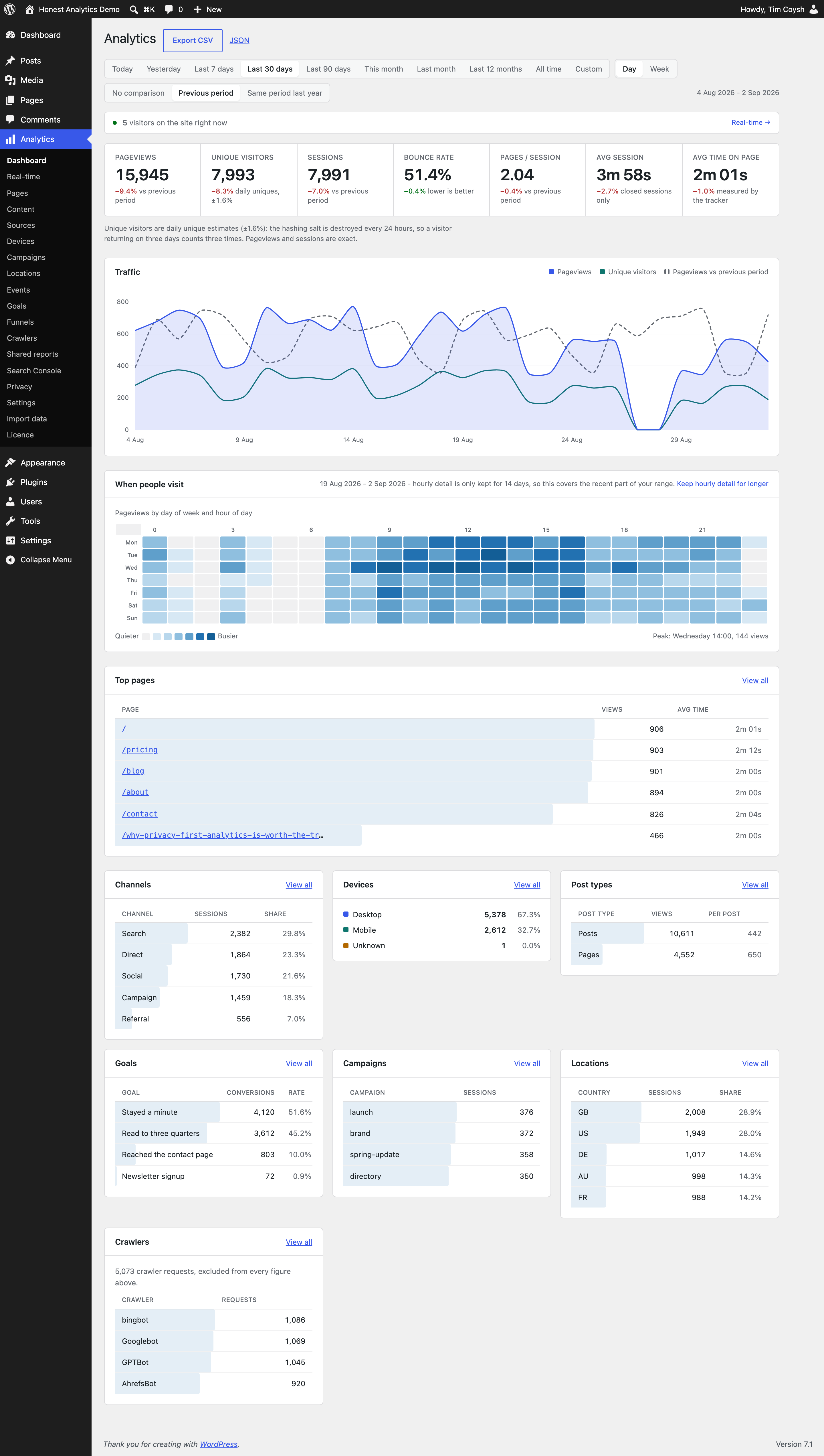
This is why unique visitors are daily estimates, not people, and why the plugin says so on every screen that shows the number. The same person visiting on three days counts three times. There is no honest way to produce a cross-day or lifetime unique-visitor figure from this model, so the plugin does not offer one.
It works behind a page cache
The server counts the requests it sees. A 1.9 KB first-party script confirms the rest from the browser. A nonce reconciles the two – consumed once per visitor, not once per nonce – so one piece of cached HTML served to a thousand people counts a thousand times.
No cache exclusions. No hole punching. No cache-plugin add-on. Tested with WP Rocket, W3 Total Cache, LiteSpeed, WP Super Cache, Cache Enabler, SG Optimizer, NitroPack and Cloudflare.
It respects opt-out signals
A request carrying Sec-GPC: 1 is not counted, not queued, and is sent no tracker at all. On by default. Do Not Track is supported the same way, off by default.
Storage that does not grow with your traffic
Storage grows with dimensions × time, not pageviews × time. A site with a hundred thousand views a day uses roughly the same disk as one with a hundred. Hourly detail is kept for a week, then compacted to daily; everything is deleted at 36 months at the latest.
What is in this free edition
- Dashboard, with pageviews, daily unique visitors, sessions and bounce rate
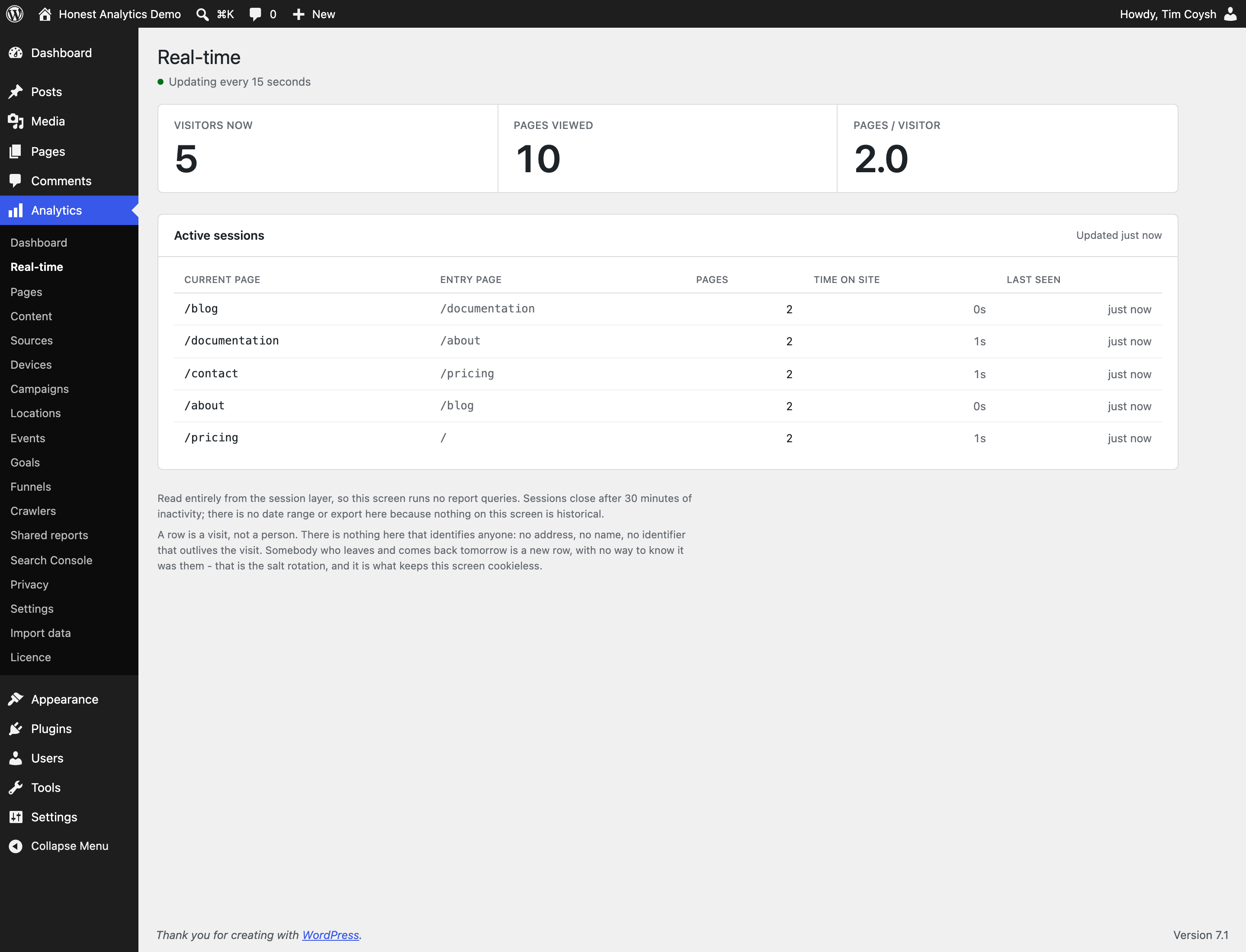
- Real-time visitors
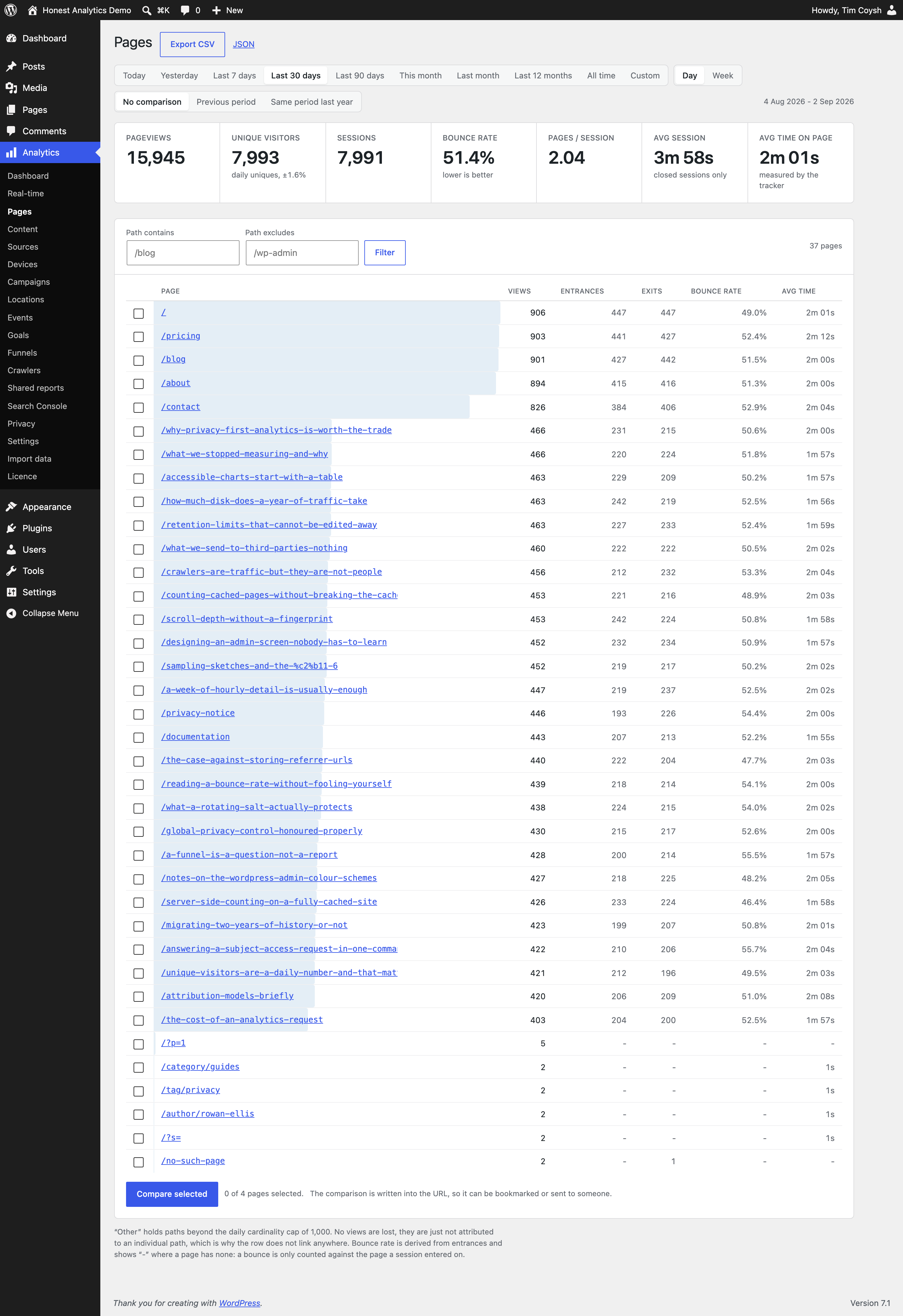
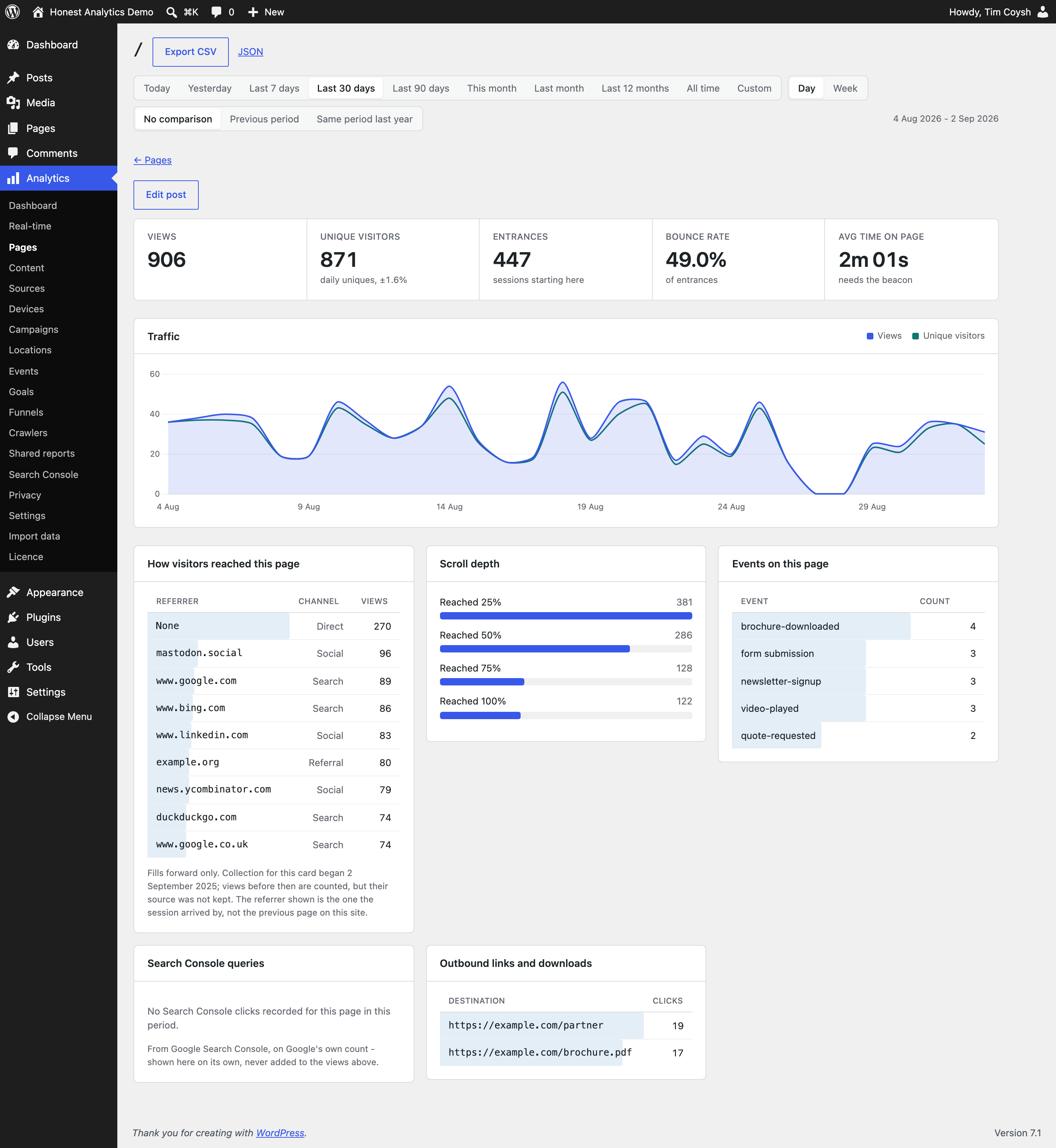
- Pages, and a detail view for any one page
- Content, by post type, taxonomy and author
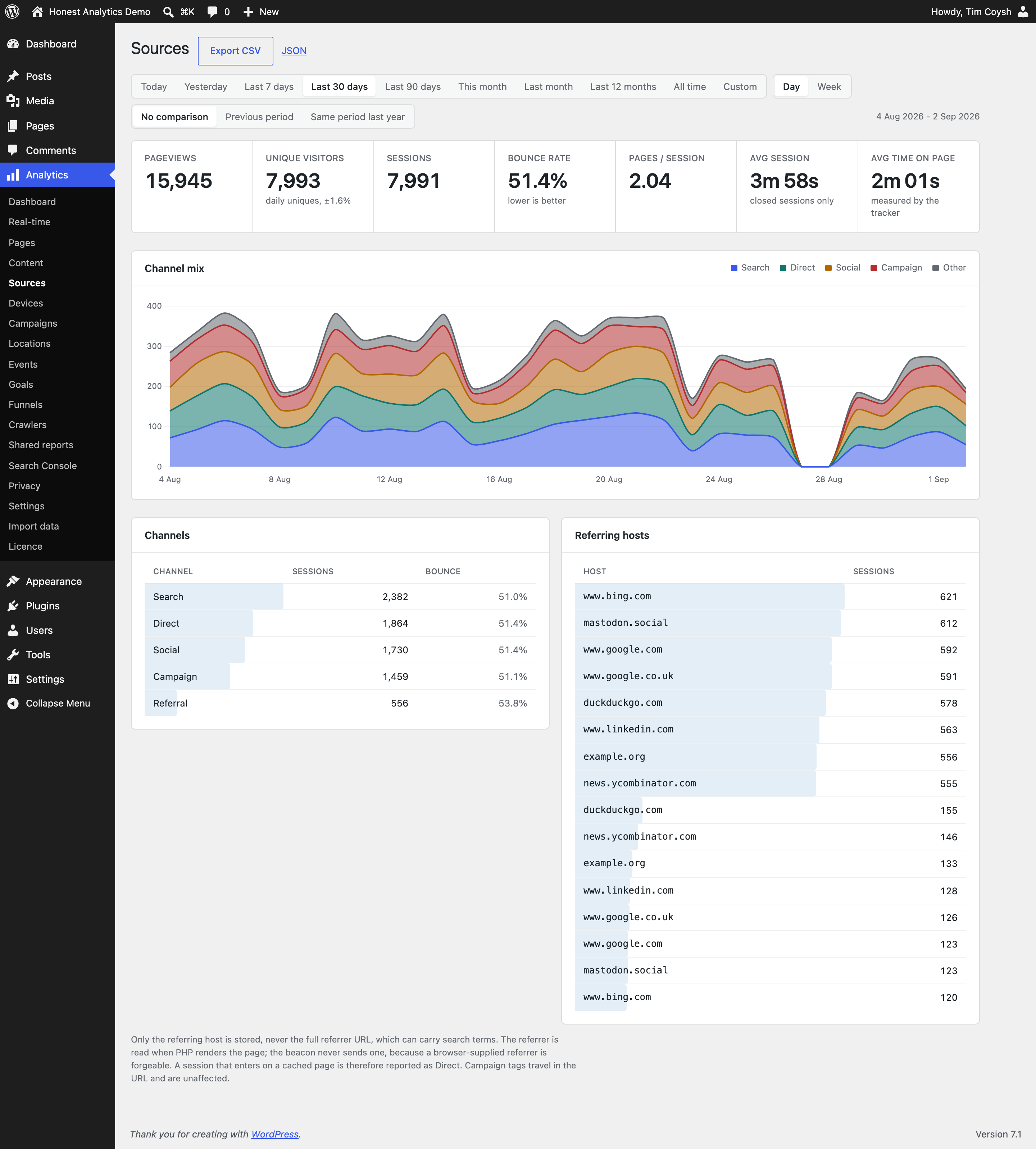
- Sources, and referring hosts
- Devices, browsers and operating systems
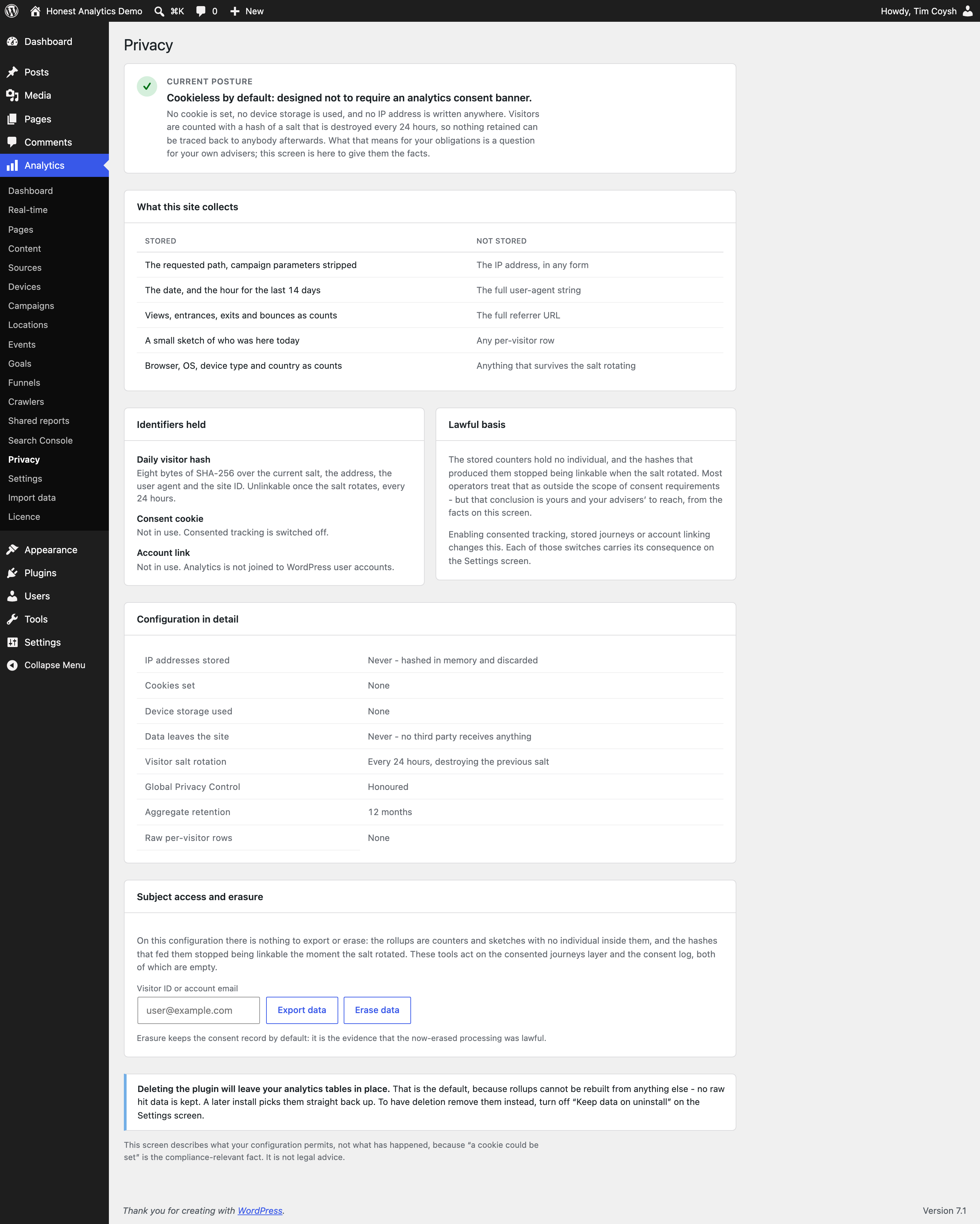
- Privacy, which states exactly what this site stores and what it does not
- CSV and JSON export from every report
- Import your history from Google Analytics, WP Statistics and others
- A signed, read-only reporting API, off until you connect a tool to it
- Two dashboard widgets, a Views column on your post lists, and an analytics panel in the editor
- WP-CLI commands, and multisite support
There are no artificial limits. No row caps, no retention caps, no date-range caps, no nag screens and no countdowns. The free edition is a product, not a trial.
What the paid edition adds
Campaigns, locations, events, goals, funnels, crawler reporting, client-shareable report links, Search Console query data, scheduled email summaries, and integrations with Contact Form 7, Gravity Forms, WooCommerce, WPForms and Ninja Forms. Details are at the plugin’s homepage. It is a one-off payment with no subscription, and it reads the same tables this edition writes – upgrading moves no data and loses no history.
None of it is in this plugin. The paid edition is a separate download, and the code for those reports is removed when this one is packaged rather than switched off – so there is no key to enter here, nothing to unlock, and nothing that stops working.
On compliance
This plugin is cookieless by default and is designed not to require an analytics consent banner in its default configuration. Whether that is true of your site depends on your site, your jurisdiction and what else you run, and this plugin cannot tell you that – nobody’s plugin can. What it can do is tell you exactly what it stores, which the Privacy screen does, in plain words, so that the person advising you has something factual to work from.
Source and releases
The free edition’s full source and every release are on GitHub: github.com/Coysh-Digital/wp-honest-analytics.
External services
This plugin makes no outbound request in the course of measuring your traffic. Nothing about your site or your visitors is sent to us or to anybody else, and there is no telemetry, licence check or update check in the free edition.
One feature contacts somewhere else, and one more answers a request from somewhere else. Both are optional, both are started by an administrator, and neither runs unless you use it.
Google Analytics, when you import your history
If you choose to bring your history over from Google Analytics, the plugin talks to Google on your behalf, using a Google Cloud client that belongs to you and credentials you enter yourself. Nothing happens until you connect an account on the Import screen, and disconnecting revokes the token.
What it contacts:
accounts.google.com– to send you to Google’s own sign-in screen so you can grant access.oauth2.googleapis.com– to exchange that grant for an access token, and to revoke it when you disconnect.analyticsadmin.googleapis.com– to list the Analytics properties your account can see, so you can pick one.analyticsdata.googleapis.com– to read the historical figures for the property and date range you choose.
What is sent: your own OAuth credentials, the property identifier you picked, and the date range and metrics being requested. No data about your WordPress site, its visitors or its content is sent. The access is read-only – the plugin asks for the analytics.readonly scope and nothing more.
This is Google’s service, governed by Google’s terms and privacy policy, not ours: terms, privacy policy. The API is documented at Google Analytics Data API.
A reporting tool you connect, if you connect one
The plugin can let an external reporting tool read this site’s figures. It is off until an administrator pastes a connection code into Analytics -> Reporting API, and clearing that code switches it off again.
This one runs the other way round from the one above: the plugin makes no request, it answers one. A tool holding the code can ask for the same aggregate figures the dashboard already shows – pageviews, sessions, bounce rate, top pages, sources, devices – for a date range it names. Requests are signed with the code rather than carrying it, are refused if the signature is older than a few minutes or is replayed, and are read-only. There is no visitor-level data in the reply because there is none in the tables.
Which tool that is, and whose terms govern it, is your choice: the plugin has no service of its own at the other end and no address built into it. Nothing is sent anywhere until you save a code.
What is not a third party
Once a day the plugin asks your own site two questions: whether the collection endpoint still answers, and whether the write spool is readable over the web. Those are HTTP requests, so they show up in a search for wp_remote_get, but they go to your own address and nowhere else. They exist because neither fact can be settled any other way – a security plugin can disable the REST API without saying so, and the rule written at activation does nothing on nginx.
Screenshots

Installation
- Upload the plugin and activate it.
- Visit Analytics in the admin menu.
- If your site is behind a full-page cache, read Scheduling – WP-Cron barely runs on a cached site, and aggregation needs a real schedule.
Requires WordPress 6.4+, PHP 8.1+, MySQL 5.7+ or MariaDB 10.4+.
FAQ
-
In the default configuration no cookie is set, no identifier persists past the day, nothing is stored per person and no third party is involved. Many operators treat that as outside consent requirements. Whether it is outside yours is a question for whoever advises you on it – this plugin will not tell you that you are compliant, because it is not in a position to know.
The Privacy screen states exactly what the configuration permits, in as many words, so that conversation can start from facts.
-
Why are my numbers different from Google Analytics?
-
Usually higher, because content blockers do not stop server-side counting. Where they are lower it is normally GPC: visitors who ask not to be counted are not counted, at all.
-
Can I import my history from Google Analytics?
-
Yes, and from the free edition – GA4 import is not held back for the paid one. Analytics -> Import data connects to the property, shows you the range Google has, and brings it across a chunk at a time; progress is saved as it goes, so you can close the tab and come back. Only permission to read is requested, nothing is written back to Google, and the connection can be removed from the same screen.
The one-off part is Google’s: nothing may read your analytics until you have registered the thing asking. That is free, needs no card, and takes about five minutes. The Import screen prints each step with your own site’s values already filled in.
WP Statistics and Independent Analytics import too, and those need no setup at all – the data is already in your database. Expect pageviews to line up closely and visitor counts not to: GA4 counts users its own way, and a unique visitor here is a daily estimate. Importing the same dates again replaces what was imported before rather than doubling it.
-
Why do unique visitors not add up across days?
-
Because the identity is destroyed every 24 hours. Unique visitors are daily estimates, and adding two days together would double-count anybody who came on both. The plugin merges the underlying sketches rather than summing them, and says so wherever the number appears.
-
Does it work without JavaScript?
-
Yes, in server mode. In the default hybrid mode a visitor without JavaScript is still counted by the server, as long as the page was not served from cache.
-
Can I export my data?
-
Yes. CSV and JSON from every report screen, and through WP-CLI, in the free edition. Exports are protected against spreadsheet formula injection.
-
Do I need cron, or a terminal?
-
Neither. Counting works on hosting with no scheduled tasks at all: ordinary page views drive the drain, the nightly tidy-up runs from the first admin page load of the day, and the identity salt rotates lazily when it falls due. Maintenance also has buttons on the Settings screen, so nothing the plugin needs doing requires WP-CLI. If you do have cron, it makes the figures slightly fresher on a busy site, and that is all it changes.
-
Does it support multisite?
-
Yes. Each site gets its own tables, settings and reports.
-
Does it phone home?
-
No. Nothing about your site, your traffic or your use of the plugin is ever sent anywhere, and there is nothing in it that reports back – no telemetry, no licence check, no update check, no remote configuration.
The plugin makes one kind of outbound request, which you start and which sends us nothing: importing your history from Google Analytics. It can also answer a reporting tool you connect to it, which is off unless you do. It calls your own site once a day to check that the collection endpoint answers and that the write spool is not readable over the web. External services below says exactly what each one is.
-
What happens to my data if I upgrade to the paid edition?
-
Nothing. Both editions read and write the same tables, so your history appears unchanged. Downgrading is equally safe: the tables are left alone and the paid reports simply stop being rendered.
-
What happens if I delete the plugin?
-
By default the tables are kept, because the rollups cannot be rebuilt from anything else – there is no raw hit data to replay. Deleting them is an option on the Settings screen that you have to choose deliberately.
Reviews
There are no reviews for this plugin.
Contributors & Developers
“Honest Analytics” is open source software. The following people have contributed to this plugin.
Contributors
Translate “Honest Analytics” into your language.
Interested in development?
Browse the code, check out the SVN repository, or subscribe to the development log by RSS.
Changelog
0.9.8
- Fixed: The tracking endpoint now accepts only the fields the tracking script sends, and cleans each one with the WordPress function suited to it before anything reads it. No change to what is counted.
- Fixed: Every database statement is now written out in full where it is prepared, with nothing assembled from a variable. No change to what you see.
- Fixed: Request details, cookies and every form field are sanitised as they are read, every form checks its nonce where it reads the form, and admin output and error messages are escaped.
0.9.7
- Changed: When the free and paid editions are active at the same time, the plugin now shows a notice asking you to deactivate one, rather than deactivating one for you. Nothing is moved or deleted either way.
- Fixed: The uploads folder is found through WordPress’s own function, so a site that has moved its uploads directory is handled correctly.
- Fixed: A pass over the whole plugin, prompted by the WordPress.org review, to bind every database query through WordPress’s identifier and value placeholders, load no core files it does not need, and load translations on the right hook. No change to what you see.
0.9.6
- Fixed: On sites deployed by git, the reports could draw no charts because a bundled library folder named “vendor” was stripped on its way to the server. The bundled files now sit under a differently named folder and load reliably.
0.9.5
- Fixed: An update that left the plugin’s own files and the libraries beside them on different versions made the Analytics screens answer “Sorry, you are not allowed to access this page”. The plugin now carries on working from its own files and tells you to reinstall, rather than standing down and leaving you with an error that explains nothing.
0.9.4
- Fixed: If an update did not finish – the plugin’s own files updated but the libraries beside them left behind, which an upload-over-the-top can do – the plugin could take the admin down with it. It now notices, declines to load, and tells you that reinstalling fixes it and takes nothing with it.
0.9.3
- Changed: The paid reports no longer appear anywhere in this edition. They were listed in the Analytics menu, each leading to a page describing what the report contains, with a matching note where the card would be on the Dashboard and the page detail view. The intent was that people could find out the reports existed; the effect was a menu of features this plugin does not have, which reads as functionality being held back. What the paid edition adds is described above, in the readme, and nowhere else.
- Changed: Everything behind those reports has been removed from this edition too, rather than left in place behind a check – goals, funnels, the consented tracking layer, stored journeys, country lookup and the report queries that read them, along with the geolocation library none of it could use. The plugin is about fifty kilobytes smaller and contains nothing that a licence would switch on.
- Added: The External services section now describes the reporting API, which lets a reporting tool you connect read this site’s aggregate figures. It is off until you paste a connection code, and clearing the code switches it off.
- Fixed: The Dashboard widget’s settings form now checks its own nonce and capability before saving your choice of range and metrics, rather than relying on the check WordPress does around it.
- Fixed: Two admin screens printed a style block into the page instead of enqueueing it. Both now go through the stylesheet the rest of the admin uses.
- Fixed: Translations are no longer loaded twice. WordPress.org serves this edition its own language packs and has loaded them without being asked since 4.6.
- Fixed: External services no longer describes downloading a geolocation database. Country reporting is part of the paid edition, so this one never made that request; the section now lists only what this edition actually contacts.
- Fixed: A further sweep for anything that only made sense in the paid edition removed the last of it – the shared half of the form integrations, the country-name and attribution lookups, the unfinished Google connection broker, and the call that loads translations this edition gets from WordPress.org anyway.
- Changed: This edition no longer contains any reference to the paid one – not a licence key field, not an edition check, not a menu row. It is a complete plugin that publishes hooks; the paid edition is a separate package that attaches to them.
- Fixed: Deactivating the plugin left one scheduled task behind. It did nothing and was dropped the moment it fired, but it stayed in your database until the plugin was installed again.
0.9.2
- Changed: The setup wizard covers more, and its welcome now appears on the plugins screen as well – which is where WordPress lands after activation. The wizard adds four settings beside the original three: whether your own signed-in team is counted, whether known bots are kept out of the numbers, whether query parameters like utm_source are ignored so one page is not split into many, and whether your history is kept or removed if the plugin is ever deleted. All remain optional, and all still live on the Settings screen.
0.9.1
- Added: An optional first-run setup wizard. A newly activated site shows a dismissible welcome, on the plugin’s own screens and the main dashboard, offering to set how visits are counted, how long data is kept, and which browser privacy signals are honoured. It is optional in every sense: the plugin counts from the moment it is activated, everything the wizard offers also lives on the Settings screen, and the welcome never returns once it is finished or skipped.
- Fixed: A twelve-month scheduled report covered twelve days. The period was read with a digits-only pattern, so “12mo” became twelve days and the email described a fortnight while calling itself a year. Each period is now read off what it actually covers.
0.9.0
- Added: An “All time” range on every report screen and on the dashboard widget. It starts at the earliest day anything was recorded, imported history included, and the chart grouping offers Year once the span is long enough.
- Added: The write spool warning can now be put away for good as well as snoozed for thirty days. Dismissing it silences the notice only; the Settings screen, the site health check and WP-CLI all still report the fault.
- Fixed: Changing the date range while reading one page’s report returned you to the Pages list. Every range, grouping and comparison control now keeps the page you are looking at, and so does the custom date picker.
- Fixed: The “When people visit” card said “Last 7 days” whatever it had actually covered. It now names the dates it drew, says when the selected range asked for more hourly detail than is kept, and links to the setting that widens it.
- Fixed: A period older than the hourly window said “Nothing to show here yet”, which read as though nobody had visited. It now explains that the hour of each visit is no longer kept for that period, and that the pageviews themselves are still counted.
- Changed: “Replace or remove the database” on the Locations screen is a button rather than a line of text.
0.8.5
- Fixed: Removing the geo database used a function the plugin guidelines discourage, behind a suppression comment that had never applied. It now uses the WordPress function for deleting a file, so a host that filters deletions sees this one.
- Fixed: One file looked as though it was missing its guard against being loaded directly. It was not missing – it sat below a long list of imports, past the point the directory’s own checker stops looking.
- Changed: The package now carries composer.json beside the vendor directory it produced, so what is bundled can be read without unpacking anything.
- Changed: The third-party licence list moved to licenses/, out of the plugin root.
0.8.4
- Changed: The readme said the free edition makes no outbound request at all, and it does – the optional Google Analytics import and the geo installer both reach a third party. The claims now say what is true: nothing leaves your server while it counts.
- Changed: A new External services section names every endpoint those two optional features contact, what is sent, and whose terms govern it.
- Changed: The changelog and the upgrade notices cover every released version again, rather than stopping at 0.5.0.
- Fixed: The Plugin URI header pointed at a page that does not exist.
- Fixed: A warning told the user to read a file that is not shipped inside the plugin. It now links to it.
- Fixed: The Settings screen understated the tracker by half a kilobyte.
- Fixed: Screenshots of the block editor had a modal across the middle of them.
0.8.3
- Changed: Nine reports stopped sorting half a kilobyte per row to produce an eight-byte answer.
- Changed: The per-page trend finds its pages by id rather than by matching their text.
0.8.2
- Changed: Finished periods are worked out once rather than on every render.
0.8.1
- Fixed: Translations were four versions out of date.
- Fixed: Dates in sentences ignored the format set in Settings > General.
- Fixed: Compact numbers and percentages could not be translated.
- Fixed: Two rows of the privacy table could have silently become one.
- Fixed: A different copy of the charting library broke the charts instead of standing down.
- Fixed: A drain that threw on one site of a network wrote the rest into it.
0.8.0
- Added: A count of the views that were dropped, on the Settings screen.
- Changed: The drain reads the sessions it needs in one query rather than one each.
- Changed: A health probe left behind by a request that was killed is cleared up.
- Changed: The first step of the import wizard asks the database once instead of six times.
- Fixed: A broken coverage table read as “nothing has been imported yet”.
- Fixed: Stopping an import left the progress bar moving underneath the message.
- Fixed: An import started without JavaScript waited five minutes for its first batch.
- Fixed: A day cut short by the size of a Google Analytics report was recorded only in the debug log.
- Fixed: Google imports ignored their time budget.
- Fixed: Native rows and imported rows could be written to each other’s row.
- Fixed: A repeating value the cardinality cap had refused cost a query every time it appeared.
0.7.0
- Changed: “How many visitors” is one row a day rather than every row in the range.
- Changed: The reports on Pages, Sources, Devices, Content and Crawlers are cached.
- Changed: Content by post type, taxonomy and author reduces the traffic to one row per post before joining.
- Changed: The spool file handling moved out of the drain into its own class.
- Changed: The import wizard works out a date range in one place.
0.6.0
- Added: Pages on client-routed themes are counted.
- Added: The Settings screen says when a day’s page views have stopped being attributed.
- Changed: Closing a batch of visits writes hundreds of rows rather than hundreds of thousands of statements.
- Changed: The top-pages report groups on an eight-byte key rather than a five-hundred-byte one.
- Changed: Scroll depth asks the database for the rows it is going to show.
- Changed: The orphaned-dimension sweep runs weekly rather than nightly.
- Changed: The health check asks the loopback question once per request.
- Changed: Schema::tableExists() is memoised per request.
- Changed: The live counter and the import progress figures use the site’s locale.
- Changed: Translations load on init rather than plugins_loaded.
- Changed: Three public filter callbacks accept mixed.
- Changed: Tested up to says 7.1.
- Changed: The admin fallback no longer runs on background requests.
- Changed: Indexes for the maintenance sweep and the single-page reports.
- Changed: The Privacy export asks two indexed questions instead of one unindexed one.
- Changed: Static analysis runs at level 8, and against the whole supported PHP range.
- Changed: PHP compatibility is checked by something that knows about PHP after 8.0.
- Changed: A second consent rate limit, on the address alone.
- Changed: The Pages screen makes one query for its post links, not two hundred.
- Changed: The auto-drain asks whether the write queue has a row rather than counting them all.
- Changed: Removed assets/admin/js/settings.js, which was shipped in both builds and loaded by neither: nothing enqueued it, and none of the markup it enhances exists any more.
- Changed: The key-value table is swept a little on every drain, in chunks.
- Changed: Fewer writes per request on sites without an object cache.
- Changed: A gzipped geo database upload is bounded on its decompressed size as well as its downloaded one.
- Fixed: A wizard step posting a nested option took the import screen down.
- Fixed: Another plugin adding an inline script could stop tracking altogether.
- Fixed: On a network, whichever edition loaded first silently won.
- Fixed: Network activation and deactivation stopped at 200 sites.
- Fixed: Every site in a –network command inherited the first site’s edition.
- Fixed: Loopback health checks failed on staging.
- Fixed: “1 year, 1 months”.
- Fixed: A visitor’s page load could drain the whole write queue.
- Fixed: One unreadable row in the write queue blocked everything behind it, for ever.
- Fixed: Closing idle visits could never finish on a site using an object cache.
- Fixed: Orphaned sessions were cleared at five thousand a night whatever had piled up.
- Fixed: An import batch killed outright was retried for ever.
- Fixed: Two things could advance the same import at once.
- Fixed: Compaction could run a site out of memory and then stall for good.
- Fixed: A lost scheduled event was never put back.
- Fixed: Health could never report a full write queue.
- Fixed: A resumed spool file re-read everything it had already committed.
- Fixed: A site upgraded without anybody visiting the admin dropped hits until somebody did.
- Fixed: A failed migration was never retried, and could leave a table without its unique key.
- Fixed: An import could commit a day it had emptied and never written.
- Fixed: A replace that failed part way deleted history without putting any back.
- Fixed: Compaction destroyed anything written while it was thinking.
- Fixed: Two tidy-ups could run at once.
- Fixed: A salt that could not be saved made every visitor a new visitor.
- Fixed: Only the last day’s folded unique counters were ever discarded.
- Fixed: Declaring an Independent Analytics install to store UTC did nothing.
- Fixed: A report table whose column had been renamed took the screen down with it.
- Fixed: A date could disappear from a report with nothing to say why.
- Fixed: Deleting the plugin could stop half way through and leave the tables behind.
- Fixed: A stale or foreign transient could stop the Google connection screens drawing.
- Fixed: Every date on every screen was a day early west of Greenwich.
- Fixed: The orphaned-dimension sweep could delete dimensions that were in use.
- Fixed: Two more writes inside the drain transaction were unchecked.
- Fixed: The real-time figure on the Dashboard stopped counting at 200.
- Fixed: A drain batch whose write failed was recorded as committed.
- Fixed: A session staged for closing by a batch that never committed was never closed.
- Fixed: Compaction zeroed the imported visitor count.
- Fixed: Session deltas are applied inside the drain transaction.
- Fixed: Uninstall with “keep data” off now removes everything.
- Security: The geo database sat at a guessable, downloadable address.
- Security: A directory that lost its guard files never got them back.
- Security: The Google client secret is encrypted at rest.
- Security: The connection broker address is pinned to https.
- Security: The GA4 property is validated rather than sanitised.
- Security: The user agent and the referrer are reduced in the request that saw them, not at the drain.
- Security: The Cloudflare address source is verified rather than trusted.
- Security: Google refresh tokens are encrypted at rest.
- Security: The geo database download refuses private addresses and has a size ceiling.
- Security: A second beacon rate limit, on the address alone.
0.5.0
- Nothing in this release affected the free edition.
0.4.0
- Changed: Search Console now has the same hosted-broker groundwork Google Analytics already had. Neither broker filter is set anywhere, so every site keeps connecting with its own Google Cloud client exactly as before.
0.3.0
- Nothing in this release affected the free edition.
0.2.3
- Added: comparison now shows on the Devices and Sources screens, and every ranked table (Pages, Devices, Sources) shows a per-row change alongside the headline figures.
- Added: Locations shows full country names, a shaded world map, and a breakdown by region.
0.2.2
- Nothing in this release affected the free edition.
0.2.1
- Fixed: “No comparison” still showed a percentage change against the previous period on every headline figure. It is now silent about change when no comparison is active.
- Fixed: the comparison line’s tooltip and legend named only the period, which read as its own metric. It now names the metric too, e.g. “Pageviews vs same period last year”.
0.2.0
- Added: a date range spanning more than one year now shows the year on the chart.
- Added: trend charts can be grouped by day, week, month or year, independently of the date range.
- Added: compare a period against the one before it, or the same period last year, with a second line on the chart and a percentage change on every headline figure.
- Added: the date range, grouping and comparison chosen on one screen now follow you to the next.
- Added: the write-spool warning can now be dismissed for thirty days at a time.
- Changed: rollup retention now defaults to thirty-six months, up from twenty-six.
- Fixed: history brought in from Google Analytics, WP Statistics or Independent Analytics is now kept regardless of the retention setting, instead of being deleted the night after import.
- Fixed: a day mixing native traffic with already-imported history could be merged into one row by the nightly tidy-up, losing which source it belonged to.
- Fixed: the Google Analytics import range step could claim a property had one day of data when it had years.
0.1.2
- Fixed: a failed Google Analytics connection said one generic sentence for every cause. A mismatched redirect address, an unrecognised Client ID or secret, and a Google Analytics API that is not switched on yet now each say which one it was.
- Fixed: a wrong Client ID or secret looked exactly like an expired connection, and told you to reconnect – which failed again the same way. It now says the sign-in details do not match.
- Added: the Google setup guide links straight to enabling each required API, instead of sending you to search for it.
- Added: the Client ID field flags an obviously wrong paste before it round-trips through a Google error.
0.1.1
- Fixed: connecting to Google Analytics went to the dashboard and stopped, because the redirect to Google’s sign-in screen was treated as though it were a link back to your own site.
- Fixed: every outcome of that connection was silent. A cancelled sign-in, a misconfigured Google project and a successful connection now each say what happened.
- Fixed: on the free edition, the admin could log a PHP warning on every page in the Analytics menu.
- Added: full setup instructions for Google Analytics, in the plugin and in the documentation.
- Added: the geo database installs from the Locations screen, and maintenance runs from buttons on Settings, so neither needs a terminal.
- Added: the offer to import from another analytics plugin now goes away once you have taken it up.
0.1.0
- First release.