

Description
EveryPage turns your PDFs into secure, trackable share links – and shows you who actually read them, right inside wp-admin. Instead of emailing an attachment or dropping a file on a page and hoping, you get a clean link and a readership report: who opened it, how far they read, how long they spent, and whether they came back.
It is built for anyone who publishes documents meant to do a job – lead magnets, whitepapers, price lists, proposals, reports, course material, media kits – and wants to know how they land.
What you can do
- Upload a PDF from the EveryPage admin and get a secure, trackable share link in seconds.
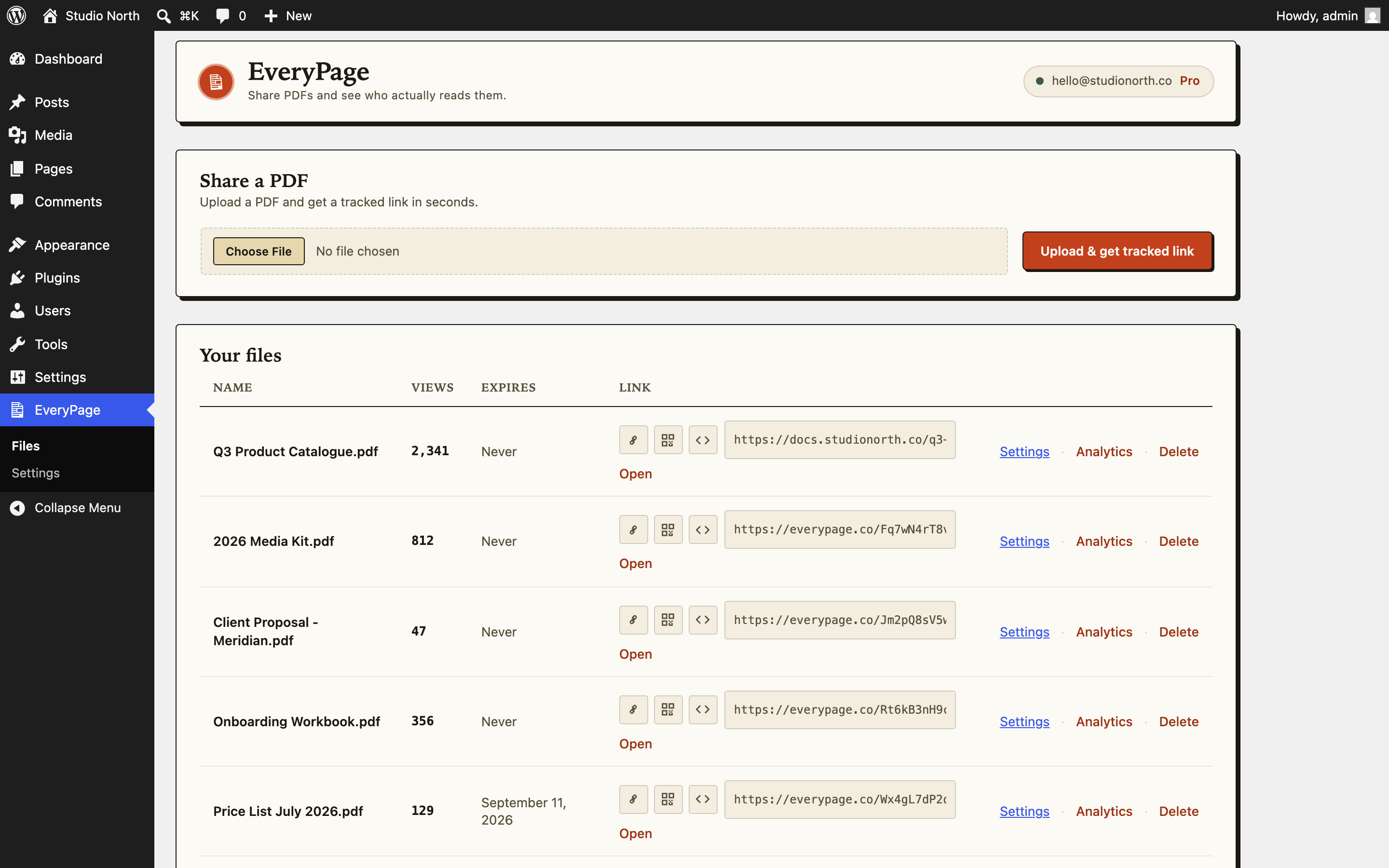
- See all your files with view counts and expiry at a glance, and open the full readership report for any document in one click.
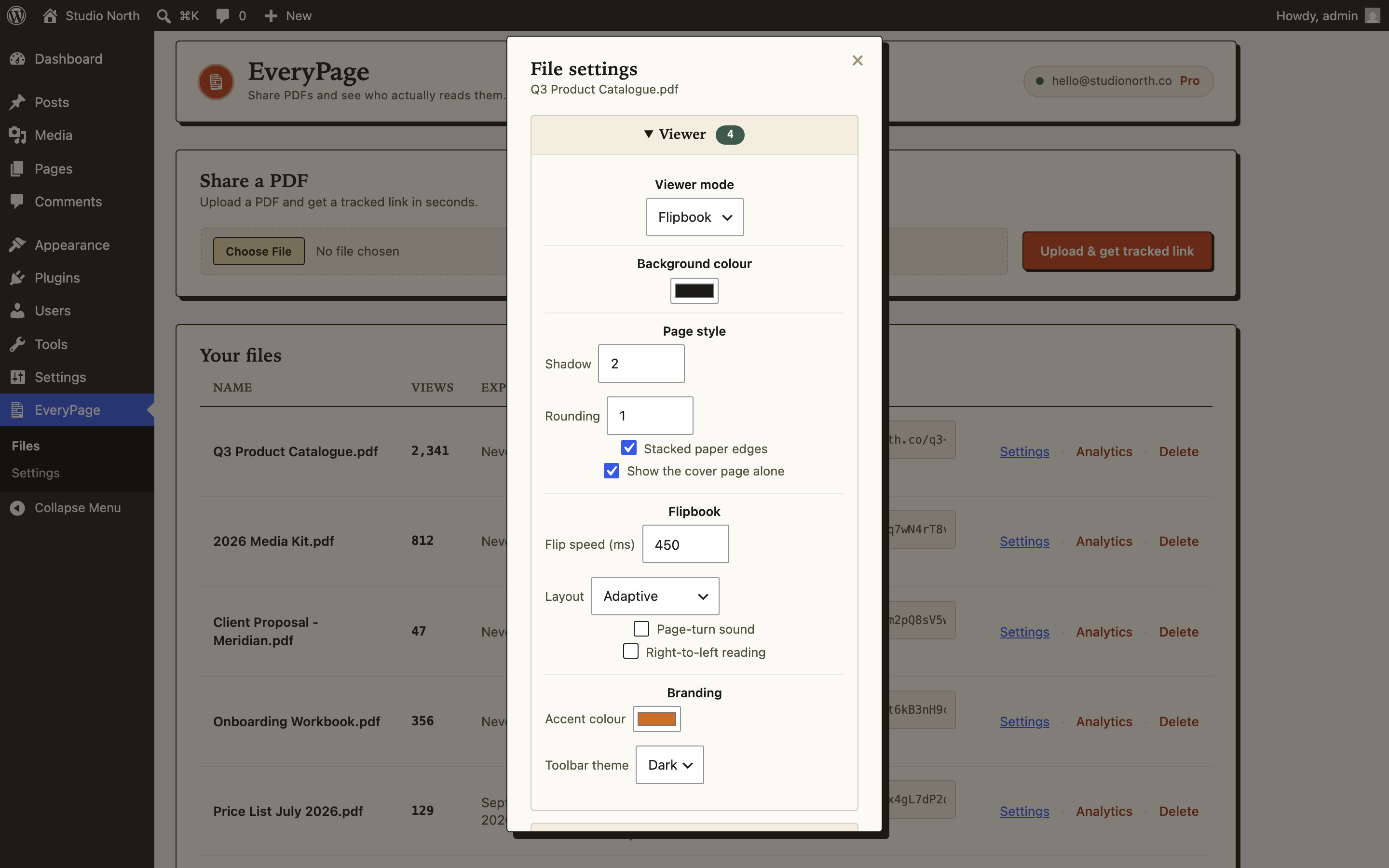
- Edit a file’s settings without leaving WordPress: viewer mode and appearance, download and copy protection, password, view limits, watermarking, email gate and lead-capture form, expiry, vanity slug, and page range – everything your EveryPage plan includes, from a drawer on the Files page.
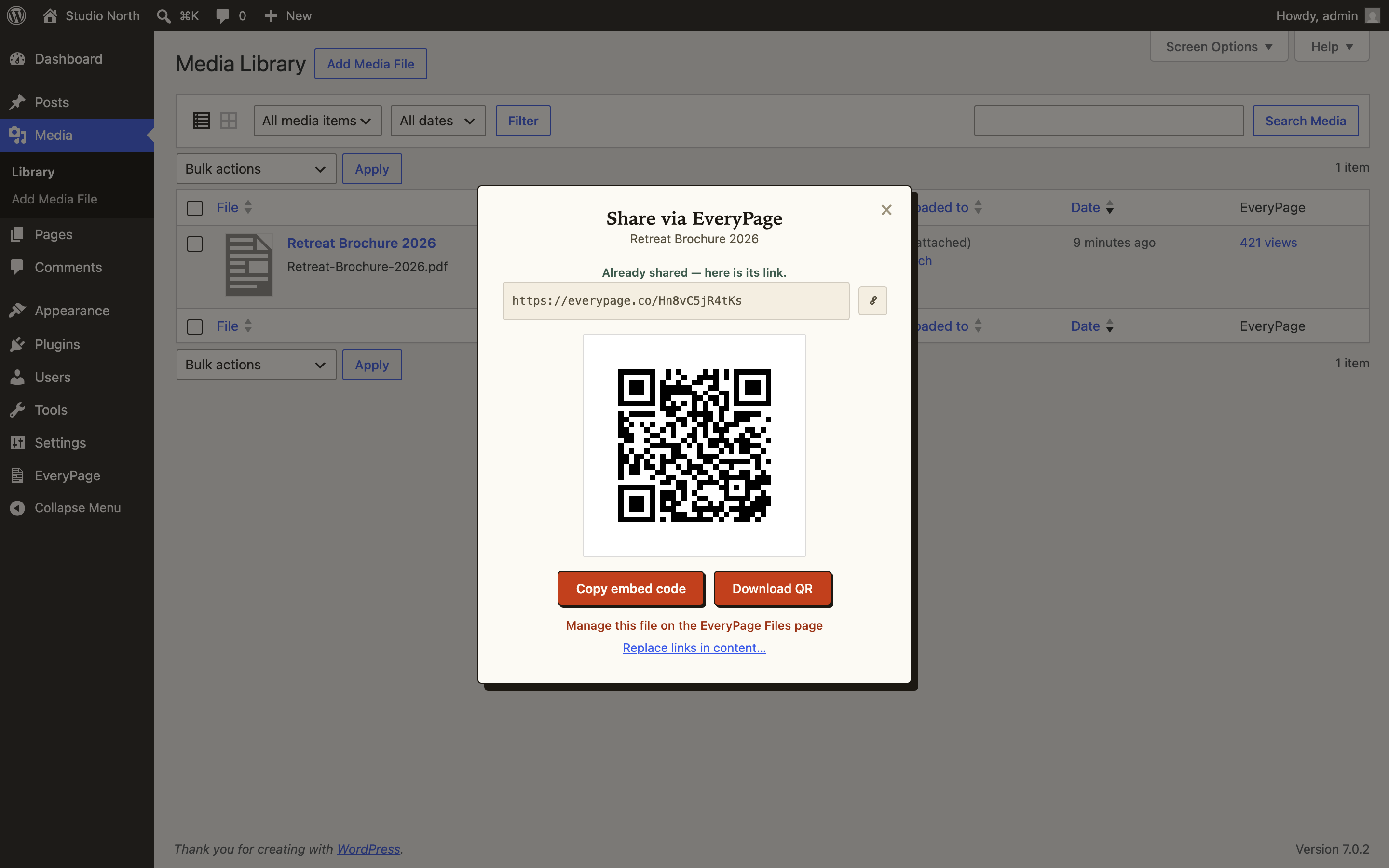
- Share every file three ways from its row: copy the link, show a QR code, or copy a ready-made iframe embed code.
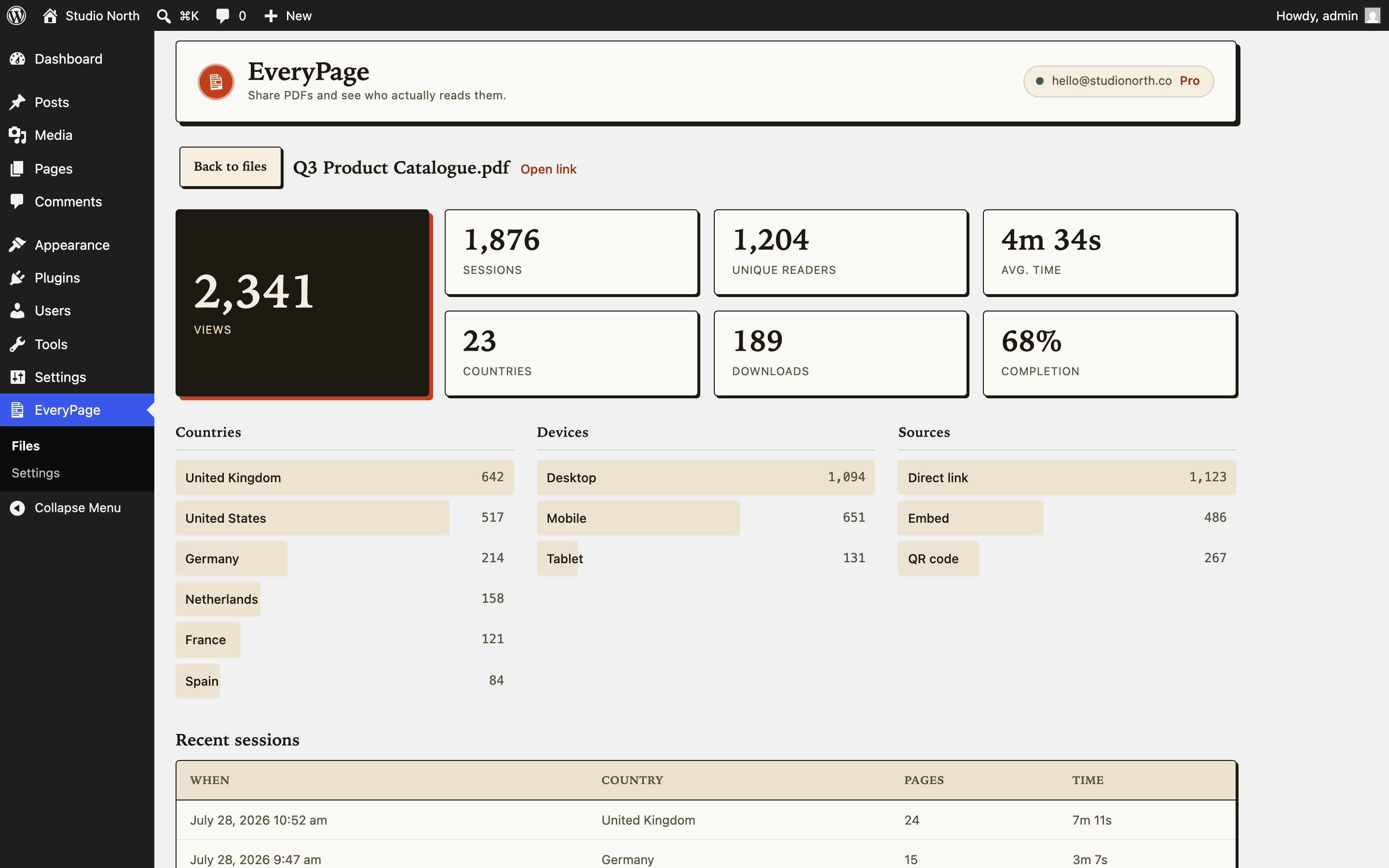
- Read page-by-page analytics: a read-through funnel, time per page, returning readers, and reader country – without storing visitor IP addresses.
- Keep an eye on recent activity from your main dashboard with the “Recent reads” widget (file, reader country, pages read, when).
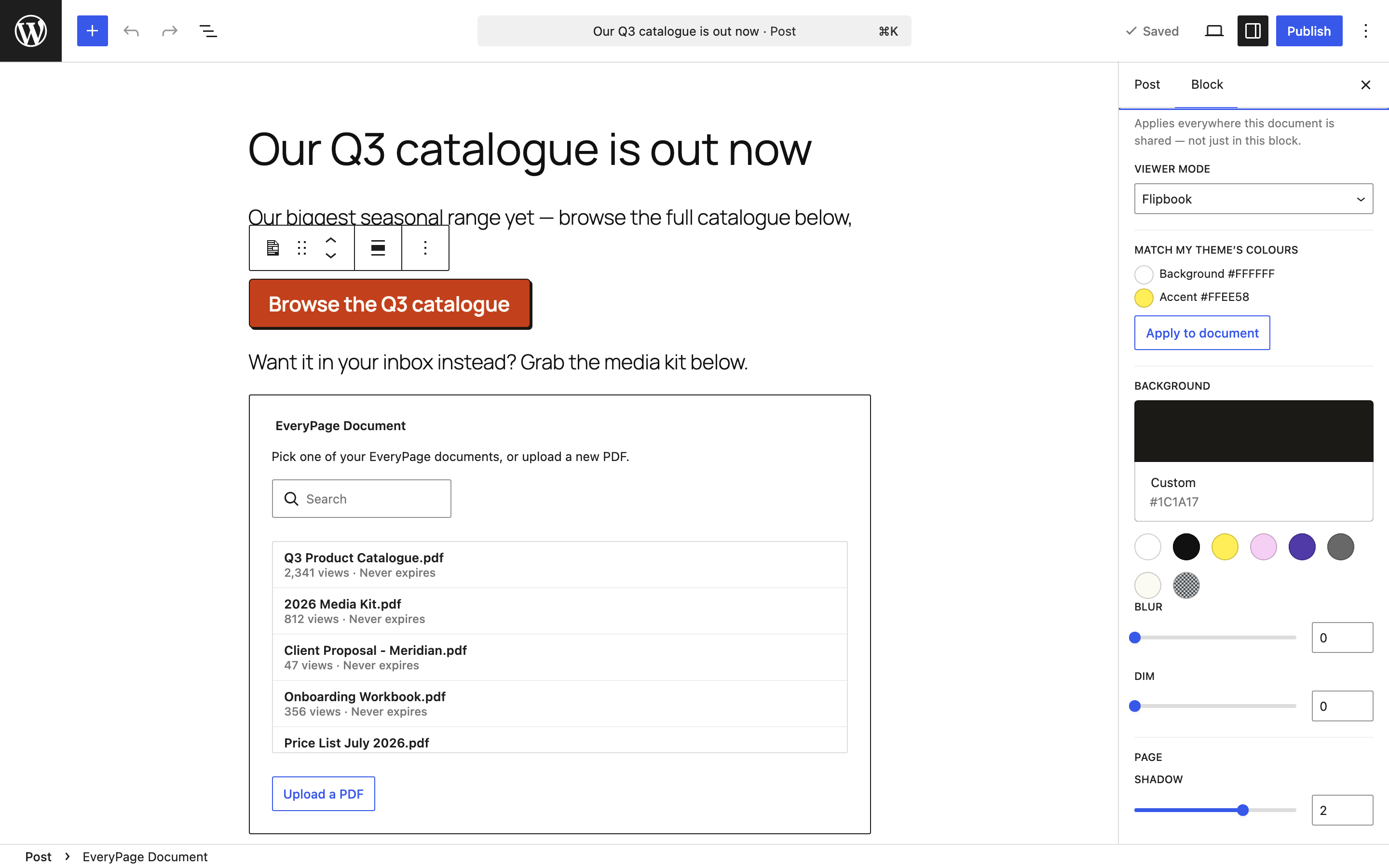
- Add the EveryPage Document block: pick one of your documents (or upload a PDF right from the editor), then embed it inline as a live viewer or as a link/button – with a live preview in the editor.
- Tune a document’s viewer from the block sidebar (viewer mode, background, page effects, protection, branding – per your EveryPage plan), including one-click “Match my theme’s colours”.
- Embed a tracked document anywhere with the
[everypage uuid="..."]shortcode – block editor, classic editor, or widgets. - Generate a QR code for any link and download it as a PNG.
- Share any PDF already in your Media Library: a “Share via EveryPage” row action, a button in the attachment details, and a bulk action – each share gives you the link, QR code, and embed snippet, and an EveryPage column shows view counts at a glance.
- Replace existing links to a Media Library PDF across your posts and pages with its tracked EveryPage link – with a dry-run preview first, an explicit confirm, and your posts’ revision history keeping the previous versions.
- Bring captured leads into WordPress: when a reader completes your email gate or lead-capture form, the plugin fires the
everypage_lead_capturedaction so MailPoet, FluentCRM, Newsletter, WP Fusion, or three lines of your own code can add them to a list (EveryPage Pro). - Build with Elementor instead of the block editor? The EveryPage Document widget renders the same tracked viewer, embedded or as a button.
Leads, in WordPress
Documents that ask for an email – a lead-capture form or the simple “Require email to view” gate – collect readers’ details on EveryPage. Turn on lead sync (EveryPage -> Settings) and the plugin checks hourly for new ones and fires an action hook for each:
add_action( 'everypage_lead_captured', function ( $lead ) {
    // $lead['email'], $lead['fields'], $lead['file_uuid'], $lead['file_name'], $lead['source']
} );
Optionally, each new lead can also be created as a WordPress subscriber. Leads captured before you switch sync on are left alone, so turning it on never floods your list with old contacts. Lead capture and reporting require an EveryPage Pro plan.
Privacy-first by design
EveryPage measures readership without storing visitor IP addresses – readers are pseudonymous, so you get returning-reader detection and engagement without holding personal data you would rather not be responsible for. Password protection, an email-capture gate, link expiry, and AES-256 encrypted storage are available depending on your EveryPage plan.
You need a free EveryPage account and an API key (Account API keys at everypage.co). This plugin is a client for the EveryPage service (https://everypage.co); PDFs you share are uploaded to your EveryPage account over HTTPS.
Development happens on GitHub: https://github.com/EveryPageApp/everypage-wordpress – issues and pull requests welcome.
External services
This plugin is a client for EveryPage (https://everypage.co), the external service it depends on to store and share your PDFs and to report readership analytics. A free EveryPage account and an API key are required.
The plugin sends data to EveryPage over HTTPS only when you actively use it:
- When you upload a PDF (EveryPage -> Files), that PDF file is sent to your EveryPage account to create a secure, trackable share link.
- When you share a PDF from your Media Library (row action, attachment details, or bulk action), that PDF file is read from your server and sent to your EveryPage account the same way.
- When you view your files, a file’s analytics, or the “Recent reads” dashboard widget, the plugin sends authenticated requests to read that data.
- When you open a file’s QR code, the plugin requests the QR image for that file.
- When lead sync is switched on, the plugin asks EveryPage hourly for leads captured since the last check, and for the reader details recorded against documents using the “Require email to view” gate. Those leads are then stored in your WordPress database, which makes you – not EveryPage – responsible for them under your own privacy policy.
- When you use the EveryPage Document block or the Elementor widget in the editor, the plugin lists your files, uploads a PDF you choose, or saves viewer settings – all server-side; your API key is never sent to the browser. A published embed loads the document viewer from everypage.co in visitors’ browsers (no API key involved).
Every request includes your EveryPage API key as a bearer token. Nothing is sent until you take one of the actions above, and the plugin contacts no other external service.
Service provided by EveryPage. Terms of Service: https://everypage.co/terms – Privacy Policy: https://everypage.co/terms
Screenshots
Blocks
This plugin provides 1 block.
- EveryPage Document Embed a tracked EveryPage PDF inline, or link to it with a styled button.
Installation
- Upload the
everypagefolder to/wp-content/plugins/, or install the zip via Plugins Add New Upload. - Activate the plugin.
- Go to EveryPage Settings, paste your API key (from everypage.co/account API keys), and save.
FAQ
-
Where do I get an API key?
-
Create one at everypage.co/account under “API keys”. It starts with
ep_live_. -
Is my API key stored securely?
-
It’s stored in your site’s options table and sent only to everypage.co over HTTPS. Treat it like a password; revoke it anytime from your EveryPage account.
-
Where are my PDFs stored?
-
On your EveryPage account, encrypted at rest – not in your WordPress media library or on your host. The plugin uploads the file to EveryPage over HTTPS and stores only the resulting share link.
-
Does it slow down my site?
-
No. The plugin only contacts EveryPage from wp-admin when you upload or view a file; nothing runs on your public front-end except the optional
[everypage]shortcode where you place it. API responses are cached briefly so admin screens stay responsive. -
No. EveryPage measures readership first-party and never stores visitor IP addresses; readers are pseudonymous. The plugin contacts no service other than EveryPage.
-
What EveryPage plan do I need?
-
The Free plan covers core readership (views, readers, time spent) on up to 3 PDFs, no card required. Page-level analytics, password protection, the email gate, longer expiry, and more files come with the paid plans. See everypage.co/pricing.
-
Yes. On any PDF attachment you’ll find a “Share via EveryPage” row action, a button in the attachment details, and a bulk action. Each share gives you the tracked link, a QR code, and an embed snippet, and the plugin can optionally rewrite existing links to that PDF in your posts and pages (with a dry-run preview and an explicit confirm first).
-
Can I embed a tracked PDF in a post or page?
-
Yes. Add the EveryPage Document block, pick (or upload) a PDF, and choose between an inline embedded viewer and a link/button. In the classic editor or a widget, use the
[everypage uuid="..."]shortcode instead. You can also simply paste an EveryPage share link on its own line – with the plugin active it embeds the full tracked viewer, like a YouTube link would. -
Who can use the EveryPage Document block?
-
Any user who can upload files can pick or upload documents. Viewer settings (mode, background, branding) apply everywhere a document is shared, so changing them from the block sidebar is limited to administrators. Your API key stays on the server; the editor talks to EveryPage through the plugin only.
Reviews
There are no reviews for this plugin.
Contributors & Developers
“EveryPage – PDF Viewer, Flipbook Embeds & Reader Analytics” is open source software. The following people have contributed to this plugin.
Contributors
Translate “EveryPage – PDF Viewer, Flipbook Embeds & Reader Analytics” into your language.
Interested in development?
Browse the code, check out the SVN repository, or subscribe to the development log by RSS.
Changelog
1.2.0
- New: lead sync – captured emails and form fills arrive in WordPress and fire the
everypage_lead_capturedaction for your mailing-list or CRM plugin, with an option to create a subscriber account for each one (requires EveryPage Pro). - New: EveryPage Document widget for Elementor, rendering the same tracked viewer as the block.
- Leads captured before you enable sync are left alone, so switching it on never replays your history into your mailing list.
- The block, the Elementor widget, and the
[everypage]shortcode now share a single render path, so their output can never drift apart. - Tested up to WordPress 7.1.
1.1.0
- New: per-file settings drawer on the Files page – edit viewer, protection, capture, and link settings in one place. Controls above your EveryPage plan stay visible but disabled, with an upgrade link.
- New: copy-embed button on every file row, completing the share trio: copy link, QR code, and iframe embed code.
- Improved: file rows now prefer the short share URL, and show your custom-domain vanity URL when one is configured.
- New: EveryPage Document block – search/pick one of your documents or upload a PDF from the editor, then embed it inline (live viewer) or as a link/button, with a live preview.
- New: per-document viewer settings in the block sidebar (viewer mode, background, page effects, flipbook/swipe options, protection, branding – per your EveryPage plan), plus one-click “Match my theme’s colours”.
- The block and the
[everypage]shortcode now share one renderer; the shortcode is unchanged. - New: Media Library integration – “Share via EveryPage” on any PDF attachment (row action, attachment details, and a bulk action), with copy link, QR code, and embed snippet in one modal, plus an EveryPage column with view counts.
- New: “Replace links in content” – rewrite existing links to a shared Media Library PDF into its tracked EveryPage link, with a dry-run preview and an explicit confirm; post revisions keep the previous versions.
- New: paste an EveryPage share link on its own line in the editor and it embeds the full tracked viewer automatically (the plugin registers everypage.co as a trusted oEmbed provider).
- Now requires WordPress 6.6+.
1.0.0
- Initial public release.
- API-key settings with a connection test, PDF upload, and a files list with view counts and expiry.
- In-admin readership analytics per file (summary, breakdowns, recent sessions).
- QR code for each share link, with a one-click PNG download.
- “Recent reads” dashboard widget and the
[everypage]shortcode. - Responses are cached briefly so admin screens stay responsive; clear errors for oversized uploads; uninstall removes stored settings.