
Description
Sell tickets and collect RSVPs with the free Event Tickets plugin, from the team behind the number one calendar in WordPress.
This plugin makes it easy to sell all different types of tickets with our free Tickets Commerce solution. Create free tickets, collect registrations and generate revenue, and manage attendees for your in-person or virtual events. Plus, it comes with features backed by our world-class team of developers and designers. Easily integrate Event Tickets with your Stripe account or PayPal business account.
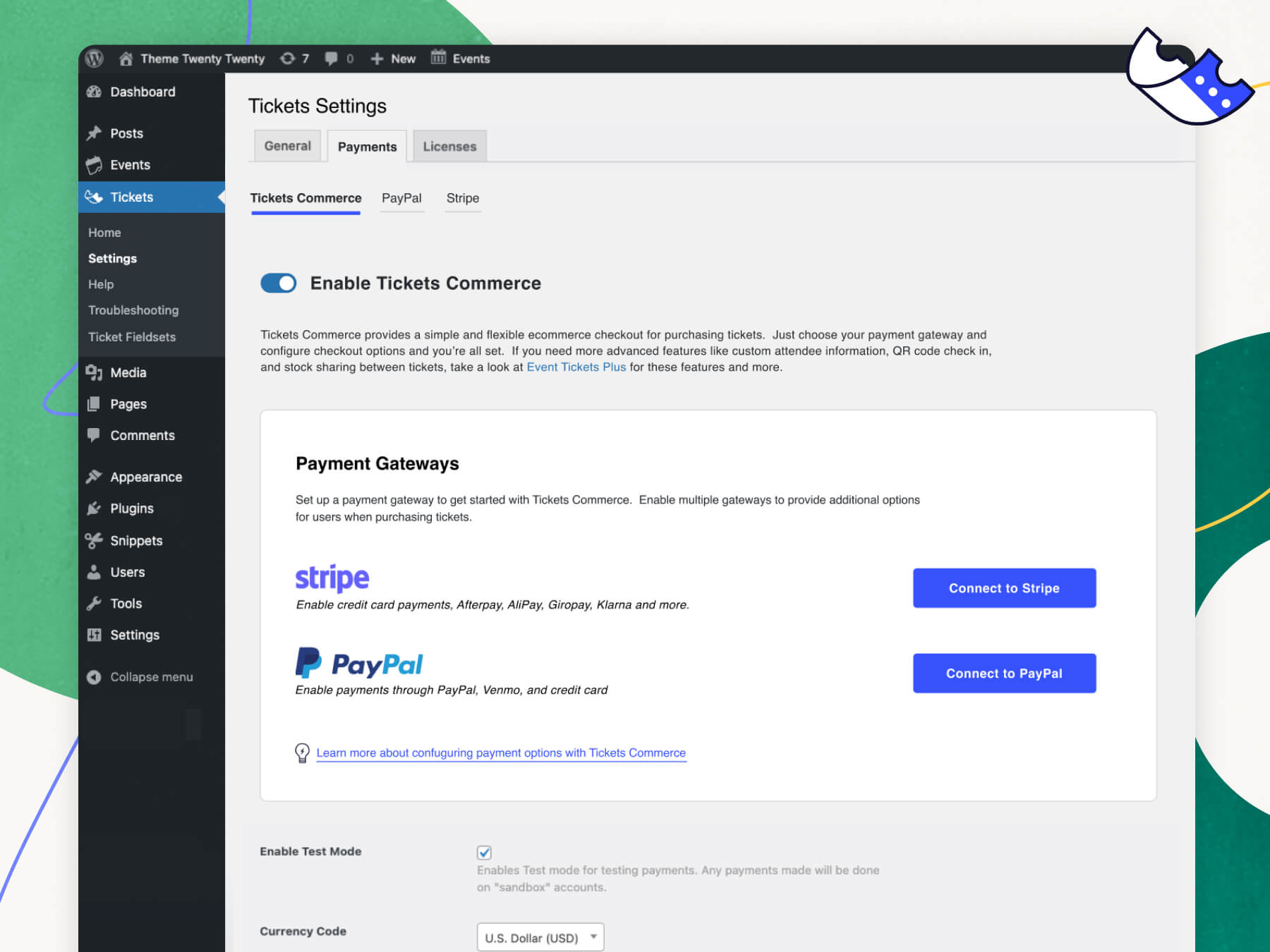
Connect to Stripe and take advantage of one of the world’s most popular payment gateways. Our Stripe integration lets you accept credit card payments on your website, along with additional payment methods including AfterPay, ClearPay, AliPay, Giropay, and Klarna.
See more videos on our YouTube channel
Easily connect to PayPal without any complicated API keys or code through our quick connection wizard in your WordPress backend. With just a few clicks, you can begin selling tickets and enable payment through PayPal, Venmo, and credit cards.
Even more, you can upgrade to Event Tickets Plus and unlock additional payment methods including digital wallets like ApplePay and Google Pay through Stripe, or use WooCommerce to take advantage of popular payment solutions including Braintree, Square, AmazonPay, and more.
🎟️ Ticketing and Registration for WordPress
See Event Tickets in action on our demo site. Just getting started? Check out the Getting Started Guide for an introduction to features, settings, and functionality.
Looking for additional features like custom registration fields, QR check-in, Apple Wallet passes, PDF tickets, Zoom integration, and more? Check out Event Tickets Plus, Wallet Plus and our other add-ons.
🔌🎨 Plug and Play or Customize
Event Tickets is built to work out of the box. Just install the plugin, configure your settings, and start collecting RSVPs and selling tickets in minutes.
Add your own touch by using Event Tickets as the foundation for customization. Personalize to your heart’s content with the help of a skeleton stylesheet, partial template overrides, template tags, hooks and filters, careful documentation, and a library of free extensions.
Whether your vision is big or small, you’re in good company. Thousands of small businesses, musicians, venues, restaurants, and non-profits are increasing revenue from their in-person and virtual events with Event Tickets. Our plugins have also been scaled to work on large networks for Fortune 100 companies, universities, and government institutions.
✨ Features
✔️ Attendees can purchase tickets to events
✔️ Attendees can RSVP to events
✔️ Free tickets with Tickets Commerce.
✔️ Sell tickets with PayPal, Paystack, and/or Stripe using our free commerce solution, Tickets Commerce.
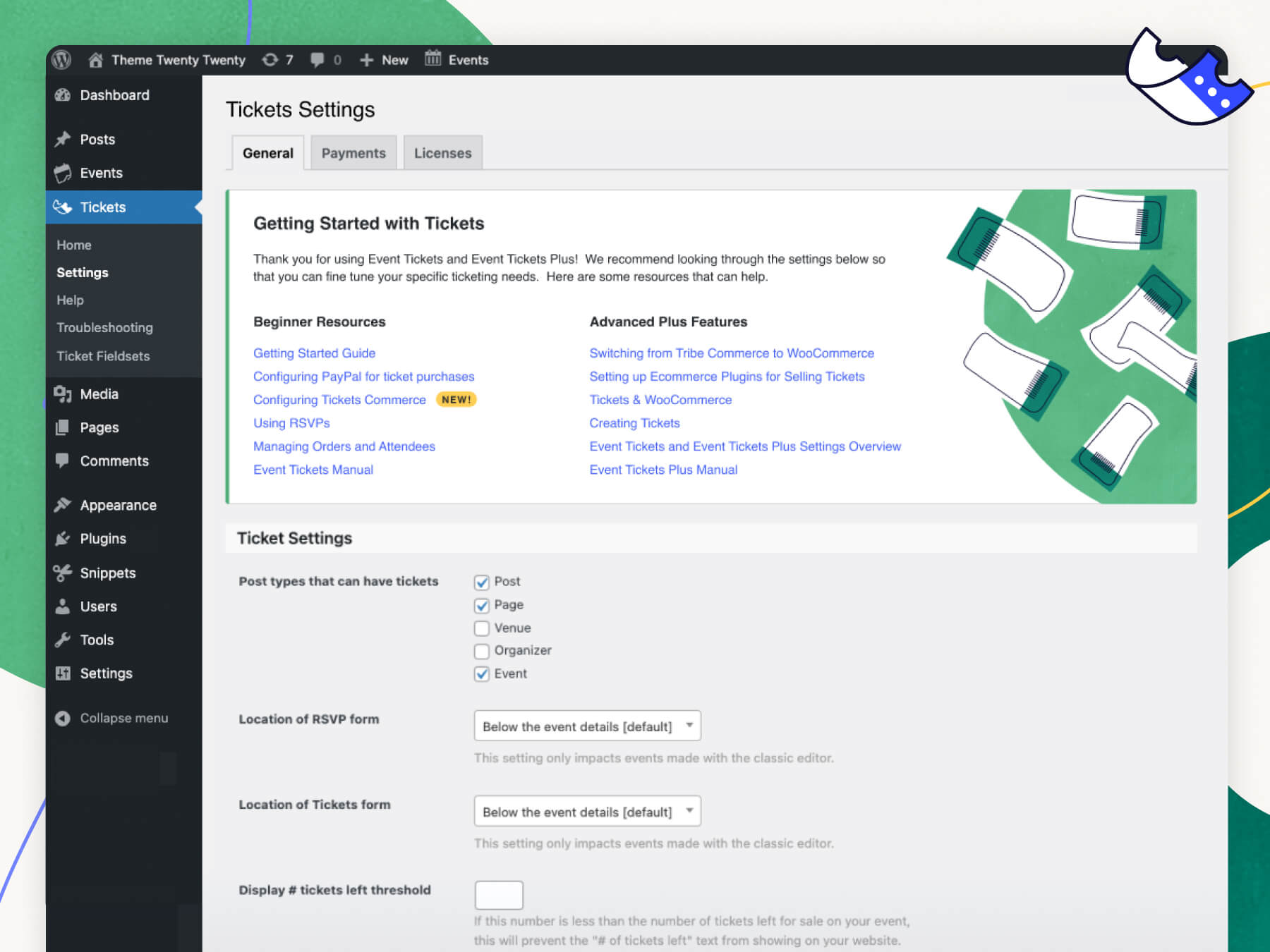
✔️ Add RSVPs and tickets to posts, pages, or custom post types
✔️ Collect ticket fees by connecting your PayPal business or Stripe account
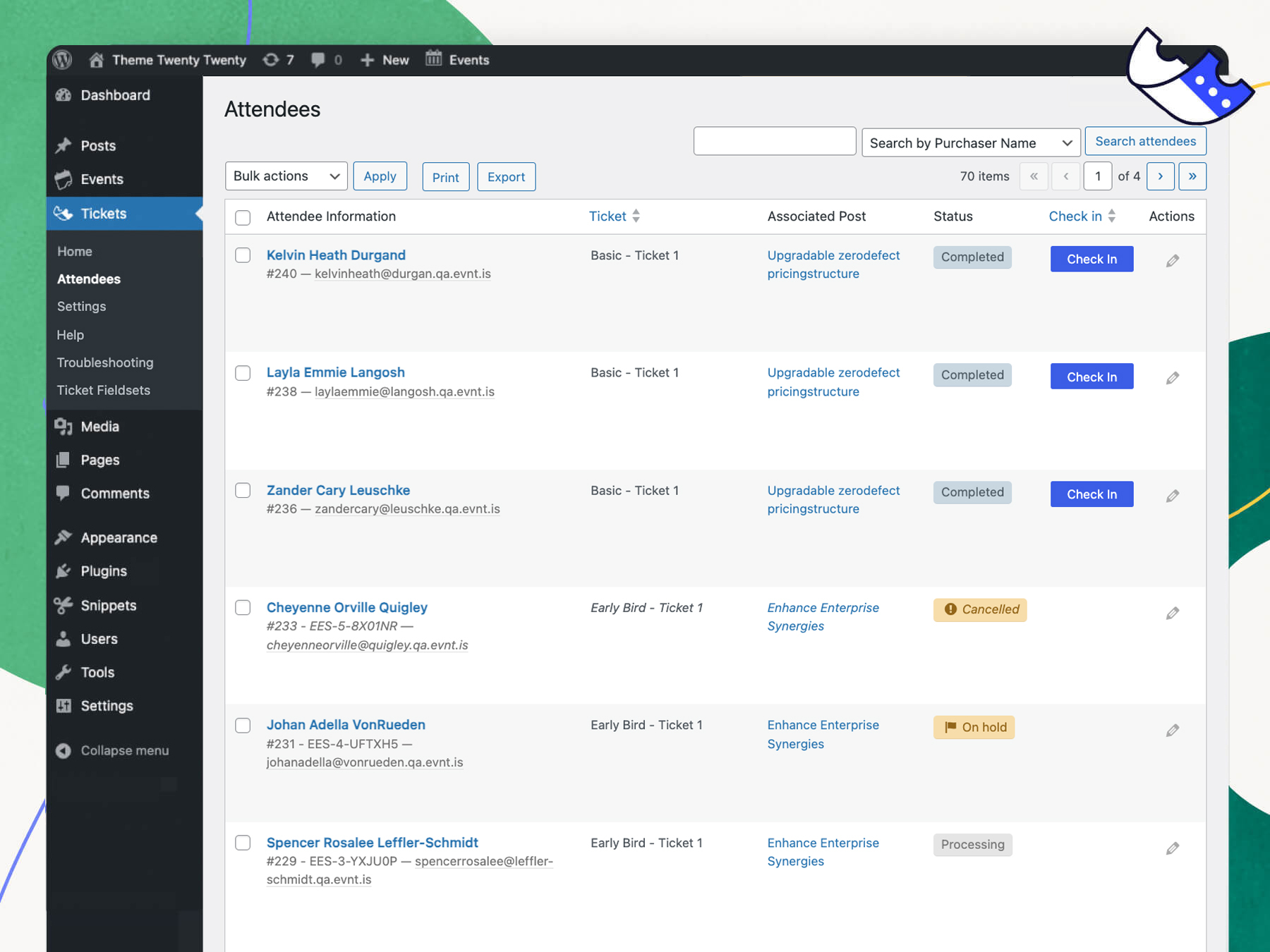
✔️ Generate sales and attendee reports
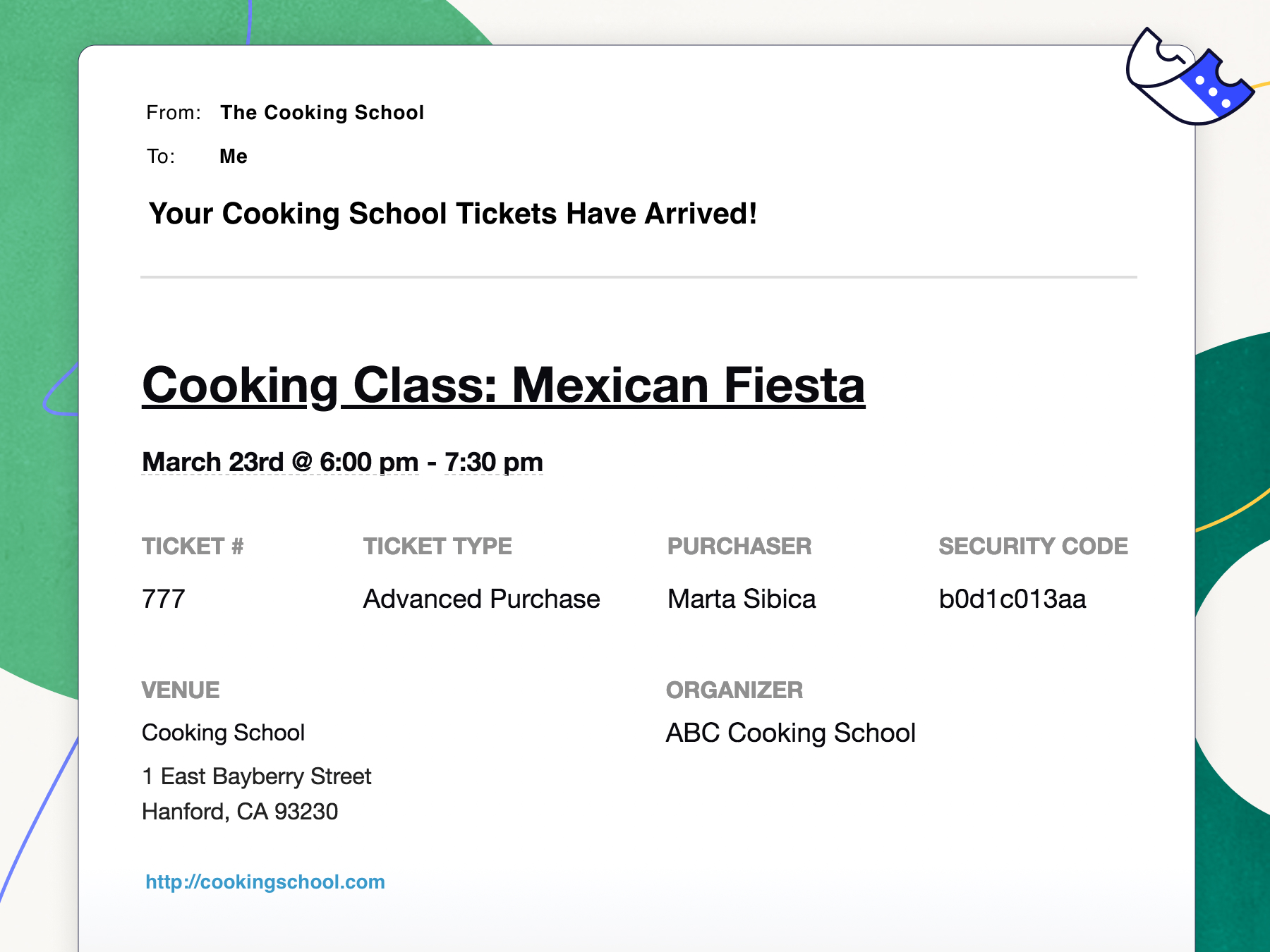
✔️ Customize Tickets and RSVP confirmation emails
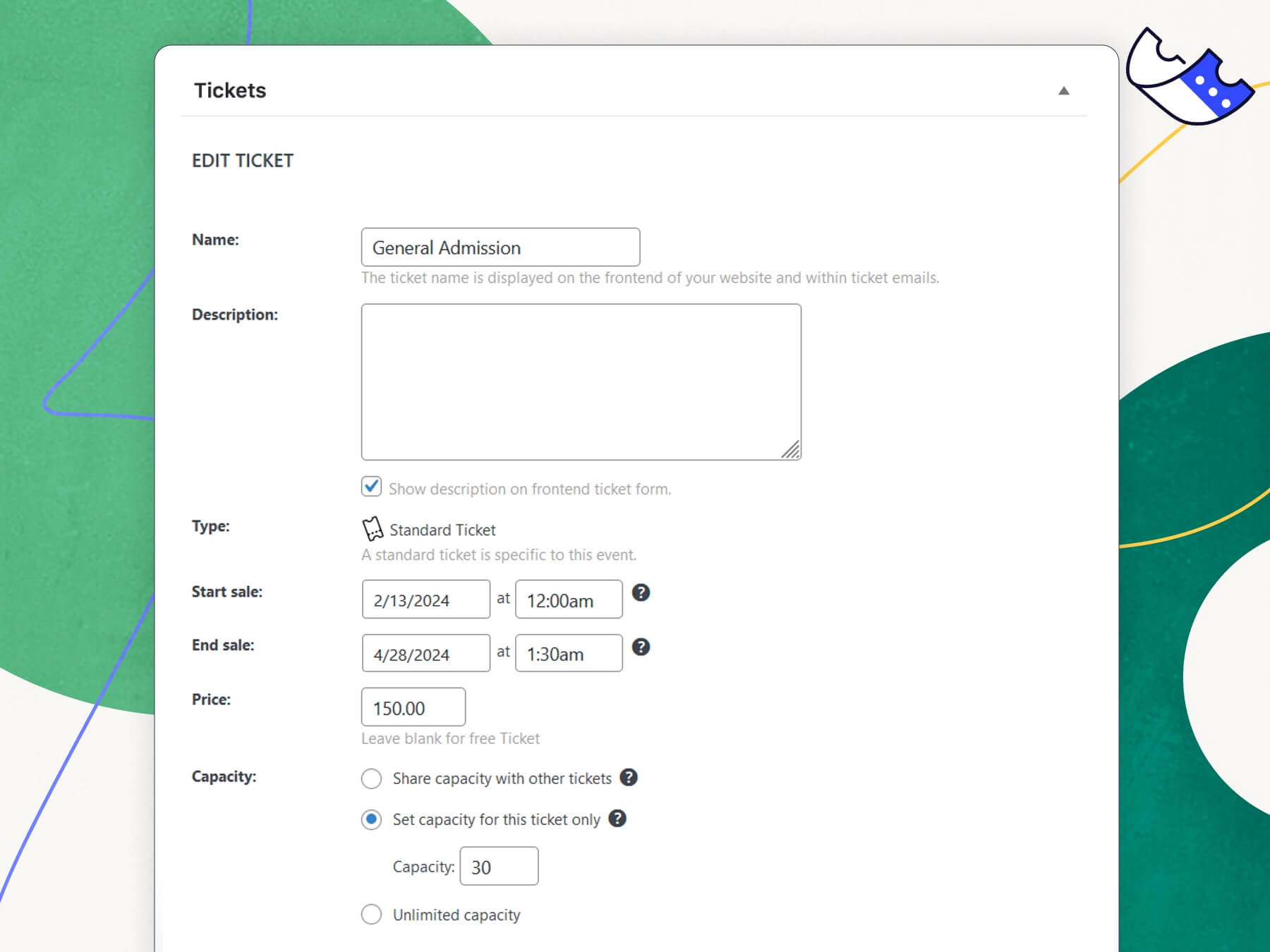
✔️ Ticket stock countdown
✔️ Works out of the box with The Events Calendar
✔️ Responsive design works on all devices
✔️ Tested on the major theme frameworks such as Avada, Genesis, Kadence, Thesis and many more.
✔️ Internationalized & translated
✔️ Extensive template tags for customization
✔️ Hooks & filters galore
✔️ Library of extensions
Upgrade to Event Tickets Plus for full WooCommerce integration to use additional payment gateways.
Upgrade to Wallet Plus for digital tickets like Apple Wallet passes and PDF tickets.
📃 Documentation
All of our documentation can be found in our knowledgebase.
Additional helpful links:
- Guide: Getting Started with Event Tickets
- Installing Event Tickets Video
- Using Tickets Commerce Video
- Configuring Tickets Emails
- Do I need Event Tickets or Event Tickets Plus?
- How to Make Money with Virtual Events
- Implementing Stripe on Event Tickets and Event Tickets Plus
If you have any questions about this plugin, you can post a thread in the WordPress.org forum. Please search existing threads before starting a new on
➕ Add-Ons
Take your calendar to the next level by pairing it with our plugins for ticketing, crowdsourcing, email marketing, and more. Learn more about all our products on our website.
Our Free Plugins:
📅 The Events Calendar
📐 Advanced Post Manager
Our Premium Plugins and Services:
⚡ Events Calendar Pro
↪️ Event Aggregator (service)
🎟️ Event Tickets Plus
✉️ Promoter
👥 Community
✏️ Filter Bar
🗓️ Eventbrite Tickets
Help
If you aren’t familiar with Event Tickets, check out our Getting Started Guide. It will have you creating tickets in no time.
Ready to dig deeper? Check out these resources:
We check in on the Event Tickets forum here on WordPress.org about once a week to help users with basic troubleshooting and identifying bugs. If you’re looking for premium, personalized support, consider upgrading to Event Tickets Plus.
Still have a question? Shoot us an email at support@theeventscalendar.com.
Translate
Event Tickets is translated into multiple languages, including German, Danish, and Dutch. Help localize Event Tickets even further by adding your locale – visit translate.wordpress.org.
All Time Contributors
We want to thank the people that have contributed over the years !
aguseo, bordoni, borkweb, brianjessee, camwynsp, deblynprado, dpantazis, filipecouto, jehromegriffiths1, jentheo,
larodiel, leahkoerper, lucatume, neillmcshea, rafsuntaskin, redscar, sdokus, tribalmike, vicskf, zbtirrell
Screenshots
Blocks
This plugin provides 2 blocks.
- Tickets Sell tickets and register attendees.
- Event Ticket A single configured ticket type.
Installation
- From the dashboard of your site, navigate to Plugins –> Add New.
- Select the Upload option and hit “Choose File.”
- When the popup appears select the event-tickets.x.x.zip file from your desktop. (The ‘x.x’ will change depending on the current version number).
- Follow the on-screen instructions and wait as the upload completes.
- When it’s finished, activate the plugin via the prompt. A message will show confirming activation was successful.
- For access to new updates, make sure you have added your valid License Key under Tickets –> Settings –> Licenses.
FAQ
-
Are there any troubleshooting steps I should try before I post a new thread in the support forum?
-
First, make sure that you’re running the latest version of Event Tickets. If you’ve got any other add-ons, make sure those are current and running the latest code as well. Also be sure to check our knowledgebase.
The most common issues we see are either plugin or theme conflicts. You can test if a plugin or theme is conflicting by manually deactivating other plugins until just Event Tickets is running on your site. If the issue persists, revert to the default Twenty Twenty theme. If the issue is resolved after deactivating a specific plugin or your theme, you’ll know that is the source of the conflict.
Note that we aren’t going to say “tough luck” if you identify a plugin/theme conflict. While we can’t guarantee 100% integration with any plugin or theme out there, we will do our best (and reach out the plugin/theme author as needed) to figure out a solution that benefits everyone.
-
I’m still stuck. Where do I go to file a bug or ask a question?
-
Free plugin users can post in the Event Tickets support forum on WordPress.org. Our team reviews that forum weekly to look for bug reports.
If you’re already an Event Tickets Plus subscriber, you’re entitled to our actively-monitored Premium Support on our website. Generally, except in times of increased support loads, we reply to all premium support tickets within 24 hours during the business week.
-
What’s the difference between Event Tickets and Events Tickets Plus?
-
Event Tickets is our free ticketing plugin that has all the basics you need to sell tickets and collect RSVPs on your website. You can use Event Tickets with or without The Events Calendar.
Event Tickets Plus is a premium plugin that runs alongside Event Tickets and enhances it with extra features, including custom registration fields, shortcodes, WooCommerce integration, enhanced Stripe functionality for Stripe for Tickets Commerce, our mobile ticketing app and more.
-
Do I need The Events Calendar to run Event Tickets?
-
Nope! Event Tickets works with or without The Events Calendar. Even if you don’t have The Events Calendar, you can create RSVPs and tickets on WordPress pages and posts.
-
Can I email attendees using Event Tickets?
-
Yes. Event Tickets automatically sends an email confirmation after attendees register or RSVP for an event. If the attendee purchases a ticket, the confirmation email will also provide a ticket to scan at the door for admission.
-
What add-ons are available for Event Tickets, and where can I read more about them?
-
The following add-ons are available for The Events Calendar:
- Events Calendar Pro, for adding premium calendar features like recurring events, advanced views, cool widgets, shortcodes, additional fields, virtual events including Zoom integration, video, livestream embed and more!
- Event Aggregator, a service that effortlessly fills your calendar with events from Meetup, Google Calendar, iCalendar, Eventbrite, CSV, and ICS.
- Event Tickets Plus, which allows you to sell tickets for your events using your favorite e-commerce platform.
- Promoter, automated email communication made just for The Events Calendar and Event Tickets. Stay in touch with your attendees every step of the way.
- Community Events, for allowing frontend event submission from your readers and allows event organizers to sell tickets to the events.
- Filter Bar, for adding advanced frontend filtering capabilities to your events calendar.
- Eventbrite Tickets, for selling tickets to your event directly through Eventbrite.
-
I have a feature idea. What’s the best way to tell you about it?
-
We’ve got a LoopedIn page where we’re actively watching for feature ideas from the community. Vote up existing feature requests or add your own, and help us shape the future of the products business in a way that best meets the community’s needs.
-
Found a security vulnerability?
-
Make sure you are reporting in a safe and responsible way. We take security very seriously. If you discover a security issue, please bring it to our attention right away! Below you will find all the methods to report security vulnerabilities:
- Report security bugs through the Patchstack Vulnerability Disclosure Program
- Check our Bug Bounty Program
- Reach out directly to us on
security [at] stellarwp.com.
-
I’ve still got questions. Where can I find answers?
-
Check out our extensive knowledgebase for articles on using, tweaking, and troubleshooting our plugins.
Reviews


Contributors & Developers
“Event Tickets and Registration” is open source software. The following people have contributed to this plugin.
Contributors


“Event Tickets and Registration” has been translated into 14 locales. Thank you to the translators for their contributions.
Translate “Event Tickets and Registration” into your language.
Interested in development?
Browse the code, check out the SVN repository, or subscribe to the development log by RSS.
Changelog
[5.30.0.1] 2026-10-01
- Fix – Prevented the Tickets metabox from losing fields in the Classic Editor when the RSVP metabox is placed above it.
[5.30.0] 2026-09-30
- Feature – Changed where RSVPs are stored to agree with Tickets. This will happen after you manually start a migration and only if you are using RSVPs already.
- Language – 60 new strings added, 336 updated, 3 fuzzied, and 8 obsoleted.
- Security – Tightened the permission checks when creating and updating tickets through the REST API.
- Tweak – Added actions:
tec_tickets_commerce_cart_process,tec_tickets_rsvp_after_save,tec_tickets_rsvp_after_meta_update,tec_tickets_rsvp_before_delete,tec_tickets_rsvp_after_delete,tec_tickets_commerce_attendee_before_delete,tec_tickets_commerce_attendee_after_delete,tec_tickets_attendee_registration_before_meta_form_fields,tec_tickets_attendee_registration_after_save,tec_tickets_commerce_single_order_details_metabox_before,tec_tickets_commerce_single_order_details_metabox_after,tribe_events_rsvp_pre_edit,tec_event_tickets_rsvp_form__start,tec_event_tickets_rsvp_metabox_edit_main,tec_event_tickets_rsvp_post_options,tec_event_tickets_rsvp_bottom,tec_tickets_my_tickets_ticket_information_after_ticket_name,event_tickets_user_details_tickets,tec_tickets_user_details_tickets - Tweak – Added filters:
tec_tickets_enabled_ticket_forms,tec_tickets_build_ticket_properties,tec_tickets_rest_ticket_upsert_params,tec_tickets_rsvp_enabled,tec_tickets_rsvp_version,tec_tickets_rsvp_v2_initial_ticket,tec_tickets_commerce_cart_add_full_item_params,tec_tickets_rsvp_v2_classic_save_data,tec_tickets_commerce_get_ticket_legacy,tec_tickets_rsvp_v2_cart_upsert_item_args,tec_tickets_rsvp_v2_render_step_template_args_pre_process,tec_tickets_rsvp_v2_render_step_template_args,tec_tickets_rsvp_v2_show_attendees_list_optout,tec_tickets_rsvp_process_ticket_fields,tec_tickets_rsvp_process_additional_fields,tec_tickets_editor_list_tickets,tec_tickets_rsvp_show_attendees_list,tec_tickets_rsvp_get_attendees_by_id_pre,tec_tickets_rsvp_get_attendees_by_user_id_pre,tribe_tickets_attendee_activity_log_data,tribe_tickets_has_meta_enabled,tribe_tickets_rsvp_form_email,tribe_tickets_rsvp_form_full_name - Tweak – Changed views:
tickets/email,tickets/my-tickets/orders-list,tickets/my-tickets/ticket-information,tickets/my-tickets/tickets-list,tickets/my-tickets/user-details,tickets/orders-rsvp,tickets/orders-tc-tickets,v2/commerce/rsvp,v2/commerce/rsvp/actions,v2/commerce/rsvp/actions/full,v2/commerce/rsvp/actions/rsvp,v2/commerce/rsvp/actions/rsvp/going,v2/commerce/rsvp/actions/rsvp/not-going,v2/commerce/rsvp/actions/success,v2/commerce/rsvp/actions/success/title,v2/commerce/rsvp/actions/success/toggle,v2/commerce/rsvp/actions/success/tooltip,v2/commerce/rsvp/ari,v2/commerce/rsvp/ari/form,v2/commerce/rsvp/ari/form/buttons,v2/commerce/rsvp/ari/form/error,v2/commerce/rsvp/ari/form/fields,v2/commerce/rsvp/ari/form/fields/email,v2/commerce/rsvp/ari/form/fields/meta,v2/commerce/rsvp/ari/form/fields/name,v2/commerce/rsvp/ari/form/guest-template,v2/commerce/rsvp/ari/form/guest,v2/commerce/rsvp/ari/form/template/fields,v2/commerce/rsvp/ari/form/template/title,v2/commerce/rsvp/ari/form/title,v2/commerce/rsvp/ari/sidebar,v2/commerce/rsvp/ari/sidebar/guest-list,v2/commerce/rsvp/ari/sidebar/guest-list/guest-template,v2/commerce/rsvp/ari/sidebar/guest-list/guest,v2/commerce/rsvp/ari/sidebar/quantity,v2/commerce/rsvp/ari/sidebar/quantity/input,v2/commerce/rsvp/ari/sidebar/quantity/minus,v2/commerce/rsvp/ari/sidebar/quantity/plus,v2/commerce/rsvp/ari/sidebar/title,v2/commerce/rsvp/attendees,v2/commerce/rsvp/attendees/attendee,v2/commerce/rsvp/attendees/attendee/name,v2/commerce/rsvp/attendees/attendee/rsvp,v2/commerce/rsvp/attendees/title,v2/commerce/rsvp/content-inactive,v2/commerce/rsvp/content,v2/commerce/rsvp/details,v2/commerce/rsvp/details/attendance,v2/commerce/rsvp/details/availability,v2/commerce/rsvp/details/availability/days-to-rsvp,v2/commerce/rsvp/details/availability/full,v2/commerce/rsvp/details/availability/remaining,v2/commerce/rsvp/details/availability/unlimited,v2/commerce/rsvp/details/description,v2/commerce/rsvp/details/title,v2/commerce/rsvp/form/buttons,v2/commerce/rsvp/form/fields,v2/commerce/rsvp/form/fields/cancel,v2/commerce/rsvp/form/fields/email,v2/commerce/rsvp/form/fields/name,v2/commerce/rsvp/form/fields/quantity,v2/commerce/rsvp/form/fields/submit,v2/commerce/rsvp/form/form,v2/commerce/rsvp/form/going/title,v2/commerce/rsvp/form/not-going/title,v2/commerce/rsvp/form/title,v2/commerce/rsvp/messages/error,v2/commerce/rsvp/messages/must-login,v2/commerce/rsvp/messages/success,v2/commerce/rsvp/messages/success/going,v2/commerce/rsvp/messages/success/not-going,v2/commerce/rsvp/my-tickets/ticket-status,v2/commerce/rsvp/my-tickets/user-details,v2/rsvp/actions/rsvp,v2/rsvp/actions/success,v2/rsvp/content,v2/rsvp/details/availability/remaining,v2/rsvp/messages/must-login - Tweak – Removed filters:
tribe_rsvp_email_subject,tribe_rsvp_non_attendance_email_content
[5.29.5.2] 2026-09-29
- Security – Hardened the validation of assigned seating reservations.
[5.29.5.1] 2026-09-24
- Language – 0 new strings added, 39 updated, 0 fuzzied, and 0 obsoleted.
- Security – Hardened the validation of the sort parameters used when ordering the tickets reports.
- Security – Tightened validation on assigned seating reservation and session handling. Props to “sequence_X0” for the report!
[5.29.5] 2026-09-17
- Fix – Dropped the cached calendar-view ticket data when tickets are sold and when the plugin updates, instead of rebuilding it mid-order, resolving an issue where sold-out events kept showing the remaining ticket count on calendar and list views.
- Fix – Fixed an issue where a custom ticket sale end date set during ticket creation in the block editor reverted to the event start date after saving the event.
- Fix – Renewed the Square access token ahead of its expiration and retried a rejected request once against the fresh one, which kept Tickets Commerce checkout from failing about 30 days after connecting to Square. Where Square would neither renew the credentials nor accept the stored token, the gateway reported itself as disconnected with an admin notice instead of showing a healthy connection while live charges failed.
- Fix – Resolved a fatal error that could occur while rendering the Move Attendees dialog when another plugin listened on the admin_enqueue_scripts action.
- Fix – Resolved an issue where the tickets and attendees REST API archives could return a JSON object instead of an array when an entry could not be formatted, preventing the Event Tickets Plus App from listing attendees.
- Fix – Stripe checkout could return a server error and never charge the buyer when a coupon changed the cart total, because the application fee left on the Payment Intent no longer matched the discounted amount.
- Language – 7 new strings added, 153 updated, 0 fuzzied, and 1 obsoleted.
- Security – Tightened the handling of Assigned Seating reservations, covering the seat labels stored against attendees and the session tokens reservations are filed under.
[5.29.4] 2026-09-03
- Fix – Resolved a fatal error that could be triggered in the Tickets Commerce cart when the decoded ticket data was null.
- Fix – Prevented the cart-to-checkout redirect and the checkout page from being stored by full-page and edge caches, resolving an issue where the Tickets Commerce checkout could show ‘Oops, no tickets!’ after selecting tickets.
- Language – 5 new strings added, 75 updated, 0 fuzzied, and 9 obsoleted.
[5.29.3.1] 2026-08-26
- Security – Enforced ticket sale start and end dates server-side, and capped RSVP quantities to the maximum allowed per purchase.
[5.29.3] 2026-08-20
- Security – Hardened attendee details rendering.
- Security – Hardened validation of the ticket parameters.
- Fix – Resolved an issue where a Stripe checkout could leave the buyer on an endless spinner with their payment taken but no order completed.
- Performance – Stopped resolving the current user during bootstrap on front-end requests to decide whether the admin Attendees screens should be registered.
- Language – 1 new strings added, 16 updated, 0 fuzzied, and 0 obsoleted.
[5.29.2.1] 2026-08-07
- Fix – Prevented a fatal error on the WooCommerce order edit screen when attendee data was read from a generator, so orders containing tickets open normally again.
- Language – 0 new strings added, 15 updated, 0 fuzzied, and 0 obsoleted.
[5.29.2] 2026-08-05
- Language – 0 new strings added, 22 updated, 0 fuzzied, and 0 obsoleted.
- Tweak – Improved the unified licensing page experience.
- Tweak – Switched changelog tooling from jetpack-changelogger to @stellarwp/changelogger.
- Fix – Reduced the number of queries and the memory used when rendering events with shared capacity tickets by sharing the event attendees between all the tickets of the same event and by caching sold out inventory results in
Tribe__Tickets__Ticket_Object::inventory(). - Fix – Resolved an issue where an attendee could still be checked in after their order was refunded.
[5.29.1] 2026-07-22
- Fix – Fixed triggered emails (RSVP going, ticket purchased) failing silently with a 403 “Unauthorized token” response from Promoter due to a missing
domainclaim in the trigger JWT payload. - Fix – Resolved a fatal error on the Attendees admin page when having both TC and Woo tickets bought on the same event.
- Fix – Resolved a fatal error on the Orders admin page when viewing orders for an event without an active ticket provider. The Orders page now gracefully handles missing provider context instead of crashing.
- Fix – Resolved an issue where the legacy Orders tabbed view could render duplicate “Orders” tabs when both Tickets Commerce and WooCommerce (Event Tickets Plus) were active.
- Security – Extracted the event-accessibility check into
is_event_accessible()for reuse in RSVPs. - Language – 1 new strings added, 87 updated, 0 fuzzied, and 1 obsoleted.
[5.29.0.1] 2026-07-10
- Security – Strengthened Tickets Commerce failed order Gateway endpoints.
- Security – Strengthened capability checks for Seating’s Layout ajax actions.
[5.29.0] 2026-07-08
- Fix – Excluded RSVP “not going” attendees from the Dashboard “At a Glance” attendee count so the number reflects actual attendance.
- Fix – Resolved an issue where duplicating an event with shared-capacity tickets reset the duplicated tickets capacity to zero.
- Tweak – Added the
tec_tickets_glance_item_attendee_count_enabledfilter to allow disabling the attendee count glance item entirely. - Performance – Replaced full attendee object hydration in
Glance_Items::update_attendee_count()with a single SQL COUNT query, preventing PHP timeouts and infinite WP-Cron re-queuing on high-volume sites. - Compatibility – Improved PHP compatibility for versions 7.4 and up to 8.4.
- Language – 4 new strings added, 97 updated, 0 fuzzied, and 0 obsoleted.
[5.28.5.1] 2026-06-29
- Security – Tightened up Stripe checkout validation.
[5.28.5] 2026-06-24
- Fix – Prevented the front-end ticket styles and scripts from loading on pages without tickets, such as the WooCommerce cart and checkout.
- Fix – Resolved an issue where select dropdowns, such as Ticket Capacity, rendered unstyled in the WordPress 7 block editor.
- Tweak – Added the
tribe_tickets_assets_should_enqueue_frontendfilter to control whether front-end ticket assets are enqueued. - Tweak – Updated broken link to coding standards in
CONTRIBUTING.md - Performance – Improved the performance of the ticketed and unticketed filter counts on admin post lists.
- Language – 0 new strings added, 24 updated, 0 fuzzied, and 0 obsoleted.
- Language – 0 new strings added, 25 updated, 0 fuzzied, and 0 obsoleted.
[5.28.4.1] 2026-06-19
- Fix – Ensure the 2% Tickets Commerce application fee is waived after a valid Event Tickets Plus license is activated on Stripe and Square. [SMTNC-1519]
[5.28.4] 2026-06-15
- Fix – Ensure proper functionality of Tickets admin pages (Settings, Help Hub, and Notifications) on non-English installs. [SMTNC-1469]
- Fix – Resolve an issue where the Attendees admin page caused a fatal error on sites using a translated admin locale. [SMTNC-1439]
- Fix – Resolve an issue where the Event Schema always reported the price currency as USD, ignoring the currency configured in the Tickets Commerce settings. [SMTNC-1239]
- Fix – Resolve an issue where the Event Tickets Plus upsell notice for WooCommerce and Easy Digital Downloads was shown on every wp-admin page; it is now limited to the Tickets admin screens, The Events Calendar admin screens, and the Plugins page. [SMTNC-1303]
- Fix – Resolved a fatal error on the Tickets > All Tickets admin page when listing tickets with no end date on PHP 8.3.9 or later. [SMTNC-295]
- Fix – Show events marked “Hide From Event Listings” in the Event Tickets App so on-site managers can still see and check them in. [SMTNC-288]
- Tweak – Added filters:
tec_tickets_rest_events_archive_include_hidden_from_listings. - Language – 0 new strings added, 82 updated, 0 fuzzied, and 0 obsoleted.
[5.28.3.2] 2026-06-09
- Fix – Send the
domainproperty over to Promoter’s Authentication layer during update notifications. [SMTNC-1351] - Language – 0 new strings added, 6 updated, 0 fuzzied, and 0 obsoleted.
[5.28.3.1] 2026-06-04
- Security – Improve escaping in titles when moving tickets. [SVUL-5]
[5.28.3] 2026-05-28
- Fix – Change checkout page heading from
h3toh2for proper heading hierarchy and screen reader accessibility. [SMTNC-971] - Fix – Publish events with Assigned Seating enabled in the Block Editor. [SMTNC-263]
- Fix – Ensure the correct usage of WordPress translation function. [ET-2634]
- Tweak – Changed views:
v2/commerce/checkout/header/title - Language – 2 new strings added, 22 updated, 1 fuzzied, and 4 obsoleted.
[5.28.2] 2026-05-14
- Tweak – Update Harbor to 1.2.0, removing the Liquid Web Products page when there are no premium plugins present.
[5.28.1] 2026-05-12
- Tweak – Update Harbor to version 1.1.0 to remove the top level Liquid Web page added to the dashboard.
[5.28.0] 2026-05-11
- Feature – Integrate with Nexcess Licensing and Portal.
- Tweak – Updated branding references from StellarWP to Nexcess.
[5.27.6.1] 2026-04-15
- Security – Improves PayPal’s and Square’s handle failure endpoint. [SVUL-71]
[5.27.6] 2026-04-07
- Security – Strengthen event attendee data access controls. [SVUL-62]
- Language – 0 new strings added, 14 updated, 0 fuzzied, and 0 obsoleted.
[5.27.5] 2026-03-11
- Fix – Change the way that the available tickets was being calculated on event list [ET-2629]
- Fix – Correctly save RSVP capacity in Block Editor. [ET-2631]
- Fix – Improve accessibility by updating the Stripe credit card form input error color to meet contrast validation requirements. [ET-2620]
- Fix – Remove json_ld from RSVP emails [ET-2084]
- Tweak – Changed views:
modal/item-remove,tickets/email,v2/rsvp/messages/error,v2/rsvp/messages/must-login,v2/rsvp/messages/success/going,v2/rsvp/messages/success/not-going,v2/tickets/item/content/description-toggle,v2/tickets/item/extra/description-toggle - Tweak – Make email headers accessible in the Tickets Email Template. [ET-2612]
- Accessibility – Add aria-label to the close button on ticket list modal [ET-2228]
- Accessibility – Add the attribute “role” on RSVP alerts to improve accessibility. [ET-2227]
- Accessibility – Prevent loss of focus when description content is hidden in the checkout modal. [ET-2230]
- Accessibility – Set the toggle description button state programmatically with aria-expanded in the checkout modal. [ET-2229]
- Language – 1 new strings added, 28 updated, 0 fuzzied, and 0 obsoleted.
[5.27.4.1] 2026-03-02
- Security – Strengthen token verification for Stripe. [SVUL-51]
[5.27.4] 2026-01-28
- Tweak – Amend small typos in text domains. Props to @DAnn2012! [ET-2596]
- Language – 1 new strings added, 38 updated, 0 fuzzied, and 0 obsoleted.
[5.27.3] 2025-12-18
- Security – Strengthen the user access level in the system information opt-in functionality. [SVUL-35]
[5.27.2] 2025-12-09
- Fix – Fixed – Error in block editor that would prevent saving events with Tickets directly. [TECTRIA-1464]
- Language – 0 new strings added, 2 updated, 0 fuzzied, and 0 obsoleted.
[5.27.1] 2025-12-03
- Fix – Resolved block editor JavaScript errors in WordPress 6.9 by properly importing
sprintffrom@wordpress/i18n. [ET-2595] - Language – 0 new strings added, 0 updated, 0 fuzzied, and 0 obsoleted.
[5.27.0] 2025-11-18
- Version – Event Tickets 5.27.0 is only compatible with The Events Calendar 6.15.12 or higher.
- Version – Event Tickets 5.27.0 is only compatible with Event Tickets Plus 6.9.0 or higher.
- Tweak – Added filters:
tec_tickets_panels - Tweak – Added actions:
tec_tickets_ticket_pre_save - Tweak – Changed views:
v2/commerce/checkout/cart/items,v2/tickets/item,v2/tickets/item/quantity,v2/tickets/item/quantity/number - Tweak – Updates Shepherd library to 0.0.9 from 0.0.6 including various improvements. Shepherd’s changelog can be found here https://github.com/stellarwp/shepherd/blob/0.0.9/CHANGELOG.md
- Tweak – Supports conditional ticket quantity control availability. [ETP-1061]
- Language – 1 new strings added, 52 updated, 2 fuzzied, and 3 obsoleted.
[5.26.7] 2025-10-28
- Fix – Add logic to only show the purchase button during checkout after billing info is filled out. [ET-2592]
- Fix – Correct Stripe payment amount formatting by standardizing all currency values to two decimals before creating payment intents, preventing incorrect low charge amounts.[ET-2558]
- Fix – Prevent ticket overselling by adding database-locked stock validation before payment intent creation. [ET-1942]
- Tweak – Changed views:
v2/commerce/gateway/stripe/card-element,v2/commerce/gateway/stripe/payment-element - Tweak – Added actions:
tec_tickets_commerce_insufficient_stock_detected,tec_conditional_content_header_notice - Tweak – Added filters:
tec_tickets_commerce_gateway_value_formatter_{$gateway_key}_currency_map - Tweak – Add upsell link for Seating in License page. [ET-2556]
- Tweak – Modify the existing inline upsell to utilize the new modular logic in common. [ET-2590]
- Tweak – Tweak logic when fetching ticket data. [ET-2555]
- Language – 6 new strings added, 66 updated, 1 fuzzied, and 0 obsoleted.
[5.26.6] 2025-10-14
- Security – Enhanced authorization validation for order processing endpoints. [SVUL-24]
- Language – 1 new strings added, 31 updated, 0 fuzzied, and 0 obsoleted.
[5.26.5] 2025-09-16
- Fix – Adjusted how cart total is handled on page refresh to avoid coupons not being applied. [ETP-1060]
- Fix – Correctly invalidate ticket caches to deal with ETP order-of-operation issue. [ETP-1044]
- Language – 0 new strings added, 8 updated, 0 fuzzied, and 0 obsoleted.