
Description
Try it out on your free dummy site: Click here => https://demo.tastewp.com/clean-login
Clean Login lets you replace the default WordPress login and registration pages with fully customised frontend forms — no coding required. Place any form anywhere on your site using a simple shortcode.
Whether you need a custom login page, a user registration form, a password reset page or an editable user profile, Clean Login has you covered with one shortcode per form:
[clean-login]— Custom login form with show/hide password toggle[clean-login-register]— User registration form with CAPTCHA, reCAPTCHA and email validation[clean-login-edit]— Frontend user profile editor (name, email, password)[clean-login-restore]— Forgot password / password reset form[clean-login-change-password]— Dedicated password change form with visual strength meter[clean-login-logout]— Standalone logout link, usable anywhere on your site
Why choose Clean Login?
- No coding — drop a shortcode into any page or post and the form appears instantly
- Fully responsive — forms adapt to any screen size and integrate with your theme’s CSS
- SEO friendly — login and registration pages are automatically marked as
noindexand excluded from sitemaps, keeping your site’s SEO clean - Secure — nonce verification on every form, honeypot antispam, CAPTCHA and Google reCAPTCHA support
- Password strength meter — visual indicator guides users to create stronger passwords
- WPML certified — official WPML compatibility for multilingual sites
- WooCommerce compatible — works alongside WooCommerce without conflicts
Features
- Custom login page with redirect after login and logout
- Frontend user registration with optional email verification
- Forgot password / password reset via email link
- Dedicated change-password form with animated strength meter (Weak / Fair / Good / Strong)
- Frontend user profile editor — update name, email and password without visiting wp-admin
- Hide admin bar for selected roles
- Block dashboard access for non-admin users
- Standby role for new registrations — users stay inactive until an admin approves them
- Role selection at registration — let users choose their own role from a curated list
- Terms and conditions checkbox on registration form
- Use email address as username
- Automatic login after registration
- Customisable “Lost password?” link text from the settings panel
- Auto-linked forms — shortcodes detect each other and generate links automatically
- Override any template from your theme (
theme/clean-login/folder) - AJAX compatible
Usage and Settings
Please, refer to Installation section
Screenshots


Installation
Installation
- Install Clean Login automatically through the WordPress Dashboard or by uploading the ZIP file in the plugins directory.
- Then, after the package is uploaded and extracted, click Activate Plugin.
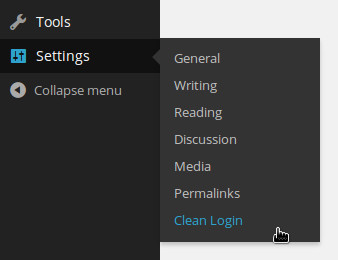
Now going through the points above, you should now see a new Clean Login menu item under Settings menu in the sidebar of the admin panel, see figure below of how it looks like.
If you get any error after following through the steps above please contact us through item support comments so we can get back to you with possible helps in installing the plugin and more. On successful activation of this plugin, you should be able to see the login form when you place this shortcode [clean-login] in any page or post
Settings
Below, the description of each shortcode for use as registration, login, lost password and profile editor forms
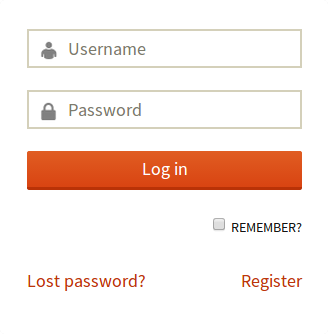
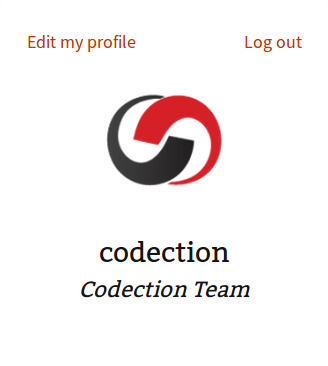
- [clean-login] This shortcode contains login form and login information.
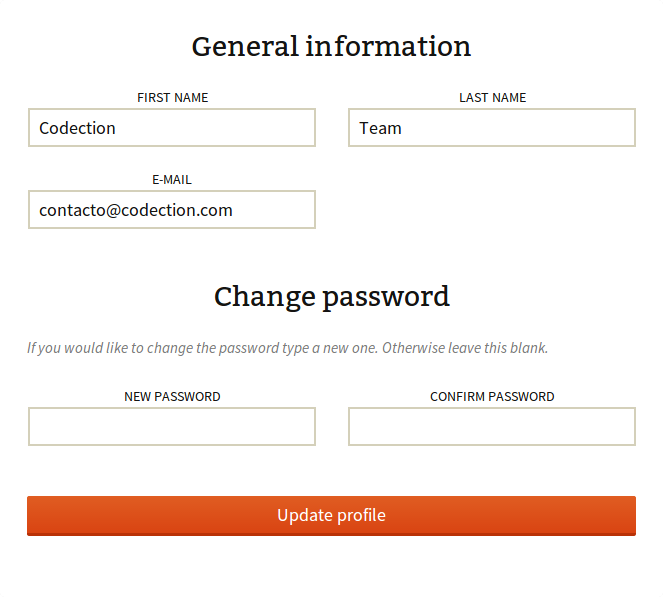
- [clean-login-edit] This shortcode contains the profile editor. If you include in a page/post a link will appear on your login preview.
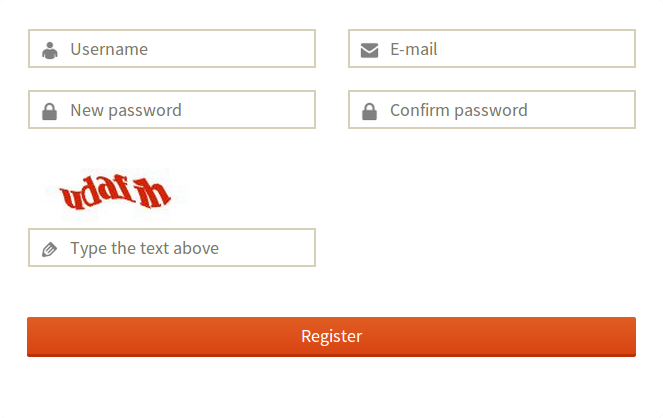
- [clean-login-register] This shortcode contains the register form. If you include in a page/post a link will appear on your login form.
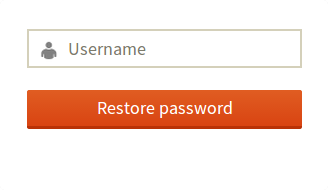
- [clean-login-restore] This shortcode contains the restore (lost password?) form. If you include in a page/post a link will appear on your login form.
- [clean-login-change-password] Dedicated password change form with a visual strength meter. Ideal as the destination after a password reset link.
- [clean-login-logout] Standalone logout link. Renders only for logged-in users; accepts an optional
textattribute to customise the label.
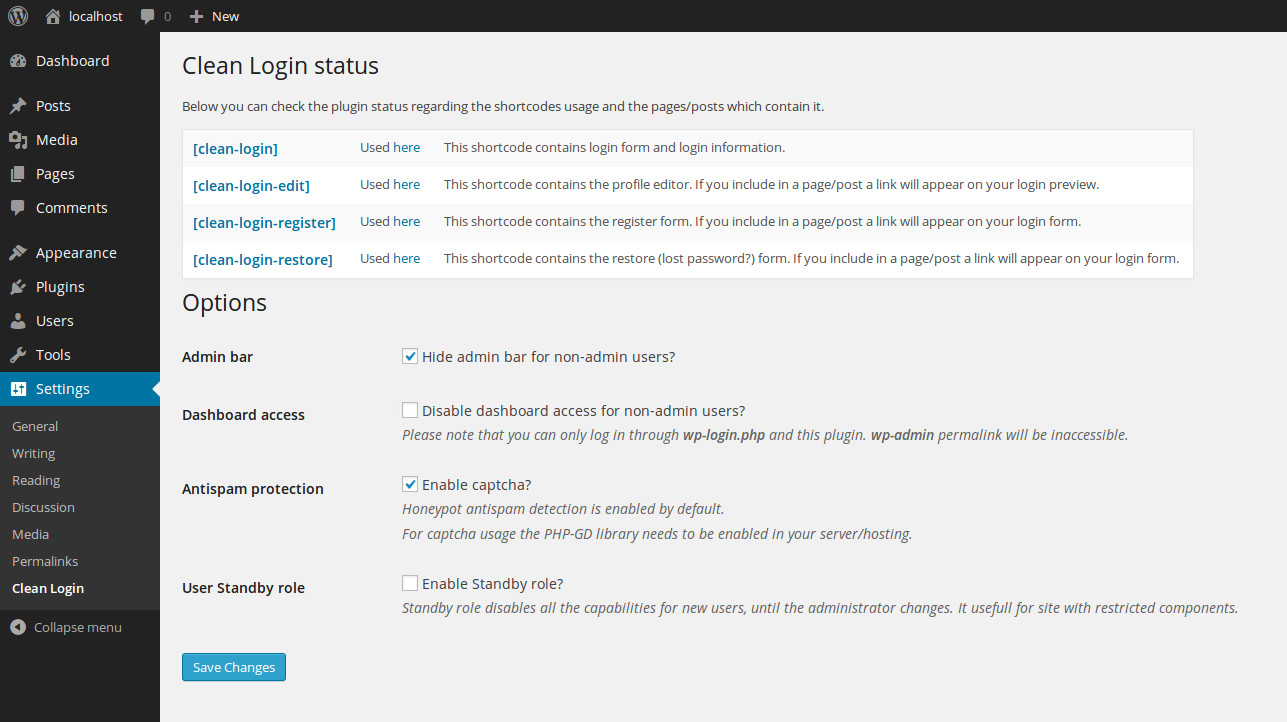
Also, in the Clean Login settings page you can check the plugin status as follows:
In this setting page you can also find the way to enable/disable the differents options of the plugin, like below:
Regarding the widget usage, just place the Clean Login status and links widget in the widget area you prefer. It will show the user status and the links to the pages/posts which contains the plugin shortcodes.
Please feel free to contact us if you have any questions.
Example
A post/page need to be created by typing the main shortcode [clean-login] in the content.
When you save or update this post/page you will see the login form.
And also in the setting page [clean-login] entry will be updated pointing to the current post/page which contains the shortcode (and generates the login form):
We would repeat the same process with the rest of shortcodes if we need it:
- [clean-login-edit] to create an edit profile form
- [clean-login-register] to create a registration form
- [clean-login-restore] to create a forgotten password and restore form
FAQ
-
How do I create a custom login page?
-
Install Clean Login, create a new page, and add the shortcode
[clean-login]to its content. Save the page — that’s it. Your custom frontend login form is live. -
Can I create a custom user registration page?
-
Yes. Create a page with the shortcode
[clean-login-register]. Make sure user registration is enabled in WordPress Settings General Membership. -
How does the password reset / forgot password page work?
-
Add
[clean-login-restore]to a page. Users enter their username or email and receive a reset link. If you also have a[clean-login-change-password]page set up, they will be redirected there to set their own password; otherwise a new password is generated and emailed to them. -
Can users change their password from the frontend?
-
Yes — use
[clean-login-change-password]for a focused password change form, or[clean-login-edit]for a full profile editor that also includes name, email and password fields. -
Is there a password strength indicator?
-
Yes. The
[clean-login-change-password]form includes an animated strength meter with four levels (Weak, Fair, Good, Strong). -
Can I redirect users to a specific page after login?
-
Yes. Go to Settings Clean Login and enable “Redirect after log in”, then enter the destination URL.
-
Can users log in with their email address instead of username?
-
Yes. Enable “Use Email as Username” in the plugin settings.
-
Is Clean Login SEO friendly?
-
Yes. Login, registration and all other plugin pages are automatically marked
noindex, nofollowand excluded from the WordPress sitemap, so they never pollute your site’s search rankings. Compatible with Yoast SEO, RankMath and AIOSEO. -
Is Clean Login compatible with WPML?
-
Yes — Clean Login holds an official WPML certification.
-
Is Clean Login compatible with WooCommerce?
-
Yes, Clean Login works alongside WooCommerce without conflicts.
-
Is Clean Login compatible with AJAX-based plugins and themes?
-
Yes, from version 1.2.6.
-
Can I override the form templates?
-
Yes. Copy any template from the plugin’s
content/folder intoyour-theme/clean-login/and edit it there. Your customisations will survive plugin updates. -
Can I modify my Avatar?
-
Clean Login uses your email address to fetch your avatar from Gravatar. To manage avatars from the WordPress dashboard, use WP User Avatar.
-
Can I change the “Lost password?” link text?
-
Yes. Go to Settings Clean Login “Lost password link text” and enter your preferred label.
-
How do I add a logout link outside of the login preview?
-
Use the shortcode
[clean-login-logout]anywhere on your site. It only renders for logged-in users and accepts an optionaltextattribute to customise the link label, e.g.[clean-login-logout text="Sign out"].
Reviews


Contributors & Developers
“Clean Login” is open source software. The following people have contributed to this plugin.
Contributors


“Clean Login” has been translated into 8 locales. Thank you to the translators for their contributions.
Translate “Clean Login” into your language.
Interested in development?
Browse the code, check out the SVN repository, or subscribe to the development log by RSS.
Changelog
1.20
- New: Google reCAPTCHA diagnostics in Settings Clean Login — automatic checks (keys, theme template overrides without the reCAPTCHA box, cache/optimisation and cookie consent plugins that can block the Google script), a live test of the Site Key and Secret Key against Google, and an optional log of failed validations with the reason returned by Google
- Improved: reCAPTCHA answers are now verified with a POST request to Google and connection errors no longer trigger PHP warnings
1.19
- Security: registration handler now enforces WordPress’s “Anyone can register” setting server-side, closing a bug that let an unauthenticated visitor create an account even while registration was disabled (reported by Artus KG)
- Security: registration CAPTCHA can no longer be bypassed by submitting the form without loading the CAPTCHA image (reported by Arthur Morgan)
1.18
- New: shortcode
[clean-login-logout]— standalone logout link, usable anywhere on the site. Renders only for logged-in users and accepts an optionaltextattribute to customise the label
1.17
- New: shortcode
[clean-login-change-password]— dedicated password change form, ideal as the destination after a password reset link - New: password strength meter in
[clean-login-change-password]with four animated levels (Weak / Fair / Good / Strong), fully translatable - New: customisable “Lost password?” link text via Settings Clean Login
- Fixed: error message not showing after failed login — redirect now uses the configured login page URL directly instead of relying on the HTTP referer
- SEO: login and registration pages automatically marked
noindex, nofollow(compatible with Yoast SEO, RankMath and AIOSEO) - SEO: canonical URL tag added to prevent duplicate content from query parameters
- SEO: plugin pages excluded from the WordPress native sitemap (WordPress 5.5+)
- Code: missing
exit()added afterwp_safe_redirect()in the login handler, as required by WordPress - Code: unused
$attsparameter removed from shortcode callbacks that accept no attributes
1.16.3
- SEO: login, register, restore and change-password pages are now automatically marked as
noindex, nofollow— compatible with WordPress native robots API, Yoast SEO and RankMath - SEO: canonical URL tag added on plugin pages to prevent duplicate content caused by query parameters (
?authentication=failed,?nocache_login=..., etc.). Skipped automatically when Yoast, RankMath or AIOSEO are active - SEO: plugin pages excluded from the WordPress native sitemap (WordPress 5.5+)
1.16.2
- Fixed: wrong-credentials error message not showing after a failed login. The redirect URL now uses the configured login page directly instead of relying on the HTTP referer, which could be absent or blocked. Added missing
exit()afterwp_safe_redirect()in the login handler, as required by WordPress - New: customizable “Lost password?” link text via Settings Clean Login Lost password link text
- New: shortcode
[clean-login-change-password]— dedicated form for changing password, ideal as destination after a password reset link. Shows only the two password fields without exposing name or email - New: password strength meter in
[clean-login-change-password]— animated bar with four levels (Weak / Fair / Good / Strong), fully translatable via .po/.mo files
1.16.1
- Documentation updated with upgrade notes for breaking changes introduced in 1.16
Upgrade notes for 1.16:
Mandatory nonces: Strict nonce verification (clean_login_wpnonce and cl_nonce) was added to login and password recovery. Anyone overriding login-form.php or restore-form.php in their theme will get broken submissions (?sent=failed) until they manually add these hidden inputs. There are no log messages that identify what has failed. On the reset password page it just says “An error has ocurred sending the email”. Note there’s a typo on “occurred” too.
Hook changes: The note “Hooks renamed” is too generic. For example, changing the filter cl_login_form to clean_login_login_form silently breaks custom templates based on previous versions. Please list the specific changes.
1.16
- Security issues fixed
- Code improvements
- Hooks renamed
1.15
- Ready for WordPress 6.9.4
- Now, when a user changes their email, the plugin no longer redirects them to profile.php in wp-admin. All the UI is handled within the plugin’s profile page
1.14.6
- Sanitized file templates variables
1.14.5
- Ready for WordPress 6.6
1.14.4
- Fixed a bug
1.14.3
- Ready for WordPress 6.4
- Compatible with PHP 8
1.14.2
- Ready for WordPress 6.3
- A mention of the WP Email Login plugin has been removed because it is not required
1.14.1
- Included a button to “Select all” items in the metabox added for nav menu items in 1.14
1.14
- Included a metabox in the nav menu items to make easier to link the pages managed by this plugin
1.13.9
- Included an eye in password field in edit profile form to make password visible if the eye is clicked and viceversa
1.13.8
- New hook added to force to generate and notify new password althought the edit profile page exists
1.13.7
- Links included
1.13.6
- Ready for WordPress 6.1.1
- In register form, the default role is validated to check if the one used in the shortcode is not valid
1.13.5
- Change email now can be handled into the plugin without being redirect to default WordPress profile page
1.13.4
- Ready for WordPress 6.0
- Fixed a bug in restore password controller, thanks to @modernwoe https://wordpress.org/support/topic/customise-notifications/
1.13.3
- Added more complexity to passwords generated when restoring passwords, now they have 12 characters and special characters in order to avoid problems with complexity password checker of WordPress
- Avoid multiple submits in forms if multiple clicks are done, thanks to Gerard Enter for suggesting these two new fixes
1.13.2
- Ready for WordPress 5.9
1.13.1
- Included labels tags in every form to improve accesibility
1.13
- Now you can hide the admin bar selecting roles, instead of only admins
1.12.9.1
- Bug fixed found in 1.12.9
1.12.9
- You can now redirect users after registering
1.12.8.3
- Force update to 1.12.8.2
1.12.8.2
- New bug fix in controller created in 1.12.8.1
1.12.8.1
- Bug fix in controller to allow filter login_redirect works
1.12.8
- Included an eye in password field in login form to make password visible if the eye is clicked and viceversa
1.12.7
- Added optional reCaptcha to login form
1.12.6.6
- New hooks added to admin email notification
1.12.6.5
- New hooks added to email validation
1.12.6.4
- Variable escaped to prevent security problems (fixed the problem generated in previous version 1.12.6.3)
1.12.6.3
- If url GET parameter is present in a login page, the user will be redirected their instead of any other URL
1.12.6.2
- Ready for WordPress 5.8
- Added new hooks to override the default admin capability
1.12.6.1
- Fixed problem in hook with a non accesible variable
1.12.6
- Legacy installations support recovering where the shortcodes are used
1.12.5
- If page with a shortcode used is detected, Clean Login detects it and remove the link
- Fixed problem saving notification new email content
- Fixed problem that display links to not used shortcodes
1.12.4.8
- Fixed problem with WPML integration
1.12.4.7
- Fixed problem with login form and failed messages when prevent cache was activated
1.12.4.6
- More problems fixed in register form
1.12.4.5
- Different problems solved
1.12.4.4
- Fixed problem saving some options
1.12.4.3
- Hide admin bar functionality fixed
1.12.4.2
- Non-cache method in login page now is optional
- Code improvements
1.12.4.1
- Fixed bug in login action because of non-cache method
1.12.4
- Included a non-cache method to prevent problems with nonce in login form
1.12.3.2
- Included more aria-labels
1.12.3.1
- Nonce in activation emails are calculated in a different way to prevent problems checking them
1.12.3
- In the edit profile form, if you change the email, the standard WordPress change email notification is sent to avoid problems with unwanted changes
1.12.2.1
- Restore shortcode lost fixed
1.12.2
- Lost fixed widget
1.12.1
- aria-labels now can be translated
- id included in some tags to improve usability
1.12
- Code refactorized
- Error updating profile when email is hidden fixed
1.11.3
- Included aria-labels to improve accesibility
1.11.2
- Automatic password generated now it is hidden from url when you are reseting it
1.11.1
- New hooks added thanks again to @harrowmykel
1.11
- New hooks added thanks to @harrowmykel
- Nonces added in frontend forms thanks again to @harrowmykel
1.10.5
- Fixed captcha not displaying when register template was overriden thanks to @harrowmykel
1.10.4
- Added nonce in settings form
1.10.3
- Email optional using attribute of shortcode in [clean-login-edit]
1.10.2
- Email headers included instead of using a filter
1.10.1
- Include filter to validate emails with custom rules
1.10
- If a shortcode is removed, the url where is it saved is updated
- If a site does not allow register, plugin does not allow use shortcode for register, does not show register link in login form and it shows an error if you try to see a page with register shortcode
- Tested on WordPress 5.3
1.9.10
- Email Notification HTML Tags bug solved. Thanks to unCommons (@uncommons)
- Tested on WordPress 5.2.2
1.9.9
- login_redirect filter included, and MemberPress compatibility ensured.
- Tested on WordPress 5.1.1
1.9.8
- Czech language added. Thanks to Zbyněk Gilar
- Tested on WordPress 5.0.1
1.9.7
- Action hook at the end of successful registration added. Thanks to Daniel Schumacher (@favor-it)
1.9.6
- Unregistering captcha session bug solved. Thanks to Joe (@htjoe38)
1.9.5
- New feature: registration process now distinguish between a wrong e-mail and an e-mail that was already registered with a different account. Thanks to Martin Newman.
- New feature: a string template parameter is now added to the clean_login_register shortcode. Thanks to Martin Newman.
- Session is now not destroyed but resetting the necessary parameter. Thanks to Martin Newman.
1.9.4
- Email notification now support HTML as claimed (Bug solved). Thanks to Adrian Toro (@adrianifero)
- Redirect after login is now working again (partially solved, just commented the suggested code). Thanks to Adrian Toro (@adrianifero)
1.9.3
- Timed hiding of notification element. Thanks to Frede Hundewadt
1.9.2
- reCaptcha bug solved, due to PHP version < 5.3
1.9.1
- reCaptcha bug solved, due to PHP version < 5.5
1.9
- Adding the Google reCaptcha option to the plugin. Thanks to Pablo Gómez Margareto (@pablomargareto)
- Norwegian and Spanish languages updated. Thanks to Pablo Gómez Margareto (@pablomargareto)
1.8.2
- Password generation bug solved. Thanks to fouad.z (@fouadz)
- Tested on 4.9
1.8.1
- $_POST sanitizing bug solved. Thanks to tomykas (@tomykas)
1.8
- Norwegian language included. Thanks to Pablo Gómez Margareto (@pablomargareto)
- Security exploits fixed, described below. Thanks to Ipstenu (Mika Epstein)
- Sanitize, escape, and validate all POST calls. Bug fixed
- Checked using Nonces and permissions. Bug fixed
- Prevent direct file access for all PHP files. Bug fixed
- Unique function name for all internal functions. Bug fixed
- index.php file (silence is golden) included.
- clean_login_register_session removed, code consequently updated.
1.7.12
- Trying to get property of non-object at clean_login_load_before_headers() function is now fixed. Thanks to rasika17 (@rasika17) for reporting this issue.
1.7.11
- Thumbnail image updated. icon-128×128 and icon-256×256
- Text domain updated to clean-login, https://translate.wordpress.org/locale/es/default/wp-plugins/clean-login
- get_translated_option_page() function bug fixed. Thanks to Ignazio Lucenti
- The third parameter for preg_match_all became optional from PHP 5.4.0. but before it’s mandatory. Fixed! Thanks to Hemant Arora (@hemantkumararora)
1.7.10
- Ukrainian language included. Thanks to Павел Дидыченко @didychenko
- Tested on 4.7
1.7.9
- Bug solved. User Roles are not translated on the frontend. Thanks to @ramzesimus for reporting it.
- Partial support with Black Studio TinyMCE Widget and Shortcode Widget plugins, but one extra shortcode [clean-login] is needed to be include in a page/post. Thanks to Marco Chiesi @marcochiesi
- Bug due to template support is now solved. Notice in the Register Form after 1.7.8 update. Thanks to @ramzesimus
- Potential bug solved, due to variable scope at register-new.php
1.7.8
- WPML redirection fixed. Thanks to @provinciacreative for the feedback
1.7.7
- WPML redirection support for all the pages with clean-login shortcode and for the terms and conditions url. Thanks to Ignazio Lucenti, and also thanks to @webanwendung24
- Template support added. Now the plugin looks for the templates in the “theme_folder/clean-login/” as well. This is very useful to override the look of the content pages and keep this overrides when updating the plugin. Thanks to Ignazio Lucenti
- cl_login_form filter included in the login form (this can be also updated through templates)
1.7.6
- Added filter cl_login_redirect_url to allow overriding the login redirect, thanks to Diego Zanella support@aelia.co
- Added filter cl_logout_redirect_url to allow overriding the logout redirect, thanks to Diego Zanella support@aelia.co
1.7.5
- get_currentuserinfo() has been also replaced in all the forms, thanks to @ramzesimus
- wp_enqueue_style unique handle name and dependency, thanks to @ramzesimus
- Tested on 4.6 (beta1)
1.7.4
- get_currentuserinfo() has been deprecated in WordPress 4.5. It is currently replaced by wp_get_current_user(). Thanks to @christer_f for notifying us
1.7.3
- Turkish language updated. Thanks to Mert Eden
- Tested on 4.5
1.7.2
- French language updated. Thanks to thaipop
1.7.1
- ‘Clean Login status and links’ widget markup bug fixed. Thanks to ramzesimus (Роман Перевала)
1.7
- Add name and surname in the registration form feature. Feature supported by Jordi Raüll
- Validate user registration through an email. Feature supported by Jordi Raüll
- Name and username as mandatory fields. Feature proposed by Vess Ivanov
- Spanish translation updated
- Catalonian language template (empty) created
- Bug fixed in the login form when using redirections
- Tested on 4.4
1.6.1
- Settings link included in the plugins list
- Redirection feature after registration bug fixed. Thanks to plentyland and davispe for reporting it
- Tested on 4.3.1
- Redirect after login and logout. Feature supported by Juan Manuel Caceres from JC Global Resources
- Spanish translation updated
- Some improvements in the setting page
1.6
- Spanish translation updated
- Notify the user registration through the ‘user_register’ action hook. By ensuring, inter alia, the user role registration and MailPoet newsletters compatibility. Thanks to hamlet237
- Bug fixed in the URL for terms and conditions at registration form. Thanks again to hamlet237
- en_US translation created, with the idea of translating default strings 🙂 Thanks to fdkfashiondesign
- Username as email feature. Thanks to Lindsay Macvean
- Single password feature. Admins can simplify the registration process if desired. Thanks again to Lindsay Macvean
- Redirection feature after registration. Thanks once again to Lindsay Macvean
- jQuery cleaned up, and log_me bug fixed. Thanks third again to Lindsay Macvean
- FAQ updated
- Tested on 4.3
- Donation link included
1.5.1
- Spanish translation updated
- Donation link included
- Reflected XSS vulnerability fixed. Thanks to HSASec-Team
1.5
- Spanish translation updated
- Clean Login register with mandatory checkbox. Feature supported by Martijn van der Wijck
1.4.1
- Swedish language included. Thanks to Didrik Holstensson Kvist
- Tested on 4.2.2
- Bug fixed ‘query_arg not sanitized at login form’. Thanks to KTS915.
1.4
- Spanish translation updated
- .cleanlogin-field-role class added to ensure more flexibility in CSS styling
- Polish language included. Thanks to Jarosław Idzior
- …query_arg()’s have been sanitized to avoid XSS vulnerability
- Registration form shortcode adds standard role capability as parameter, e.g. [clean-login-register role=”contributor”]. Feature supported by Joyce Tan
1.3
- Email notification for new registered users with an editable email content, as option in the setting page. Feature supported by Роман Перевала (Perevala Roman)
- Predefined roles by the administrator when a new user is registered with the ability to choose his/her own role, as option in the setting page. Feature supported by Роман Перевала (Perevala Roman)
- Translation included in the restore password email subject
- Translation included in the new user email subject
1.2.8
- Logout link included in default Clean Login Widget
1.2.7
- Bug fixed ‘Notice: Use of undefined constant DOING_AJAX’
1.2.6
- Bug fixed in AJAX queries. Thanks again to Роман Перевала for reporting
1.2.5
- Bug fixed in block dashboard access (as option) related with some AJAX interactions. Thanks to Роман Перевала for reporting
1.2.4
- FAQ section included.
1.2.3
- French language updated. Thanks to Alain Sole
- Tested on 4.2
1.2.2
- Bug fixed in password complexity checker. Thanks to Steve Scofield for reporting
1.2.1
- Russian language included. Thanks to Anastassiya Polyakova
- Hebrew language filename fixed
1.2
- Password complexity as option. Passwords must be at least eight characters including one upper/lowercase letter, one special/symbol character and alphanumeric characters. Passwords should not contain the user\’s username, email, or first/last name. Feature supported by Steve Scofield
- “Failed security check” replaced by “Failed security check, expired Activation Link due to duplication or date.”
1.1.11
- Italian language included. Thanks to Walter Priori Friggi
1.1.10
- Persian language included. Thanks to Morteza Rajabzade
- Dutch language included. Thanks to Hans van der Marel
1.1.9
- Improving captcha visibility (higher font size). Thanks to plentyland for the feedback.
- WP Super Cache full compatibility (https://wordpress.org/plugins/wp-super-cache/)
1.1.8
- Brazilian Portuguese language included. Thanks to Filipe Mendes Schüler (@fmschuler)
- Tested on 4.1.1
1.1.7
- German language included. Thanks to Rainer (rainerma)
- Serbian language included. Thanks to Borisa Djuraskovic (from webhostinghub.com)
1.1.6
- Hebrew language updated. Thanks again to Ahrale (from Atar4U)
1.1.5
- Hebrew language included. Thanks to Ahrale (from Atar4U)
- Tested on 4.1
- WPML Certified plugin (http://wpml.org/plugin/clean-login/)
1.1.4
- Danish language included. Thanks to Bkold (Børge Kolding)
- Registration button disabled on submit (with JS, no jQuery to ensure themes compatibility)
- Icon for WordPress dashboard included (for both 128 and 256 px resolutions)
1.1.3
- French language updated from sources (no translation included)
1.1.2
- Simplifying the placeholder in the restore form by ensuring external plugins (which replace strings) compatibility.
1.1.1
- Bug detected: First name and last name of the current user is hidden if the username is hidden by settings. Solved!
1.1.0
- Enabling to permit users to reset their password using their email. Feature supported by KTS915
- The username can be switched off from the preview form. Feature supported by KTS915
- Spanish language updated.
1.0.6
- French language included. Thanks to Blasteur83 (Dylan Lane)
1.0.5
- Prepend all the functions names by ensuring the plugin compatibility and stability. Thanks to dharmashanti
- Tested on 3.9.2
1.0.4
- Output buffering turned on, following the Shortcode API. Thanks to stewarty
1.0.3
- Mistake solved under plugin description. Thanks to WP-Biz (Ryan)
1.0.2
- Demo site URL updated and also the content
- Screenshots updated
- Documentation deleted from index.html and also updated here.
1.0.1
- Banner created
- Screenshots added
- Demo site for testing purposes
1.0.0
- First release