

Description
People now ask ChatGPT, Gemini and Perplexity instead of searching, and those answers cite a handful of sites. Citolume tells you whether yours is one of them — and who is cited instead.
Not an SEO plugin. No meta tags, no sitemaps, no schema engine, no redirects. Citolume does one job — AI visibility — and works alongside whatever SEO plugin you already use. It is small (under 1 MB, no frameworks) and adds nothing to your pages for human visitors.
Free to start: connecting is one click, with no card, and tracks two questions. The crawler log and llms.txt work with no connection at all.
Track AI citations
Ask real AI engines the questions your customers ask, and see who gets cited — you, or someone else.
- One funnel for the whole picture — reachable, crawled, mentioned, cited — so you always know which stage to work on.
- Who owns your questions — the domains the engines cite instead of you, ranked.
- Honest results. AI answers vary, so each question is reported as a frequency, with four states: cited, mentioned (named without a link), not cited, and “the engine never searched”, which nobody can win and is never counted as a miss.
- Read the engine’s own words — the answer and the exact sources behind it, per engine.
- Coverage gaps — questions no engine answers well yet: openings, not failures.
- Re-check on demand with credits, outside the schedule — one credit, one question.
Free tracks 2 questions monthly on Gemini. Starter ($9.99/month) tracks 5 weekly and adds Perplexity; Growth ($24.99/month) tracks 10 weekly and adds ChatGPT.
“What’s weak on this page?”
For a question where you are not cited, one click reads the page on your site that best answers it and checks what stops an engine from using it — whether the answer is in the opening, the headings, structured data, llms.txt, crawler access. Each finding comes with the steps to fix it and, where one honestly exists, the exact code to paste. It reads your site only, so it costs no credit.
AI readiness
Fifteen checks on the technical floor, fetched from your live site: can AI crawlers reach you, can they index you, can they find your pages (sitemap, feed, llms.txt), and can they tell who you are (title, description, headings, language, canonical, organisation data). Every failing check links straight to the WordPress setting that fixes it. Free once connected.
See which AI crawlers visit
Every visit from a recognised AI crawler is recorded: which crawler, which page, and when — with the pages they read most and a 30-day trend. Recognised crawlers include GPTBot, OAI-SearchBot and ChatGPT-User (OpenAI), ClaudeBot and Claude-User (Anthropic), PerplexityBot, DuckAssistBot, Amazonbot, Bytespider, meta-externalagent and CCBot, each labelled with who runs it and why it visits. A robots.txt check shows which of them you are blocking.
Publish an llms.txt
llms.txt is a plain-text index of your content at a fixed address, so an AI engine can find what matters without crawling everything. Citolume builds yours from your published content and serves it at `/llms.txt`: nothing written to disk, updated whenever you publish. Add site context, write your own sections (they survive regeneration), and give each post its own description or leave it out.
Honest about the limits
- If your site uses page caching, cached pages are served without running WordPress, so those crawler visits cannot be counted. The plugin detects this and says so rather than showing a confident number that is wrong.
llms.txtis a proposal, not a standard. Not every AI engine reads it. It costs nothing to publish, but treat it as housekeeping, not a guarantee.- Nothing here can promise a citation. Fixing what the checks find removes reasons an engine cannot use your page; whether it then cites you is the engine’s call — and that is exactly what Citolume measures.
Private by design
Only recognised AI crawlers are recorded, and only the crawler name, the path it requested, and the date. No IP addresses, no logging of your human visitors, nothing that identifies a person.
External services
Citation tracking talks to our service at api.citolume.com, and only after you click Connect in the setup wizard — nothing is sent on install or activation. Connecting sends your site address and site name so the service can verify the site is yours and set up its free plan. The setup wizard also shows you the email address of the WordPress user running it and offers to create your Citolume account with it: if you leave it in place, that address and your WordPress first and last name are sent too, and the service emails you one link to set a password. Clear the field and none of it is sent — the site connects with no account, exactly as before. After that, requests carry the site’s licence key and the questions you choose to track. When you run AI readiness, ask “What’s weak on this page?” or ask for question suggestions, the service reads your site’s public pages — robots.txt, the sitemap, the feed, llms.txt, the homepage and the page that best answers the question — exactly as any visitor could; nothing private is read. Once a day the plugin also checks in: that call carries the licence key, and — if the crawler log has recorded anything — the day’s totals from it, which are the crawler name, the page path it visited, the date and a visit count. No visitor data and no page content. The check-in also keeps your site marked active so scans are not paused as dormant. If you bought a plan, claiming its key sends your site address and the email used at checkout. Uninstalling sends one final request so the service stops scanning this site; your history is kept for a reinstall. Billing itself lives in your account at app.citolume.com — the plugin only links there, and “Manage subscription” opens the billing portal your account provides. The plugin never handles payment details. The service is governed by the privacy policy at https://citolume.com/privacy/ and the terms at https://citolume.com/terms/. If it is unreachable, every free feature continues untouched.
Screenshots


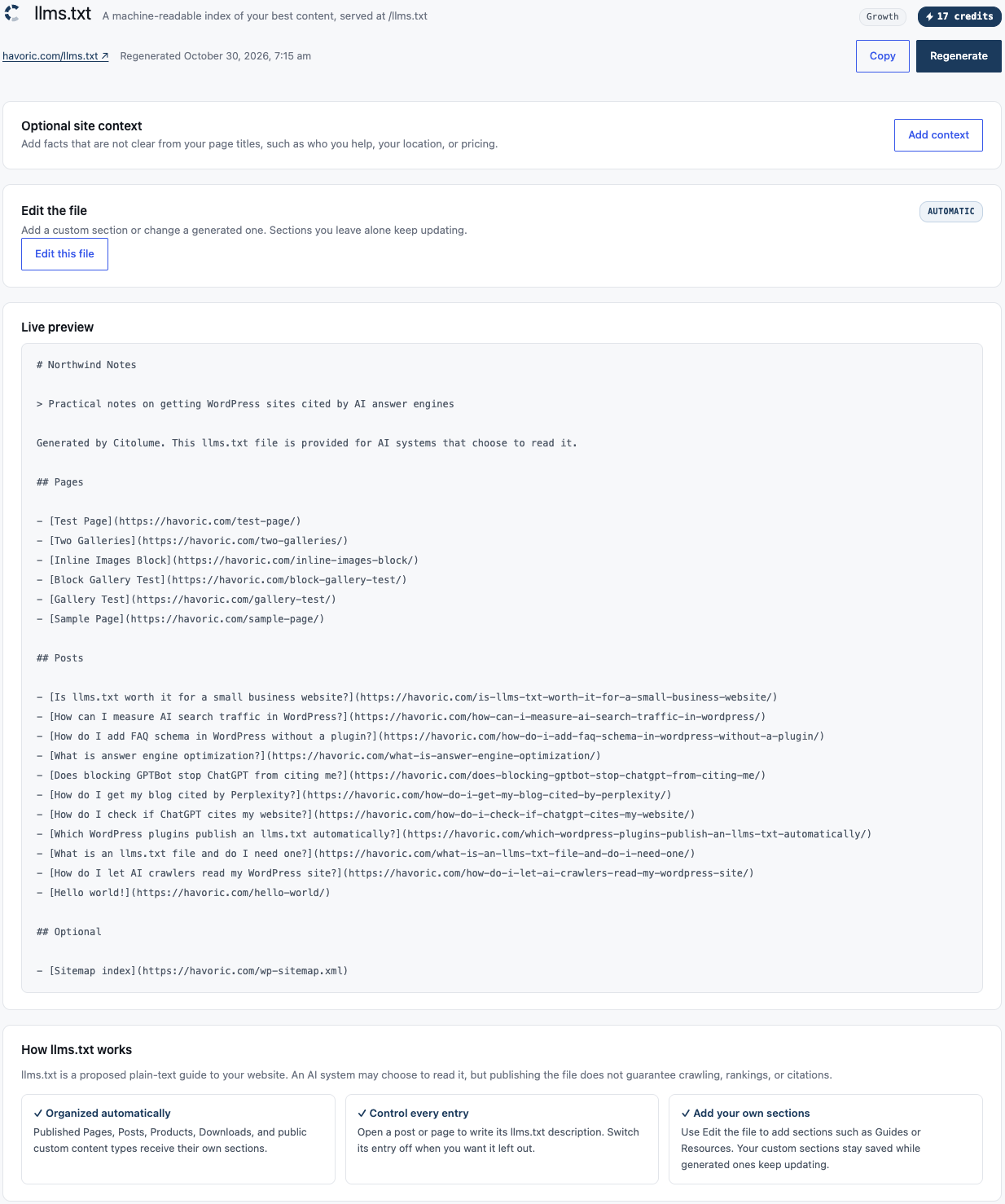
Installation
- Install the plugin through Plugins Add New, or upload the files to
/wp-content/plugins/citolume. - Activate it. The setup wizard opens: connecting for citation tracking is one click and optional.
- Open Citolume in the admin menu.
The crawler log starts immediately. llms.txt needs pretty permalinks; on plain permalinks the plugin says so and links to the setting.
FAQ
-
Does ChatGPT cite my website?
-
That is exactly the question Citolume answers. Add the questions your customers would ask, and each scan asks the AI engines on your plan — Gemini, Perplexity and ChatGPT — and records whether your site is among the sources each one cites, how often, and who is cited instead.
-
How is this different from Yoast, Rank Math or other SEO plugins?
-
SEO plugins optimise your pages for Google’s search results. Citolume measures something they do not: whether AI answer engines cite you. It has no meta tags, sitemaps or schema of its own, so it never conflicts with your SEO plugin — use both.
-
Is it free?
-
Yes, to start. The crawler log and llms.txt are free with no connection at all. Connecting is free too — one click, no card — and adds AI readiness and citation tracking for two questions, scanned monthly on Gemini. Paid plans add questions, engines and weekly scans; billing lives in your account at app.citolume.com, never inside WordPress.
-
Why does it say my numbers are too low?
-
Because they are, if you run page caching. Caching plugins serve a saved copy of a page without starting WordPress, so the plugin never sees those requests. Anything cached is invisible to it, and the counts should be read as a floor rather than a total.
-
Where is my llms.txt file?
-
There is no file. It is generated when requested and served at
/llms.txt. That means it never goes stale, and it works on hosts where the web root is not writable. If you already have a realllms.txtfile in your site root, that one is served instead and the plugin leaves it alone. -
My llms.txt shows a 404 or an HTML page
-
Your site is using plain permalinks, so WordPress never receives the request. Pick any other option under Settings Permalinks.
-
Are you checking the real ChatGPT, or something else?
-
Citation tracking asks each engine through its official API, with web search on. That is a close proxy for the app you use, but not identical — the consumer apps have their own retrieval on top. When an engine answers a question without searching at all, that is reported honestly rather than counted as though you were not cited. Answers vary, so paid plans ask each question twice per scan (free asks once) and results are reported as a frequency, never a yes/no.
-
Does this send my data anywhere?
-
The crawler log, the crawler-block check and llms.txt work entirely inside your own site, with no account and no external service.
Citation tracking talks to our service once you connect — an explicit click in the setup wizard, never automatic. From then on the plugin sends the site’s licence key, the questions you chose to track, and once a day the crawler log’s daily totals (crawler name, page path, date, count). If the service is unreachable, or you never connect, everything else carries on exactly as before.
-
Does it slow my site down?
-
No. One small write per AI crawler visit, and nothing at all for human visitors. Visits are aggregated per crawler, per page, per day rather than stored one row per request, so the table stays small. Records older than 90 days are removed automatically.
-
Can I block these crawlers instead?
-
Not with this plugin. Its job is to show you what is happening. Blocking is done through robots.txt.
Reviews
There are no reviews for this plugin.
Contributors & Developers
“Citolume – AI Visibility” is open source software. The following people have contributed to this plugin.
Contributors
Translate “Citolume – AI Visibility” into your language.
Interested in development?
Browse the code, check out the SVN repository, or subscribe to the development log by RSS.
Changelog
0.2.0
- NEW: AI crawler logging, with per-crawler totals, most crawled pages, and a 30 day chart.
- NEW: Crawler-block check — whether robots.txt blocks any AI crawler, with honest “cannot tell” states.
- NEW: Virtual
/llms.txtwith its own screen: site context, custom sections that survive regeneration, per-post descriptions and an exclude switch. - NEW: Page cache detection, so undercounted figures are labelled rather than presented as fact.
- NEW: Citation tracking with a free tier — a funnel-led Overview (reachable, crawled, mentioned, cited), who owns your questions, and per-question per-engine results with frequency, mention, and honest unknown states.
- NEW: One-click connect — the plugin proves the site is yours and stores the key itself, nothing to paste.