

Description
Beautiful fundraising, no platform fee, right on your own WordPress site.
Cheerful Give turns any WordPress site into a warm, welcoming place to give. Drop in one shortcode and your supporters get a fast, mobile-first donation form they can complete in a few taps, one-off or monthly, in your own currency, with Apple Pay, Google Pay and cards. It’s for anyone raising money online: nonprofits and charities, churches, schools and clubs, community groups, creators and campaigns, anywhere Stripe operates.
And the best part: you keep 100% of every donation.
💯 No platform fee, and here’s what that means
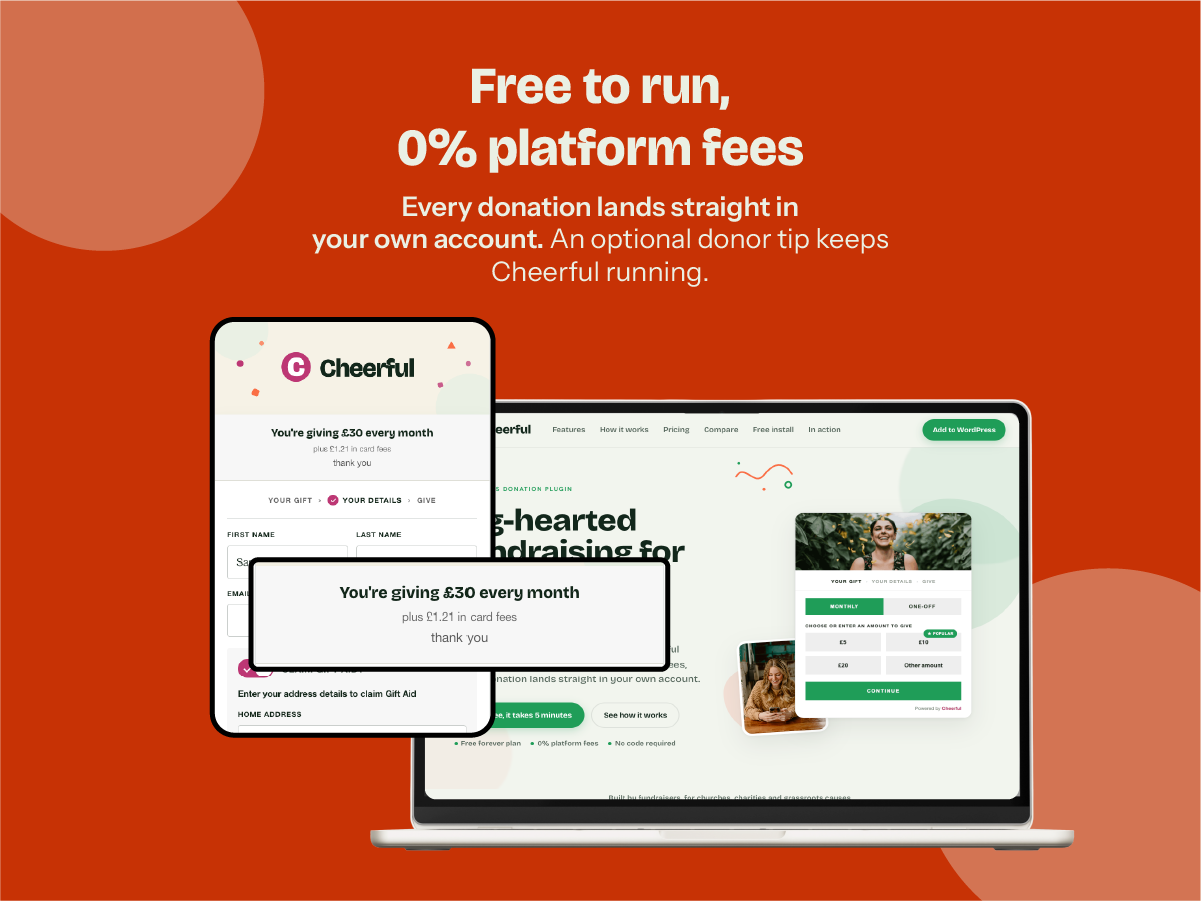
Cheerful never takes a percentage of your donations. Every gift goes straight into your own Stripe account and you keep 100% of it. (Stripe’s standard card processing fee still applies, exactly as it would with any Stripe integration, and is paid to Stripe, not to us.)
So how is the plugin free to run? Through an entirely optional tip. At checkout, a donor can choose to add a small tip toward keeping Cheerful free, on top of their gift, or skip it in a single tap. That tip is the donor’s own contribution to us; it never comes out of your donation, so you receive the full gift either way, whether the donor tips or not.
✨ Why Cheerful Give?
Everything you need to accept donations on your own site is built into the free plugin: a beautiful branded form, one-off and recurring gifts, Gift Aid, reporting and privacy tools. Connect Stripe with one click, add a shortcode, and you’re raising money in minutes, with a built-in test mode to try it all first, no platform fee, and nothing to unlock.
🎨 Beautiful, on-brand donation forms
- A fast, mobile-first form that works on any device, added with a single
[cheerful-give]shortcode - One-off or monthly giving, each with your own preset amounts, plus a custom-amount option
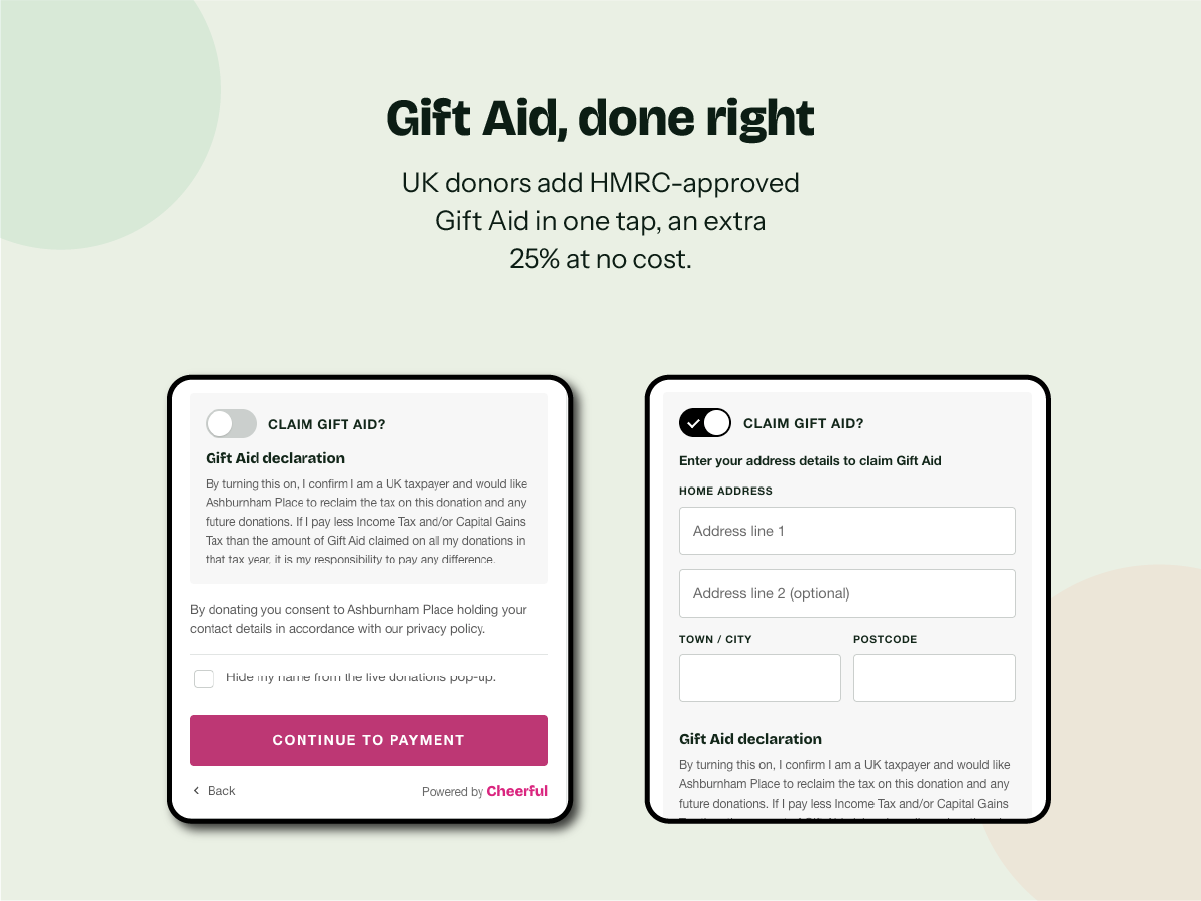
- Gift Aid for UK charities, with HMRC-approved declaration wording, for an extra 25% at no cost to the donor (elsewhere, it simply stays off)
- Unlimited campaigns, each with its own goal, preset amounts and story, with nothing to unlock
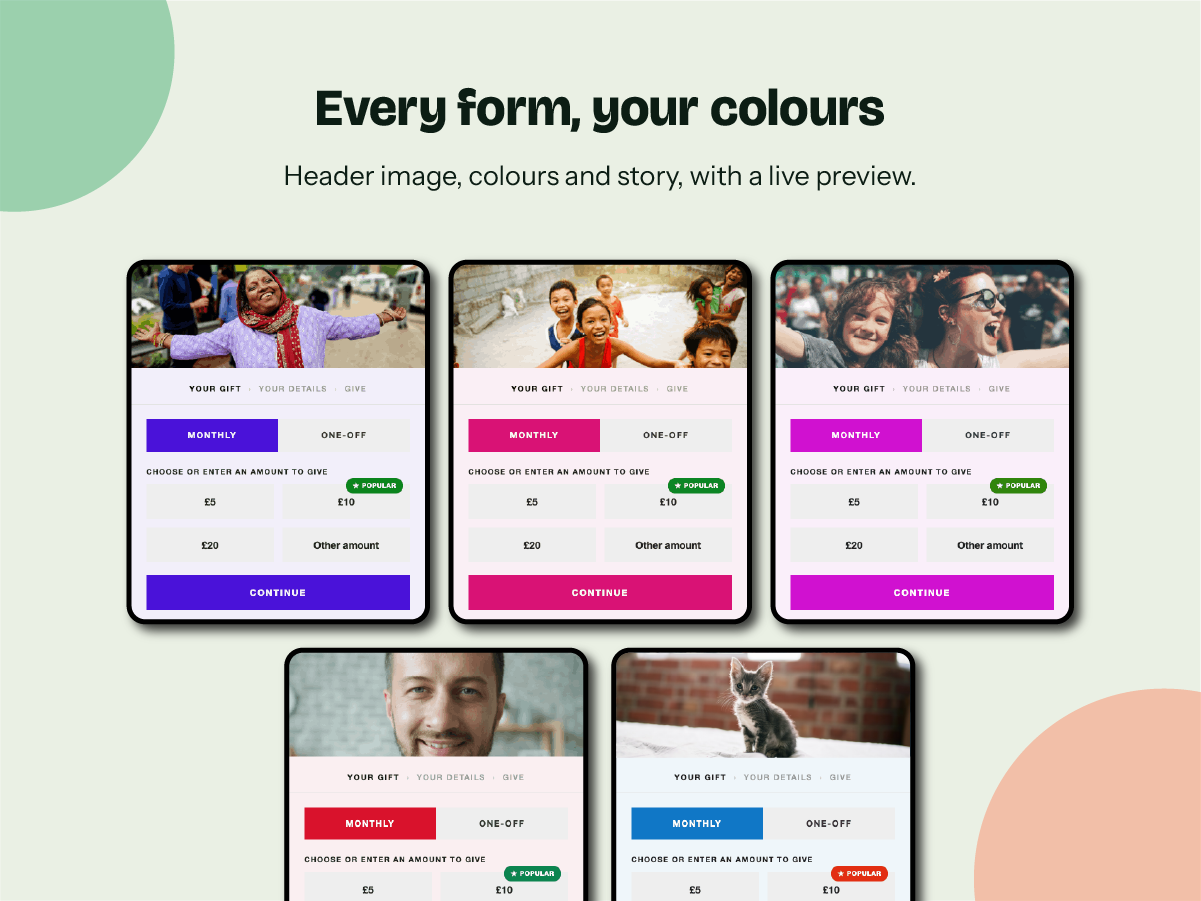
- Make it yours: primary and hover colours, corner radius, shadow, border, width, a header image and the font, all with a live preview as you edit
- A friendly live-donations popup that celebrates recent gifts and encourages others to give
- Translation-ready, and you can optionally hide the small “Powered by Cheerful” credit
💳 Payment methods
- Apple Pay, Google Pay and cards, all powered by Stripe
- Accept donations in your own currency: GBP, USD, EUR, AUD, CAD or NZD
- An optional “cover the fees” switch, so donors can add the card fee and even more of each gift reaches you
- 100% of each gift is paid straight into your own Stripe account, with no platform fee
✉️ Automatic emails, so you can set it and forget it
- An optional thank-you and receipt email to every donor, set up once
- A friendly notice to a monthly donor if a card payment ever fails, with a secure link to update it
- A new-donation notification to your team, plus optional large-donation alerts
- An optional monthly summary email, so you always know how giving is going
📊 Fundraising reporting you can act on
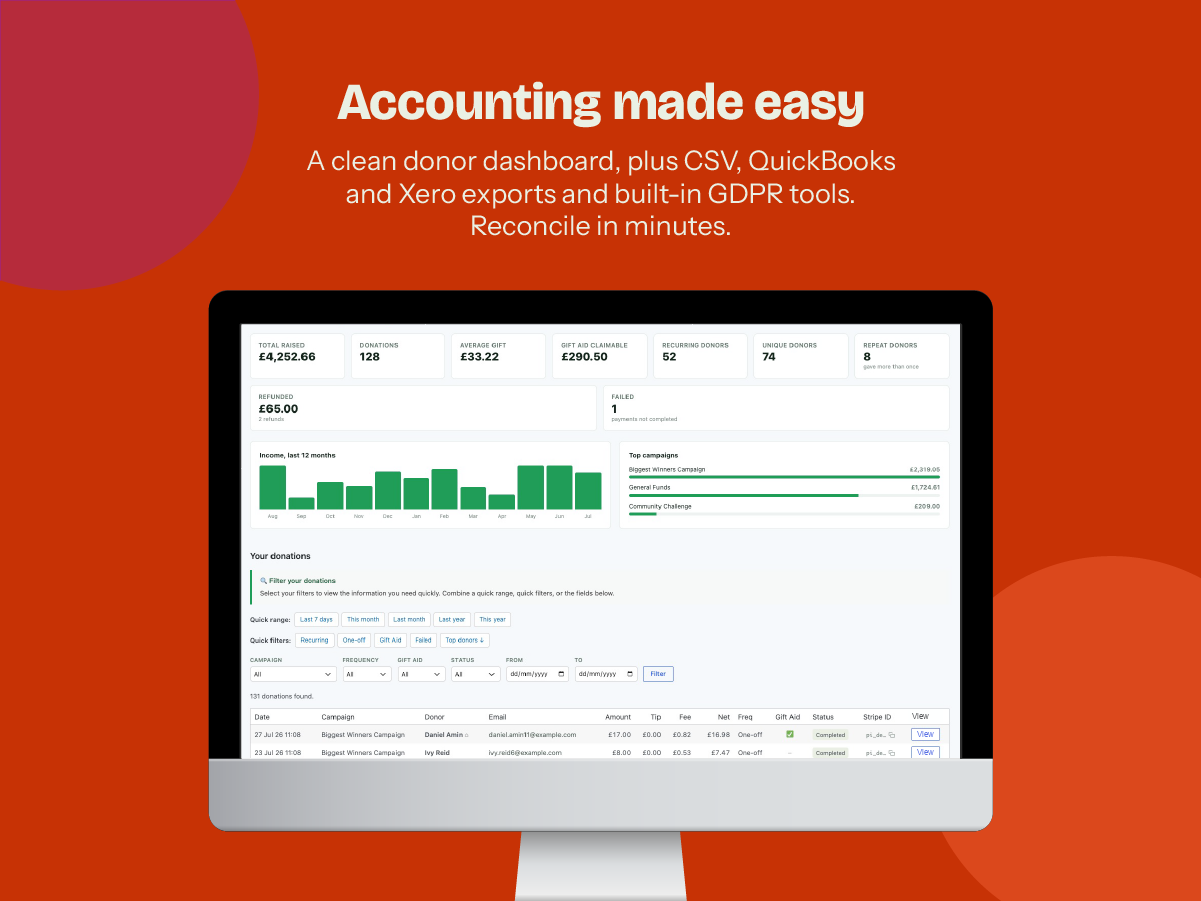
- A clean dashboard with total raised, average gift, Gift Aid claimable, recurring gifts and a monthly trend
- Quick filters and date ranges, plus your top campaigns and top donors at a glance
- Export your donations and donors to CSV, or straight to QuickBooks and Xero for reconciliation
- Every figure leads with the amount actually given to you, so your books and your Gift Aid claim start from the right number
🔒 Donor management and privacy
- See your supporters and their giving at a glance, and export a stewardship list of your top donors
- Donors give with no account to create; a monthly gift continues until cancelled through Stripe’s secure billing portal
- Per-donation anonymity, so each donor can give publicly or privately
- An optional mailing-list opt-in on the form, unticked by default, with a subscriber list you can export as CSV for your own email tool
- Optional privacy-policy and terms consent, with on/off toggles
- Built-in tools to export or anonymise a donor’s data (GDPR, CCPA and similar), wired into WordPress’s own Export and Erase Personal Data tools, plus automatic anonymisation after your chosen retention period
↩️ Refunds without the headache
Refund a donation from your own Stripe dashboard and Cheerful does the rest: it automatically returns the donor’s optional tip (in full on a full refund, or proportionally on a partial one) and updates your dashboard totals to match.
🛡️ Security your donors can trust
- Card details are entered directly into Stripe’s own secure fields and never touch your website or our servers
- Payments run on Stripe, a PCI-compliant, industry-leading payment provider, over encrypted connections
- Your organisation connects its own Stripe account and is paid directly; you never hold Stripe platform credentials on your site
- The donation form is served only over HTTPS, and the payment endpoints are protected against abuse
🤝 How Cheerful is funded
Cheerful is free to use and takes no platform fee. It’s kept going by two entirely optional things:
- An optional donor tip at checkout, a small, skippable contribution toward keeping Cheerful free for everyone. It’s collected as a Stripe application fee; your organisation still receives its full gift.
- An optional Mailsync add-on, a separate paid plugin from getcheerful.org that syncs mailing-list opt-ins to Mailchimp or MailerLite. The core plugin is free and fully functional without it.
🌍 Who it’s for
Cheerful works for organisations and individuals of every size and cause:
- Churches and faith groups: collections, tithes, offerings and ministry appeals
- Animal shelters and rescues: fund medical care, rescue work and adoption drives
- Food banks and community aid: raise money to feed and support your neighbours
- Schools and PTAs: donations for trips, programmes and classroom supplies
- Charities and foundations: accept one-off and regular gifts for any programme
- Arts and culture: fund performances, exhibitions and creative projects
- Clubs, teams and community groups: subs, fundraisers and member support
- Creators, campaigns and individuals: a tip jar, a cause or a personal fundraiser
If you can add a shortcode to a page, you can raise money with Cheerful, in your own currency, without handing a slice of every donation to a platform.
🧩 Add-on (optional, separate plugin)
The plugin is free and complete on its own. One optional add-on is available separately from getcheerful.org:
- Mailsync: automatically sync new mailing-list opt-ins to Mailchimp or MailerLite. Without it, the free plugin still captures opt-ins and exports them as CSV for your email tool.
External services
This plugin connects to third-party services to take payments. No data is sent until a visitor makes a donation.
Stripe: payment processing. When a donor pays, their payment and donation details are sent to Stripe to create and confirm the charge, and Stripe’s JavaScript is loaded from js.stripe.com on pages showing the donation form. Organisations connect their own Stripe account, and funds are paid directly to them. Stripe.js sets functional cookies required to process payments (not used for tracking or advertising).
- Terms: https://stripe.com/legal
- Privacy: https://stripe.com/privacy
Cheerful payments backend (api.thegiver.dev), a Cheerful-hosted service that performs the Stripe operations on the organisation’s behalf, so organisations never have to hold Stripe platform credentials on their own site. When a donation is made, the plugin sends the following to https://api.thegiver.dev over HTTPS, authenticated with a per-site token: the donation amount, any optional tip, the frequency, the campaign, the donor’s first name, last name and email, and, only if the donor opts in to Gift Aid, their name and home address. The service creates the charge or subscription on the connected Stripe account and returns donation events to your site. It is also used during the one-click “Connect with Stripe” step and, on a daily schedule, to fetch the non-personal tip options shown at checkout. No personal data is sent for those configuration or connection requests.
- Terms of Service: https://getcheerful.org/terms-of-service/
- Privacy Policy: https://getcheerful.org/privacy-policy/
- Data Processing Agreement: https://getcheerful.org/data-processing-agreement/
- Cookie Policy: https://getcheerful.org/cookie-policy/
- Sub-processors: https://getcheerful.org/sub-processors/
This plugin does not contact Mailchimp, MailerLite or any email provider. It captures mailing-list opt-ins and exports them as CSV for you to import into your own email tool. Automatic syncing is handled only by the optional, separately-installed Mailsync add-on, whose own documentation covers the data it sends.
Cheerful support diagnostic log (optional), off by default. If you turn on “Diagnostic logging” (Home Support) to help troubleshoot a problem, the plugin records PHP errors on your site to a private log file in your uploads folder. Nothing leaves your site until you click “Send log to support”, which emails the log to Cheerful (hey@getcheerful.org). The log records error messages only, but those can occasionally contain personal data, so you can download and review it first. Logging switches itself off automatically after one week.
Donor records are stored in your own WordPress database. You should disclose the use of Stripe and Cheerful (and the Mailsync add-on, if you install it) in your site’s privacy and cookie policies.
Quick setup
Most organisations are up and running in well under 10 minutes. If you need a hand setting up, get in touch through getcheerful.org.
- Install and activate. Install Cheerful Give from Plugins Add New, or upload the
cheerful-givefolder to/wp-content/plugins/, then activate it. A new Cheerful menu appears in your WordPress admin. - Turn on test mode (recommended first). Go to Cheerful Home Set up and enable Test mode, so you can try the whole flow with Stripe test cards before taking any real money.
- Connect Stripe. Click Connect with Stripe and complete the one-click connection with your organisation’s Stripe account. There are no API keys to copy and no webhooks to configure. Cheerful handles that for you. You return to a “Your Stripe account is connected” confirmation.
- Add your donation form. Create or edit a page and add the
[cheerful-give]shortcode. A default campaign works out of the box; add more under Cheerful Campaigns and target one with[cheerful-give campaign="your-campaign-slug"]. - Make a test donation. Publish the page and pay with the Stripe test card
4242 4242 4242 4242, any future expiry, any CVC and any postcode. You’ll see the thank-you screen, and the gift appears under Cheerful Dashboard (switch it to “test”). - Go live. Turn test mode off and you’re ready to accept real donations.
Your site must be served over HTTPS for the donation form to appear (a Stripe requirement). On a non-HTTPS site the plugin shows an admin notice and hides the form.
Credits
This plugin bundles the Bricolage Grotesque typeface (© 2022 The Bricolage Grotesque Project Authors), designed by Mathieu Triay and licensed under the SIL Open Font License, Version 1.1. The font is self-hosted (never loaded from a third-party CDN). The full licence is included at assets/fonts/OFL.txt. Source: https://github.com/ateliertriay/bricolage
Screenshots


FAQ
What do I need to run Cheerful Give?
WordPress 6.0 or newer, PHP 8.0 or newer, an HTTPS (SSL) site, and a free Stripe account for your organisation. You connect it with one click: no keys or webhooks to configure. Most managed WordPress hosts meet these out of the box.
Does Cheerful take a percentage of donations?
No. Your organisation receives 100% of every donation, straight into your own Stripe account (less only Stripe’s standard card processing fee, which Stripe charges on any integration). Cheerful is funded instead by optional donor tips, plus the optional Mailsync add-on.
How does the optional donor tip work?
At checkout a donor can choose to add a small, entirely optional tip that helps keep Cheerful free. It’s shown with a clear “No thanks” option, so any donor can decline it in one tap, and your organisation always receives its full gift either way. The tip is collected by Stripe as an application fee and is not part of the donation to your cause.
Which currencies can I accept?
GBP, USD, EUR, AUD, CAD and NZD. Choose your currency in the plugin settings; donors give and are charged in that currency.
Can donors give monthly, not just one-off?
Yes. Donors switch between a one-off gift and a monthly recurring donation right on the form, each with its own preset amounts. Monthly gifts are set up as a Stripe subscription and continue until the donor cancels. They can manage or cancel from a secure Stripe billing link (also emailed to them automatically if a renewal payment ever fails).
Who pays the card processing fees?
Stripe deducts its standard card processing fee from each payment, exactly as it would for any Stripe integration. Cheerful adds no fee of its own. You can optionally switch on “cover the payment fees”, which invites the donor to add the estimated card fee so even more of their gift reaches you.
How do refunds work?
You issue refunds from your own Stripe dashboard, in full or in part. Cheerful then automatically returns the donor’s optional tip in step with the refund (the whole tip on a full refund, or the same proportion on a partial one) and updates your dashboard totals and reports to match.
How does Gift Aid work?
If you’re a UK charity, switch Gift Aid on and eligible donors can add an HMRC-approved declaration in one tap, letting you reclaim an extra 25% at no cost to them. The declaration, plus the donor’s name and home address, is stored with the donation for your claim and included in your exports.
Do donors need to create an account?
No. Donors give directly on your site with no account or login. Their card details are entered into Stripe’s own secure fields and never touch your server.
Can I match the form to my brand?
Yes. From the Branding screen you set your primary and button-hover colours, corner radius, shadow, border, width, a header image and the font, all with a live preview as you edit. You can also hide the small “Powered by Cheerful” credit.
Will it work with my theme or page builder?
Yes. The form is added with the
[cheerful-give]shortcode, so it works in the block editor, the classic editor and popular page builders, and renders on the front end of any theme. It’s mobile-first and responsive.How is Cheerful Give different from other donation plugins?
Two things stand out. First, there is no platform fee: many donation tools take a percentage of every gift, while Cheerful takes none and is funded by optional donor tips instead, so you keep 100% of what you raise. Second, it is beautifully simple: a branded, mobile-first form you add with a single shortcode, with one-off and monthly giving, Gift Aid, reporting, exports and privacy tools built in. You connect your own Stripe account with one click and donations are paid directly to you.
If you want more than a basic button, yes. A donate button is quick, but Cheerful gives you a fully branded, mobile-first form with one-off and monthly giving, your own preset amounts, Apple Pay and Google Pay, Gift Aid for UK charities, and a donor dashboard with CSV, QuickBooks and Xero exports, all from a single shortcode, with 100% of each gift going straight into your own Stripe account. (Cheerful processes payments through Stripe rather than PayPal.)
Do I need to configure Stripe webhooks myself?
No. The Cheerful payments backend handles webhooks for you and forwards the relevant donation events to your site securely, with nothing to set up in the Stripe dashboard.
Does this work without HTTPS?
No. The donation form is not shown on non-HTTPS sites, and an admin warning appears if SSL is not active.
What is the Mailsync add-on, and do I need it?
Mailsync is an optional, separately-installed paid plugin that automatically syncs mailing-list opt-ins to Mailchimp or MailerLite. You don’t need it: the free plugin captures opt-ins and lets you export them as a CSV for your own email tool. Mailsync simply automates that sync.
Where is donor data stored?
Donation records are stored in your own WordPress database. Payment card details are handled entirely by Stripe and never touch your server. The plugin includes privacy tools to export or anonymise a donor’s data (for GDPR, CCPA, the Australian Privacy Act and similar), plugs into WordPress’s own Export and Erase Personal Data tools, and can automatically anonymise personal data after your chosen retention period while keeping the amounts you need for your accounts (and Gift Aid records in the UK).
What happens to my data if I uninstall?
Your donation records stay in your WordPress database when you deactivate or uninstall, so nothing is lost by accident. Only if you specifically enable “delete all data on uninstall” (off by default) is the plugin’s data removed when you uninstall.
Reviews
There are no reviews for this plugin.
Contributors & Developers
“Cheerful Give” is open source software. The following people have contributed to this plugin.
Contributors
Translate “Cheerful Give” into your language.
Interested in development?
Browse the code, check out the SVN repository, or subscribe to the development log by RSS.
Changelog
1.26.0
- Security: a new Security tab adds optional, invisible bot protection — bring your own free keys from Cloudflare Turnstile, hCaptcha or Google reCAPTCHA — plus a one-click link to switch on Stripe Radar. Most donors never see a thing; only suspicious visitors get a brief check.
- Card-testing defence: if a burst of suspicious donation attempts is blocked, you get a single “suspicious activity” heads-up email so you can tighten your setup. The hidden honeypot and rate limiting on your form are always on.
- Chargebacks: when a donor’s bank disputes a payment, the donation is marked “Disputed” in your dashboard and you’re emailed, so you can respond in Stripe in time.
- Activity log: sensitive actions — connecting or disconnecting Stripe, and exporting donor data — are now recorded (who, when, and from where) on the Security tab, and kept for a year.
- Reliability and security under the hood: donation confirmations from Cheerful’s backend are now time-stamped and replay-protected, and disconnecting your Stripe account is handled cleanly.
- Donation form polish: clearer “Add 25% with Gift Aid” wording, tidier on/off switches with a tick and cross, and better spacing on the amount buttons.
- Branding — Advanced colours: a new optional section on the Branding page lets you set the donation form’s text, button and border colours by hand, with an optional border on the Continue button — handy for minimal or white designs where the automatic colours aren’t quite what you want. The automatic colours stay the default, so nothing changes unless you turn it on.
- Multisite: new sites added to a network are set up automatically.
- Fixed the “Reset branding to defaults” button on the Branding page.
- Fixed the campaign editor jumping back to the first tab after you save or refresh — it now keeps you on the tab you were using.
1.25.1
- Header image controls: fit any image to the header band cleanly, with no cropping or tiling. Choose how it fills the band (Cover, Contain, Fill or Scale down), which part to anchor (a nine-way position), and the band height (Standard, Tall or Extra tall). You can also float the image outside the card’s frame, so a transparent PNG blends into your page.
- Embed as an iframe: alongside each campaign’s shortcode you now get an iframe embed that fully isolates the donation form from your theme’s styles. Handy if a theme restyles the form, and it works pasted onto any page, even a non-WordPress one.
- Tidied the Branding screen layout and simplified the wording across the admin.
- Removed the “Donation delivery” self-test from setup: the automatic recovery added in the last update makes a blocked notification a brief delay rather than a lost donation, so the warning was no longer needed.
1.25.0
- Reliability: donations now record even when a security plugin or firewall on your site blocks Stripe’s incoming notifications. Your site periodically checks the payment service for recently completed donations and records any it missed — covering one-off gifts, first monthly payments and every monthly renewal. Receipts and your admin notification email still send as usual, with full donor and Gift Aid details.
- Theme compatibility: the donation form now holds its own appearance — button shape, fonts, colours, hover states and text size — even on themes that aggressively restyle buttons and inputs, so your Branding settings display the way you set them.
- Campaigns: the “Raised” figure on the Campaigns screen now matches your donor dashboard exactly — real (live) donations only, counting the gift itself (not any covered card fee or tip) and netting refunds. Test donations no longer inflate a campaign’s total.
- Setup & admin: a clear banner shows when the form is in test mode; you can now set a button text colour and remove a header image to return to the default; and the Campaigns, Donations and Mailing list screens share the same tidy card layout.
- Polish: donation-form buttons use a single, slightly larger text size, with assorted spacing and styling refinements across the admin.
1.24.0
- Reliability: a donation caught by a momentary database hiccup is now retried by Stripe instead of being lost, and only your own donations are ever recorded (never another Stripe subscription on the same account).
- Donors no longer get stuck on busy or cached sites: an expired security token refreshes and retries automatically, and friendly messages replace raw technical errors at the payment step.
- Your Stripe dashboard now labels each payment “Donation – [campaign]” or “Monthly donation – [campaign]” instead of leaving it blank.
- Refunds: a refunded monthly donation now correctly shows as Refunded in your dashboard (with its tip returned automatically), matching how one-off refunds already worked.
- Security: the Stripe connection now requires a matching security token to complete; the spam honeypot is now active; rate limiting is proxy-aware so donors behind a CDN aren’t blocked at peak; and email validation is stronger.
- Dashboard: “Recurring donors” now counts real subscribers rather than each monthly payment; partially refunded gifts get their own amber badge; the dashboard opens in your site’s current Live/Test mode; and long lists page tidily.
- Gift Aid: the address is required on monthly gifts too (for valid HMRC claims), and an erasure request keeps HMRC-required records for the retention window.
- Consent: your donors’ privacy and terms agreement is now recorded per donation and enforced on the server.
- Fixes: billing country follows your account (not always GB); campaign saves report errors instead of silently failing; a rare payment-loading hang is resolved; the live donations popup no longer appears oversized or unstyled on pages that don’t contain a donation form (e.g. another plugin’s page or a page-builder preview).
1.23.0
- Refunds now flow through your dashboard totals, exports and monthly summary. A refunded donation reduces “Total raised”, Gift Aid claimable and your campaign/donor figures: a full refund comes out entirely, a partial refund keeps only the share you didn’t return. A new “Partially refunded” status and filter, and Refunded/Tip Refunded/Refunded Date columns in the donations CSV, let you see exactly what came back.
1.22.0
- Added: when you refund a donation from your Stripe dashboard, the donor’s tip is now returned too: the whole tip on a full refund, or the same share of it on a partial refund. The refund and the returned tip are recorded against the donation in your dashboard.
1.21.8
- The optional donor tip is always shown at checkout, and every live donations popup control (custom avatar, timing, on-screen duration, minimum amount and position) is available to everyone.
- Reworked how the plugin’s admin scripts and styles are attached so no output buffer is ever left open.
- Updated the “External services” documentation for accuracy.
1.21.7
- Campaigns are now unlimited on every install.
- Added: if Stripe hasn’t confirmed a card fee by the time a donation arrives, that donation’s card fee and net received are now marked as estimates in your dashboard, your notification email and your export (a new “Card Fee Confirmed” column). Rare, but you can now see at a glance which figures are Stripe’s own and which to double-check.
- Fixed: some donations recorded an estimated card fee instead of Stripe’s real one, which also made “net received” wrong. This happened at random, whenever Stripe hadn’t finished calculating the fee at the moment it told us about the payment.
- Changed: the donation form now says the card fee is an estimate. The exact fee depends on the donor’s own card and isn’t known until they pay, so the figure on the form is a good guess; your dashboard and emails always show the real fee Stripe charged.
- Fixed: your charity’s name no longer appears twice in a row at the bottom of donation emails.
- Fixed: when a donor covered the card fee, the amount asked for was too small, so the charity received slightly less than the full gift. The fee cover now allows for the fee Stripe charges on the whole payment, and assumes your own country’s card rate rather than a flat 2.9% + 30p.
- Fixed: the “Card Fee” column wrongly included the donor’s tip to Cheerful, which also made “Net Received” too low. Fees now match Stripe exactly.
- Fixed: monthly donations recorded an estimated card fee instead of Stripe’s real one, always showed the donor’s tip as £0.00, and left the payment method blank.
- Changed: dashboard totals (Total raised, Average gift, Gift Aid, trend, top campaigns and donors) now show the amount given to you, excluding card fees and any tip, so they match the “Amount Given” column in your export.
1.21.6
- Your donation figures now lead with “Amount given to [your organisation]” (the donation itself) instead of the total charged, so your books and your Gift Aid claim start from the right number.
- Donor tips to Cheerful are now listed separately and clearly marked as not your income. They never reach your account (Stripe takes them as an application fee), so they no longer sit inside your totals.
- When a donor covers the card fee, the notification email now says so, instead of looking like a cost you paid.
- New “Total charged to donor” column at the end of the donations export, for reconciling against Stripe.
- Gift Aid is a UK-only scheme, so its columns (and the address fields only collected to support a claim) no longer appear in the donations export for organisations outside the UK.
1.21.5
- New: donation receipts now itemise what the donor paid: the donation, any card fee or tip they chose to cover, and the total charged.
- Reliability: donations are always recorded (and the receipt sent) even if the database upgrade for this version hasn’t finished applying yet, so an update can never drop a donation mid-way.
- New: the charity notification email now shows the Stripe processing fee for each donation.
- Gift Aid is now calculated on the donor’s actual gift rather than the fee-covered total, so the claim matches the receipt.
- Fix: the donation form now loads correctly on block themes (Twenty Twenty-Four / Twenty Twenty-Five and similar), where its buttons could previously stay unresponsive.
- Tip step: “No thanks” now appears below the custom-tip field, and the tip amount stays readable when you hover a percentage option.