xavrios

Forum Replies Created
-
Thank you @arsengunner! The plugin has already very useful features, I’m looking forward to its continuous development.
Thanks you!
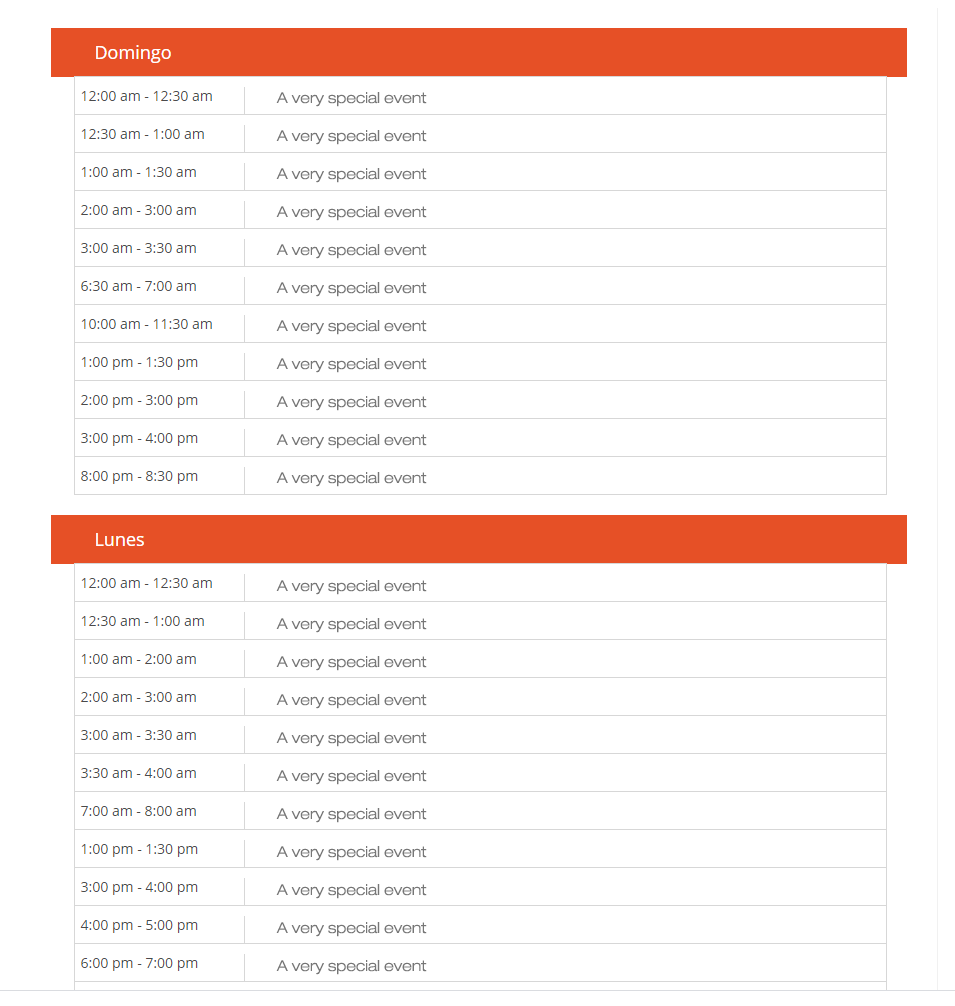
I’m using this style to get a result like this:.mptt-shortcode-wrapper .mptt-shortcode-list .mptt-column .mptt-events-list .mptt-list-event .timeslot {
margin-left: -191px;
margin-top: -36px;
border-width: 1px;
border-color: #d7d7d7;
border-style: solid;
padding: 6px;
}.mptt-shortcode-wrapper .mptt-shortcode-list .mptt-column .mptt-events-list .mptt-list-event {
font-size: 14px;
border-left-width: 1px;
border-left-color: #d7d7d7;
margin-top: -10px;
margin-left: 150px;
}.mptt-shortcode-wrapper .mptt-shortcode-list .mptt-column .mptt-column-title {
background-color: #E65026;
padding: 12px;
color: #ffffff;
font-weight: 400;
margin-left: -23px;
padding-left: 44px;
}
ResultAs you can see, my events are displaying as a list thanks to the code you shared on another post.
Now what I need is, once I open the page, (if today is Tuesday Feb 23rd at 2pm) the page should auto scroll to the actual event on this date and time, Something similar to what happens with the widget element for upcoming events, but starting with the ongoing event but being able to see past events or if seeing past events is not possible being able to see all the upcoming events.Right now the widget for upcoming events doesn’t show days, just events, that’s why is not useful to me.
Thank you!