WP24

Forum Replies Created
-
Eklentiyi etkinleştirin, gerekirse ayarları yapın ve kısa kodla entegre edin.
Forum: Plugins
In reply to: [WP24 Domain Check] Theme NatixDa das ein kostenpflichtiges Theme ist kann ich das nicht testen.
Können Sie einen Link zu der Seite posten?Forum: Plugins
In reply to: [WP24 Domain Check] Change the Design..You can change the width of the domain name field in the general settings.
Forum: Plugins
In reply to: [WP24 Domain Check] Change the Design..I don’t know what you exactly mean with dropdown. But since you are using an other theme it’s difficult to change the design to your example.
You could use a button instead of links, to do so change the WooCommerce settings from “[link]buy now[/link] for [price]” to “[button]buy now[/button] for [price]”.
For other stylings you would need to put custom CSS, e.g. to add a gray line do:.wp24-dc .table-cell { border-bottom: 1px solid lightgray; }Forum: Plugins
In reply to: [WP24 Domain Check] Change the Design..That depends on the theme you are using. In principle, that should be possible.
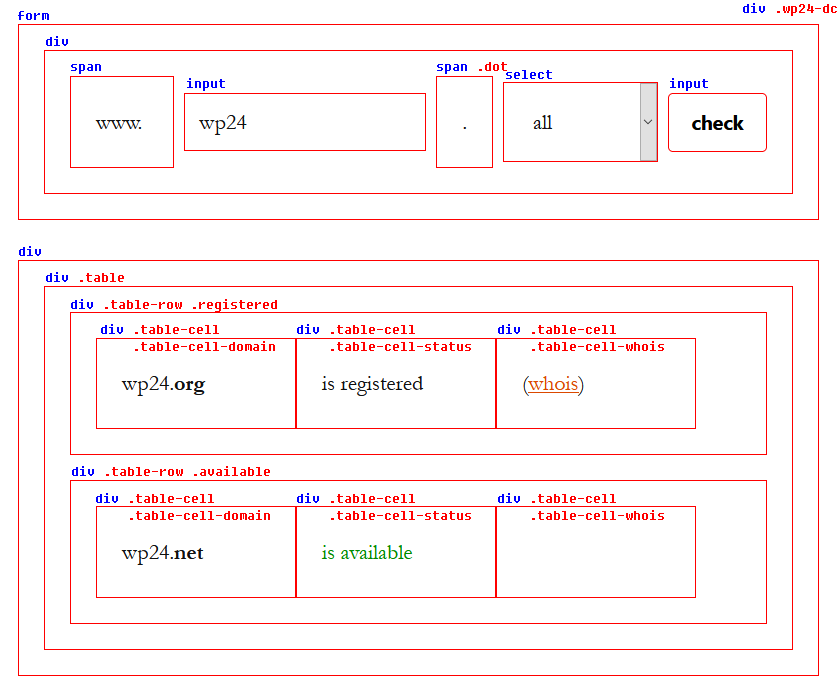
You can find the HTML and CSS structure here: https://wp24.org/images/plugins/domain-check/html-css-structure.pngForum: Plugins
In reply to: [WP24 Domain Check] Set different price to TLD’s won’t saveDoes the page reload after hitting the save button? The page should scroll to top then. Maybe you need to make your browser window smaller to test.
Forum: Plugins
In reply to: [WP24 Domain Check] Translating Placeholder etc. texts with WPMLString translation should be the right way: https://wp24.org/plugins/domain-check/wpml.html
Forum: Plugins
In reply to: [WP24 Domain Check] Not showing in Breakdance BuilderIs anything displayed or is the check form completely missing on the page you put the shortcode?
Could you post a link to the page where the problem occurs?Forum: Plugins
In reply to: [WP24 Domain Check] Popup WindowCould you post a link to your site where the problem occurs?
As far as I know the elementor popup is a pro feature, so I can not test it myself.Forum: Plugins
In reply to: [WP24 Domain Check] Change the Design..In that case you need to style the textfield and button via CSS. Just to give you an idea:
#dc-domain-1 {
	height: 75px;
	margin-right: 0;
	border-bottom-left-radius: 50px;
	border-top-left-radius: 50px;
}
#dc-submit-1 {
	height: 75px;
	background-color: orange;
	border-bottom-right-radius: 50px;
	border-top-right-radius: 50px;
}
The CSS needs to modified depending on the theme you are using.
Forum: Plugins
In reply to: [WP24 Domain Check] Change the Design..The design is normally taken over from the theme you are using. So the textfield and button should look like the rest of your page.
Or do you exactly want to have the design shown in your screenshot?Forum: Plugins
In reply to: [WP24 Domain Check] @ small isues with pluginYou can change the width of the domain name field in the general settings of the plugin.
There are also several recaptcha settings where you could also enter your keys. Which problems exactly do you have, to enable it?
Forum: Plugins
In reply to: [WP24 Domain Check] some TLD s not workThat is really strange since technically all whois servers are queried the same way.
All I can think of is that your servers ip is blocked by the whois server or that your server is blocking the connection to the whois servers.Forum: Plugins
In reply to: [WP24 Domain Check] some TLD s not workPort 43 needs to be opened by your hosting provider, otherwise the whois queries won’t work.
You can find the requirements for whois queries in the plugins settings under system info.Forum: Plugins
In reply to: [WP24 Domain Check] Include current product details in the cartCould you explain how you have configured your products and how the domain should be added?
You have different hosting plans as products and the domain should be added before or afterwards?