webworks

Forum Replies Created
-
Thank so much – got response this morning. I’ll give that css a try.
I filled out the ticket request and entered my purchase ID, but haven’t yet received a response and don’t see access to a ticket area.
Do I need to be logged in to get a response?
I tried resetting my password but it says “invalid”. …but I know it’s valid because that’s where the receipt was sent 🙂 I also tried my pro updraft login, but it appears each product has a separate account.
Additionally, the text doesn’t appear to be reducing in size for mobile – Can we work that in? I must be missing that setting (?)
Forum: Plugins
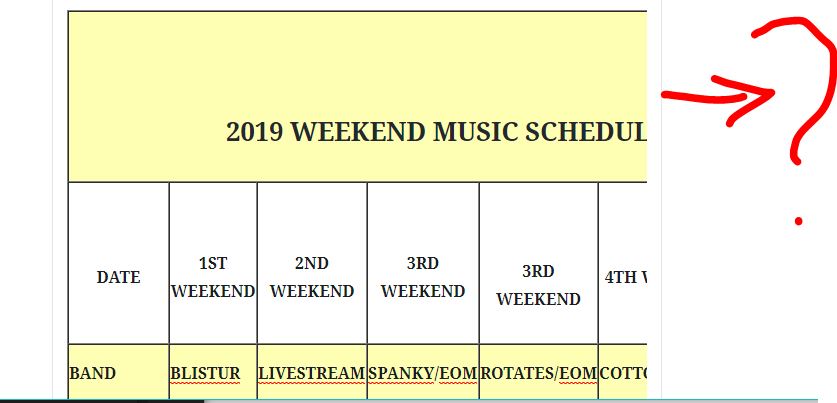
In reply to: [Classic Editor] Thanks for Keeping the Classic EditorI have no idea how to *get* to the last 2 columns of my table ?
How can I widen this area?
See screen shot:
https://tradewindslounge.com/wp-content/uploads/2019/01/Capture.jpgDo I need to dig through HTML?
EDIT:
I finally used the arrow keys. First I tried to click and drag to resize. Then I looked for a “view switch” similar to the classic editor. I’ve wasted almost an hour on this LOL.Anybody else having trouble viewing wide tables, just use the arrow keys. Yes, it would be nice to widen this area 🙂
- This reply was modified 7 years, 4 months ago by webworks.
Forum: Plugins
In reply to: [Firelight Lightbox] Auto Popup on home page – Pro ver.Thanks so much for your help.
I added a simple text link at the bottom. Then I created a separate page and used the iframe method. The auto works for that as well. I was able to get the size we wanted too.
I never could get the other methods working – but as long as the iframe works, I’m good with it 🙂
Again – many thanks.
- This reply was modified 7 years, 5 months ago by webworks.
Forum: Plugins
In reply to: [Firelight Lightbox] Auto Popup on home page – Pro ver.I used the class (on the existing button) and fancybox-auto in Rel Attribute and it didn’t work.
I don’t understand why the regular link is not working. Because I’ve been successful with linking to another page (opens in lightbox). Maybe I can try it that way and the auto pop-up will work. I’ll stand by first and see if you have any other ideas.
BTW – The button I was going to leave as an anchor link that goes to the bottom. They want to keep the form at the bottom, but also want auto popup.
Forum: Plugins
In reply to: [Firelight Lightbox] Auto Popup on home page – Pro ver.just noticed your add’l post – fingers crossed – stay tuned –
VC Options are:
Extra class
Rel Attribute
Advanced on click actionI’ll see if I can place the right things in the right place. In the meantime, if you have answers for each of those 3 I’ll be so very grateful 🙂
(I don’t see an ID – that’s unusual because most VC features have ID option)
- This reply was modified 7 years, 5 months ago by webworks.
Forum: Plugins
In reply to: [Firelight Lightbox] Auto Popup on home page – Pro ver.I’m afraid I’m not getting either to work 🙁
Whether I have fancy-box-hidden class or not, wordpress keeps putting this ahead of the link. (I’m not sure if that’s the cause)
<a id="fancybox-auto" class="fancybox-inline fancybox-hidden"></a>Let's stay in touch!Can you see it on the link, and what might be holding it up? I was sure to clear the server side cache, and viewed incognito….also another browser.
I tried removing any possible optimization, but it didn’t fix it
<!--noptimize-->Forum: Plugins
In reply to: [Firelight Lightbox] Define SelectorI’m not sure – I’ve tried quite a few things – no joy 🙁
I suppose I’ll need to build the grid manually.
Thanks for responding so quickly!
Forum: Plugins
In reply to: [Firelight Lightbox] Define SelectorApparently I need to *change* the selector for fancybox to be named something else (in order for WP Bakery to pick it up and use it. (According to this post: http://bbird.me/disable-replace-visual-composer-lightbox/)
Here’s my page: https://stilesinteriors.com/welcome-3/#portfolio
The client doesn’t prefer the WP Bakery default lightbox (prettyphoto). We just need a single enlarged image to appear with an exit “X” in the corner.
I hope we can use Fancybox 🙂
Resolved
Ah!
I came close except I was using \F015 for the home icon, and the css I left out additional specifics. I placed it on the actual page instead of settings.
You are on the ball 🙂
I wasn’t expecting response until Monday. I wish I’d have found this before I found your competition. This is an amazing plugin and the client is very happy to be able to use our standard theme. Very flexible and professional.
Thanks again –
Update: Please disregard #1 – The company name works and I added some inline CSS to turn it white on the search page.
A challenge remains for #2 and #3. Although I located the maps.css file and the teal color I hope to replace, I must not be using the proper css. Maybe take a look when you get a chance – thanks!
I can’t thank you enough! A couple more things you probably also have quick answers to:
1) For the functions file addition (to replace the price with text) is there anyway I can make it a white house icon? A statement in place of price looks great on the maps, but resulted in gray text here:
https://francispm.com/2018/property-search/If that’s not possible or too involved, I just need to turn the text white on the property search page.
2) I’ve almost got the map colored, but there is a teal colored spinner I’d like to make blue, as well as the teal colored background bar that holds the text. Am I missing that place in the settings?
https://francispm.com/2018/map-search-apartments-in-texas/
3) On the search page, when you hover over the thumbnail, it’s a TEAL tint. What’s the best way to turn that to tinted black?
https://francispm.com/2018/property-search/
~~~~~~~~~~~~~~~~~~
This is RE Question #1 – Icon code there maybe?add_filter('rem_property_price', 'change_price_text', 20, 3); function change_price_text($return, $price, $args){ if ($price == '1') { return 'ICON CODE HERE?'; } else { return $return; } }Thanks in advance for your response!
I found this answer for the Pricing on the map. I replaced it with “Details” and it works great: https://wordpress.org/support/topic/replace-price-with-price-available-on-request/
Now I just need SQ removal, spot color and tag link fix 🙂
Thanks so much for your response in advance –